C#实现三菱MC通讯协议库(4C帧-格式1)
运行环境:VS2022 .net Standard2.0
通讯库项目地址(Gitee):通讯库项目Gitee 仓库
Melsec通讯手册链接(蓝奏云):三菱Q系列与L系列MELSEC通讯协议手册
C24模块用户手册链接(蓝奏云):三菱Q系列串行通信模块用户手册(基础篇)
QnA兼容4C帧格式1报文分析:QnA兼容4C帧格式1报文分析
通讯工具(蓝奏云):Commix 1.4
概要:根据三菱的 Melsec 通讯协议(本文称MC协议)手册内容,使用串口实现了 PC 与 PLC 的通讯,能够通过QnA兼容4C帧的格式1实现 PC 读写 PLC 的软元件存储器内容(异步方法),最后用一个 C#控制台项目测试了通讯库功能
背景介绍
MC协议是三菱 PLC 与主机通讯的一种公开协议,PC 可通过三菱C24或者E71模块读取 PLC 的运行状态和I/O点位
以下是MC协议的两种模块和适用的通信帧和通信格式代码表格
| 对象模块 | 可使用的通信帧 | 通信数据代码 | | C24 | QnA兼容3C帧 | 格式1~4 | ASCII代码 | | QnA兼容4C帧 | 格式5 | 二进制代码 | | QnA兼容2C帧 | 格式1~4 | ASCII代码 | | A兼容1C帧 | ASCII代码 | | E71 | 4E帧 | ASCII代码或二进制代码 | | QnA兼容3E帧 | ASCII代码或二进制代码 | | A兼容1E帧 | ASCII代码或二进制代码 |
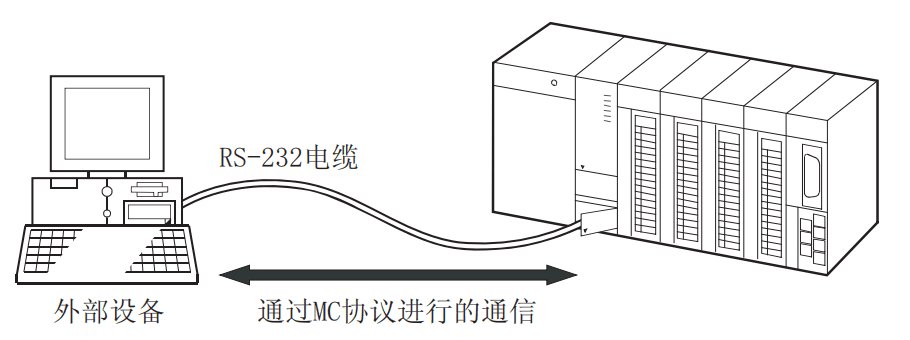
通过MC协议进行的数据通信是以半双工通信进行,在对PLC发送指令报文后会接收到来自PLC的响应报文,接收完全后才能再次发送下一个指令报文
在没接收完全响应报文就发送下一个指令报文会发生错误!
示意图如下所示
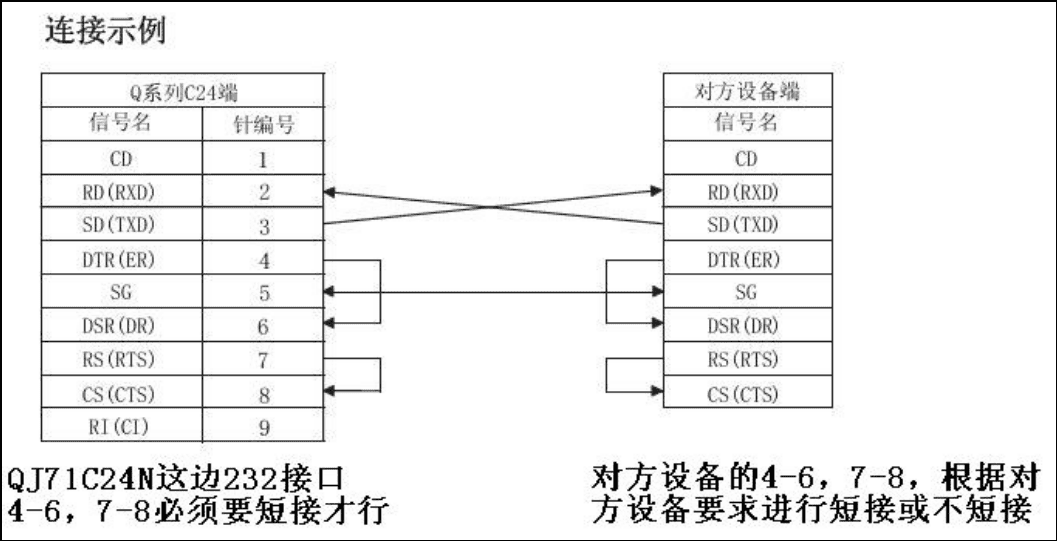
本文主要介绍QnA兼容4C帧的格式1,需要使用RS232线连接PC主机与PLC,连接示意图与RS232线序图如下所示
QnA兼容4C帧(格式1)报文分析
QnA兼容4C帧的格式1通过ASCII代码进行通信,通信报文如下表
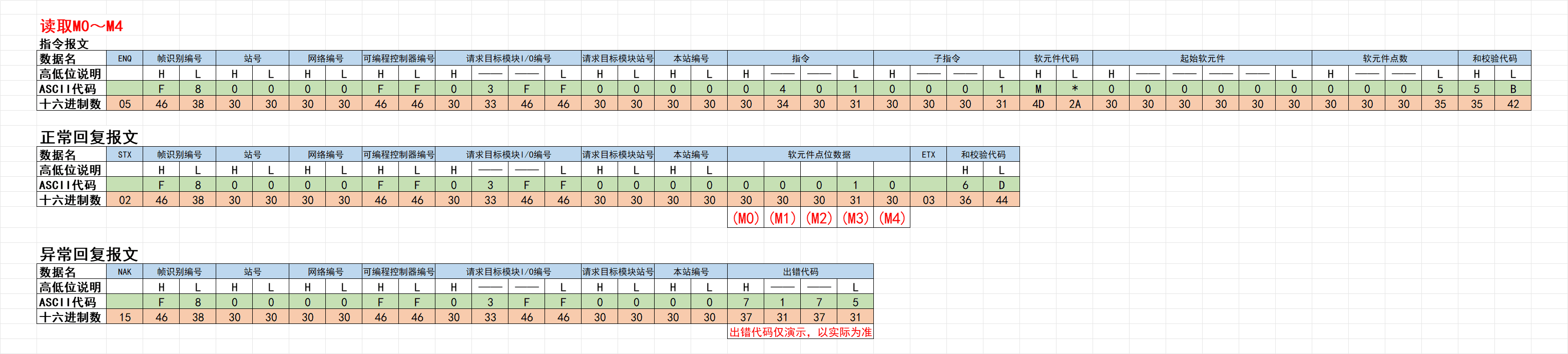
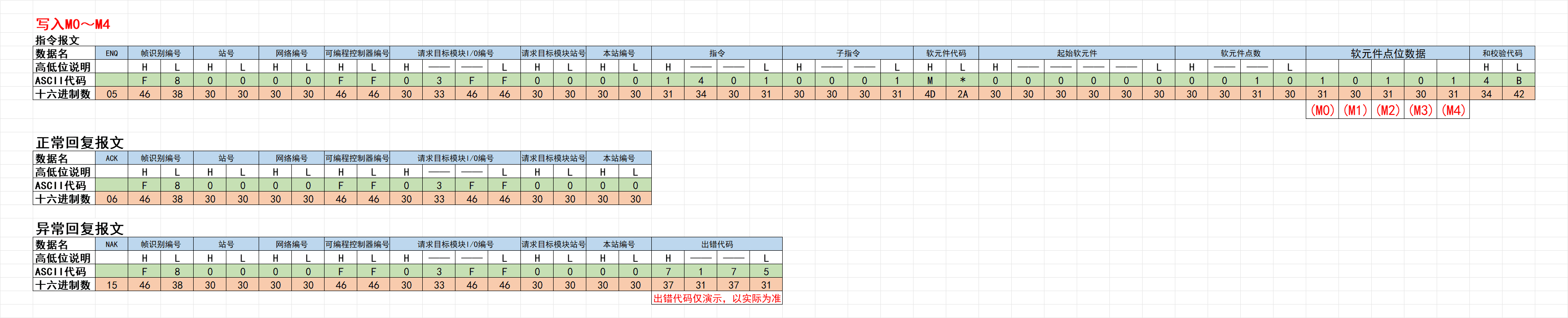
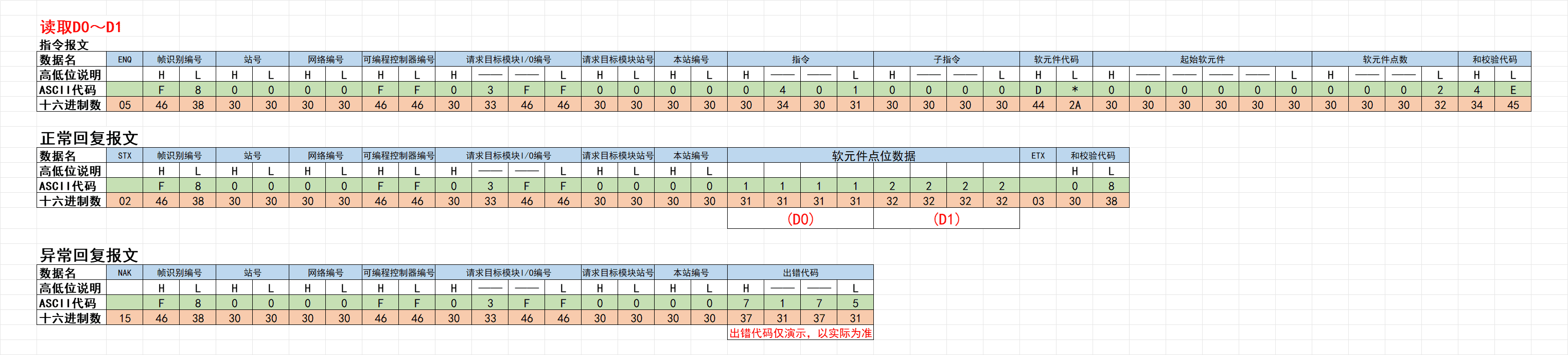
以QnA兼容4C帧(格式1)读写M0~M4、D0~D1的两个例子,通过表格说明
报文表格文件:QnA兼容4C帧格式1报文分析
读写M0~M4报文例子
读写D0~D1报文例子
QnA兼容4C帧的通用数据内容说明
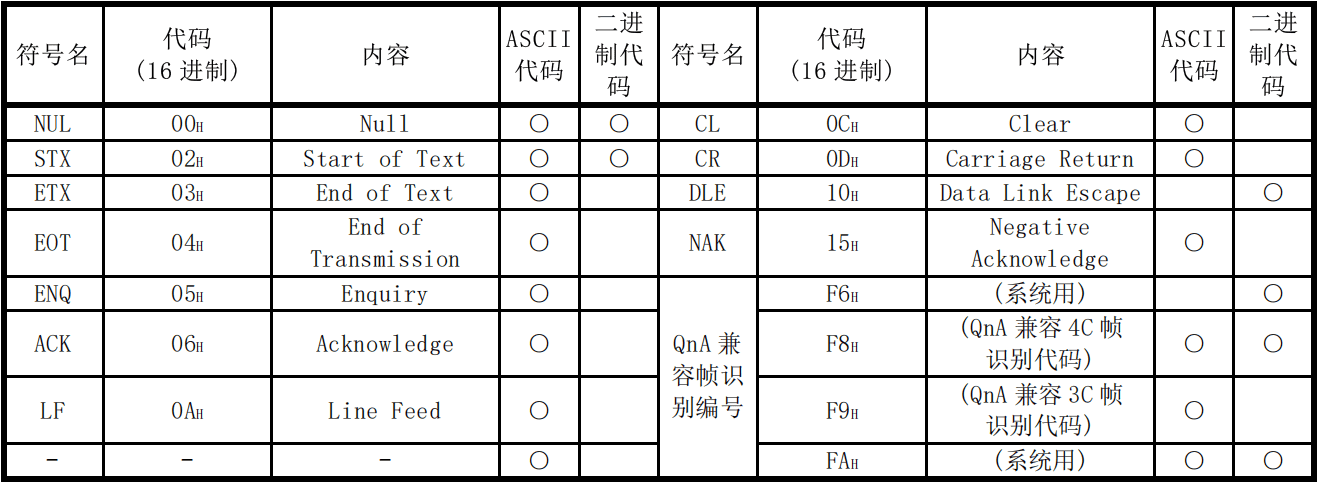
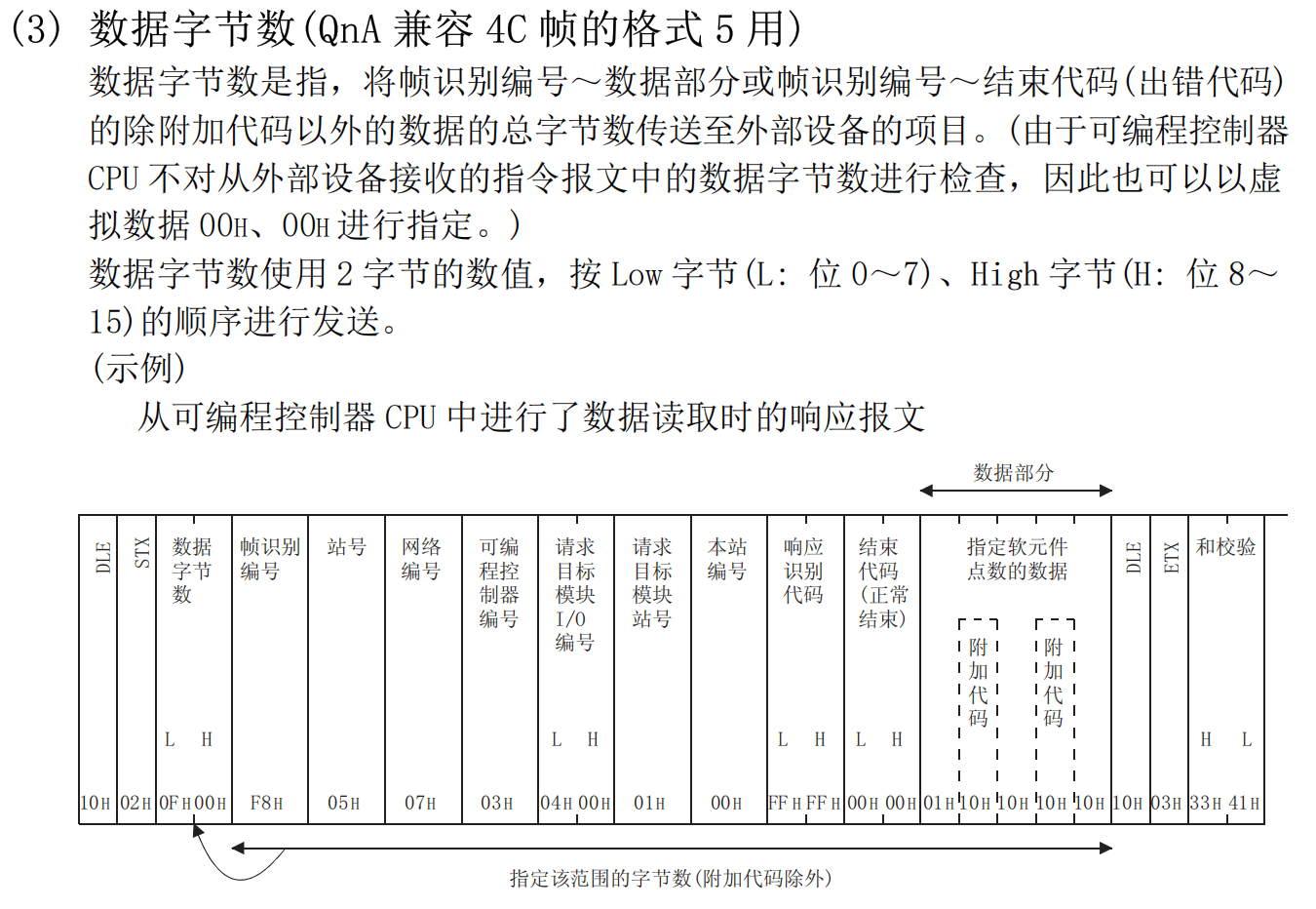
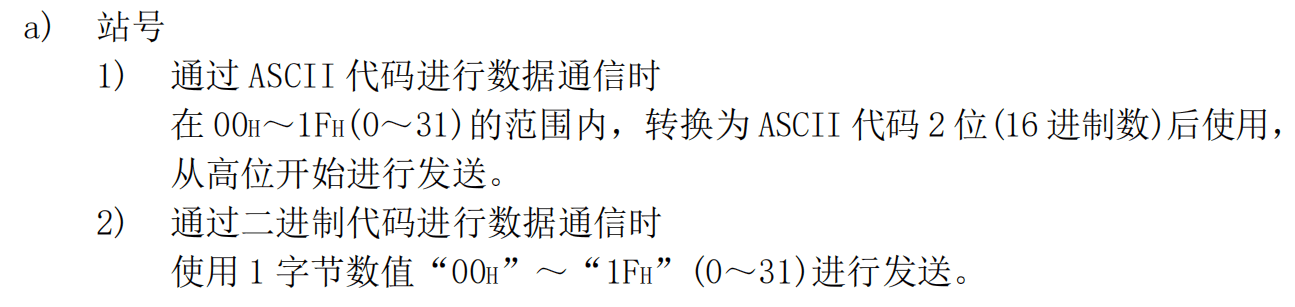
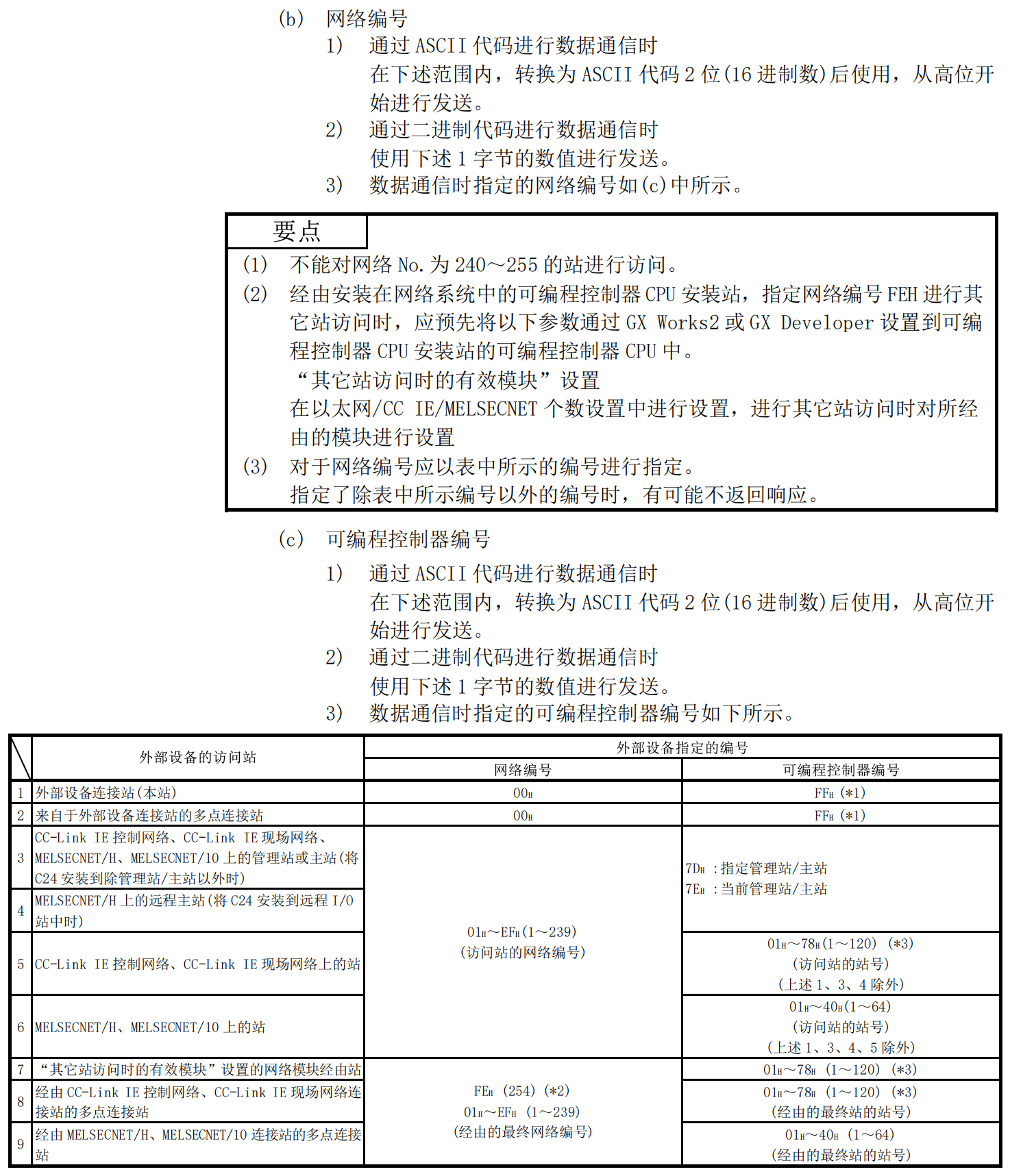
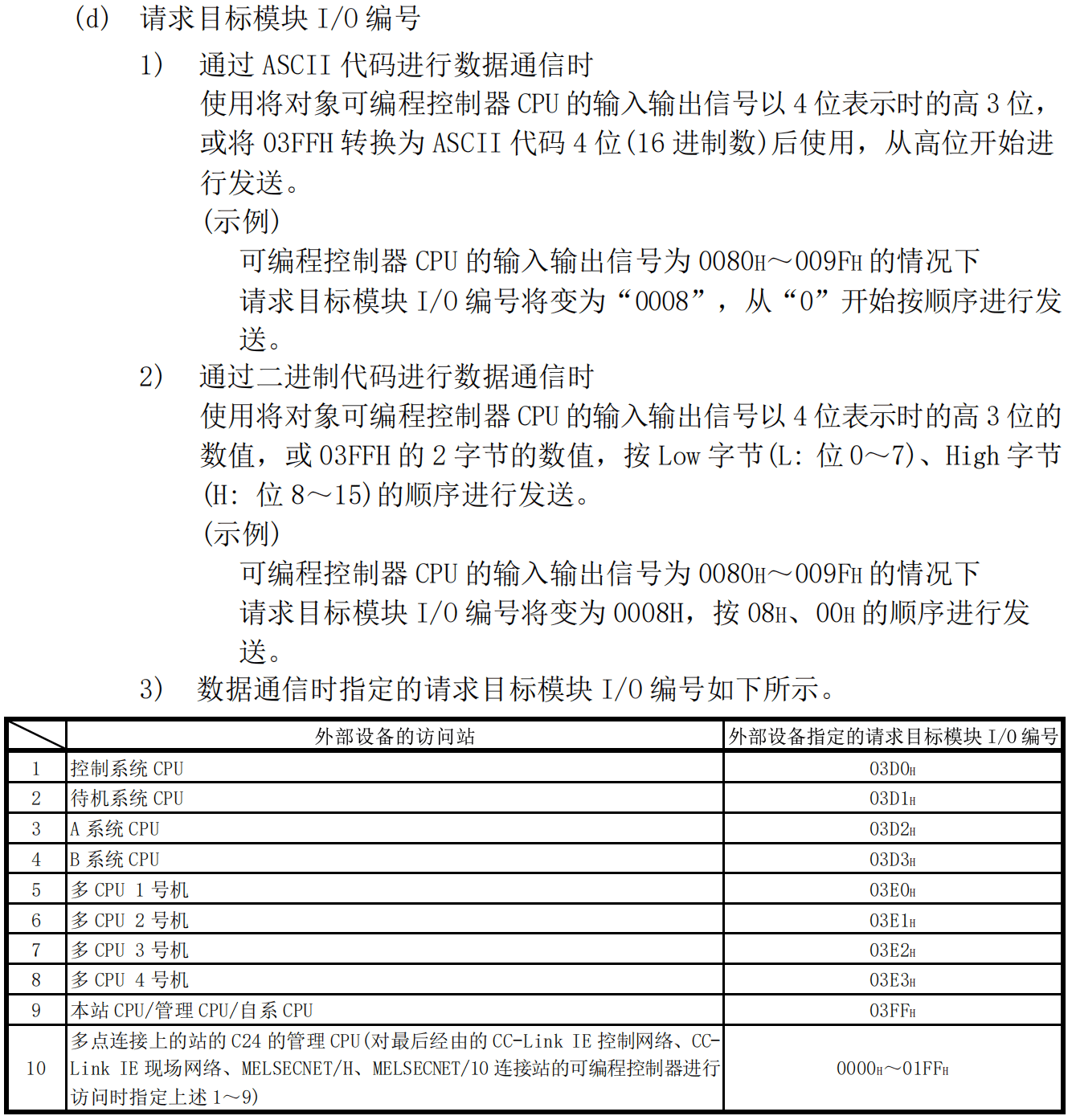
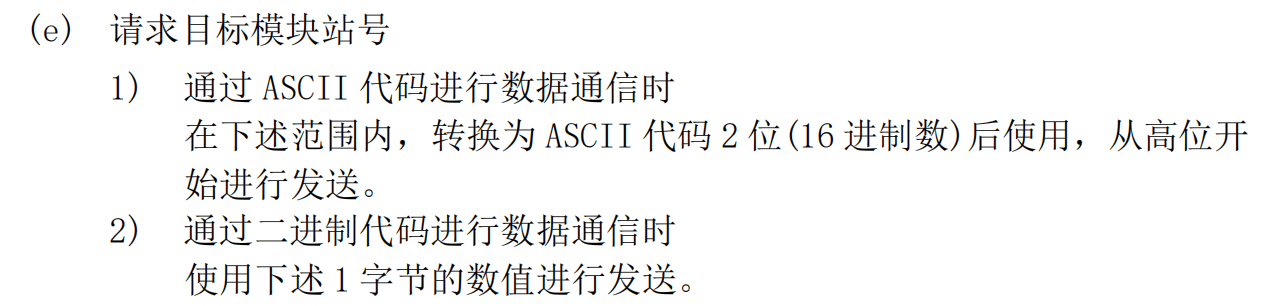
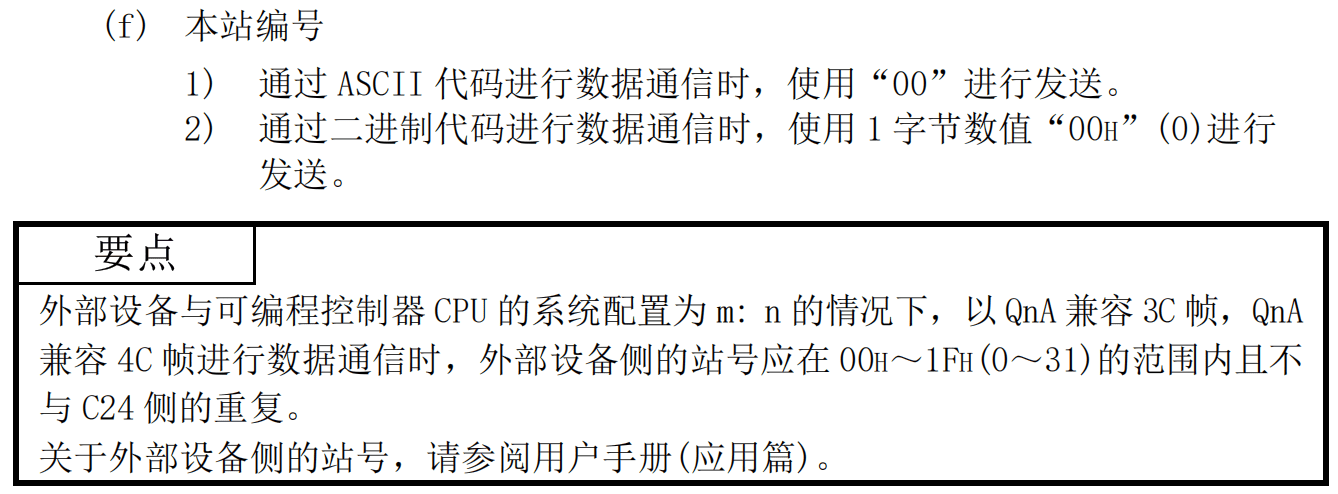
此部分在官方的协议手册有详细说明,相关内容通过下列图片表示
控制代码
数据字节数(格式5用)
帧识别编号
站号
网络编号与可编程控制器编号
请求目标模块I/O编号
请求目标模块站号
本站编号
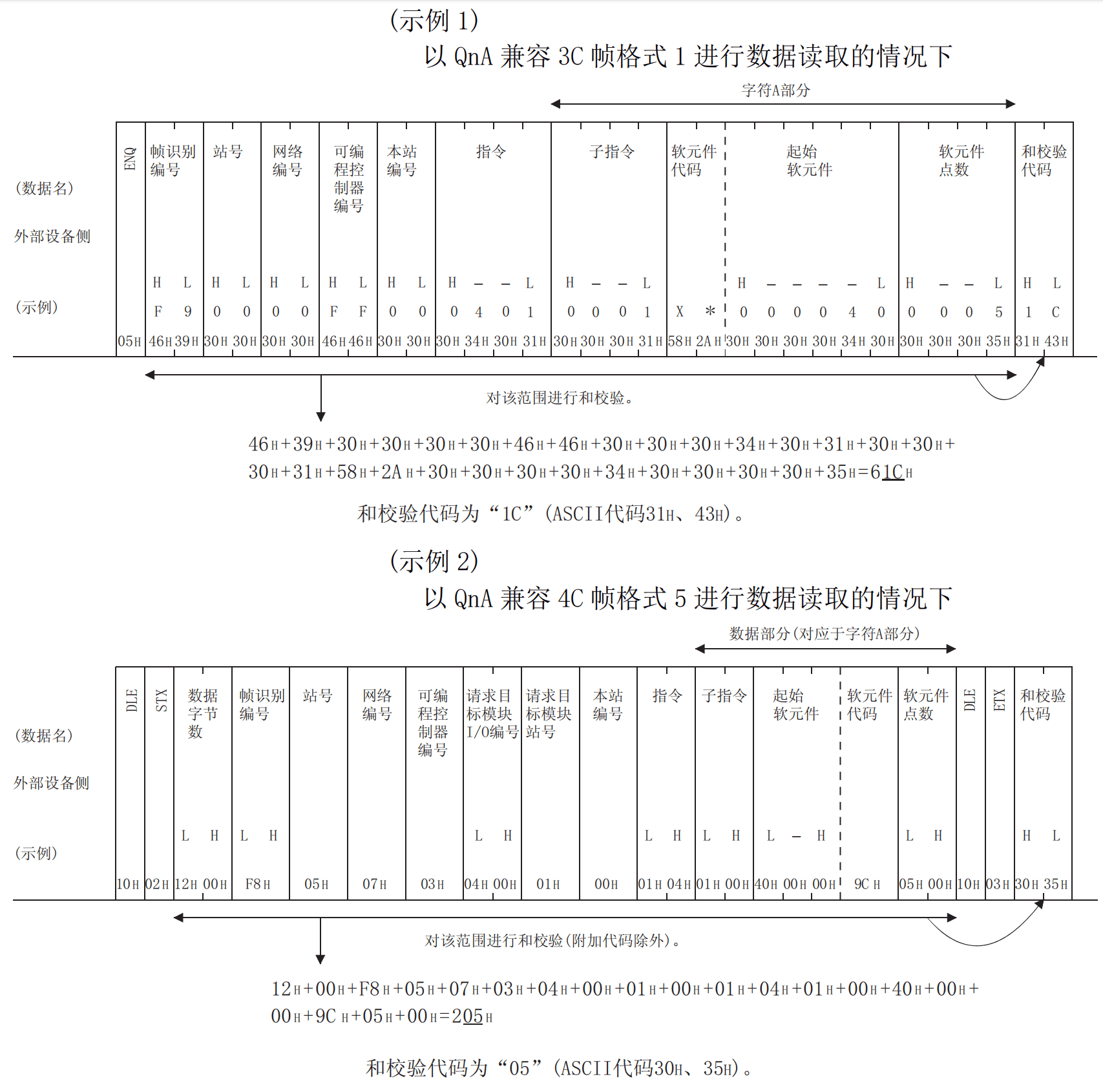
和校验代码
在报文中参与和校验的部分在各个格式中不同,需要自行查阅协议手册
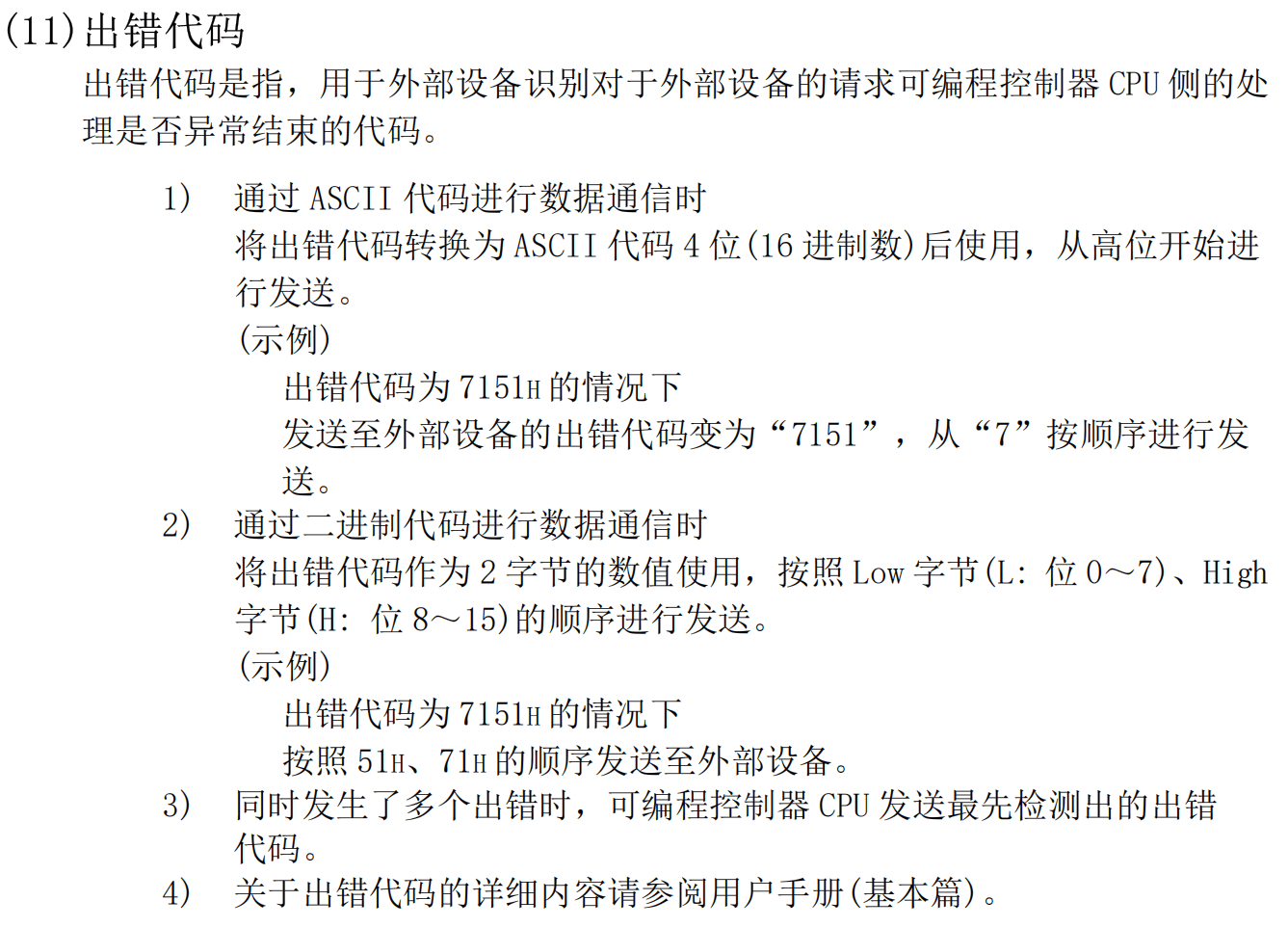
出错代码
C24模块与E71模块的错误代码可能不相同,需要自行查阅协议手册
C24模块用户手册:三菱Q系列串行通信模块用户手册(基础篇)
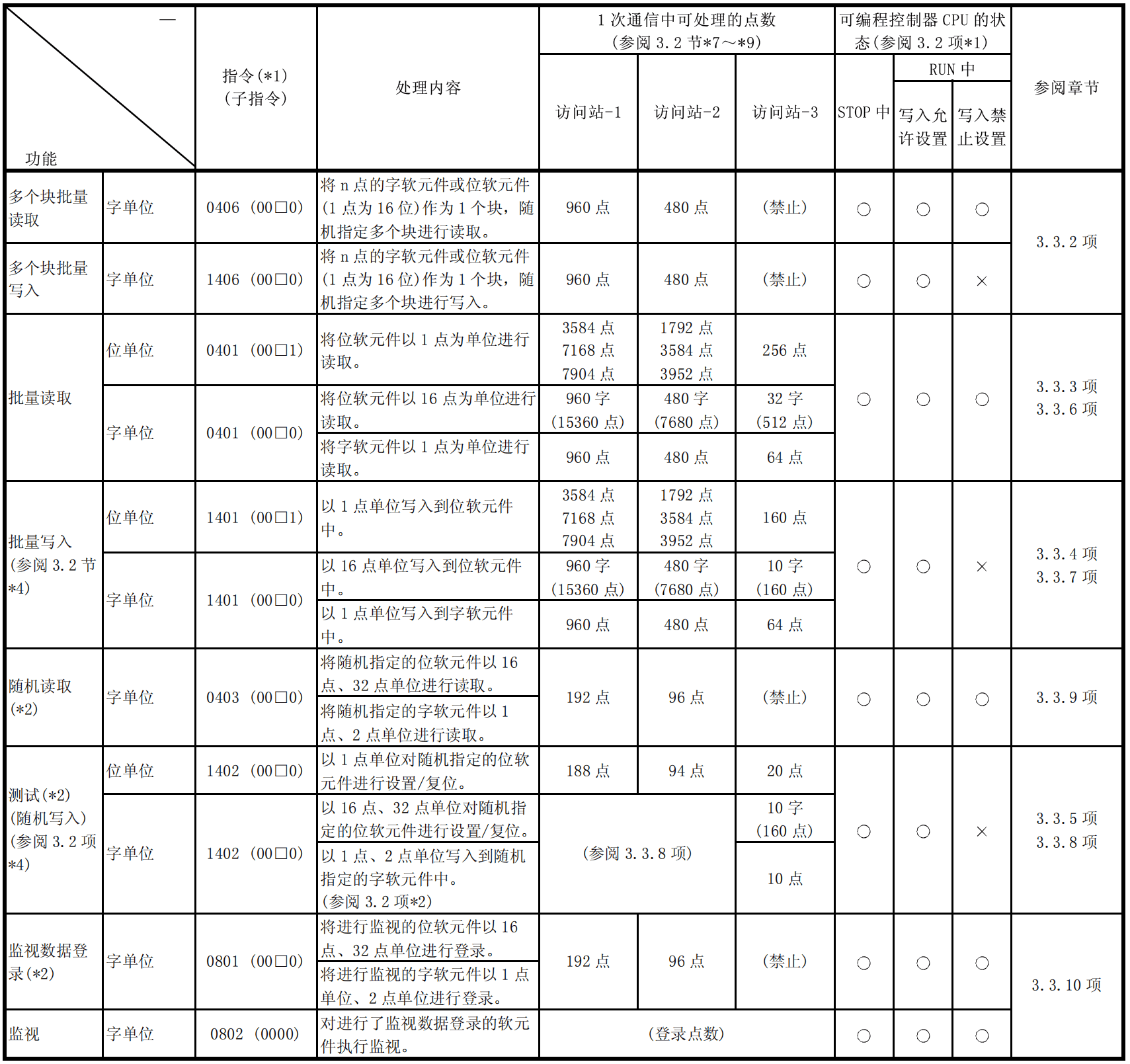
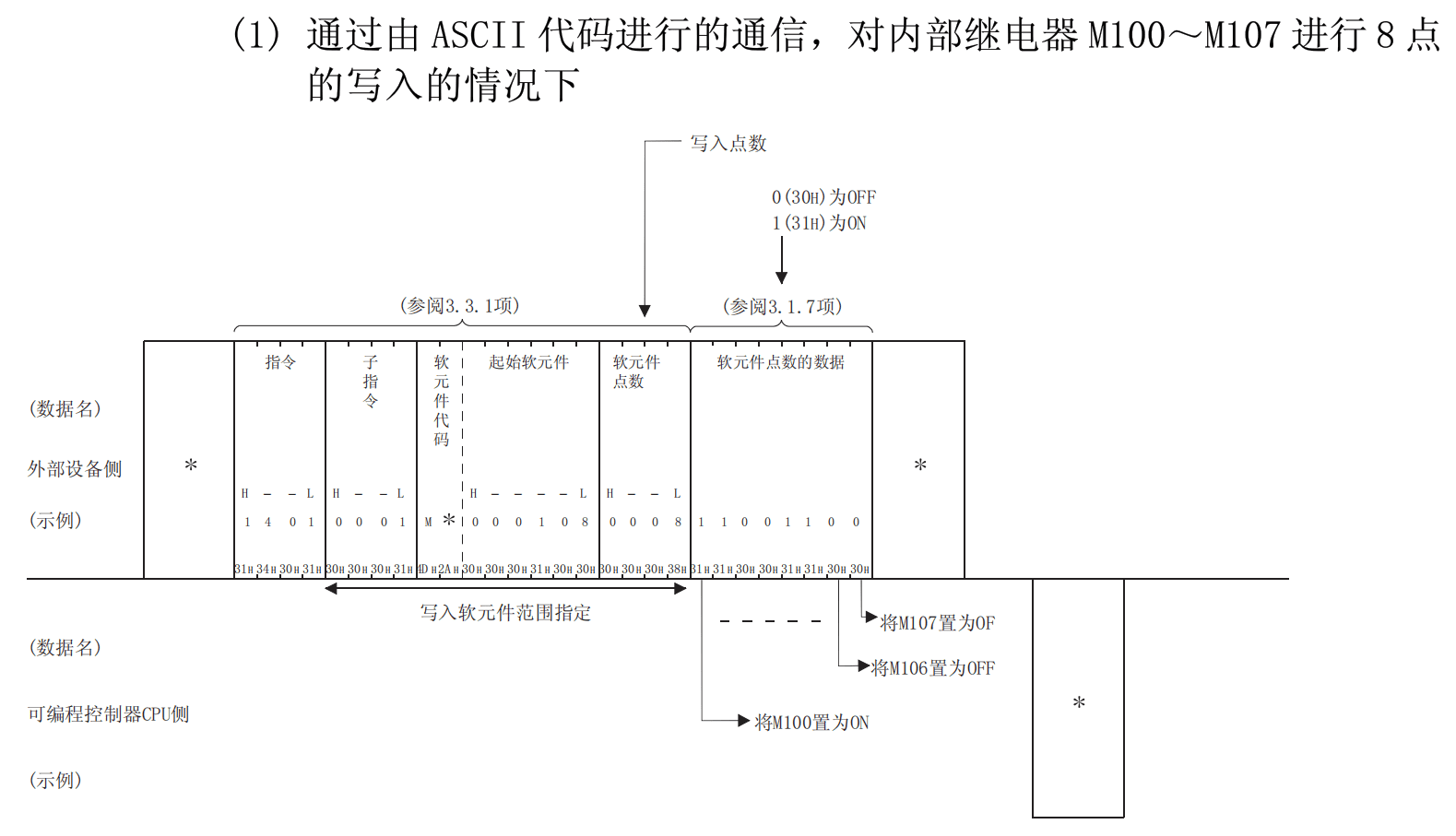
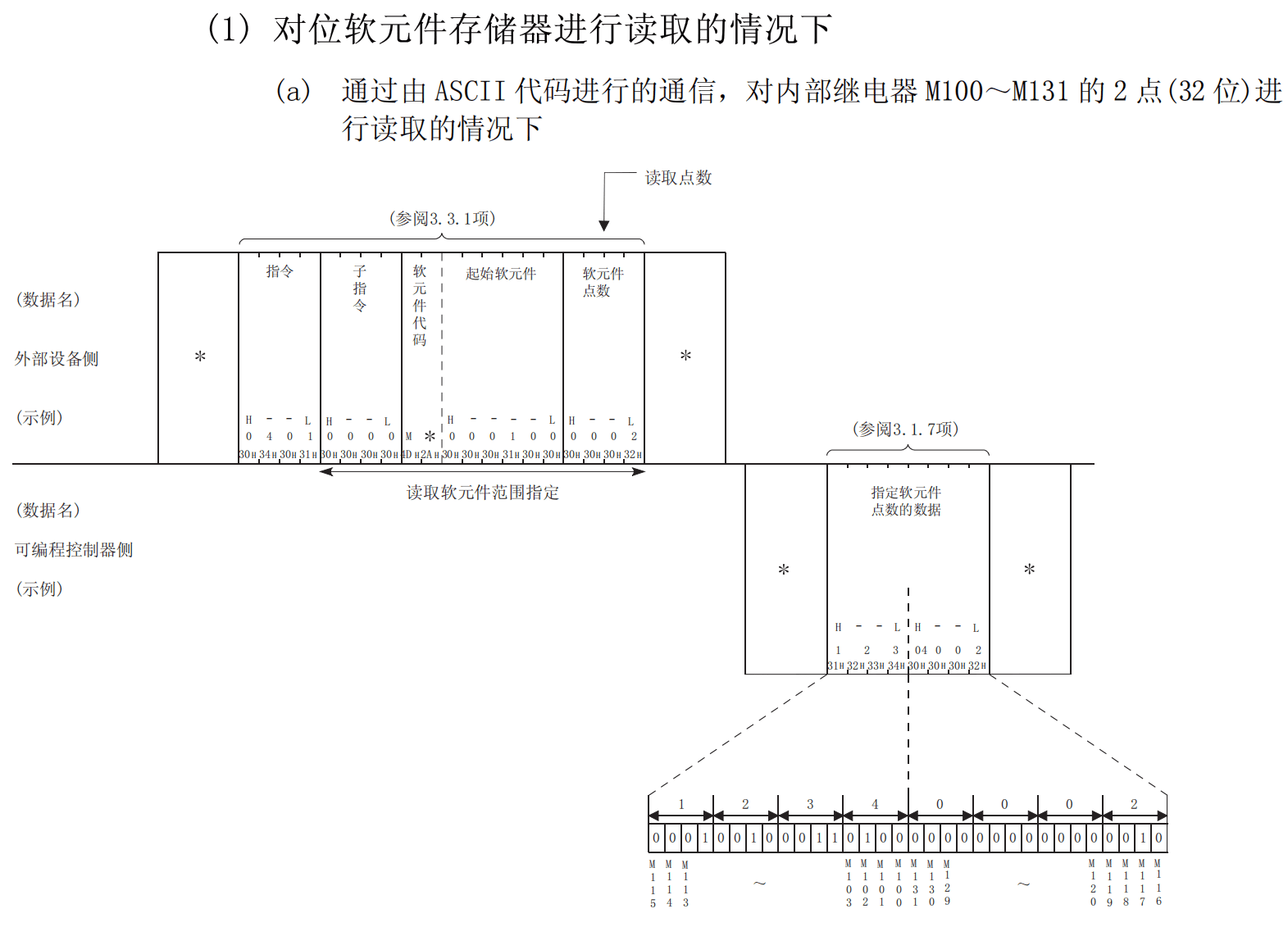
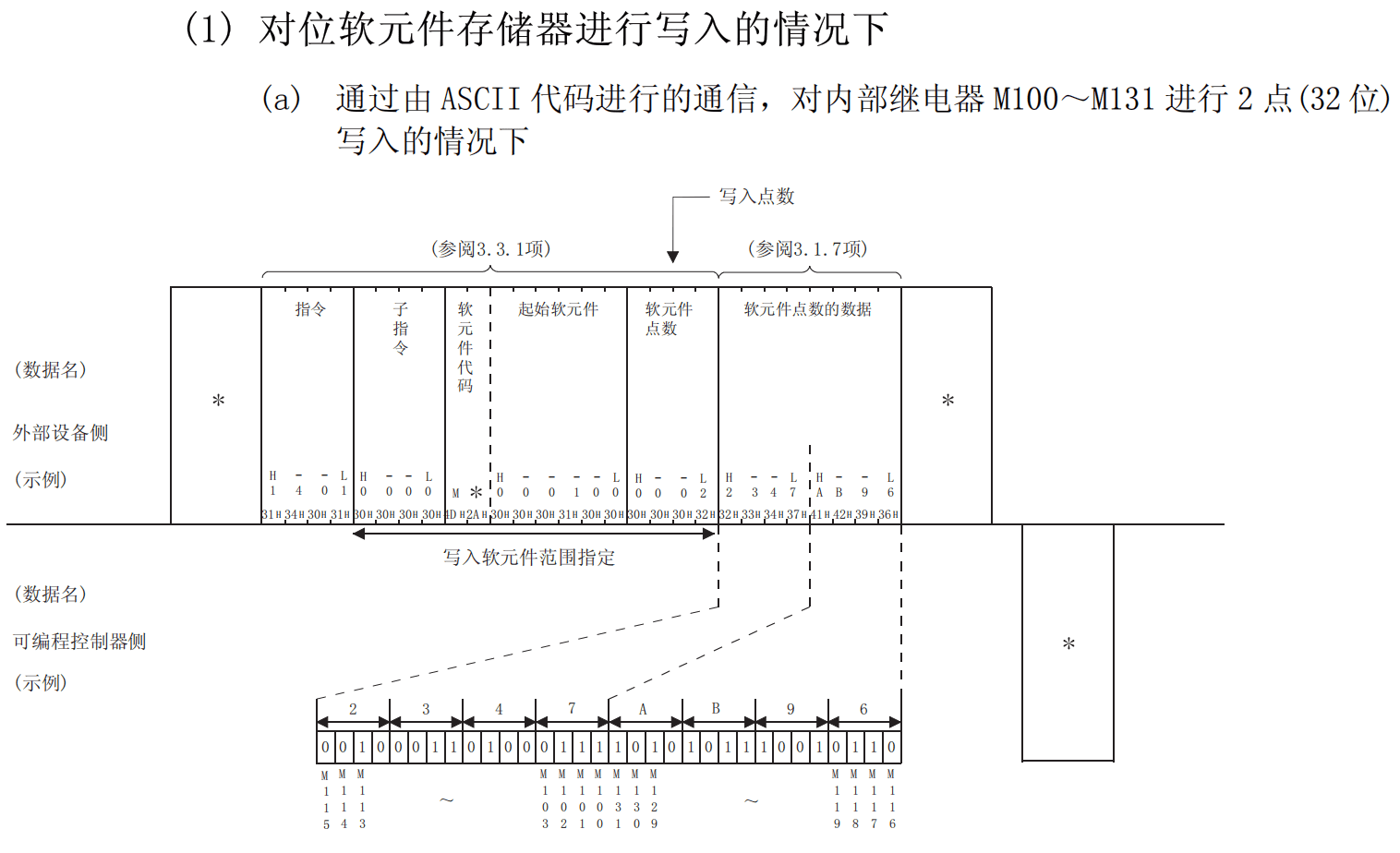
软元件的批量读写指令
指令的部分内容说明
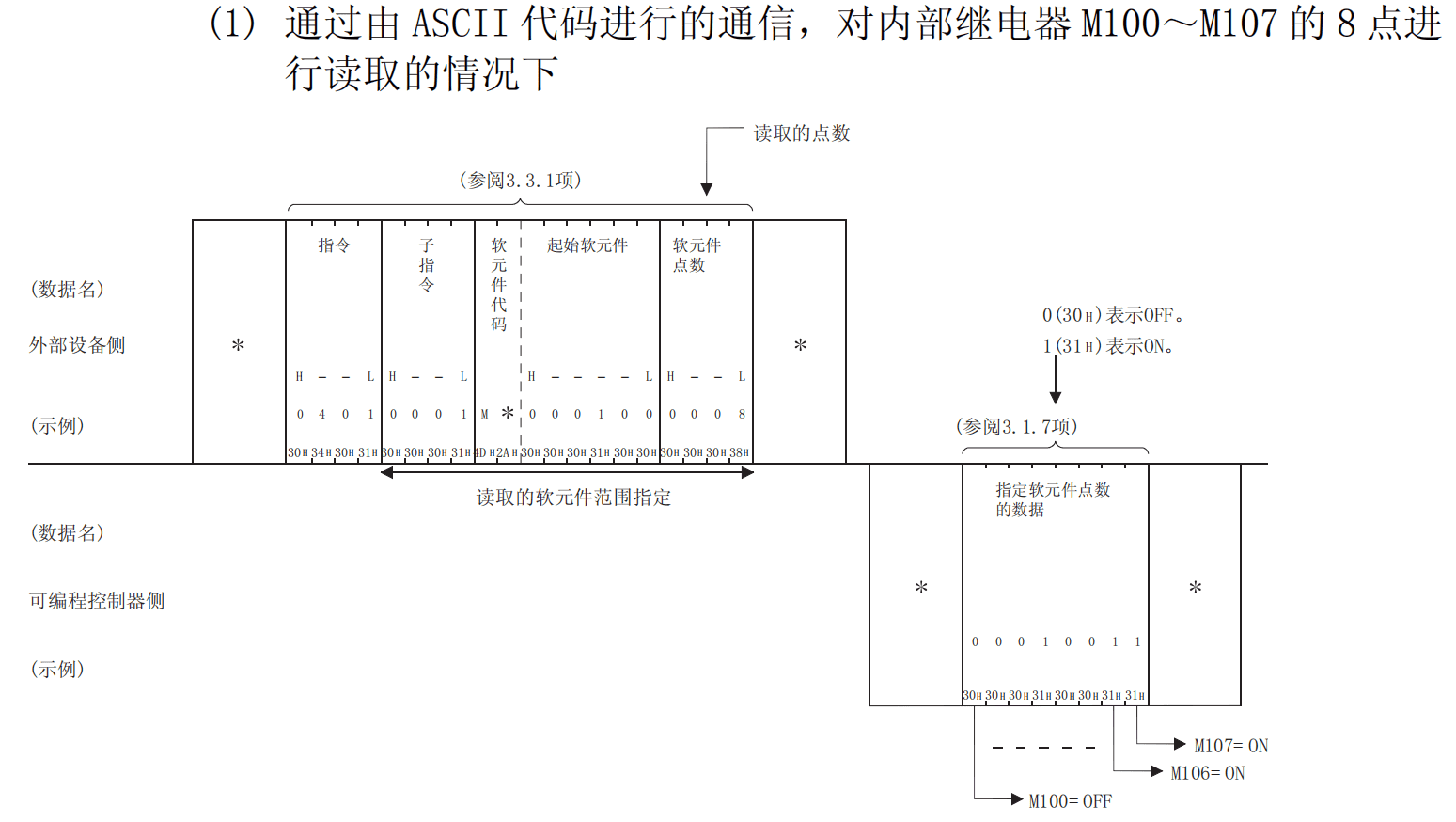
位单元的读写指令
字单元的读写指令
MC协议的功能很强大,本文的内容只是分享了其中的一小部分,如果大家有需要的话,可以通过它的通讯手册更深入的了解MC协议
MC协议手册:三菱Q系列与L系列MELSEC通讯协议手册
MC通讯库的C#实现
和校验实现
根据上文提供的和校验代码规则制作了一个和校验的方法,以下代码可以用于手动调试和校验代码的内容- Console.WriteLine("Start Test!!");//测试用,Frame1的和校验代码应为"0x31,0x43";或者十进制的"49,67"List Frame1 = new List { 0x46, 0x39, 0x30, 0x30, 0x30, 0x30, 0x46, 0x46, 0x30, 0x30, 0x30, 0x34, 0x30, 0x31, 0x30, 0x30, 0x30, 0x31, 0x58, 0x2A, 0x30, 0x30, 0x30, 0x30, 0x34, 0x30, 0x30, 0x30, 0x30, 0x35 };List Frame2 = new List { 0x46, 0x38, 0x30, 0x30, 0x30, 0x30, 0x46, 0x46, 0x30, 0x33, 0x46, 0x46, 0x30, 0x30, 0x30, 0x30, 0x30, 0x34, 0x30, 0x31, 0x30, 0x30, 0x30, 0x31, 0x4d, 0x2a, 0x30, 0x30, 0x30, 0x30, 0x30, 0x30, 0x30, 0x30, 0x30, 0x35 };List result = CheckSum(Frame2);System.Console.WriteLine($"{result[0]},{result[1]}");System.Console.WriteLine("Over!!");public static List CheckSum(List frame){ try { List checkResult = new List(); //取和 int sum = 0; foreach (byte b in frame) { sum += b; } //截取最后后两位 byte lowByte = (byte)(sum & 0xFF); //转为十六进制字符串 string hexString = lowByte.ToString("X2"); if (hexString.Length >= 2) { char num1 = hexString[hexString.Length - 2]; char num2 = hexString[hexString.Length - 1]; //按照高位在前顺序添加 checkResult.Add((byte)num1); checkResult.Add((byte)num2); } else { checkResult.Add(0x30); checkResult.Add((byte)hexString[0]); } return checkResult; } catch (Exception) { throw; }}
通讯库使用了Serial Port进行串口通讯,通过使用SemaphoreSlim(信号量限制)、DataReceived(串口接收数据方法)和TaskCompletionSource(异步任务传输串口数据)等内容实现串口通讯
以下是部分代码- //构造函数public Melsec4CClient(string portname, int baudrate, System.IO.Ports.Parity parity, int databits, System.IO.Ports.StopBits stopbits) { this.PortName = portname; this.BaudRate = baudrate; this.Parity = parity; this.DataBits = databits; this.StopBits = stopbits; }
- //串口接收数据方法private void Melsec_4C_ReadIO_DataReceived(object sender, SerialDataReceivedEventArgs e) { try { //获取并添加到缓冲区 int bytesToRead = serialPort.BytesToRead; byte[] buffer = new byte[bytesToRead]; serialPort.Read(buffer, 0, bytesToRead); receiveBuffer.AddRange(buffer); //处理数据 //查找完整的报文 while (true) { if (format == Melsec_4C_FormatEnum.Format1) { int startIndex = receiveBuffer.IndexOf((byte)0x02);//STX int errIndex = receiveBuffer.IndexOf((byte)0x15);//NAK if (startIndex != -1 && errIndex == -1)//只找到STX,正常结束 { if (receiveBuffer.Count > 17 + startIndex)//接收保文到Data部分 { int seqStartIndex = FindSeq(receiveBuffer, new byte[] { 0x02, 0x46, 0x38 }); if (seqStartIndex == -1) { //继续接收数据 break; } if (seqStartIndex != startIndex) { startIndex = seqStartIndex; } int endIndex = receiveBuffer.IndexOf((byte)0x03, startIndex + 17);//ETX if (endIndex == -1) { //继续接收数据 break; } //找到和校验位置 if (isCheckSum)//有和校验 { if (receiveBuffer.Count >= (endIndex + 3)) { int frameEnd = endIndex + 3; //提取完整报文(从STX到和校验代码) List completeFrame = receiveBuffer.GetRange(startIndex, frameEnd - startIndex); //读取到的和校验数值 List receivedCheckSum = new List() { completeFrame[completeFrame.Count - 2], completeFrame[completeFrame.Count - 1] }; //用于计算和校验的数据 List dataForCheckSum = new List(); for (int i = 1; i < completeFrame.Count - 2; i++)//待测试 { dataForCheckSum.Add(completeFrame[i]); } List calculatedCheckSum = Melsec_4C_Check.CheckSum(format, dataForCheckSum); if (!calculatedCheckSum.SequenceEqual(receivedCheckSum)) { throw new InvalidOperationException("读取的和校验数值与计算的不符"); } //完成结果 receiveTcs.TrySetResult(completeFrame); //清除缓冲区中已处理的报文 receiveBuffer.RemoveRange(0, frameEnd); } else { //继续接收数据 break; } } else//无和校验 { List completeFrame = receiveBuffer.GetRange(startIndex, endIndex - startIndex);//待测试,是否要+1? //完成结果 receiveTcs.TrySetResult(completeFrame); //清除缓冲区中已处理的报文 receiveBuffer.RemoveRange(0, endIndex); } } else { //继续接收数据 break; } } else if (startIndex == -1 && errIndex != -1)//只找到NAK,异常结束 { //到达固定字数 if (receiveBuffer.Count >= 21 + errIndex) { int seqErrIndex = FindSeq(receiveBuffer, new byte[] { 0x15, 0x46, 0x38 }); if (seqErrIndex == -1) { //继续接收数据 break; } if (seqErrIndex != errIndex) { errIndex = seqErrIndex; } int frameEnd = errIndex + 21; List completeFrame = receiveBuffer.GetRange(errIndex, frameEnd - errIndex);//待测试,是否要+1? //完成结果 receiveTcs.TrySetResult(completeFrame); //清除缓冲区中已处理的报文 receiveBuffer.RemoveRange(0, frameEnd); } else { //继续接收数据 break; } } else //两个开头都没找到 { //继续接收数据 break; } } else { //format数值错误,抛出异常 throw new ArgumentOutOfRangeException("format error!"); } } } catch (Exception ex) { if (receiveTcs.Task.IsCompleted == false) { receiveTcs.TrySetException(ex); } } }
- //读取位单位的异步方法public async Task ReadIOBitAsync(Melsec_4C_IOAreaEnum IOArea, uint IOAdr, uint ReadCount) { try { Melsec_4C_FrameConfig config = new Melsec_4C_FrameConfig(); if (format == Melsec_4C_FormatEnum.Format1) { config.IDCode = Melsec_4C_ControlCode.IDCode_ASCII_4C;//F8 config.SNCode = new List { 0x30, 0x30 };//00 config.NetCode = new List { 0x30, 0x30 };//00 config.CPUCode = new List { 0x46, 0x46 };//FF config.TargetModuleIOCode = new List { 0x30, 0x33, 0x46, 0x46 };//03FF config.TargetModuleSNCode = new List { 0x30, 0x30 };//00 config.ThisSNCode = new List { 0x30, 0x30 };//00 config.Command = new List { 0x30, 0x34, 0x30, 0x31 };//0401 config.SonCommand = new List { 0x30, 0x30, 0x30, 0x31 };//0001 List datas = new List(); //选择IO区域代码 switch (IOArea) { case Melsec_4C_IOAreaEnum.IO_X: datas.AddRange(Melsec_4C_IOAreaCode.IOArea_ASCII.IOArea_X); break; case Melsec_4C_IOAreaEnum.IO_Y: datas.AddRange(Melsec_4C_IOAreaCode.IOArea_ASCII.IOArea_Y); break; case Melsec_4C_IOAreaEnum.IO_M: datas.AddRange(Melsec_4C_IOAreaCode.IOArea_ASCII.IOArea_M); break; case Melsec_4C_IOAreaEnum.IO_L: datas.AddRange(Melsec_4C_IOAreaCode.IOArea_ASCII.IOArea_L); break; case Melsec_4C_IOAreaEnum.IO_F: datas.AddRange(Melsec_4C_IOAreaCode.IOArea_ASCII.IOArea_F); break; case Melsec_4C_IOAreaEnum.IO_V: datas.AddRange(Melsec_4C_IOAreaCode.IOArea_ASCII.IOArea_V); break; case Melsec_4C_IOAreaEnum.IO_B: datas.AddRange(Melsec_4C_IOAreaCode.IOArea_ASCII.IOArea_B); break; case Melsec_4C_IOAreaEnum.IO_TC: datas.AddRange(Melsec_4C_IOAreaCode.IOArea_ASCII.IOArea_T); break; case Melsec_4C_IOAreaEnum.IO_CC: datas.AddRange(Melsec_4C_IOAreaCode.IOArea_ASCII.IOArea_C); break; case Melsec_4C_IOAreaEnum.IO_S: datas.AddRange(Melsec_4C_IOAreaCode.IOArea_ASCII.IOArea_S); break; default: throw new ArgumentOutOfRangeException("IO区域选择出错"); } datas.AddRange(MelsecConverter.Uint_D6String_ByteList(IOAdr)); datas.AddRange(MelsecConverter.Uint_D4String_ByteList(ReadCount)); config.Datas = datas; var result = await ReadIOAreaAsync(config); //result解析 if (result.IsSuccessed) { List listResult = MelsecConverter.ByteList_ASCII_BoolList(result.Datas); return listResult; } else { throw new Exception(result.ExMessage); } } else { throw new ArgumentOutOfRangeException("format选择出错"); } } catch (Exception) { throw; } }
详细代码可参考:通讯库项目Gitee 仓库
控制台试验
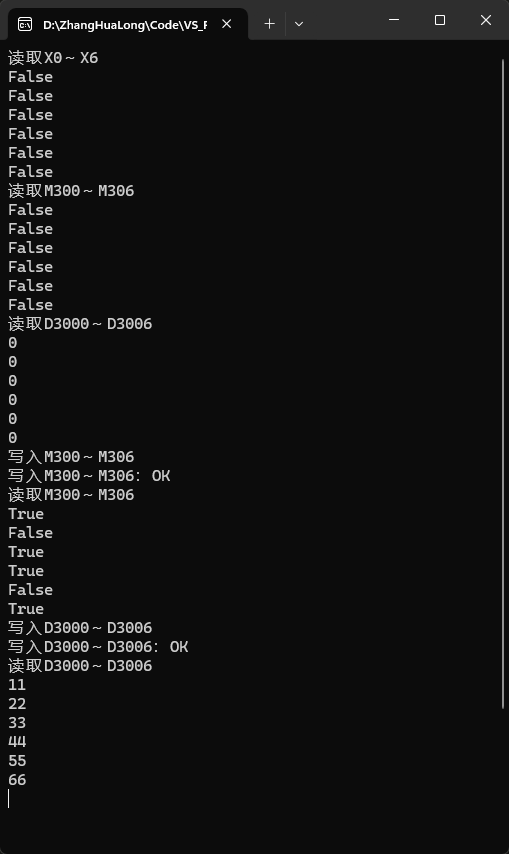
使用控制台进行通讯库试验,以下是试验使用的代码和试验结果图- using Mitsubishi.MelsecLib;using Mitsubishi.MelsecLib.Melsec4CBase;using System.IO.Ports;namespace MelsecTest{ internal class Program { private static Melsec4CClient? plc; private static Melsec_4C_FormatEnum format; static async Task Main(string[] args) { plc = new Melsec4CClient("COM6",9600, Parity.Even,7,StopBits.Two); var isConnect = await plc.ConnectAsync(Melsec_4C_FormatEnum.Format1,true,false); if (isConnect) { Console.WriteLine("读取X0~X6"); var result1 = await plc.ReadIOBitAsync(Melsec_4C_IOAreaEnum.IO_X, 0, 6); foreach (var b in result1) { Console.WriteLine(b.ToString()); } await Task.Delay(1000); Console.WriteLine("读取M300~M306"); var result2 = await plc.ReadIOBitAsync(Melsec_4C_IOAreaEnum.IO_M, 300, 6); foreach (var b in result2) { Console.WriteLine(b.ToString()); } await Task.Delay(1000); Console.WriteLine("读取D3000~D3006"); var result3 = await plc.ReadIOWordAsync(Melsec_4C_IOAreaEnum.IO_D, 3000, 6); foreach (var b in result3) { Console.WriteLine(b.ToString()); } await Task.Delay(1000); Console.WriteLine("写入M300~M306"); var result4 = await plc.WriteIOBitAsync(Melsec_4C_IOAreaEnum.IO_M, 300, new List { true, false, true, true, false, true }); if (result4) { Console.WriteLine("写入M300~M306:OK"); } else { Console.WriteLine("写入M300~M306:NG"); } await Task.Delay(1000); Console.WriteLine("读取M300~M306"); var result5 = await plc.ReadIOBitAsync(Melsec_4C_IOAreaEnum.IO_M, 300, 6); foreach (var b in result5) { Console.WriteLine(b.ToString()); } await Task.Delay(1000); Console.WriteLine("写入D3000~D3006"); var result6 = await plc.WriteIOWordAsync(Melsec_4C_IOAreaEnum.IO_D, 3000, new List { 11,22,33,44,55,66 }); if (result6) { Console.WriteLine("写入D3000~D3006:OK"); } else { Console.WriteLine("写入D3000~D3006:NG"); } await Task.Delay(1000); Console.WriteLine("读取D3000~D3006"); var result7 = await plc.ReadIOWordAsync(Melsec_4C_IOAreaEnum.IO_D, 3000, 6); foreach (var b in result7) { Console.WriteLine(b.ToString()); } await Task.Delay(1000); Console.WriteLine("恢复M300~M306"); await plc.WriteIOBitAsync(Melsec_4C_IOAreaEnum.IO_M, 300, new List { false, false, false, false, false, false }); await Task.Delay(1000); Console.WriteLine("恢复D3000~D3006"); await plc.WriteIOWordAsync(Melsec_4C_IOAreaEnum.IO_D, 3000, new List { 0, 0, 0, 0, 0, 0 }); await Task.Delay(1000); } else { Console.WriteLine("连接错误"); } await plc.DisconnectAsync(); Console.ReadKey(); } }}
详细代码可参考:通讯库项目Gitee 仓库
试验结果图如下图
后续
项目还有很多值得改进的地方,例如使用ConcurrentQueue多线程队列来实现串口通讯的队列;开发4C帧的其他格式和E71模块的通讯代码等,这些后续进行改进了都会在仓库上进行更新。
来源:程序园用户自行投稿发布,如果侵权,请联系站长删除
免责声明:如果侵犯了您的权益,请联系站长,我们会及时删除侵权内容,谢谢合作! |






 提升卡
提升卡 置顶卡
置顶卡 沉默卡
沉默卡 喧嚣卡
喧嚣卡 变色卡
变色卡 千斤顶
千斤顶 照妖镜
照妖镜


