博客地址:https://www.cnblogs.com/zylyehuo/
基础:ROS1 noetic 中将 Unitree G1 的 URDF 导入 Gazebo/RViz
- RViz 只是“眼睛”,Gazebo 才是“身体”。
- RViz 滑条 (joint_state_publisher):它只是在广播“数据”:“我现在假设关节在 30 度”。RViz 听到了,就画给你看。
- Gazebo:它模拟的是真实的物理电机。它听不到“假设”,它只接受“电机电压/扭矩指令”。
目前的连接是断开的: 滑条 GUI ---> /joint_states ---> RViz (更新画面) Gazebo (不仅没收到指令,而且现在的模型里连“电机”都没装,只有空壳)
要解决这个问题,需要做三件事
- 给 URDF 装电机:添加 标签。
- 配置控制器:生成 controllers.yaml。
- 写个转换桥梁:把滑条的信号“翻译”成电机指令发给 Gazebo。
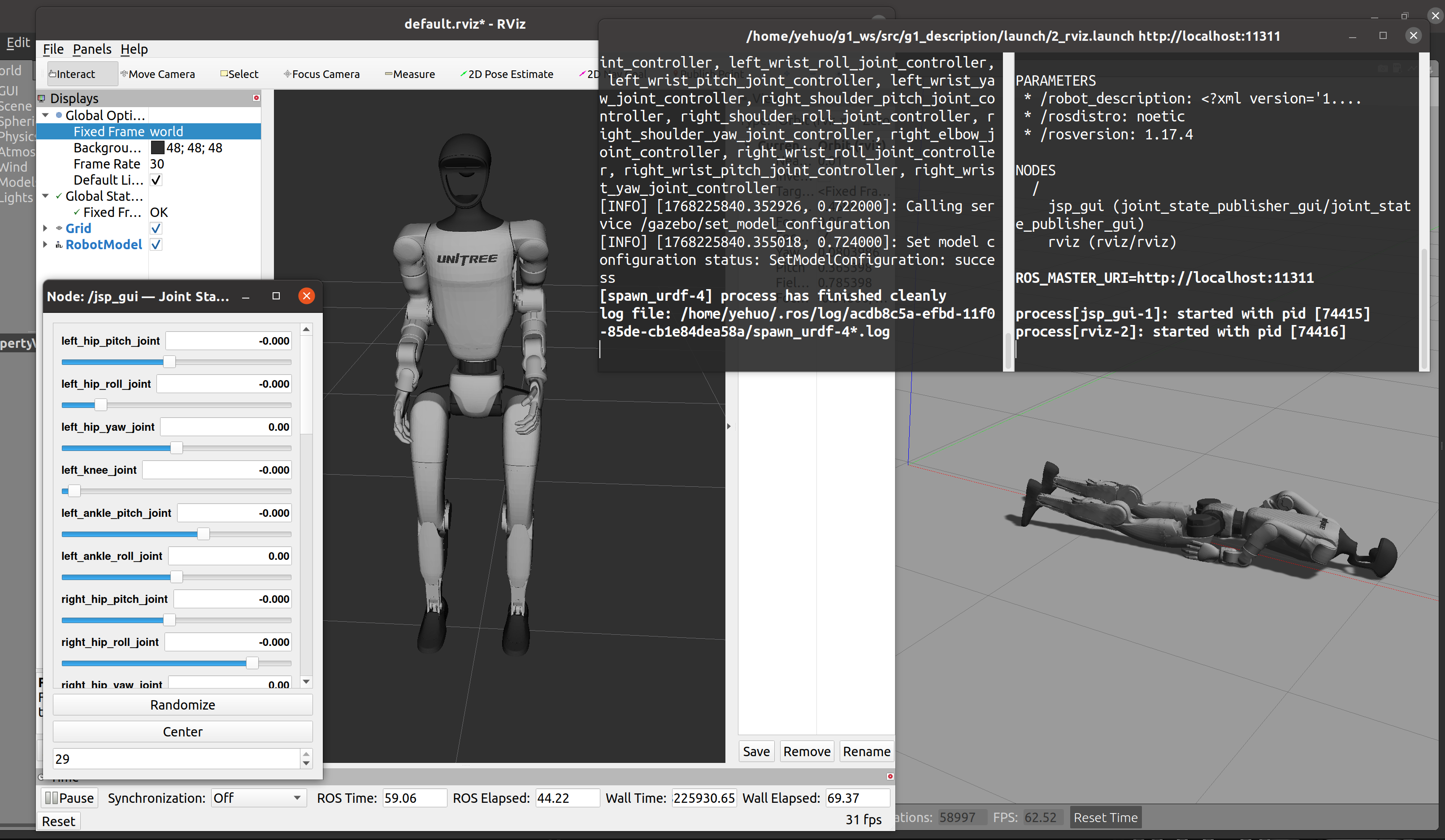
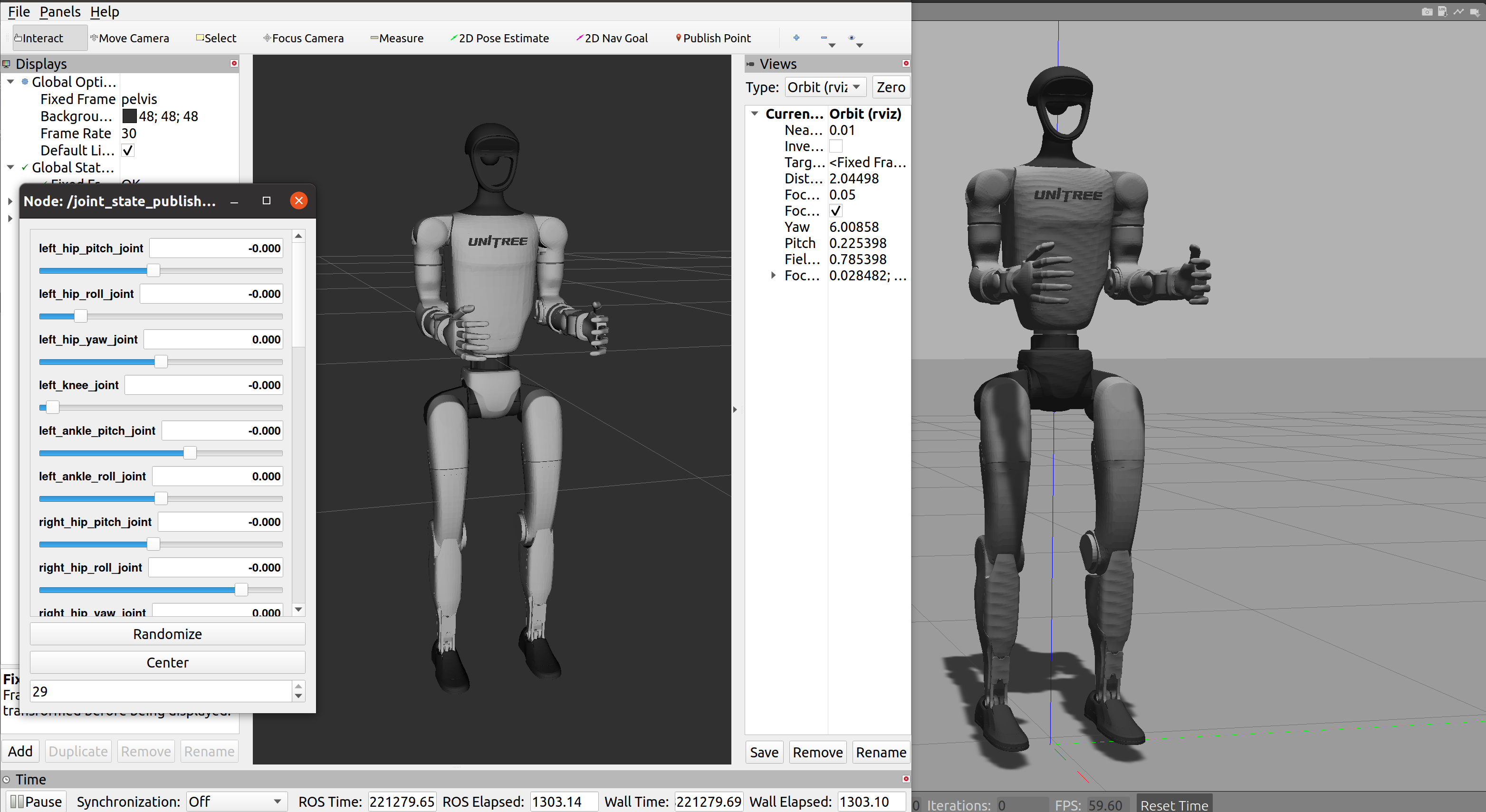
效果预览
运行 rviz_gazebo.py
运行 rviz_gazebo_fixed.py
第一步:安装必要的 ROS 控制包
- sudo apt-get install ros-noetic-ros-control ros-noetic-ros-controllers ros-noetic-gazebo-ros-control
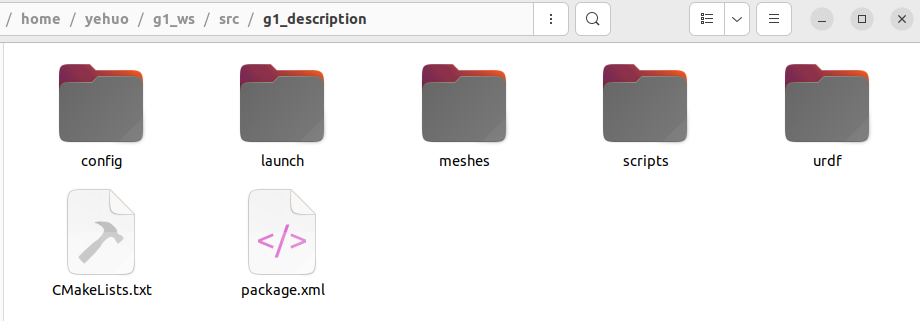
~/g1_ws/src/g1_description/scripts/rviz_gazebo.py
这份生成的机器人会由于没有控制代码而倒地
- #!/usr/bin/env python3import osimport sysimport xml.etree.ElementTree as ET# ================= 路径配置 =================SCRIPT_DIR = os.path.dirname(os.path.abspath(__file__))PKG_ROOT = os.path.dirname(SCRIPT_DIR)PKG_NAME = "g1_description"# 文件路径SRC_URDF = os.path.join(PKG_ROOT, "urdf/g1_29dof.urdf")DST_URDF = os.path.join(PKG_ROOT, "urdf/g1_complete.urdf")YAML_FILE = os.path.join(PKG_ROOT, "config/controllers.yaml")BRIDGE_SCRIPT = os.path.join(PKG_ROOT, "scripts/bridge_node.py")LAUNCH_GAZEBO = os.path.join(PKG_ROOT, "launch/1_gazebo.launch")LAUNCH_RVIZ = os.path.join(PKG_ROOT, "launch/2_rviz.launch")# 颜色映射COLOR_MAP = { "white": "Gazebo/Grey", "grey": "Gazebo/Grey", "dark": "Gazebo/DarkGrey", "black": "Gazebo/FlatBlack"}print(f"正在生成【全物理走路调试版】环境...")def generate_files(): # 1. 目录检查 os.makedirs(os.path.join(PKG_ROOT, "config"), exist_ok=True) os.makedirs(os.path.join(PKG_ROOT, "launch"), exist_ok=True) if not os.path.exists(SRC_URDF): print(f"错误: 找不到 {SRC_URDF}") sys.exit(1) tree = ET.parse(SRC_URDF) root = tree.getroot() joint_names = [] # ================= 1. URDF 物理配置 (Floating Base) ================= # 1.1 移除所有 World 固定锚点 (彻底自由) for link in root.findall('link'): if link.get('name') == 'world': root.remove(link) for joint in root.findall('joint'): if joint.get('name') == 'world_anchor': root.remove(joint) # 1.2 确保 base_link 存在 (作为浮动基座的根) has_base = False for link in root.findall('link'): if link.get('name') == 'base_link': has_base = True if not has_base: base_link = ET.Element('link', name='base_link') # 给 base_link 一个微小的惯性,防止 Gazebo 忽略它 inertial = ET.SubElement(base_link, 'inertial') ET.SubElement(inertial, 'mass', value="0.01") ET.SubElement(inertial, 'inertia', ixx="0.001", ixy="0", ixz="0", iyy="0.001", iyz="0", izz="0.001") root.insert(0, base_link) # 连接 base_link -> pelvis joint = ET.Element('joint', name='base_to_pelvis', type='fixed') ET.SubElement(joint, 'parent', link='base_link') ET.SubElement(joint, 'child', link='pelvis') ET.SubElement(joint, 'origin', xyz="0 0 0", rpy="0 0 0") root.insert(1, joint) # 1.3 物理参数精细化 (摩擦力与接触刚度) # 清理所有旧的 gazebo 标签 for gazebo in root.findall('gazebo'): root.remove(gazebo) for link in root.findall('link'): name = link.get('name') # A. 惯性修复 inertial = link.find('inertial') if inertial: mass = inertial.find('mass') if mass and float(mass.get('value')) < 0.05: mass.set('value', '0.05') inertia = inertial.find('inertia') if inertia: for ax in ['ixx','iyy','izz']: if float(inertia.get(ax)) < 0.0001: inertia.set(ax, '0.0001') # B. Gazebo 属性生成 gz = ET.SubElement(root, 'gazebo', reference=name) # 开启重力!(这是走路的前提) ET.SubElement(gz, 'turnGravityOff').text = 'false' ET.SubElement(gz, 'selfCollide').text = 'false' # 暂时关闭自碰撞防止炸机 # 颜色匹配 visual = link.find('visual') mat_name = "white" if visual: mat = visual.find('material') if mat is not None: mat_name = mat.get('name', 'white').lower() ET.SubElement(gz, 'material').text = COLOR_MAP.get(mat_name, "Gazebo/Grey") # C. 【关键】脚底摩擦力增强 # 假设 link 名字里带 ankle_roll 的是脚底接触件 if "ankle_roll" in name: # 高摩擦力,防止打滑 ET.SubElement(gz, 'mu1').text = "1.5" ET.SubElement(gz, 'mu2').text = "1.5" # 接触刚度 (kp) 和 阻尼 (kd) # kp 越大越硬,kd 越大越不弹 ET.SubElement(gz, 'kp').text = "1000000.0" ET.SubElement(gz, 'kd').text = "100.0" # 最小穿透深度,防止抖动 ET.SubElement(gz, 'minDepth').text = "0.001" ET.SubElement(gz, 'maxVel').text = "0.0" # 防止高速弹射 # ================= 2. 插件与电机 ================= # ros_control gz_c = ET.SubElement(root, 'gazebo') pl_c = ET.SubElement(gz_c, 'plugin', name="gazebo_ros_control", filename="libgazebo_ros_control.so") ET.SubElement(pl_c, 'robotNamespace').text = f"/{PKG_NAME}" ET.SubElement(pl_c, 'legacyModeNS').text = "true" # P3D (真值反馈,用于做闭环控制) gz_p3d = ET.SubElement(root, 'gazebo') pl_p3d = ET.SubElement(gz_p3d, 'plugin', name="p3d_base_controller", filename="libgazebo_ros_p3d.so") ET.SubElement(pl_p3d, 'alwaysOn').text = "true" ET.SubElement(pl_p3d, 'updateRate').text = "100.0" ET.SubElement(pl_p3d, 'bodyName').text = "pelvis" ET.SubElement(pl_p3d, 'topicName').text = "ground_truth_odom" ET.SubElement(pl_p3d, 'frameName').text = "world" ET.SubElement(pl_p3d, 'xyzOffsets').text = "0 0 0" ET.SubElement(pl_p3d, 'rpyOffsets').text = "0 0 0" # 电机接口 for joint in root.findall('joint'): if joint.get('type') in ['revolute', 'continuous', 'prismatic']: name = joint.get('name') joint_names.append(name) # 去重 is_dup = False for tr in root.findall('transmission'): if tr.get('name') == f"{name}_trans": is_dup = True if not is_dup: trans = ET.SubElement(root, 'transmission', name=f"{name}_trans") ET.SubElement(trans, 'type').text = "transmission_interface/SimpleTransmission" j = ET.SubElement(trans, 'joint', name=name) ET.SubElement(j, 'hardwareInterface').text = "hardware_interface/PositionJointInterface" act = ET.SubElement(trans, 'actuator', name=f"{name}_motor") ET.SubElement(act, 'mechanicalReduction').text = "1" ET.SubElement(act, 'hardwareInterface').text = "hardware_interface/PositionJointInterface" tree.write(DST_URDF, encoding='utf-8', xml_declaration=True) # ================= 3. PID 参数 (支撑级) ================= with open(YAML_FILE, 'w') as f: f.write(f"{PKG_NAME}:\n") f.write(" joint_state_controller:\n") f.write(" type: joint_state_controller/JointStateController\n") f.write(" publish_rate: 100\n\n") for jn in joint_names: f.write(f" {jn}_controller:\n") f.write(" type: position_controllers/JointPositionController\n") f.write(f" joint: {jn}\n") # 这里的 PID 是控制器层面的,可以稍大 f.write(" pid: {p: 800.0, i: 0.0, d: 20.0}\n") # Gazebo 物理引擎 PID (核心) f.write("\n gazebo_ros_control:\n pid_gains:\n") for jn in joint_names: if "ankle" in jn or "knee" in jn or "hip" in jn: # 腿部:需要大力矩支撑体重,但阻尼要适中防止震荡 # P=800~1000 足够支撑 G1 这种体型的机器人 f.write(f" {jn}: {{p: 1000.0, i: 0.1, d: 50.0}}\n") else: # 手臂:不需要太大 f.write(f" {jn}: {{p: 300.0, i: 0.0, d: 5.0}}\n") # ================= 4. Bridge Script ================= with open(BRIDGE_SCRIPT, 'w') as f: f.write(f"""#!/usr/bin/env python3import rospyfrom sensor_msgs.msg import JointStatefrom std_msgs.msg import Float64class Bridge: def __init__(self): rospy.init_node('rviz_bridge') self.pubs = {{}} self.ns = "/{PKG_NAME}" rospy.Subscriber("/gui_commands", JointState, self.cb) def cb(self, msg): for i, n in enumerate(msg.name): if n not in self.pubs: self.pubs[n] = rospy.Publisher(f"{{self.ns}}/{{n}}_controller/command", Float64, queue_size=10) self.pubs[n].publish(msg.position[i])if __name__ == '__main__': Bridge(); rospy.spin()""") os.chmod(BRIDGE_SCRIPT, 0o755) # ================= 5. Launch Gazebo (Walk Ready) ================= ctl_str = " ".join([f"{jn}_controller" for jn in joint_names]) urdf_rel = "urdf/g1_complete.urdf" yaml_rel = "config/controllers.yaml" with open(LAUNCH_GAZEBO, 'w') as f: f.write(f""" """) # ================= 6. Launch RViz ================= with open(LAUNCH_RVIZ, 'w') as f: f.write(f""" """) print("\n[完成] 调试环境已就绪!") print("-------------------------------------------------------") print("1. python3 scripts/rviz_gazebo.py") print("2. cd ~/g1_ws && catkin_make && source devel/setup.bash") print("3. roslaunch g1_description 1_gazebo.launch") print(" -> 注意:Gazebo 启动是暂停的。点击 Play 后,机器人会下落到地面。") print(" -> 如果参数合适,它会保持蹲姿平衡;如果不合适,它会倒。") print("-------------------------------------------------------")if __name__ == "__main__": generate_files()
这份生成的机器人会固定在世界系中
- #!/usr/bin/env python3import osimport sysimport xml.etree.ElementTree as ET# ================= 路径配置 =================SCRIPT_DIR = os.path.dirname(os.path.abspath(__file__))PKG_ROOT = os.path.dirname(SCRIPT_DIR)PKG_NAME = "g1_description"# 文件路径SRC_URDF = os.path.join(PKG_ROOT, "urdf/g1_29dof.urdf")DST_URDF = os.path.join(PKG_ROOT, "urdf/g1_complete.urdf")YAML_FILE = os.path.join(PKG_ROOT, "config/controllers.yaml")BRIDGE_SCRIPT = os.path.join(PKG_ROOT, "scripts/bridge_node.py")LAUNCH_GAZEBO = os.path.join(PKG_ROOT, "launch/1_gazebo.launch")LAUNCH_RVIZ = os.path.join(PKG_ROOT, "launch/2_rviz.launch")# 颜色映射表 (URDF材质名 -> Gazebo材质名)COLOR_MAP = { "white": "Gazebo/Grey", # 银灰色 "grey": "Gazebo/Grey", "dark": "Gazebo/DarkGrey", # 深黑色 "black": "Gazebo/FlatBlack"}print(f"正在生成【完美静止 + 颜色修复版】配置文件...")def generate_files(): os.makedirs(os.path.join(PKG_ROOT, "config"), exist_ok=True) os.makedirs(os.path.join(PKG_ROOT, "launch"), exist_ok=True) if not os.path.exists(SRC_URDF): print(f"错误: 找不到 {SRC_URDF}") sys.exit(1) tree = ET.parse(SRC_URDF) root = tree.getroot() joint_names = [] # ================= 1. 结构修复 (Base Link & World Anchor) ================= # 1.1 补全 base_link has_base = False for link in root.findall('link'): if link.get('name') == 'base_link': has_base = True if not has_base: base_link = ET.Element('link', name='base_link') root.insert(0, base_link) joint = ET.Element('joint', name='base_to_pelvis', type='fixed') ET.SubElement(joint, 'parent', link='base_link') ET.SubElement(joint, 'child', link='pelvis') ET.SubElement(joint, 'origin', xyz="0 0 0", rpy="0 0 0") root.insert(1, joint) # 1.2 添加 World 锚点 (固定在 0.79m) has_world = False for link in root.findall('link'): if link.get('name') == 'world': has_world = True if not has_world: world_link = ET.Element('link', name='world') root.insert(0, world_link) anchor = ET.Element('joint', name='world_anchor', type='fixed') ET.SubElement(anchor, 'parent', link='world') ET.SubElement(anchor, 'child', link='base_link') ET.SubElement(anchor, 'origin', xyz="0 0 0.79", rpy="0 0 0") root.insert(1, anchor) # ================= 2. 颜色与物理修复 (核心) ================= # 先清理所有现有的 gazebo 标签,避免冲突 for gazebo in root.findall('gazebo'): root.remove(gazebo) # 遍历所有 Link,重新生成属性 for link in root.findall('link'): name = link.get('name') if name == 'world': continue # --- A. 物理惯性清洗 --- inertial = link.find('inertial') if inertial: mass = inertial.find('mass') if mass: if float(mass.get('value')) < 0.01: mass.set('value', '0.01') inertia = inertial.find('inertia') if inertia: for ax in ['ixx','iyy','izz']: if float(inertia.get(ax)) < 0.001: inertia.set(ax, '0.001') # --- B. 生成 Gazebo 标签 (颜色 + 物理) --- gz = ET.SubElement(root, 'gazebo', reference=name) # B1. 物理属性 (无重力,无碰撞) ET.SubElement(gz, 'turnGravityOff').text = 'true' ET.SubElement(gz, 'selfCollide').text = 'false' # B2. 颜色自动匹配 # 查找该 link 下的 visual -> material -> name visual = link.find('visual') mat_name = "white" # 默认值 if visual: mat = visual.find('material') if mat is not None: mat_name = mat.get('name', 'white').lower() # 根据字典映射颜色 gz_color = COLOR_MAP.get(mat_name, "Gazebo/Grey") ET.SubElement(gz, 'material').text = gz_color # ================= 3. 插件与电机 ================= gz_c = ET.SubElement(root, 'gazebo') pl_c = ET.SubElement(gz_c, 'plugin', name="gazebo_ros_control", filename="libgazebo_ros_control.so") ET.SubElement(pl_c, 'robotNamespace').text = f"/{PKG_NAME}" ET.SubElement(pl_c, 'legacyModeNS').text = "true" for joint in root.findall('joint'): if joint.get('type') in ['revolute', 'continuous', 'prismatic']: name = joint.get('name') joint_names.append(name) # 检查重复 is_dup = False for tr in root.findall('transmission'): if tr.get('name') == f"{name}_trans": is_dup = True if not is_dup: trans = ET.SubElement(root, 'transmission', name=f"{name}_trans") ET.SubElement(trans, 'type').text = "transmission_interface/SimpleTransmission" j = ET.SubElement(trans, 'joint', name=name) ET.SubElement(j, 'hardwareInterface').text = "hardware_interface/PositionJointInterface" act = ET.SubElement(trans, 'actuator', name=f"{name}_motor") ET.SubElement(act, 'mechanicalReduction').text = "1" ET.SubElement(act, 'hardwareInterface').text = "hardware_interface/PositionJointInterface" tree.write(DST_URDF, encoding='utf-8', xml_declaration=True) # ================= 4. PID Config (柔和防抖) ================= with open(YAML_FILE, 'w') as f: f.write(f"{PKG_NAME}:\n") f.write(" joint_state_controller:\n") f.write(" type: joint_state_controller/JointStateController\n") f.write(" publish_rate: 100\n\n") for jn in joint_names: f.write(f" {jn}_controller:\n") f.write(" type: position_controllers/JointPositionController\n") f.write(f" joint: {jn}\n") # 这里的 PID 可以小一点,因为 Gazebo 物理层有自己的 PID f.write(" pid: {p: 100.0, i: 0.0, d: 1.0}\n") # Gazebo 物理 PID (P=50, D=0.5 足够驱动失重关节) f.write("\n gazebo_ros_control:\n pid_gains:\n") for jn in joint_names: f.write(f" {jn}: {{p: 50.0, i: 0.0, d: 0.5}}\n") # ================= 5. Bridge Script ================= with open(BRIDGE_SCRIPT, 'w') as f: f.write(f"""#!/usr/bin/env python3import rospyfrom sensor_msgs.msg import JointStatefrom std_msgs.msg import Float64class Bridge: def __init__(self): rospy.init_node('rviz_bridge') self.pubs = {{}} self.ns = "/{PKG_NAME}" rospy.Subscriber("/gui_commands", JointState, self.cb) def cb(self, msg): for i, n in enumerate(msg.name): if n not in self.pubs: self.pubs[n] = rospy.Publisher(f"{{self.ns}}/{{n}}_controller/command", Float64, queue_size=10) self.pubs[n].publish(msg.position[i])if __name__ == '__main__': Bridge(); rospy.spin()""") os.chmod(BRIDGE_SCRIPT, 0o755) # ================= 6. Launch Gazebo ================= ctl_str = " ".join([f"{jn}_controller" for jn in joint_names]) urdf_rel = "urdf/g1_complete.urdf" yaml_rel = "config/controllers.yaml" with open(LAUNCH_GAZEBO, 'w') as f: f.write(f""" """) # ================= 7. Launch RViz ================= with open(LAUNCH_RVIZ, 'w') as f: f.write(f""" """) print("-------------------------------------------------------") print("1. python3 scripts/rviz_gazebo.py") print("2. cd ~/g1_ws && catkin_make && source devel/setup.bash") print("3. roslaunch g1_description 1_gazebo.launch") print("4. roslaunch g1_description 2_rviz.launch") print("-------------------------------------------------------")if __name__ == "__main__": generate_files()
- python3 ~/g1_ws/src/g1_description/scripts/rviz_gazebo.py# python3 ~/g1_ws/src/g1_description/scripts/rviz_gazebo_fixed.py
- cd ~/g1_wscatkin_makesource devel/setup.bash
终端 1 (仿真)
- roslaunch g1_description 1_gazebo.launch
终端 2 (控制)
- roslaunch g1_description 2_rviz.launch
免责声明:如果侵犯了您的权益,请联系站长,我们会及时删除侵权内容,谢谢合作! |


 提升卡
提升卡 置顶卡
置顶卡 沉默卡
沉默卡 喧嚣卡
喧嚣卡 变色卡
变色卡 千斤顶
千斤顶 照妖镜
照妖镜


