找回密码
 立即注册
首页 业界区 业界 在 Kubernetes 中部署 LiteLLM

在 Kubernetes 中部署 LiteLLM

铜坠匍 2 小时前
前言

本文仅为 LiteLLM 部署流程,非 LiteLLM 使用教程。
部署环境:阿里云ACK
部署方式:PostgreSQL + Redis + LiteLLM
参考链接:官网文档
LiteLLM 部署流程

Redis 部署

可实现多个 litellm 容器间的负载均衡
本次使用 bitnami 提供的 redis 版本,yaml 文件中使用的环境变量可参考对应文档添加或更改
需要注意的是,bitnami 在 2025 下半年终止了免费镜像的提供。本次 yaml 中不提供具体镜像地址,可自行去渡渡鸟或其他镜像站同步
  1. apiVersion: apps/v1
  2. kind: StatefulSet
  3. metadata:
  4.   annotations:
  5.   labels:
  6.     app.kubernetes.io/component: master
  7.     app.kubernetes.io/instance: litellm
  8.     app.kubernetes.io/name: redis
  9.   name: litellm-redis-master
  10.   namespace: litellm
  11. spec:
  12.   podManagementPolicy: OrderedReady
  13.   replicas: 1
  14.   selector:
  15.     matchLabels:
  16.       app.kubernetes.io/component: master
  17.       app.kubernetes.io/instance: litellm
  18.       app.kubernetes.io/name: redis
  19.   serviceName: litellm-redis-headless
  20.   template:
  21.     metadata:
  22.       annotations:
  23.       labels:
  24.         app.kubernetes.io/component: master
  25.         app.kubernetes.io/instance: litellm
  26.         app.kubernetes.io/name: redis
  27.     spec:
  28.       containers:
  29.       - args:
  30.         - -c
  31.         - /opt/bitnami/scripts/start-scripts/start-master.sh
  32.         command:
  33.         - /bin/bash
  34.         env:
  35.         - name: BITNAMI_DEBUG
  36.           value: "false"
  37.         - name: REDIS_REPLICATION_MODE
  38.           value: master
  39.         - name: ALLOW_EMPTY_PASSWORD
  40.           value: "no"
  41.         - name: REDIS_PASSWORD
  42.           valueFrom:
  43.             secretKeyRef:
  44.               key: redis-password
  45.               name: litellm-redis
  46.         - name: REDIS_TLS_ENABLED
  47.           value: "no"
  48.         - name: REDIS_PORT
  49.           value: "6379"
  50.         image:   ## FIXME: 本次使用 bitnami 提供的 redos:7.0.12
  51.         imagePullPolicy: IfNotPresent
  52.         livenessProbe:
  53.           exec:
  54.             command:
  55.             - sh
  56.             - -c
  57.             - /health/ping_liveness_local.sh 5
  58.           failureThreshold: 5
  59.           initialDelaySeconds: 20
  60.           periodSeconds: 5
  61.           successThreshold: 1
  62.           timeoutSeconds: 6
  63.         name: redis
  64.         ports:
  65.         - containerPort: 6379
  66.           name: redis
  67.           protocol: TCP
  68.         readinessProbe:
  69.           exec:
  70.             command:
  71.             - sh
  72.             - -c
  73.             - /health/ping_readiness_local.sh 1
  74.           failureThreshold: 5
  75.           initialDelaySeconds: 20
  76.           periodSeconds: 5
  77.           successThreshold: 1
  78.           timeoutSeconds: 2
  79.         securityContext:
  80.           runAsUser: 1001
  81.         volumeMounts:
  82.         - mountPath: /opt/bitnami/scripts/start-scripts
  83.           name: start-scripts
  84.         - mountPath: /health
  85.           name: health
  86.         - mountPath: /data
  87.           name: redis-data
  88.         - mountPath: /opt/bitnami/redis/mounted-etc
  89.           name: config
  90.         - mountPath: /opt/bitnami/redis/etc/
  91.           name: redis-tmp-conf
  92.         - mountPath: /tmp
  93.           name: tmp
  94.       dnsPolicy: ClusterFirst
  95.       imagePullSecrets:
  96.       - name: deepflow
  97.       restartPolicy: Always
  98.       schedulerName: default-scheduler
  99.       securityContext:
  100.         fsGroup: 1001
  101.       terminationGracePeriodSeconds: 30
  102.       volumes:
  103.       - configMap:
  104.           defaultMode: 493
  105.           name: litellm-redis-scripts
  106.         name: start-scripts
  107.       - configMap:
  108.           defaultMode: 493
  109.           name: litellm-redis-health
  110.         name: health
  111.       - configMap:
  112.           defaultMode: 420
  113.           name: litellm-redis-configuration
  114.         name: config
  115.       - emptyDir: {}
  116.         name: redis-tmp-conf
  117.       - emptyDir: {}
  118.         name: tmp
  119.       ## 本次使用 emptyDir 方式临时存储数据
  120.       - emptyDir: {}
  121.         name: redis-data
  122.   ## 此处可自行选择使用 PVC 或者 emptyDir 方式存储数据
  123.   # volumeClaimTemplates:
  124.   # - apiVersion: v1
  125.   #   kind: PersistentVolumeClaim
  126.   #   metadata:
  127.   #     labels:
  128.   #       app.kubernetes.io/component: master
  129.   #       app.kubernetes.io/instance: litellm
  130.   #       app.kubernetes.io/name: redis
  131.   #     name: redis-data
  132.   #     namespace: litellm
  133.   #   spec:
  134.   #     accessModes:
  135.   #     - ReadWriteOnce
  136.   #     resources:
  137.   #       requests:
  138.   #         storage: 20Gi
  139.   ## 需要注意的是,SC 并不通用(不同地区/节点可能无法使用同一个)
  140.   #     storageClassName: "alicloud-disk-essd"
  141.   #     volumeMode: Filesystem
  142. ---
  143. apiVersion: v1
  144. data:
  145.   master.conf: |-
  146.     dir /data
  147.     # User-supplied master configuration:
  148.     rename-command FLUSHDB ""
  149.     rename-command FLUSHALL ""
  150.     # End of master configuration
  151.   redis.conf: |-
  152.     # User-supplied common configuration:
  153.     # Enable AOF https://redis.io/topics/persistence#append-only-file
  154.     appendonly yes
  155.     # Disable RDB persistence, AOF persistence already enabled.
  156.     save ""
  157.     # End of common configuration
  158.   replica.conf: |-
  159.     dir /data
  160.     # User-supplied replica configuration:
  161.     rename-command FLUSHDB ""
  162.     rename-command FLUSHALL ""
  163.     # End of replica configuration
  164. kind: ConfigMap
  165. metadata:
  166.   annotations:
  167.   labels:
  168.     app.kubernetes.io/instance: litellm
  169.     app.kubernetes.io/name: redis
  170.   name: litellm-redis-configuration
  171.   namespace: litellm
  172. ---
  173. apiVersion: v1
  174. data:
  175.   ping_liveness_local.sh: |-
  176.     #!/bin/bash
  177.     [[ -f $REDIS_PASSWORD_FILE ]] && export REDIS_PASSWORD="$(< "${REDIS_PASSWORD_FILE}")"
  178.     [[ -n "$REDIS_PASSWORD" ]] && export REDISCLI_AUTH="$REDIS_PASSWORD"
  179.     response=$(
  180.       timeout -s 3 $1 \
  181.       redis-cli \
  182.         -h localhost \
  183.         -p $REDIS_PORT \
  184.         ping
  185.     )
  186.     if [ "$?" -eq "124" ]; then
  187.       echo "Timed out"
  188.       exit 1
  189.     fi
  190.     responseFirstWord=$(echo $response | head -n1 | awk '{print $1;}')
  191.     if [ "$response" != "PONG" ] && [ "$responseFirstWord" != "LOADING" ] && [ "$responseFirstWord" != "MASTERDOWN" ]; then
  192.       echo "$response"
  193.       exit 1
  194.     fi
  195.   ping_liveness_local_and_master.sh: |-
  196.     script_dir="$(dirname "$0")"
  197.     exit_status=0
  198.     "$script_dir/ping_liveness_local.sh" $1 || exit_status=$?
  199.     "$script_dir/ping_liveness_master.sh" $1 || exit_status=$?
  200.     exit $exit_status
  201.   ping_liveness_master.sh: |-
  202.     #!/bin/bash
  203.     [[ -f $REDIS_MASTER_PASSWORD_FILE ]] && export REDIS_MASTER_PASSWORD="$(< "${REDIS_MASTER_PASSWORD_FILE}")"
  204.     [[ -n "$REDIS_MASTER_PASSWORD" ]] && export REDISCLI_AUTH="$REDIS_MASTER_PASSWORD"
  205.     response=$(
  206.       timeout -s 3 $1 \
  207.       redis-cli \
  208.         -h $REDIS_MASTER_HOST \
  209.         -p $REDIS_MASTER_PORT_NUMBER \
  210.         ping
  211.     )
  212.     if [ "$?" -eq "124" ]; then
  213.       echo "Timed out"
  214.       exit 1
  215.     fi
  216.     responseFirstWord=$(echo $response | head -n1 | awk '{print $1;}')
  217.     if [ "$response" != "PONG" ] && [ "$responseFirstWord" != "LOADING" ]; then
  218.       echo "$response"
  219.       exit 1
  220.     fi
  221.   ping_readiness_local.sh: |-
  222.     #!/bin/bash
  223.     [[ -f $REDIS_PASSWORD_FILE ]] && export REDIS_PASSWORD="$(< "${REDIS_PASSWORD_FILE}")"
  224.     [[ -n "$REDIS_PASSWORD" ]] && export REDISCLI_AUTH="$REDIS_PASSWORD"
  225.     response=$(
  226.       timeout -s 3 $1 \
  227.       redis-cli \
  228.         -h localhost \
  229.         -p $REDIS_PORT \
  230.         ping
  231.     )
  232.     if [ "$?" -eq "124" ]; then
  233.       echo "Timed out"
  234.       exit 1
  235.     fi
  236.     if [ "$response" != "PONG" ]; then
  237.       echo "$response"
  238.       exit 1
  239.     fi
  240.   ping_readiness_local_and_master.sh: |-
  241.     script_dir="$(dirname "$0")"
  242.     exit_status=0
  243.     "$script_dir/ping_readiness_local.sh" $1 || exit_status=$?
  244.     "$script_dir/ping_readiness_master.sh" $1 || exit_status=$?
  245.     exit $exit_status
  246.   ping_readiness_master.sh: |-
  247.     #!/bin/bash
  248.     [[ -f $REDIS_MASTER_PASSWORD_FILE ]] && export REDIS_MASTER_PASSWORD="$(< "${REDIS_MASTER_PASSWORD_FILE}")"
  249.     [[ -n "$REDIS_MASTER_PASSWORD" ]] && export REDISCLI_AUTH="$REDIS_MASTER_PASSWORD"
  250.     response=$(
  251.       timeout -s 3 $1 \
  252.       redis-cli \
  253.         -h $REDIS_MASTER_HOST \
  254.         -p $REDIS_MASTER_PORT_NUMBER \
  255.         ping
  256.     )
  257.     if [ "$?" -eq "124" ]; then
  258.       echo "Timed out"
  259.       exit 1
  260.     fi
  261.     if [ "$response" != "PONG" ]; then
  262.       echo "$response"
  263.       exit 1
  264.     fi
  265. kind: ConfigMap
  266. metadata:
  267.   annotations:
  268.   labels:
  269.     app.kubernetes.io/instance: litellm
  270.     app.kubernetes.io/name: redis
  271.   name: litellm-redis-health
  272.   namespace: litellm
  273. ---
  274. apiVersion: v1
  275. data:
  276.   start-master.sh: |
  277.     #!/bin/bash
  278.     [[ -f $REDIS_PASSWORD_FILE ]] && export REDIS_PASSWORD="$(< "${REDIS_PASSWORD_FILE}")"
  279.     if [[ ! -f /opt/bitnami/redis/etc/master.conf ]];then
  280.         cp /opt/bitnami/redis/mounted-etc/master.conf /opt/bitnami/redis/etc/master.conf
  281.     fi
  282.     if [[ ! -f /opt/bitnami/redis/etc/redis.conf ]];then
  283.         cp /opt/bitnami/redis/mounted-etc/redis.conf /opt/bitnami/redis/etc/redis.conf
  284.     fi
  285.     ARGS=("--port" "${REDIS_PORT}")
  286.     ARGS+=("--requirepass" "${REDIS_PASSWORD}")
  287.     ARGS+=("--masterauth" "${REDIS_PASSWORD}")
  288.     ARGS+=("--include" "/opt/bitnami/redis/etc/redis.conf")
  289.     ARGS+=("--include" "/opt/bitnami/redis/etc/master.conf")
  290.     exec redis-server "${ARGS[@]}"
  291. kind: ConfigMap
  292. metadata:
  293.   annotations:
  294.   labels:
  295.     app.kubernetes.io/instance: litellm
  296.     app.kubernetes.io/name: redis
  297.   name: litellm-redis-scripts
  298.   namespace: litellm
  299. ---
  300. apiVersion: v1
  301. data:
  302.   redis-password:  ## FIXME: 自行通过 base64 编码后设置 Redis 密码
  303. kind: Secret
  304. metadata:
  305.   annotations:
  306.   labels:
  307.     app.kubernetes.io/instance: litellm
  308.     app.kubernetes.io/name: redis
  309.   name: litellm-redis
  310.   namespace: litellm
  311. type: Opaque
  312. ---
  313. apiVersion: v1
  314. kind: Service
  315. metadata:
  316.   annotations:
  317.   labels:
  318.     app.kubernetes.io/instance: litellm
  319.     app.kubernetes.io/name: redis
  320.   name: litellm-redis-headless
  321.   namespace: litellm
  322. spec:
  323.   clusterIP: None
  324.   clusterIPs:
  325.   - None
  326.   internalTrafficPolicy: Cluster
  327.   ipFamilies:
  328.   - IPv4
  329.   ipFamilyPolicy: SingleStack
  330.   ports:
  331.   - name: tcp-redis
  332.     port: 6379
  333.     protocol: TCP
  334.     targetPort: redis
  335.   publishNotReadyAddresses: true
  336.   selector:
  337.     app.kubernetes.io/instance: litellm
  338.     app.kubernetes.io/name: redis
  339.   type: ClusterIP
  340. ---
  341. apiVersion: v1
  342. kind: Service
  343. metadata:
  344.   annotations:
  345.   labels:
  346.     app.kubernetes.io/component: master
  347.     app.kubernetes.io/instance: litellm
  348.     app.kubernetes.io/name: redis
  349.   name: litellm-redis-master
  350.   namespace: litellm
  351. spec:
  352.   internalTrafficPolicy: Cluster
  353.   ipFamilies:
  354.   - IPv4
  355.   ipFamilyPolicy: SingleStack
  356.   ports:
  357.   - name: tcp-redis
  358.     port: 6379
  359.     protocol: TCP
  360.     targetPort: redis
  361.   selector:
  362.     app.kubernetes.io/component: master
  363.     app.kubernetes.io/instance: litellm
  364.     app.kubernetes.io/name: redis
  365.   type: ClusterIP
复制代码
PostgreSQL 部署

当使用 Postgres 作为后端数据库时,可以启用 虚拟 Key费用追踪 功能:

  • 虚拟 Key:不是写在配置文件里的静态 key,而是存储在数据库中的逻辑 key。没有数据库就无法可靠地管理这些 Key。
  • 费用追踪:每一次模型调用都会持久化写入数据库,从而支持账单、配额等功能
本次使用 bitnami 提供的 postgres 版本,yaml 文件中使用的环境变量可参考对应文档添加或更改
需要注意的是,bitnami 在 2025 下半年终止了免费镜像的提供。本次 yaml 中不提供具体镜像地址,可自行去渡渡鸟或其他镜像站同步
  1. apiVersion: apps/v1
  2. kind: StatefulSet
  3. metadata:
  4.   annotations:
  5.   labels:
  6.     app.kubernetes.io/component: primary
  7.     app.kubernetes.io/instance: litellm
  8.     app.kubernetes.io/name: postgresql
  9.   name: litellm-postgresql
  10.   namespace: litellm
  11. spec:
  12.   podManagementPolicy: OrderedReady
  13.   replicas: 1
  14.   selector:
  15.     matchLabels:
  16.       app.kubernetes.io/component: primary
  17.       app.kubernetes.io/instance: litellm
  18.       app.kubernetes.io/name: postgresql
  19.   serviceName: litellm-postgresql-hl
  20.   template:
  21.     metadata:
  22.       labels:
  23.         app.kubernetes.io/component: primary
  24.         app.kubernetes.io/instance: litellm
  25.         app.kubernetes.io/name: postgresql
  26.       name: litellm-postgresql
  27.     spec:
  28.       containers:
  29.       - env:
  30.         - name: BITNAMI_DEBUG
  31.           value: "false"
  32.         - name: POSTGRESQL_PORT_NUMBER
  33.           value: "5432"
  34.         - name: POSTGRESQL_VOLUME_DIR
  35.           value: /bitnami/postgresql
  36.         - name: PGDATA
  37.           value: /bitnami/postgresql/data
  38.         - name: POSTGRES_PASSWORD
  39.           valueFrom:
  40.             secretKeyRef:
  41.               key: postgres-password
  42.               name: litellm-postgresql
  43.         - name: POSTGRES_DB
  44.           value: litellm
  45.         - name: POSTGRESQL_ENABLE_LDAP
  46.           value: "no"
  47.         - name: POSTGRESQL_ENABLE_TLS
  48.           value: "no"
  49.         - name: POSTGRESQL_LOG_HOSTNAME
  50.           value: "false"
  51.         - name: POSTGRESQL_LOG_CONNECTIONS
  52.           value: "false"
  53.         - name: POSTGRESQL_LOG_DISCONNECTIONS
  54.           value: "false"
  55.         - name: POSTGRESQL_PGAUDIT_LOG_CATALOG
  56.           value: "off"
  57.         - name: POSTGRESQL_CLIENT_MIN_MESSAGES
  58.           value: error
  59.         - name: POSTGRESQL_SHARED_PRELOAD_LIBRARIES
  60.           value: pgaudit
  61.         image: ## FIXME: 本次使用 bitnami 提供的 postgresql:15.3.0-debian-11-r7
  62.         imagePullPolicy: IfNotPresent
  63.         livenessProbe:
  64.           exec:
  65.             command:
  66.             - /bin/sh
  67.             - -c
  68.             - exec pg_isready -U "postgres" -d "dbname=litellm" -h 127.0.0.1 -p 5432
  69.           failureThreshold: 6
  70.           initialDelaySeconds: 30
  71.           periodSeconds: 10
  72.           successThreshold: 1
  73.           timeoutSeconds: 5
  74.         name: postgresql
  75.         ports:
  76.         - containerPort: 5432
  77.           name: tcp-postgresql
  78.           protocol: TCP
  79.         readinessProbe:
  80.           exec:
  81.             ## 注: 此处 command 手动添加了通过 postgres 用户创建 litellm 库的步骤,便于 litellm 部署时直接引用
  82.             command:
  83.             - /bin/sh
  84.             - -c
  85.             - -e
  86.             - |
  87.               exec pg_isready -U "postgres" -d "dbname=litellm" -h 127.0.0.1 -p 5432
  88.               [ -f /opt/bitnami/postgresql/tmp/.initialized ] || [ -f /bitnami/postgresql/.initialized ]
  89.           failureThreshold: 6
  90.           initialDelaySeconds: 5
  91.           periodSeconds: 10
  92.           successThreshold: 1
  93.           timeoutSeconds: 5
  94.         resources:
  95.           requests:
  96.             cpu: 250m
  97.             memory: 256Mi
  98.         securityContext:
  99.           runAsUser: 1001
  100.         volumeMounts:
  101.         - mountPath: /dev/shm
  102.           name: dshm
  103.         - mountPath: /bitnami/postgresql
  104.           name: litellm-postgresql
  105.       dnsPolicy: ClusterFirst
  106.       restartPolicy: Always
  107.       securityContext:
  108.         fsGroup: 1001
  109.       volumes:
  110.       - emptyDir:
  111.           medium: Memory
  112.         name: dshm
  113.       ## 本次使用 emptyDir 方式临时存储
  114.       - emptyDir: {}
  115.         name: litellm-postgresql
  116.   ## 此处可自行选择使用 PVC 或者 emptyDir 方式存储数据
  117.   # volumeClaimTemplates:
  118.   # - apiVersion: v1
  119.   #   kind: PersistentVolumeClaim
  120.   #   metadata:
  121.   #     name: litellm-postgresql
  122.   #     namespace: litellm
  123.   #   spec:
  124.   #     accessModes:
  125.   #     - ReadWriteOnce
  126.   #     resources:
  127.   #       requests:
  128.   #         storage: 20Gi
  129.   #     storageClassName: "alicloud-disk-topology-alltype"
  130.   #     volumeMode: Filesystem
  131. ---
  132. apiVersion: v1
  133. kind: Service
  134. metadata:
  135.   annotations:
  136.   labels:
  137.     app.kubernetes.io/component: primary
  138.     app.kubernetes.io/instance: litellm
  139.     app.kubernetes.io/name: postgresql
  140.   name: litellm-postgresql
  141.   namespace: litellm
  142. spec:
  143.   internalTrafficPolicy: Cluster
  144.   ipFamilies:
  145.   - IPv4
  146.   ipFamilyPolicy: SingleStack
  147.   ports:
  148.   - name: tcp-postgresql
  149.     port: 5432
  150.     protocol: TCP
  151.     targetPort: tcp-postgresql
  152.   selector:
  153.     app.kubernetes.io/component: primary
  154.     app.kubernetes.io/instance: litellm
  155.     app.kubernetes.io/name: postgresql
  156.   type: ClusterIP
  157. ---
  158. apiVersion: v1
  159. kind: Service
  160. metadata:
  161.   annotations:
  162.   labels:
  163.     app.kubernetes.io/component: primary
  164.     app.kubernetes.io/instance: litellm
  165.     app.kubernetes.io/name: postgresql
  166.     service.alpha.kubernetes.io/tolerate-unready-endpoints: "true"
  167.   name: litellm-postgresql-hl
  168.   namespace: litellm
  169. spec:
  170.   internalTrafficPolicy: Cluster
  171.   ipFamilies:
  172.   - IPv4
  173.   ipFamilyPolicy: SingleStack
  174.   ports:
  175.   - name: tcp-postgresql
  176.     port: 5432
  177.     protocol: TCP
  178.     targetPort: tcp-postgresql
  179.   publishNotReadyAddresses: true
  180.   selector:
  181.     app.kubernetes.io/component: primary
  182.     app.kubernetes.io/instance: litellm
  183.     app.kubernetes.io/name: postgresql
  184.   type: ClusterIP
  185. ---
  186. apiVersion: v1
  187. data:
  188.   postgres-password:   ## FIXME: 自行通过 base64 编码后设置 postgres 密码
  189. kind: Secret
  190. metadata:
  191.   annotations:
  192.   labels:
  193.     app.kubernetes.io/instance: litellm
  194.     app.kubernetes.io/name: postgresql
  195.   name: litellm-postgresql
  196.   namespace: litellm
  197. type: Opaque
复制代码
Litellm 部署

LiteLLM 是一个统一的 AI 接口代理服务,只需要对接 LiteLLM 一个地址,而不用关心后面到底接的是 OpenAI、Azure 或是其他厂商。
  1. apiVersion: v1
  2. kind: ConfigMap
  3. metadata:
  4.   name: litellm-config-file
  5.   namespace: litellm
  6. data:
  7.   config.yaml: |
  8.     ## 对接 Redis,自行对应上方部署后的值
  9.     router_settings:
  10.       redis_host: <redis host>
  11.       redis_password: <redis password>
  12.       redis_port: <redis port>
  13. ---
  14. apiVersion: v1
  15. kind: Secret
  16. type: Opaque
  17. metadata:
  18.   name: litellm-secrets
  19.   namespace: litellm
  20. data:
  21.   ## FIXME: 此变量的作用可参考官网链接,本文部署中未手动在 configMap 中配置 model_list,因此没啥用:
  22.   ## https://docs.litellm.ai/docs/proxy/deploy#kubernetes
  23.   CA_AZURE_OPENAI_API_KEY:
  24. ---
  25. apiVersion: apps/v1
  26. kind: Deployment
  27. metadata:
  28.   name: litellm-deployment
  29.   namespace: litellm
  30.   labels:
  31.     app: litellm
  32. spec:
  33.   selector:
  34.     matchLabels:
  35.       app: litellm
  36.   template:
  37.     metadata:
  38.       labels:
  39.         app: litellm
  40.     spec:
  41.       ## 注: 由于部署时网络环境原因,本次选择宿主机网络部署。
  42.       hostNetwork: true
  43.       dnsPolicy: ClusterFirstWithHostNet
  44.       containers:
  45.       - name: litellm
  46.         image: "docker.litellm.ai/berriai/litellm:main-stable"
  47.         args:
  48.           - "--config"
  49.           - "/app/proxy_server_config.yaml"
  50.         ports:
  51.         - containerPort: 4000
  52.         volumeMounts:
  53.         - name: config-volume
  54.           mountPath: /app/proxy_server_config.yaml
  55.           subPath: config.yaml
  56.         env:
  57.         ## 管理员密钥
  58.         - name: LITELLM_MASTER_KEY
  59.           value:
  60.         ## 连接 postgres 数据库
  61.         ## 查看 pgsql yaml 中 command 注释即可
  62.         ## postgresql://<user>:<password>@<host>:<port>/<dbname>
  63.         - name: DATABASE_URL
  64.           value:
  65.         envFrom:
  66.         - secretRef:
  67.             name: litellm-secrets
  68.       volumes:
  69.         - name: config-volume
  70.           configMap:
  71.             name: litellm-config-file
  72. ---
  73. apiVersion: v1
  74. kind: Service
  75. metadata:
  76.   name: litellm-service
  77.   namespace: litellm
  78. spec:
  79.   selector:
  80.     app: litellm
  81.   ports:
  82.     - protocol: TCP
  83.       port: 4000
  84.   type: ClusterIP
复制代码
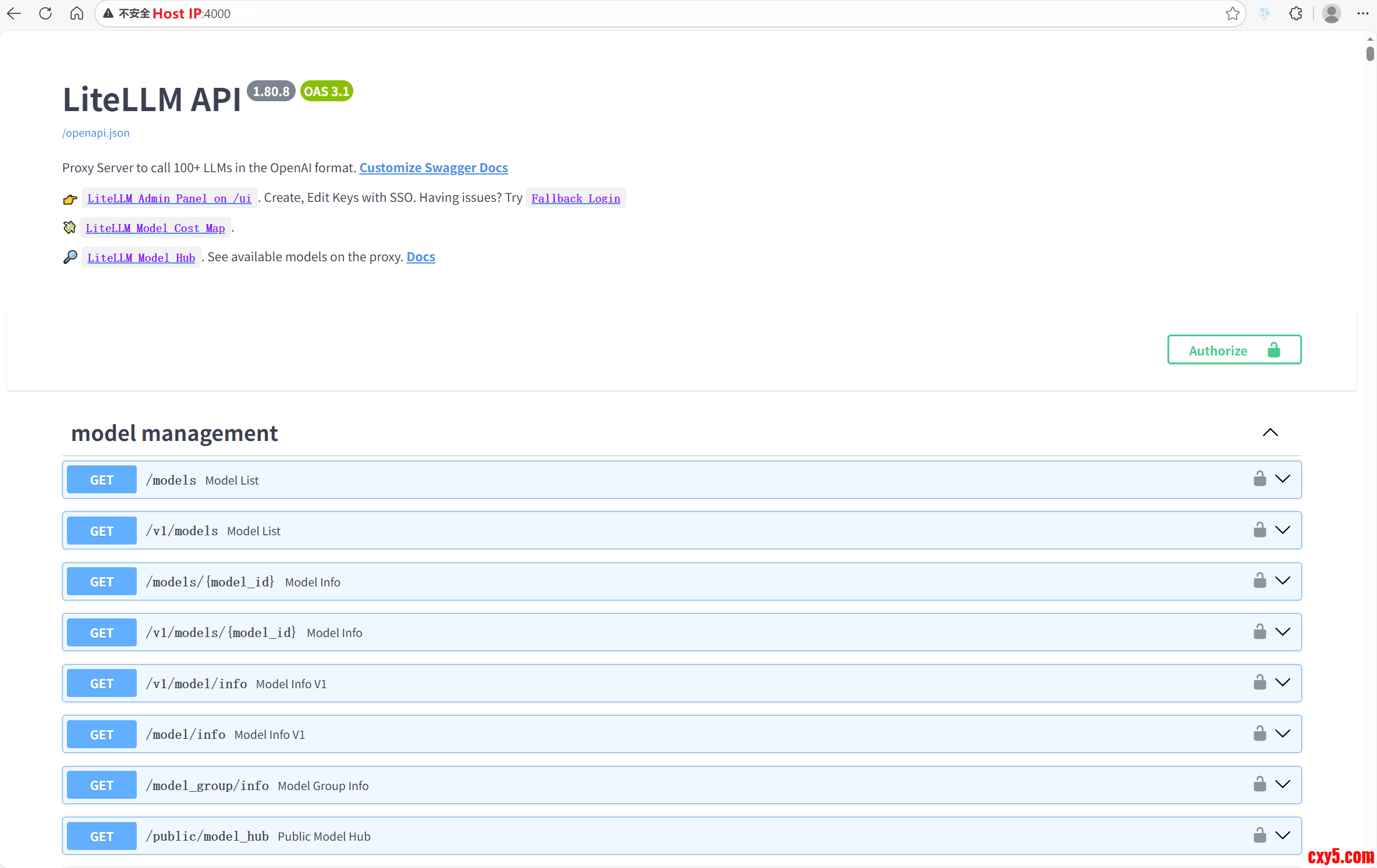
Litellm 前端效果

1.png


来源:程序园用户自行投稿发布,如果侵权,请联系站长删除
免责声明:如果侵犯了您的权益,请联系站长,我们会及时删除侵权内容,谢谢合作!

相关推荐

您需要登录后才可以回帖 登录 | 立即注册