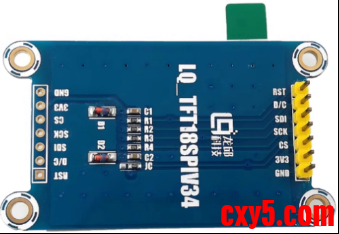
在《第21届智能汽车竞赛走马观碑软硬件设计》中我们介绍到我们的开发板使用了1.8寸TFT显示模块,显示模块使用的LCD驱动芯片为ST7735,屏幕分辨率为128*160,尺寸为1.8寸,屏幕显示接口采用SPI通信方式。
一、ST7735设备驱动
SPI驱动源码移植可参考:
- 《通信协议-SPI》;
- 《linux驱动移植-SPI总线设备驱动》;
- 《linux驱动移植-SPI控制器驱动》;
- 《linux驱动移植-SPI驱动移植(OLED SSD1306)》。
龙邱科技提供的驱动源码位于:TFT18_Driver。实际上我们下载的内核linux 6.12已经内置了ST7735的驱动,这里我们就直接使用内核驱动即可,驱动源码位于drivers/staging/fbtft/fb_st7735r.c。
1.1 ST7735驱动
1.1.1 fb_st7735r.c
drivers/staging/fbtft/fb_st7735r.c源码如下:
点击查看详情- // SPDX-License-Identifier: GPL-2.0+
- /*
- * FB driver for the ST7735R LCD Controller
- *
- * Copyright (C) 2013 Noralf Tronnes
- */
- #include <linux/module.h>
- #include <linux/kernel.h>
- #include <linux/init.h>
- #include <video/mipi_display.h>
- #include "fbtft.h"
- #define DRVNAME "fb_st7735r"
- #define DEFAULT_GAMMA "0F 1A 0F 18 2F 28 20 22 1F 1B 23 37 00 07 02 10\n" \
- "0F 1B 0F 17 33 2C 29 2E 30 30 39 3F 00 07 03 10"
- static const s16 default_init_sequence[] = {
- -1, MIPI_DCS_SOFT_RESET,
- -2, 150, /* delay */
- -1, MIPI_DCS_EXIT_SLEEP_MODE,
- -2, 500, /* delay */
- /* FRMCTR1 - frame rate control: normal mode
- * frame rate = fosc / (1 x 2 + 40) * (LINE + 2C + 2D)
- */
- -1, 0xB1, 0x01, 0x2C, 0x2D,
- /* FRMCTR2 - frame rate control: idle mode
- * frame rate = fosc / (1 x 2 + 40) * (LINE + 2C + 2D)
- */
- -1, 0xB2, 0x01, 0x2C, 0x2D,
- /* FRMCTR3 - frame rate control - partial mode
- * dot inversion mode, line inversion mode
- */
- -1, 0xB3, 0x01, 0x2C, 0x2D, 0x01, 0x2C, 0x2D,
- /* INVCTR - display inversion control
- * no inversion
- */
- -1, 0xB4, 0x07,
- /* PWCTR1 - Power Control
- * -4.6V, AUTO mode
- */
- -1, 0xC0, 0xA2, 0x02, 0x84,
- /* PWCTR2 - Power Control
- * VGH25 = 2.4C VGSEL = -10 VGH = 3 * AVDD
- */
- -1, 0xC1, 0xC5,
- /* PWCTR3 - Power Control
- * Opamp current small, Boost frequency
- */
- -1, 0xC2, 0x0A, 0x00,
- /* PWCTR4 - Power Control
- * BCLK/2, Opamp current small & Medium low
- */
- -1, 0xC3, 0x8A, 0x2A,
- /* PWCTR5 - Power Control */
- -1, 0xC4, 0x8A, 0xEE,
- /* VMCTR1 - Power Control */
- -1, 0xC5, 0x0E,
- -1, MIPI_DCS_EXIT_INVERT_MODE,
- -1, MIPI_DCS_SET_PIXEL_FORMAT, MIPI_DCS_PIXEL_FMT_16BIT,
- -1, MIPI_DCS_SET_DISPLAY_ON,
- -2, 100, /* delay */
- -1, MIPI_DCS_ENTER_NORMAL_MODE,
- -2, 10, /* delay */
- /* end marker */
- -3
- };
- static void set_addr_win(struct fbtft_par *par, int xs, int ys, int xe, int ye)
- {
- write_reg(par, MIPI_DCS_SET_COLUMN_ADDRESS,
- xs >> 8, xs & 0xFF, xe >> 8, xe & 0xFF);
- write_reg(par, MIPI_DCS_SET_PAGE_ADDRESS,
- ys >> 8, ys & 0xFF, ye >> 8, ye & 0xFF);
- write_reg(par, MIPI_DCS_WRITE_MEMORY_START);
- }
- #define MY BIT(7)
- #define MX BIT(6)
- #define MV BIT(5)
- static int set_var(struct fbtft_par *par)
- {
- /* MADCTL - Memory data access control
- * RGB/BGR:
- * 1. Mode selection pin SRGB
- * RGB H/W pin for color filter setting: 0=RGB, 1=BGR
- * 2. MADCTL RGB bit
- * RGB-BGR ORDER color filter panel: 0=RGB, 1=BGR
- */
- switch (par->info->var.rotate) {
- case 0:
- write_reg(par, MIPI_DCS_SET_ADDRESS_MODE,
- MX | MY | (par->bgr << 3));
- break;
- case 270:
- write_reg(par, MIPI_DCS_SET_ADDRESS_MODE,
- MY | MV | (par->bgr << 3));
- break;
- case 180:
- write_reg(par, MIPI_DCS_SET_ADDRESS_MODE,
- par->bgr << 3);
- break;
- case 90:
- write_reg(par, MIPI_DCS_SET_ADDRESS_MODE,
- MX | MV | (par->bgr << 3));
- break;
- }
- return 0;
- }
- /*
- * Gamma string format:
- * VRF0P VOS0P PK0P PK1P PK2P PK3P PK4P PK5P PK6P PK7P PK8P PK9P SELV0P SELV1P SELV62P SELV63P
- * VRF0N VOS0N PK0N PK1N PK2N PK3N PK4N PK5N PK6N PK7N PK8N PK9N SELV0N SELV1N SELV62N SELV63N
- */
- #define CURVE(num, idx) curves[(num) * par->gamma.num_values + (idx)]
- static int set_gamma(struct fbtft_par *par, u32 *curves)
- {
- int i, j;
- /* apply mask */
- for (i = 0; i < par->gamma.num_curves; i++)
- for (j = 0; j < par->gamma.num_values; j++)
- CURVE(i, j) &= 0x3f;
- for (i = 0; i < par->gamma.num_curves; i++)
- write_reg(par, 0xE0 + i,
- CURVE(i, 0), CURVE(i, 1),
- CURVE(i, 2), CURVE(i, 3),
- CURVE(i, 4), CURVE(i, 5),
- CURVE(i, 6), CURVE(i, 7),
- CURVE(i, 8), CURVE(i, 9),
- CURVE(i, 10), CURVE(i, 11),
- CURVE(i, 12), CURVE(i, 13),
- CURVE(i, 14), CURVE(i, 15));
- return 0;
- }
- #undef CURVE
- static struct fbtft_display display = {
- .regwidth = 8,
- .width = 128,
- .height = 160,
- .init_sequence = default_init_sequence,
- .gamma_num = 2,
- .gamma_len = 16,
- .gamma = DEFAULT_GAMMA,
- .fbtftops = {
- .set_addr_win = set_addr_win,
- .set_var = set_var,
- .set_gamma = set_gamma,
- },
- };
- FBTFT_REGISTER_DRIVER(DRVNAME, "sitronix,st7735r", &display);
- MODULE_ALIAS("spi:" DRVNAME);
- MODULE_ALIAS("platform:" DRVNAME);
- MODULE_ALIAS("spi:st7735r");
- MODULE_ALIAS("platform:st7735r");
- MODULE_DESCRIPTION("FB driver for the ST7735R LCD Controller");
- MODULE_AUTHOR("Noralf Tronnes");
- MODULE_LICENSE("GPL");
这里采用了FBTFT 框架,一个基于fbdev的辅助框架,位于drivers/staging/fbtft/,专门为小尺寸SPI/并口LCD控制器(如 ST7735、ILI9341、SSD1306等)设计;
维度Framebuffer (fbdev)FBTFT层次底层框架基于 fbdev 的中间件复杂度需要实现完整的 fb_ops只需配置结构体,框架代劳适用范围所有显示硬件小尺寸 SPI/并口 LCD 控制器输出产物驱动直接注册 /dev/fbX驱动通过 FBTFT 注册 /dev/fbX代码量较大极少(通常几百行)例子drivers/video/fbdev/ 下的各种驱动drivers/staging/fbtft/fb_st7735r.c以 fb_st7735r.c 驱动为例,它没有直接调用register_framebuffer,而是通过宏FBTFT_REGISTER_DRIVER将设备描述结构体传递给 FBTFT框架。FBTFT框架内部完成:
- 分配 fb_info 结构体;
- 填充 fb_ops(使用框架内的通用函数);
- 调用 register_framebuffer 向系统注册fbdev设备。
因此,用户空间看到的/dev/fb0仍然是一个标准的framebuffer设备,只不过背后的实现由FBTFT框架统一管理。
如果对framebuffer设备驱动框架图感兴趣可以参考:《linux驱动移植-LCD驱动基础》。
1.2 内核配置
进入内核配置界面:- zhengyang@ubuntu:/opt/2k0300/build-2k0300/workspace/linux-6.12$ cd ~
- zhengyang@ubuntu:~$ cd /opt/2k0300/build-2k0300/workspace/linux-6.12
- zhengyang@ubuntu:/opt/2k0300/build-2k0300/workspace/linux-6.12$ source ../set_env.sh && make menuconfig
- Device Drivers →
- [*] Staging drivers →
- [*] Support for small TFT LCD display modules →
- <*> FB driver for the ST7735R LCD Controller
- [*] SPI support →
- <*> Loongson SPI Controller Platform Driver Support
- CONFIG_FB_TFT_ST7735R=y
- CONFIG_SPI_LOONGSON_PLATFORM=y
1.3 新增设备节点
这里我们将显示模块接到spi1接口,因此需要适当调整设备树。
1.3.1 spi1
spi1节点定义在arch/loongarch/boot/dts/loongson-2k0300.dtsi:- spi1: spi@0x16018000 {
- compatible = "loongson,ls-spi";
- reg = <0 0x16018000 0 0x10>;
- #address-cells = <1>;
- #size-cells = <0>;
- interrupt-parent = <&liointc1>;
- interrupts = <13 IRQ_TYPE_LEVEL_HIGH>; // 45 - 32 = 13
- clock-frequency = <200000000>;
- pinctrl-0 = <&spi1_pins>;
- pinctrl-names = "default";
- status = "disabled";
- };
- spi1::标签,用于在设备树中其他地方通过&spi1引用这个节点,方便添加属性或修改状态;
- spi@0x16018000:节点名,格式为 设备名@寄存器基地址。这里spi是功能名,0x16108000是该SPI控制器的物理寄存器基地址。
- compatible:驱动匹配字符串。内核通过该属性寻找能驱动此设备的驱动程序;
- reg:寄存器地址范围。格式为 ,由于龙芯采用64位寻址,这里用两个32位数表示64位地址;
- #address-cells和#size-cells:定义该节点下子节点(即挂载的SPI从设备)的地址和长度格式。
- #address-cells = :子节点的 reg 属性中,地址部分占用1个32位单元;
- #size-cells = :子节点的 reg 属性中没有长度字段;
- interrupt-parent:指定该设备的中断路由到哪个中断控制器。&liointc0 是龙芯2K0300内部的中断控制器节点(即龙芯I/O中断控制器)的标签;
- interrupts:描述中断线的具体信息;
- :硬件中断编号(对应SPI1控制器在中断控制器中的编号);
- IRQ_TYPE_LEVEL_HIGH:中断触发类型,这里定义为高电平触发。该宏在 中定义。
- pinctrl-0:指定设备使用的第一组引脚配置,&spi1_pins 是另一个设备树节点的标签,该节点描述了SPI的MOSI和MISO引脚应复用为SPI功能,并可能包含上拉等电气属性;
- pinctrl-names:为引脚的配置状态命名,与 pinctrl-0 对应。"default" 是默认状态,驱动在probe时会自动应用 pinctrl-0 的配置,引脚配置设置为&spi1_pins;
- clock-frequency:SPI控制器的输入时钟频率(单位Hz);
- status:设备状态,此时处于禁用状态。
更多有关设备树相关的内容可以参考:《linux设备树-基础介绍》。
1.3.2 st7735r
修改arch/loongarch/boot/dts/ls2k300_99pi.dtsi:- &spi1 {
- status = "okay";
- cs-gpios = <&gpio 63 GPIO_ACTIVE_LOW>; // CS引脚,根据实际修改
- // 屏幕驱动
- st7735r@0{
- status = "okay";
- compatible = "sitronix,st7735r";
- reg = <0>;
- spi-max-frequency = <100000000>;
- fps = <60>;
- dc-gpios = <&gpio 48 GPIO_ACTIVE_HIGH>;
- reset-gpios = <&gpio 49 GPIO_ACTIVE_LOW>;
- rotate = <90>;
- buswidth = <8>;
- };
- };
其中st7735r@0设备节点下的compatible名称要和fb_st7735r.c驱动中的名称匹配。
1.3.3 spi1_pins
spi1_pins定义在arch/loongarch/boot/dts/loongson-2k0300.dtsi:- pinmux: pinmux@16000490 {
- ......
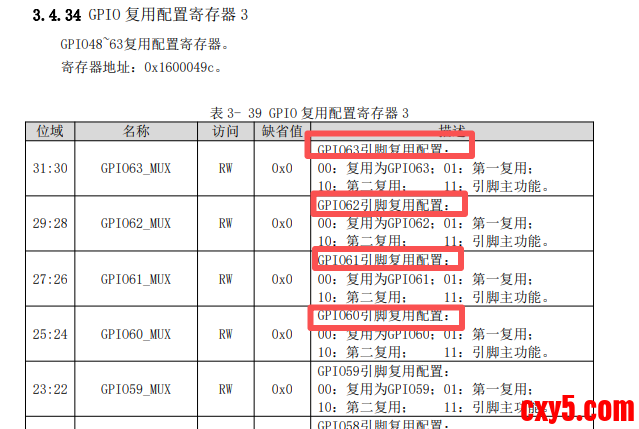
- spi1_pins: pinmux_G60_G63_as_spi1 {
- pinctrl-single,bits = <0xc 0xff000000 0xff000000>;
- };
- ......
- }
注:pinctrl-single 是一个通用的引脚控制驱动,适用于那些引脚复用寄存器是“单寄存器位域”的芯片。当SoC没有提供复杂的pinctrl框架时,可以直接用这种方式“裸写”寄存器。
二、应用程序
接下来我们在example目录下创建子目录st7735_app;- zhengyang@ubuntu:/opt/2k0300/loongson_2k300_lib/example$ mkdir st7735_app
- zhengyang@ubuntu:/opt/2k0300/loongson_2k300_lib/example/st7735_app$ tree .
- .
- ├── main.c
- └── Makefile
ST7735驱动注册为帧缓冲设备/dev/fb0。应用程序可以通过mmap将屏幕显存映射到用户空间,然后直接写入像素数据。
下面是一个完整的C程序,实现屏幕初始化、清屏、绘制像素、显示文字等基本功能,编译后可在帧缓冲设备(/dev/fb0)上运行;
点击查看详情- /*
- * 测试 ST7735 屏幕(通过 /dev/fb0)的简单图形和文字显示
- */
- #include <stdio.h>
- #include <stdlib.h>
- #include <unistd.h>
- #include <fcntl.h>
- #include <sys/ioctl.h>
- #include <sys/mman.h>
- #include <linux/fb.h>
- #include <string.h>
- static int fb_fd;
- static struct fb_var_screeninfo vinfo;
- static struct fb_fix_screeninfo finfo;
- static uint16_t *fb_mem = NULL;
- static size_t fb_size;
- static int fb_width, fb_height;
- // 颜色宏:RGB565 格式
- #define RGB565(r,g,b) ((((r)>>3)<<11) | (((g)>>2)<<5) | ((b)>>3))
- #define COLOR_RED RGB565(255,0,0)
- #define COLOR_GREEN RGB565(0,255,0)
- #define COLOR_BLUE RGB565(0,0,255)
- #define COLOR_WHITE RGB565(255,255,255)
- #define COLOR_BLACK 0x0000
- // 初始化帧缓冲设备
- int fb_init(void) {
- fb_fd = open("/dev/fb0", O_RDWR);
- if (fb_fd < 0) {
- perror("open /dev/fb0");
- return -1;
- }
- if (ioctl(fb_fd, FBIOGET_VSCREENINFO, &vinfo) < 0) {
- perror("ioctl FBIOGET_VSCREENINFO");
- close(fb_fd);
- return -1;
- }
- if (ioctl(fb_fd, FBIOGET_FSCREENINFO, &finfo) < 0) {
- perror("ioctl FBIOGET_FSCREENINFO");
- close(fb_fd);
- return -1;
- }
- fb_width = vinfo.xres;
- fb_height = vinfo.yres;
- fb_size = fb_width * fb_height * vinfo.bits_per_pixel / 8;
- printf("FB: %dx%d, %d bpp, line_len=%d\n", fb_width, fb_height, vinfo.bits_per_pixel, finfo.line_length);
- fb_mem = mmap(0, fb_size, PROT_READ | PROT_WRITE, MAP_SHARED, fb_fd, 0);
- if (fb_mem == MAP_FAILED) {
- perror("mmap");
- close(fb_fd);
- return -1;
- }
- return 0;
- }
- // 关闭帧缓冲设备
- void fb_deinit(void) {
- if (fb_mem) munmap(fb_mem, fb_size);
- if (fb_fd >= 0) close(fb_fd);
- }
- // 绘制像素(x, y)坐标,颜色 color(RGB565)
- void fb_draw_pixel(int x, int y, uint16_t color) {
- if (x >= 0 && x < fb_width && y >= 0 && y < fb_height)
- fb_mem[y * fb_width + x] = color;
- }
- // 清屏为指定颜色
- void fb_clear(uint16_t color) {
- for (int i = 0; i < fb_width * fb_height; i++)
- fb_mem[i] = color;
- }
- // 绘制矩形(填充)
- void fb_fill_rect(int x, int y, int w, int h, uint16_t color) {
- int x1 = (x < 0) ? 0 : x;
- int y1 = (y < 0) ? 0 : y;
- int x2 = (x + w > fb_width) ? fb_width : x + w;
- int y2 = (y + h > fb_height) ? fb_height : y + h;
- for (int i = y1; i < y2; i++)
- for (int j = x1; j < x2; j++)
- fb_mem[i * fb_width + j] = color;
- }
- // 绘制空心矩形框
- void fb_draw_rect(int x, int y, int w, int h, uint16_t color) {
- fb_fill_rect(x, y, w, 1, color); // 上边
- fb_fill_rect(x, y + h - 1, w, 1, color); // 下边
- fb_fill_rect(x, y, 1, h, color); // 左边
- fb_fill_rect(x + w - 1, y, 1, h, color); // 右边
- }
- // 简易 8x8 字符点阵(仅 ASCII 可打印字符部分示例,这里只提供数字和部分字母)
- static uint8_t font_8x8[95][8] = {0}; // 实际上需要完整字库,这里简化,只实现常用字母数字
- // 预置一些常用字符(仅示例,实际需完整)
- static uint8_t char_A[8] = {0x00, 0x18, 0x24, 0x42, 0x7E, 0x42, 0x42, 0x00};
- static uint8_t char_B[8] = {0x7C, 0x42, 0x7C, 0x42, 0x42, 0x7C, 0x00, 0x00};
- static uint8_t char_C[8] = {0x3C, 0x42, 0x40, 0x40, 0x40, 0x3C, 0x00, 0x00};
- static uint8_t char_D[8] = {0x78, 0x44, 0x42, 0x42, 0x44, 0x78, 0x00, 0x00};
- static uint8_t char_E[8] = {0x7E, 0x40, 0x7C, 0x40, 0x40, 0x7E, 0x00, 0x00};
- static uint8_t char_F[8] = {0x7E, 0x40, 0x7C, 0x40, 0x40, 0x40, 0x00, 0x00};
- static uint8_t char_G[8] = {0x3C, 0x42, 0x40, 0x4E, 0x42, 0x3C, 0x00, 0x00};
- static uint8_t char_H[8] = {0x42, 0x42, 0x7E, 0x42, 0x42, 0x42, 0x00, 0x00};
- static uint8_t char_I[8] = {0x3E, 0x08, 0x08, 0x08, 0x08, 0x3E, 0x00, 0x00};
- static uint8_t char_J[8] = {0x1F, 0x04, 0x04, 0x04, 0x44, 0x38, 0x00, 0x00};
- static uint8_t char_K[8] = {0x42, 0x44, 0x48, 0x70, 0x48, 0x44, 0x42, 0x00};
- static uint8_t char_L[8] = {0x40, 0x40, 0x40, 0x40, 0x40, 0x7E, 0x00, 0x00};
- static uint8_t char_M[8] = {0x42, 0x66, 0x5A, 0x42, 0x42, 0x42, 0x00, 0x00};
- static uint8_t char_N[8] = {0x42, 0x62, 0x52, 0x4A, 0x46, 0x42, 0x00, 0x00};
- static uint8_t char_O[8] = {0x3C, 0x42, 0x42, 0x42, 0x42, 0x3C, 0x00, 0x00};
- static uint8_t char_P[8] = {0x7C, 0x42, 0x42, 0x7C, 0x40, 0x40, 0x00, 0x00};
- static uint8_t char_Q[8] = {0x3C, 0x42, 0x42, 0x52, 0x4C, 0x32, 0x00, 0x00};
- static uint8_t char_R[8] = {0x7C, 0x42, 0x42, 0x7C, 0x44, 0x42, 0x00, 0x00};
- static uint8_t char_S[8] = {0x3C, 0x42, 0x20, 0x1C, 0x02, 0x7C, 0x00, 0x00};
- static uint8_t char_T[8] = {0x7E, 0x08, 0x08, 0x08, 0x08, 0x08, 0x00, 0x00};
- static uint8_t char_U[8] = {0x42, 0x42, 0x42, 0x42, 0x42, 0x3C, 0x00, 0x00};
- static uint8_t char_V[8] = {0x42, 0x42, 0x42, 0x24, 0x24, 0x18, 0x00, 0x00};
- static uint8_t char_W[8] = {0x42, 0x42, 0x42, 0x5A, 0x66, 0x42, 0x00, 0x00};
- static uint8_t char_X[8] = {0x42, 0x24, 0x18, 0x18, 0x24, 0x42, 0x00, 0x00};
- static uint8_t char_Y[8] = {0x42, 0x24, 0x18, 0x08, 0x08, 0x08, 0x00, 0x00};
- static uint8_t char_Z[8] = {0x7E, 0x02, 0x04, 0x08, 0x10, 0x7E, 0x00, 0x00};
- static uint8_t char_0[8] = {0x3C, 0x42, 0x46, 0x4A, 0x52, 0x62, 0x3C, 0x00};
- static uint8_t char_1[8] = {0x08, 0x18, 0x08, 0x08, 0x08, 0x08, 0x1C, 0x00};
- static uint8_t char_2[8] = {0x3C, 0x42, 0x02, 0x0C, 0x30, 0x40, 0x7E, 0x00};
- static uint8_t char_3[8] = {0x3C, 0x42, 0x02, 0x1C, 0x02, 0x42, 0x3C, 0x00};
- static uint8_t char_4[8] = {0x08, 0x18, 0x28, 0x48, 0x7E, 0x08, 0x08, 0x00};
- static uint8_t char_5[8] = {0x7E, 0x40, 0x7C, 0x02, 0x02, 0x42, 0x3C, 0x00};
- static uint8_t char_6[8] = {0x3C, 0x40, 0x7C, 0x42, 0x42, 0x42, 0x3C, 0x00};
- static uint8_t char_7[8] = {0x7E, 0x02, 0x04, 0x08, 0x10, 0x10, 0x10, 0x00};
- static uint8_t char_8[8] = {0x3C, 0x42, 0x42, 0x3C, 0x42, 0x42, 0x3C, 0x00};
- static uint8_t char_9[8] = {0x3C, 0x42, 0x42, 0x3E, 0x02, 0x42, 0x3C, 0x00};
- void fb_draw_char(int x, int y, char ch, uint16_t fg, uint16_t bg) {
- uint8_t *glyph = NULL;
- if (ch >= 'A' && ch <= 'Z') {
- switch(ch) {
- case 'A': glyph = char_A; break;
- case 'B': glyph = char_B; break;
- case 'C': glyph = char_C; break;
- case 'D': glyph = char_D; break;
- case 'E': glyph = char_E; break;
- case 'F': glyph = char_F; break;
- case 'G': glyph = char_G; break;
- case 'H': glyph = char_H; break;
- case 'I': glyph = char_I; break;
- case 'J': glyph = char_J; break;
- case 'K': glyph = char_K; break;
- case 'L': glyph = char_L; break;
- case 'M': glyph = char_M; break;
- case 'N': glyph = char_N; break;
- case 'O': glyph = char_O; break;
- case 'P': glyph = char_P; break;
- case 'Q': glyph = char_Q; break;
- case 'R': glyph = char_R; break;
- case 'S': glyph = char_S; break;
- case 'T': glyph = char_T; break;
- case 'U': glyph = char_U; break;
- case 'V': glyph = char_V; break;
- case 'W': glyph = char_W; break;
- case 'X': glyph = char_X; break;
- case 'Y': glyph = char_Y; break;
- case 'Z': glyph = char_Z; break;
- }
- } else if (ch >= '0' && ch <= '9') {
- switch(ch) {
- case '0': glyph = char_0; break;
- case '1': glyph = char_1; break;
- case '2': glyph = char_2; break;
- case '3': glyph = char_3; break;
- case '4': glyph = char_4; break;
- case '5': glyph = char_5; break;
- case '6': glyph = char_6; break;
- case '7': glyph = char_7; break;
- case '8': glyph = char_8; break;
- case '9': glyph = char_9; break;
- }
- } else {
- // 其他字符(空格等)不绘制
- return;
- }
- if (!glyph) return;
- for (int row = 0; row < 8; row++) {
- uint8_t line = glyph[row];
- for (int col = 0; col < 8; col++) {
- if (line & (0x80 >> col)) {
- fb_draw_pixel(x + col, y + row, fg);
- } else {
- fb_draw_pixel(x + col, y + row, bg);
- }
- }
- }
- }
- void fb_draw_string(int x, int y, const char *str, uint16_t fg, uint16_t bg) {
- int cx = x;
- int cy = y;
- for (int i = 0; str[i]; i++) {
- if (str[i] == '\n') {
- cx = x;
- cy += 9; // 8像素高度+1行间距
- continue;
- }
- fb_draw_char(cx, cy, str[i], fg, bg);
- cx += 9; // 8像素宽度+1间距
- if (cx + 8 > fb_width) {
- cx = x;
- cy += 9;
- }
- }
- }
- // 简单测试:显示一些图形和文字
- void test_display(void) {
- fb_clear(COLOR_BLACK);
- // 画红色填充矩形
- fb_fill_rect(10, 10, 100, 50, COLOR_RED);
- // 画蓝色边框
- fb_draw_rect(120, 10, 100, 50, COLOR_BLUE);
- // 显示文字
- fb_draw_string(10, 80, "Hello", COLOR_WHITE, COLOR_BLACK);
- fb_draw_string(10, 95, "ST7735", COLOR_GREEN, COLOR_BLACK);
- fb_draw_string(10, 110, "LCD", COLOR_BLUE, COLOR_BLACK);
- // 显示数字和字母混合
- fb_draw_string(10, 130, "A1B2C3", COLOR_RED, COLOR_BLACK);
- }
- int main(void) {
- if (fb_init() != 0) {
- fprintf(stderr, "Failed to init framebuffer\n");
- return 1;
- }
- test_display();
- // 保持显示10秒后退出(或按任意键)
- printf("Display test. Press Enter to exit...\n");
- getchar();
- fb_deinit();
- return 0;
- }
- all:
- loongarch64-linux-gnu-gcc -o main main.c
- clean:
- rm -rf *.o main
- zhengyang@ubuntu:/opt/2k0300/loongson_2k300_lib/example/st7735_app$ make
- loongarch64-linux-gnu-gcc -o main main.c
- zhengyang@ubuntu:/opt/2k0300/loongson_2k300_lib/example/st7735_app$ ll
- -rwxrwxr-x 1 zhengyang zhengyang 20680 3月 24 14:26 main*
- -rw-rw-r-- 1 zhengyang zhengyang 1070 3月 24 14:23 main.c
- -rw-rw-r-- 1 zhengyang zhengyang 71 3月 24 14:24 Makefile
3.1 硬件接线
显示模块与龙芯2K0300开发板正确连接,接线如下:
屏幕引脚功能建议连接的龙芯GPIO说明VCC电源3.3V屏幕电源GND地GNDD0SCLKSPI1_SCLK (GPIO60)SPI总线时钟D1MOSISPI1_MOSI(GPIO62)SPI主机输出从机输入DC命令/数据选择GPIO48用于区分命令和数据RST复位GPIO49屏幕复位引脚CS片选SPI1_CSn(GPIO63)SPI片选信号3.2 烧录设备树
有关设备树的编译和烧录分别参考:
3.3 安装驱动
由于我们在内核配置环节将驱动配置到内核中了,因此需要重新编译内核并烧录内核。
3.3.1 编译内核
ubuntu宿主接重新编译内核:- zhengyang@ubuntu:/opt/2k0300/build-2k0300/workspace/linux-6.12$ source ../set_env.sh && make uImage -j$(nproc)
久久派烧录内核:- root@buildroot:~$ scp zhengyang@172.23.34.186:/opt/2k0300/build-2k0300/workspace/linux-6.12/arch/loongarch/boot/uImage /boot/
- root@buildroot:~$ reboot
- root@buildroot:~$ ls /dev/fb0
久久派开发板执行如下命令:- root@buildroot:~$ scp zhengyang@172.23.34.186:/opt/2k0300/loongson_2k300_lib/example/st7735_app/main ./
- root@buildroot:~$ ./main
[1] Linux内核分析——基于LoongArch架构(Linux-6.0).pdf
[2] 第一卷-pmon软件使用手册.pdf
[3] 第二卷-pinctrl与dts开发手册.pdf
[4] 第三卷-2k300内核开发手册.pdf
[5] 第四卷-文件系统开发手册.pdf
[6] 第五卷-qt相关解决方案.pdf
[7] LS2K0300久久派_V1.1板卡使用手册v1.2_20240705.pdf
[8] 龙芯2K300_301软件开源库
[9] 21届智能车走马观碑开源仓库
来源:程序园用户自行投稿发布,如果侵权,请联系站长删除
免责声明:如果侵犯了您的权益,请联系站长,我们会及时删除侵权内容,谢谢合作! |


 提升卡
提升卡 置顶卡
置顶卡 沉默卡
沉默卡 喧嚣卡
喧嚣卡 变色卡
变色卡 千斤顶
千斤顶 照妖镜
照妖镜


