今天,我们要触及 Agent 最核心的能力之一:记忆(Memory)。
很多 Agent 框架会使用向量数据库(Vector DB)来实现长期记忆,但 nanobot 走了一条完全不同的路:纯 Markdown 驱动。这种设计不仅极致轻量,而且对人类极其友好——你可以直接打开文件,像修改文档一样“修剪”AI 的记忆。
1. 记忆的两层架构:事实与日志
nanobot 的记忆系统(nanobot/agent/memory.py)采用了精妙的两层架构,分别对应不同的存储需求:
第一层:MEMORY.md(长期事实)
这是 Agent 的“知识库”。它存储的是经过提炼的、持久的事实。例如:
- “用户的名字是肥肥旭。”
- “用户更喜欢使用 Python 进行开发。”
- “项目 A 的部署地址是 xxx。”
第二层:HISTORY.md(搜索日志)
这是 Agent 的“流水账”。它存储的是过去对话的简要总结,按时间顺序排列。它的作用是提供上下文线索,方便通过简单的 grep 搜索来找回细节。
2. nanobog记忆逻辑
1. 主动触发(基于模型判断)
当模型认为当前对话中出现了需要长期记忆的信息时,它会主动读取 MEMORY.md 文件,并使用 edit_file 工具进行更新。
- 执行流程示例(以用户输入“我喜欢王楚然”为例):
- 第一步:模型判断需要了解当前记忆,调用 read_file 读取 MEMORY.md。
- 第二步:模型判断需要更新记忆,调用 edit_file 将“Likes Wang Churan (王楚然)”写入文件。
- 第三步:模型回复用户确认信息。
- MEMORY.md文件变更对比:
- BEFORE:
- ## Preferences
- (User preferences learned over time)
- AFTER:
- ## Preferences
- - Likes Wang Churan (王楚然)
- (User preferences learned over time)
2. 条件触发(系统自动维护)
核心机制:记忆固化(Consolidation),下面两种情况会触发记忆固化逻辑:
- 基于消息阈值:
在 nanobot/agent/loop.py 的 _process_message 方法中,系统会实时计算当前会话中“未固化的消息数量”:
unconsolidated = len(session.messages) - session.last_consolidated
当这个数量达到或超过设定的阈值(memory_window,默认为 100)时,且当前没有正在进行的固化任务,系统就会自动启动异步固化流程。
- 手动执行 /new 命令:
当你输入 /new 命令开启新会话时,系统会强制对当前会话中尚未固化的所有消息进行一次“归档式”固化,确保旧会话的上下文被妥善保存到 MEMORY.md 和 HISTORY.md 中,然后再清空当前会话。
固化流程:AI 的自我总结,我以/new命令来看一下具体的固化逻辑
固化的核心逻辑在nanobot/agent/memory.py中的consolidate方法,这是一个非常“元”的过程:nanobot 会启动一个专门的记忆固化 Agent,并给它下达指令:
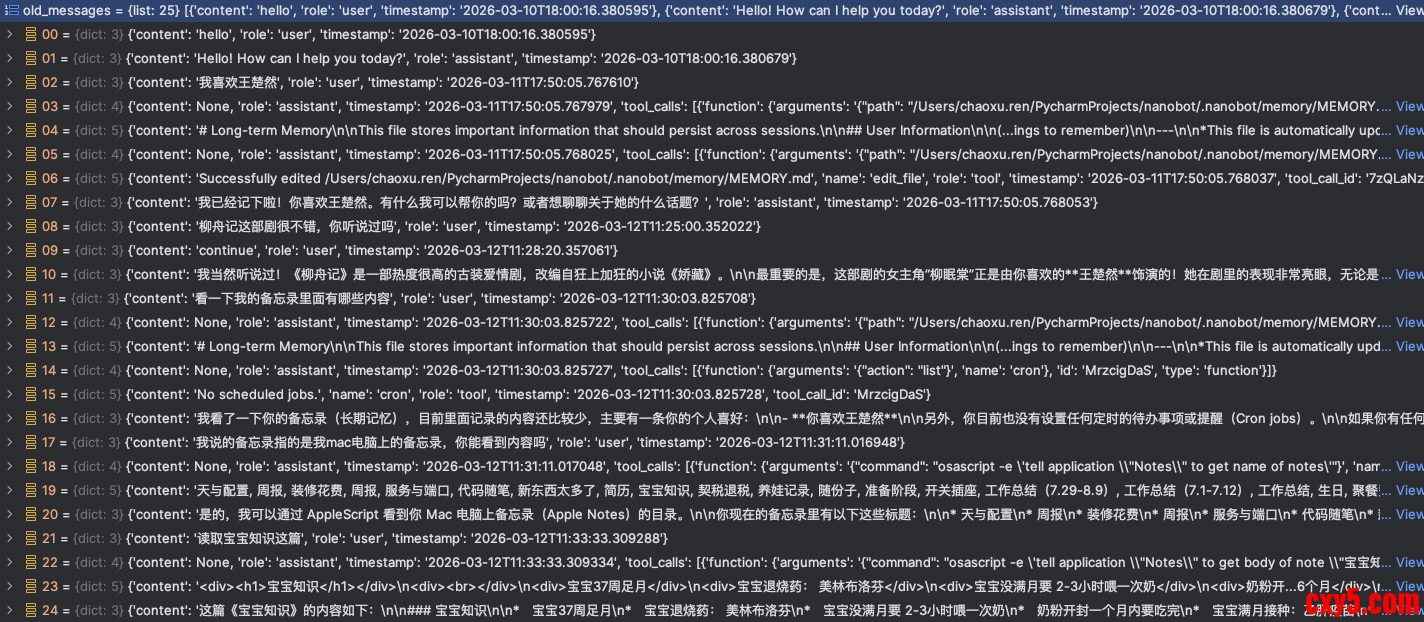
- 读取历史消息:取出即将被移出窗口的旧对话。会从workspace/sessions中读取session_name.jsonl历史对话,我这里总共是25条。
- 读取当前记忆:加载现有的 MEMORY.md 内容。
- 系统提示词和记忆固话提示词
- You are a memory consolidation agent. Call the save_memory tool with your consolidation of the conversation.
- 记忆固话提示词(user_prompt):
这块内容比较长,这里只展示关键部分,将步骤1、步骤2中的内容结合起来,形成一个完整的提示词。
- Process this conversation and call the save_memory tool with your consolidation.
- ## Current Long-term Memory
- # Long-term Memory
- This file stores important information that should persist across sessions.
- ## User Information
- (Important facts about the user)
- ## Preferences
- - Likes Wang Churan (王楚然)
- (User preferences learned over time)
- ## Project Context
- (Information about ongoing projects)
- ## Important Notes
- (Things to remember)
- ---
- *This file is automatically updated by nanobot when important information should be remembered.*
- ## Conversation to Process
- [2026-03-10T18:00] USER: hello
- [2026-03-10T18:00] ASSISTANT: Hello! How can I help you today?
- [2026-03-11T17:50] USER: 我喜欢王楚然
- [2026-03-11T17:50] TOOL: # Long-term Memory
- This file stores important information that should persist across sessions.
- ...
- ...
- user_prompt中明确指明调用 save_memory 工具:
- history_entry:要求 AI 将这段旧对话总结成 2-5 句话,存入 HISTORY.md。
- memory_update:要求 AI 根据新对话更新 MEMORY.md。如果发现了新事实,就添加进去;如果旧事实有误,就修正它。
- # nanobot/agent/memory.py 中的工具定义
- _SAVE_MEMORY_TOOL = [
- {
- "type": "function",
- "function": {
- "name": "save_memory",
- "description": "Save the memory consolidation result to persistent storage.",
- "parameters": {
- "type": "object",
- "properties": {
- "history_entry": {
- "type": "string",
- "description": "A paragraph (2-5 sentences) summarizing key events/decisions/topics. "
- "Start with [YYYY-MM-DD HH:MM]. Include detail useful for grep search.",
- },
- "memory_update": {
- "type": "string",
- "description": "Full updated long-term memory as markdown. Include all existing "
- "facts plus new ones. Return unchanged if nothing new.",
- },
- },
- "required": ["history_entry", "memory_update"],
- },
- },
- }
- ]
- 调用大模型,传入messages和tools:
- 获取大模型的回复:
- 解析大模型工具调用结果:
- history_entry: 追加写入 workspace/memory/HISTORY.md
- BEFORE:
- 【空】
- AFTER:
- [2026-03-12 11:33] User discussed the drama "Liu Zhou Ji" starring Wang Churan. User then requested to read their Mac Apple Notes. The assistant accessed the notes list and read the "宝宝知识" (Baby Knowledge) note, which contains detailed information on newborn care and postpartum care for the user's wife.
- memory_update: 更新 workspace/memory/MEMORY.md
- BEFORE:
- xxx
- ## Preferences
- - Likes Wang Churan (王楚然)
- (User preferences learned over time)
- xxx
- AFTER:
- xxx
- ## Preferences
- - Likes the actress Wang Churan (王楚然).
- - Enjoyed the drama "Liu Zhou Ji" (柳舟记).
- xxx
- 结束:
- 历史消息清除:旧对话从 workspace/sessions 中移除,释放空间。
- 返回给用户结果:“New session started.”
⚠️ 这里调用大模型的时候虽然传入了tool,但是并没有后续的tool执行步骤。只是利用了tool的特性,让大模型生成工具调用的参数。本质上通过调整提示词让大模型输出json格式一样能满足要求。
来源:程序园用户自行投稿发布,如果侵权,请联系站长删除
免责声明:如果侵犯了您的权益,请联系站长,我们会及时删除侵权内容,谢谢合作! |








 提升卡
提升卡 置顶卡
置顶卡 沉默卡
沉默卡 喧嚣卡
喧嚣卡 变色卡
变色卡 千斤顶
千斤顶 照妖镜
照妖镜


