背景:
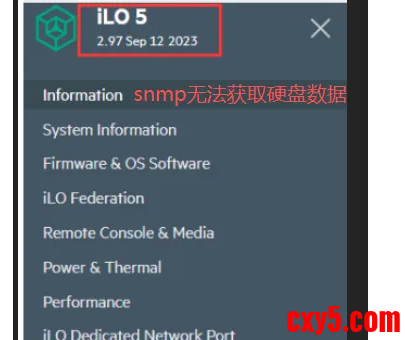
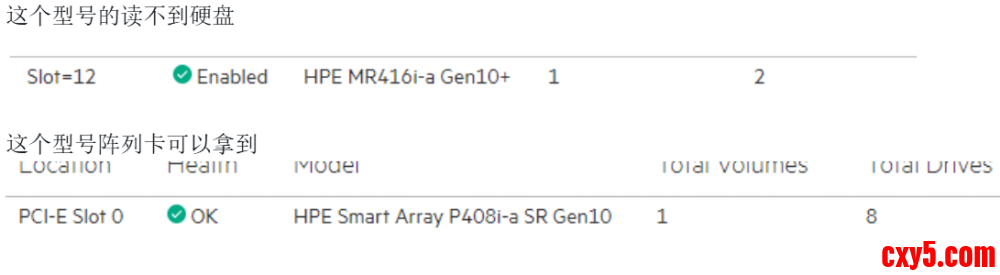
服务器硬盘故障率比较高,希望通过zabbix监控服务器硬盘状态,公司有不同ILO版本HP服务器。ILO低版本的服务器可以通过snmp获取到硬盘状态信息而ILO高版本服务器因为是高版本阵列卡,不支持snmp读取硬盘数据。
服务器型号:
HP ProLiant DL380 Gen Plus
解决:
snmp+redfish方式对服务器进行监控,redfish获取硬盘信息
Redfish
Redfish 是 DMTF 制定的现代服务器硬件管理标准,基于 RESTful API + JSON + HTTPS,核心是安全、易读、可扩展、跨厂商统一,用于替代传统 IPMI。
1. 核心资源类型(常用路径)
资源类型
| 路径示例
| 管理内容
| Service Root
| /redfish/v1
| 服务入口、版本、能力发现DMTF
| Systems(服务器)
| /redfish/v1/Systems/1
| CPU、内存、硬盘、网卡、电源状态、引导、KVM
| Chassis(机箱)
| /redfish/v1/Chassis/1
| 电源、风扇、温度、传感器、物理状态
| Managers(BMC)
| /redfish/v1/Managers/1
| BMC 配置、网络、日志、固件、会话
| UpdateService
| /redfish/v1/UpdateService
| 固件上传、升级任务、进度查询
| AccountService
| /redfish/v1/AccountService
| 用户、角色、权限、认证
| SessionService
| /redfish/v1/SessionService
| 会话创建 / 销毁、Token 管理
| LogServices
| /redfish/v1/Systems/1/LogServices
| 会话创建 / 销毁、Token 管理
|
由于产生官方Ipmi和redfish没有详细文档,我们在服务器web管理界面使用F12查看接口请求信息。
以下是具体获取数据脚本
#!/itops/python3/bin/python3
# -*- coding: UTF-8 -*-
###########################
#make: kk
###########################
import requests
import json
import inspect
import urllib3
import argparse
from os import popen
from requests.auth import HTTPBasicAuth
#忽略证书验证警告
urllib3.disable_warnings(urllib3.exceptions.InsecureRequestWarning)
# Redfish API endpoint URL
class HPE(object):
def volumeName(self):
token= self.getToken()
headers= {
'Content-Type': 'application/json',
'X-Auth-Token': '{0}'.format(token)
}
url='https://{hostIp}/redfish/v1/Systems/1/Storage/DE009000'.format(hostIp=self.hostIp)
response = requests.get(url, headers=headers,verify=False)
driversName=response.json()['Drives']
diskName=[]
for i in driversName:
urlDriver='https://{hostIp}{url}'.format(hostIp=self.hostIp,url=i['@odata.id'])
response = requests.get(urlDriver, headers=headers,verify=False)
#print(response.json()['Status']['State'])
#print(response.json()['PhysicalLocation']['PartLocation']['ServiceLabel'])
diskName.append({"{#NAME}": response.json()['PhysicalLocation']['PartLocation']['ServiceLabel']})
print(json.dumps({'data': diskName}))
def volumeStatus(self):
token= self.getToken()
headers= {
'Content-Type': 'application/json',
'X-Auth-Token': '{0}'.format(token)
}
url='https://{hostIp}/redfish/v1/Systems/1/Storage/DE009000'.format(hostIp=self.hostIp)
response = requests.get(url, headers=headers,verify=False)
driversName=response.json()['Drives']
diskStatus={}
for i in driversName:
urlDriver='https://{hostIp}{url}'.format(hostIp=self.hostIp,url=i['@odata.id'])
response = requests.get(urlDriver, headers=headers,verify=False)
volumeName = "volumeStatus[{0}]".format(response.json()['PhysicalLocation']['PartLocation']['ServiceLabel'])
volumeStatus = response.json()['Status']['State']
serialKey = "serialNumber[{0}]".format(response.json()['PhysicalLocation']['PartLocation']['ServiceLabel'])
serialNumber = response.json()['SerialNumber']
mediaKey = "mediaType[{0}]".format(response.json()['PhysicalLocation']['PartLocation']['ServiceLabel'])
mediaType = response.json()['MediaType']
capacityKey = "capacityBytes[{0}]".format(response.json()['PhysicalLocation']['PartLocation']['ServiceLabel'])
capacityBytes = response.json()['CapacityBytes']
modelKey = "model[{0}]".format(response.json()['PhysicalLocation']['PartLocation']['ServiceLabel'])
model = response.json()['Model']
revisionKey = "revision[{0}]".format(response.json()['PhysicalLocation']['PartLocation']['ServiceLabel'])
revision = response.json()['Revision']
nameKey = "name[{0}]".format(response.json()['PhysicalLocation']['PartLocation']['ServiceLabel'])
name = response.json()['Name']
self.Sender(volumeName,volumeStatus)
self.Sender(serialKey,serialNumber)
self.Sender(mediaKey,mediaType)
self.Sender(capacityKey,capacityBytes)
self.Sender(modelKey,model)
self.Sender(revisionKey,revision)
self.Sender(nameKey,name)
#['SerialNumber']
#['MediaType']
#['CapacityBytes']
#['Model']
#['Revision']
#['Name']
#print(response.json()['Status']['State'])
#print(response.json()['PhysicalLocation']['PartLocation']['ServiceLabel'])
print('ok')
class Main(HPE):
def __init__(self):
parser = argparse.ArgumentParser()
parser.add_argument('--host')
parser.add_argument('--user')
parser.add_argument('--password')
parser.add_argument('--hostname',required=False)
subparsers = parser.add_subparsers()
#self.sender = "/itops/zabbix/bin/zabbix_sender"
#self.server = '127.0.0.1'
for name in dir(self):
if not name.startswith("_"):
p = subparsers.add_parser(name)
method = getattr(self, name)
argnames = inspect.getargspec(method).args[1:]
for argname in argnames:
p.add_argument(argname)
p.set_defaults(func=method, argnames=argnames)
self.args = parser.parse_args()
self.hostIp = self.args.host #服务器web管理界面IP地址
self.username = self.args.user #服务器web管理界面账号
self.password = self.args.password #服务器web管理界面密码
self.hostname = self.args.hostname #zabbix上面服务器主机名称
self.sender = "/itops/zabbix/bin/zabbix_sender"
self.server = '127.0.0.1'
def __call__(self):
try:
a = self.args
callargs = [getattr(a, name) for name in a.argnames]
return self.args.func(*callargs)
except Exception as err:
print('0')
print(str(err))
# Redfish API credentials
def Sender(self,key,value):
popen('%s -z %s -s %s -k %s -o %s > /dev/null ' % (self.sender,self.server,self.hostname,key,value))
#print('%s -z %s -s %s -k volumeStatus[%s] -o %s > /dev/null ' % (self.sender,self.server,self.hostname,key,value))
def getToken(self):
# 请求头部信息
url = 'https://{hostIp}/redfish/v1/Sessions/'.format(hostIp=self.hostIp)
headers = {
'Content-Type': 'application/json'
}
data = {" assword":self.password,"UserName":self.username} assword":self.password,"UserName":self.username}
# 发送GET请求获取Redfish API信息
response = requests.post(url, headers=headers, data=json.dumps(data), verify=False) # 如果不是自签名证书,可以去掉verify参数
if response.status_code == 201:
token=response.headers['X-Auth-Token']
#print(token)
return token
else:
print('Failed to retrieve data from Redfish API. Status code:', response.status_code)
if __name__ == "__main__":
main = Main()
main()
python3 /itops/zabbix/scripts/hpe.py --host {#服务器IP地址} --user {#账号} --password {#密码}
zabbix取值结果:
来源:程序园用户自行投稿发布,如果侵权,请联系站长删除
免责声明:如果侵犯了您的权益,请联系站长,我们会及时删除侵权内容,谢谢合作! |




 提升卡
提升卡 置顶卡
置顶卡 沉默卡
沉默卡 喧嚣卡
喧嚣卡 变色卡
变色卡 千斤顶
千斤顶 照妖镜
照妖镜


