Ansible是什么?
Ansible官网:https://www.ansible.com/
Ansible 是一款开源的自动化运维工具,由 RedHat 公司开发维护,核心目标是实现:
- 批量服务器操作(命令执行、软件安装、配置修改)
- 应用部署与生命周期管理
- 配置自动化(替代手动修改配置文件)
- 任务编排(按顺序执行复杂的运维流程)
它最大的特点是无客户端(Agentless) —— 不需要在被管理的服务器上安装任何代理程序,仅通过 SSH 协议(默认)或 WinRM(Windows 主机)与目标机器通信,部署和使用门槛极低。
Ansible 核心特性
- 无代理架构:仅需控制节点(安装 Ansible 的机器)能 SSH 连接被管理节点,无需在目标机装软件,降低维护成本;
- 模块化设计:内置上千个模块(如 yum/apt 安装软件、copy 传输文件、service 管理服务),覆盖绝大多数运维场景;
- 声明式语法:用 YAML 编写 Playbook(剧本),只需描述 “最终要达到什么状态”,无需写 “如何达到这个状态”,Ansible 会自动处理执行逻辑;
- 幂等性:多次执行同一个操作,结果始终一致(比如 “确保 nginx 服务启动”,无论执行多少次,最终都是启动状态);
- 跨平台:支持管理 Linux、Windows、网络设备(华为 / 思科 / 华三)、云平台(AWS / 阿里云 / 腾讯云)等。
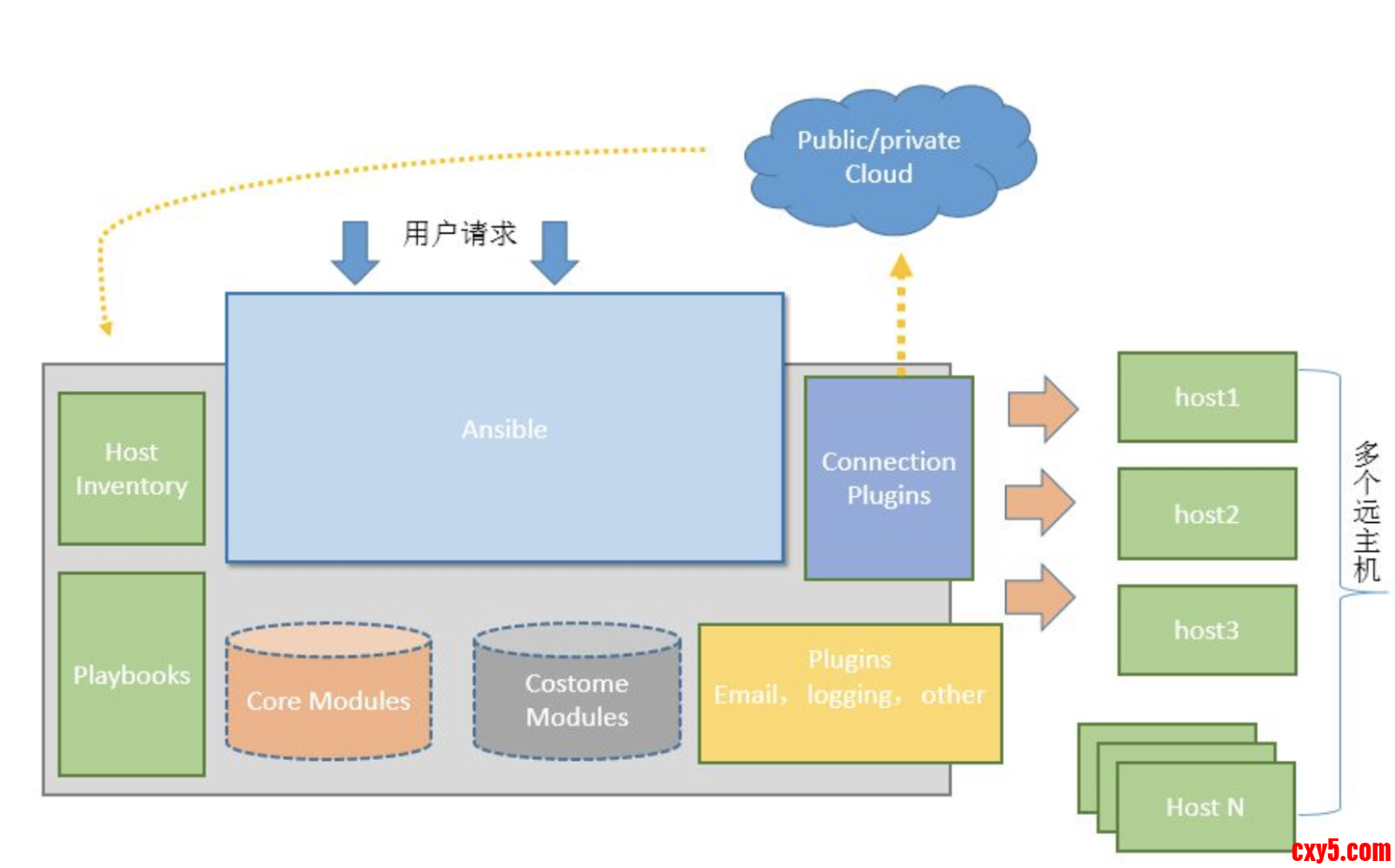
Ansible架构
Ansible安装与配置
安装Ansible
- # 首先安装python3
- root@master:~# apt install -y python3
- root@master:~# apt install -y python3-pip
- # 安装ansible
- # -i指定安装源,可以不加-i参数,直接pip3 install ansible
- root@master:~# pip3 install -i https://pypi.tuna.tsinghua.edu.cn/simple ansible
- root@master:~# ansible --version
- ansible [core 2.14.18]
- config file = /etc/ansible/ansible.cfg
- configured module search path = ['/root/.ansible/plugins/modules', '/usr/share/ansible/plugins/modules']
- ansible python module location = /usr/lib/python3/dist-packages/ansible
- ansible collection location = /root/.ansible/collections:/usr/share/ansible/collections
- executable location = /usr/bin/ansible
- python version = 3.11.2 (main, Aug 26 2024, 07:20:54) [GCC 12.2.0] (/usr/bin/python3)
- jinja version = 3.1.5
- libyaml = True
Ansible的配置文件默认没有配置上,需要使用命令进行初始化- # 创建目录
- root@master:~# mkdir -p /etc/ansible
- # 初始化配置文件
- root@master:~# ansible-config init --disabled > /etc/ansible/ansible.cfg
- root@master:~# vim /etc/ansible/ansible.cfg
- # #类似于 ssh -oStrictHostKeyChecking=no
- host_key_checking=False
- # 日志
- log_path=/var/log/ansible.log
Ansible的hosts文件作用
- 定义被管理节点:把所有需要 Ansible 操作的服务器(IP / 主机名 / 域名)列在这个文件里,Ansible 只能识别并操作这里面的节点;
- 分组管理节点:按业务场景(如 web 服务器、数据库服务器)给节点分组,方便批量操作指定分组(比如只给 web 组装 nginx);
- 配置节点属性:给单个节点 / 分组设置专属变量(如 SSH 端口、登录用户、自定义参数),让 Ansible 适配不同节点的差异;
- 简化操作指令:不用每次执行命令都手动写一堆 IP,直接用分组名(如 webservers)就能指代一组节点。
配置hosts文件
Ansible 默认读取 /etc/ansible/hosts,你也可以通过 -i 参数指定自定义的 hosts 文件(比如 ansible -i /opt/my_hosts all -m ping)。
- root@master:~# cat /etc/ansible/hosts
- [web]
- 10.37.99.63
- 10.37.120.9
- [db]
- 10.37.99.63
- [es]
- 10.37.120.9
可以查看这篇文章:Linux机器之间配置免密登录
当然也可以不配置免密登录,这个后续文章会更新,这里可以照着这里做就好
测试使用
- # -m指定ansible的模块
- root@master:~# ansible all -m ping
- [WARNING]: Platform linux on host 10.37.99.63 is using the discovered Python interpreter at /usr/bin/python3.11, but future installation of another Python interpreter could
- change the meaning of that path. See https://docs.ansible.com/ansible-core/2.14/reference_appendices/interpreter_discovery.html for more information.
- 10.37.99.63 | SUCCESS => {
- "ansible_facts": {
- "discovered_interpreter_python": "/usr/bin/python3.11"
- },
- "changed": false,
- "ping": "pong"
- }
- [WARNING]: Platform linux on host 10.37.120.9 is using the discovered Python interpreter at /usr/bin/python3.11, but future installation of another Python interpreter could
- change the meaning of that path. See https://docs.ansible.com/ansible-core/2.14/reference_appendices/interpreter_discovery.html for more information.
- 10.37.120.9 | SUCCESS => {
- "ansible_facts": {
- "discovered_interpreter_python": "/usr/bin/python3.11"
- },
- "changed": false,
- "ping": "pong"
- }
- # -m指定ansible的模块,-a指定模块命令
- root@master:~# ansible db -m command -a 'hostname -I'
- [WARNING]: Platform linux on host 10.37.99.63 is using the discovered Python interpreter at /usr/bin/python3.11, but future installation of another Python interpreter could
- change the meaning of that path. See https://docs.ansible.com/ansible-core/2.14/reference_appendices/interpreter_discovery.html for more information.
- 10.37.99.63 | CHANGED | rc=0 >>
- 10.37.99.63 172.17.0.1 100.112.111.195 fdbd:dc01:ff:318:71d3:f428:1bc5:b474
- root@master:~# vim /etc/ansible/ansible.cfg
- # 找到下面这一行
- interpreter_python=auto_silent
- root@master:~# ansible db -m command -a 'hostname -I'
- # 发现warning警告已经没有了
- 10.37.99.63 | CHANGED | rc=0 >>
- 10.37.99.63 172.17.0.1 100.112.111.195 fdbd:dc01:ff:318:71d3:f428:1bc5:b474
免责声明:如果侵犯了您的权益,请联系站长,我们会及时删除侵权内容,谢谢合作! |


 提升卡
提升卡 置顶卡
置顶卡 沉默卡
沉默卡 喧嚣卡
喧嚣卡 变色卡
变色卡 千斤顶
千斤顶 照妖镜
照妖镜


