【学习目标】
- 理解应用链接的核心作用,掌握其解耦跨应用跳转的实现逻辑;
- 完成 Deep Linking 全流程开发:自定义Scheme配置、canOpenLink校验后拉起、Web组件拦截跳转、参数解析;
- 完成 App Linking 全流程开发:AGC云端配置、服务器配置、客户端配置、拉起与降级处理、校验验证;
- 掌握 canOpenLink 跳转前置校验的使用方式、配置要求与版本限制;
- 能根据业务场景合理选择 Deep Linking 或 App Linking 完成落地开发。
【内容铺垫】
上一节我们掌握了 显式 Want / 隐式 Want 拉起组件的核心原理,其中隐式 Want 已能通过特征匹配实现跨应用跳转,但实际项目中更常用标准化 URI 链接统一跳转逻辑:
- Deep Linking:基于隐式Want URI匹配,自定义Scheme,适合内部/测试场景;
- App Linking:在Deep Linking基础上增加域名校验,支持未安装降级打开网页,适合对外发布场景。
说明:隐式 Want使用方法匹配规则上节已讲透,本节不再演示隐式相关代码,只聚焦生产环境中更实用的「链接式跳转+前置校验」全流程实战。
本节复用第六节的 WantAndLinkingDemo(调用方)和 ImplicitReceiverDemo(接收方)工程,无需新增额外工程结构。
一、应用链接核心概念
应用链接通过标准化 URI 规则匹配并拉起目标应用,核心分为两种类型:
1. 两种应用链接对比
维度Deep LinkingApp Linking实现原理隐式Want URI匹配Deep Linking + 域名校验协议格式自定义Scheme标准 HTTPS 域名配置范围仅客户端本地配置云端 + 服务器 + 客户端未安装应用处理直接跳转失败自动降级打开网页canOpenLink 支持支持不支持适用场景内部跳转、调试、轻量场景分享、扫码、广告、对外发布2. 通用开发规则
- 被拉起的目标组件必须配置 exported: true,否则普通应用无法触发跳转;
- 应用链接规则需配置在独立的skill对象中,不可与桌面入口skill(entities: ["entity.system.home"])混用;
- skills 配置中 actions 字段不能为空,否则链接匹配会直接失败;
- 使用 canOpenLink 前,调用方需在 entry/module.json5 配置 querySchemes 声明待校验的Scheme:
- API 21 及以上版本:最多配置 200 个 Scheme;
- API 20 及以下版本:最多配置 50 个 Scheme。
二、工程结构(仅展示新增/修改部分)
- # 调用方:WantAndLinkingDemo
- WantAndLinkingDemo/
- ├─ entry/src/main/ets/entryability/EntryAbility.ets // 仅负责页面加载,无额外修改
- ├─ entry/src/main/ets/pages/Index.ets // 新增Linking演示入口按钮
- ├─ entry/src/main/ets/pages/LinkingPage.ets // 核心:链接拉起+校验演示
- ├─ entry/src/main/resources/rawfile/index.html // Web组件跳转测试页面
- └─ entry/src/main/module.json5 // 新增querySchemes配置
- # 接收方:ImplicitReceiverDemo
- ImplicitReceiverDemo/
- ├─ entry/src/main/ets/entryability/EntryAbility.ets // 新增链接参数解析逻辑
- ├─ entry/src/main/ets/pages/Index.ets // 新增参数展示区域
- └─ entry/src/main/module.json5 // 新增Deep/App Linking skill配置
(一)接收方:ImplicitReceiverDemo 配置与参数解析
1. module.json5 配置Deep Linking独立skill
- {
- "module": {
- "abilities": [
- {
- "exported": true, // 必须开启,否则无法被外部应用拉起
- "skills": [
- // 配置 Deep Linking
- {
- "actions": ["ohos.want.action.viewData"], // 不能为空
- "uris": [
- {
- "scheme": "harmonydemo", // 自定义Scheme,不以ohos开头
- "host": "www.example.com",
- "pathStartWith": "programs" // 匹配路径前缀
- }
- ]
- }
- ]
- }
- ]
- }
- }
- import { AbilityConstant, UIAbility, Want } from '@kit.AbilityKit';
- import { url } from '@kit.ArkTS';
- import { hilog } from '@kit.PerformanceAnalysisKit';
- import { window } from '@kit.ArkUI';
- const DOMAIN = 0x0000;
- const TAG = 'ImplicitReceiverDemo';
- export default class EntryAbility extends UIAbility {
- // 应用首次启动时解析参数
- onCreate(want: Want, launchParam: AbilityConstant.LaunchParam): void {
- this.parseLinkParams(want);
- }
- // 应用已启动,再次被拉起时更新参数
- onNewWant(want: Want, launchParam: AbilityConstant.LaunchParam): void {
- this.parseLinkParams(want);
- }
- onWindowStageCreate(windowStage: window.WindowStage): void {
- windowStage.loadContent('pages/Index');
- }
- // 统一解析Deep Linking参数(替换id为linkId)
- private parseLinkParams(want: Want) {
- const uri = want.uri;
- if (!uri) return;
- try {
- // 官方标准URI解析方式
- const urlObject = url.URL.parseURL(uri);
- const action = urlObject.params.get('action');
- const linkId = urlObject.params.get('linkId');
-
- // 存入AppStorage供页面展示
- AppStorage.setOrCreate('action', action || '');
- AppStorage.setOrCreate('linkId', linkId || '');
- hilog.info(DOMAIN, TAG, `参数解析成功:action=${action}, linkId=${linkId}`);
- } catch (err) {
- hilog.error(DOMAIN, TAG, `参数解析失败:${JSON.stringify(err)}`);
- }
- }
- }
- @Entry
- @Component
- struct Index {
- // 绑定AppStorage中的参数
- @StorageProp('action') action: string = '';
- @StorageProp('linkId') linkId: string = '';
- build() {
- Column({ space: 20}) {
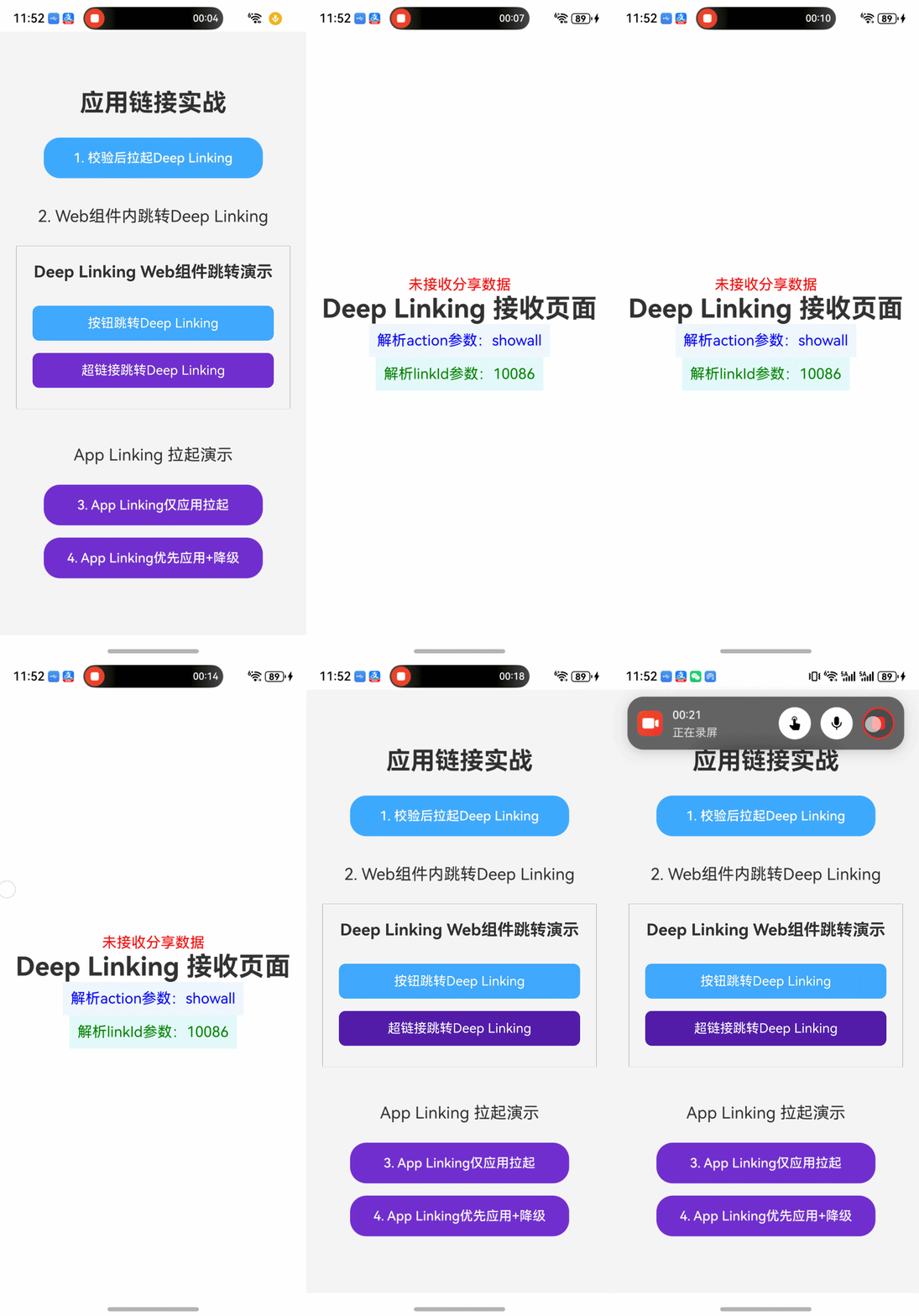
- Text('Deep Linking 接收页面')
- .fontSize(32)
- .fontWeight(FontWeight.Bold);
-
- Text(`解析action参数:${this.action}`)
- .fontSize(18)
- .fontColor(Color.Blue)
- .padding(10)
- .backgroundColor('#f0f7ff');
-
- Text(`解析linkId参数:${this.linkId}`)
- .fontSize(18)
- .fontColor(Color.Green)
- .padding(10)
- .backgroundColor('#e6fffa');
- }
- .width('100%')
- .height('100%')
- .justifyContent(FlexAlign.Center)
- .padding(20);
- }
- }
1. rawfile/index.html(Web组件跳转测试页面)
- <!DOCTYPE html>
- <html lang="zh-CN">
- <head>
- <meta charset="UTF-8">
- <meta name="viewport" content="width=device-width, initial-scale=1.0, maximum-scale=1.0, user-scalable=no">
- <meta http-equiv="X-UA-Compatible" content="IE=edge">
- <title>Deep Linking H5跳转演示</title>
-
- </head>
- <body>
- <h1>Deep Linking Web组件跳转演示</h1>
- <button onclick="jump()">按钮跳转Deep Linking</button>
- 超链接跳转Deep Linking
- </body>
- </html>
- import { bundleManager, common } from '@kit.AbilityKit';
- import { BusinessError } from '@kit.BasicServicesKit';
- import { hilog } from '@kit.PerformanceAnalysisKit';
- import { promptAction } from '@kit.ArkUI';
- import { webview } from '@kit.ArkWeb';
- const TAG = 'LinkingPage';
- const DOMAIN = 0x0000;
- // Deep Linking链接
- const DEEP_LINK = 'harmonydemo://www.example.com/programs?action=showall&linkId=10086';
- // App Linking链接(需替换为自己的已校验域名)
- const APP_LINK = 'https://www.example.com/programs?action=showall&linkId=10086';
- @Entry
- @Component
- struct LinkingPage {
- private context = this.getUIContext().getHostContext() as common.UIAbilityContext;
- private webController = new webview.WebviewController();
- build() {
- Column({ space: 15}) {
- Text('应用链接实战')
- .fontSize(30)
- .fontWeight(FontWeight.Bold)
- .margin({ bottom: 10 });
- // 1. canOpenLink校验后拉起
- Button('1. 校验后拉起Deep Linking')
- .width('80%')
- .height(50)
- .backgroundColor('#40a9ff')
- .fontColor($r('sys.color.white'))
- .onClick(() => this.checkAndOpenDeepLink());
- // 2. Web组件内拦截跳转
- Text('2. Web组件内跳转Deep Linking')
- .fontSize(20)
- .margin({ top: 20, bottom: 10 });
- Web({ src: $rawfile('index.html'), controller: this.webController })
- .width('100%')
- .height(200)
- .onLoadIntercept((event) => {
- const url = event.data.getRequestUrl();
- // 拦截自定义Scheme链接
- if (url.startsWith('harmonydemo://')) {
- this.checkAndOpenDeepLink(); // 复用校验逻辑,保证体验一致
- return true; // 阻止Web组件加载该链接
- }
- return false; // 允许加载其他普通链接
- });
- // --- App Linking 演示区域 ---
- Text('App Linking 拉起演示')
- .fontSize(20)
- .margin({ top: 30, bottom: 10 });
- Button('3. App Linking仅应用拉起')
- .width('80%')
- .height(50)
- .backgroundColor('#722ed1')
- .fontColor($r('sys.color.white'))
- .onClick(() => this.openAppLinkOnly());
- Button('4. App Linking优先应用+降级')
- .width('80%')
- .height(50)
- .backgroundColor('#722ed1')
- .fontColor($r('sys.color.white'))
- .onClick(() => this.openAppLinkPriority());
- }
- .width('100%')
- .height('100%')
- .justifyContent(FlexAlign.Center)
- .backgroundColor('#f5f5f5')
- .padding(20);
- }
- // 核心方法:校验后拉起Deep Linking
- private checkAndOpenDeepLink() {
- try {
- // 前置校验:判断是否有应用可处理该链接
- const canOpen = bundleManager.canOpenLink(DEEP_LINK);
- hilog.info(DOMAIN, TAG, `canOpenLink校验结果:${canOpen}`);
- if (canOpen) {
- // 校验通过,执行拉起
- this.context.openLink(DEEP_LINK, { appLinkingOnly: false });
- hilog.info(DOMAIN, TAG, 'Deep Linking拉起成功');
- } else {
- promptAction.showToast({ message: '暂无应用可处理该链接' });
- }
- } catch (err) {
- const error = err as BusinessError;
- hilog.error(DOMAIN, TAG, `拉起失败:${error.code}-${error.message}`);
- promptAction.showToast({ message: '链接拉起失败' });
- }
- }
- // App Linking仅应用拉起(无匹配应用则抛异常)
- private async openAppLinkOnly() {
- try {
- await this.context.openLink(APP_LINK, { appLinkingOnly: true });
- hilog.info(DOMAIN, TAG, 'App Linking仅应用方式拉起成功');
- } catch (err) {
- const error = err as BusinessError;
- hilog.error(DOMAIN, TAG, `仅应用拉起失败:${error.code}-${error.message}`);
- promptAction.showToast({ message: '无匹配应用,拉起失败' });
- }
- }
- // App Linking优先应用拉起(无应用则打开网页)
- private async openAppLinkPriority() {
- try {
- await this.context.openLink(APP_LINK, { appLinkingOnly: false });
- hilog.info(DOMAIN, TAG, 'App Linking优先应用方式拉起成功');
- } catch (err) {
- const error = err as BusinessError;
- hilog.error(DOMAIN, TAG, `优先应用拉起失败:${error.code}-${error.message}`);
- promptAction.showToast({ message: '应用未安装,将打开网页版' });
- }
- }
- }
- {
- "module": {
- "querySchemes": ["harmonydemo"], // 声明待校验的Scheme,必须配置
- "abilities": [
- {
- "name": "EntryAbility",
- "exported": true,
- "skills": [
- {
- "entities": ["entity.system.home"],
- "actions": ["ohos.want.action.home"]
- }
- ]
- }
- ]
- }
- }
- import router from '@ohos.router';
- @Entry
- @Component
- struct Index {
- build() {
- Column({ space: 10}) {
- // 6.Linking演示
- Button('6. Linking演示')
- .width('80%')
- .height(50)
- .fontSize(18)
- .backgroundColor('#1890ff')
- .fontColor($r('sys.color.white'))
- .onClick(() => {
- router.push({ url:"pages/LinkingPage"})
- });
- }
- .width('100%')
- .height('100%')
- .justifyContent(FlexAlign.Center);
- }
- }
四、App Linking 实战(HTTPS域名+域名校验)
App Linking在Deep Linking基础上增加了域名校验环节,通过域名校验可消除应用归属歧义,让链接更安全可靠。其核心特性是:同一HTTPS网址支持「应用+网页」双端呈现,应用已安装则打开应用,未安装则降级打开网页。
1. 前置准备
- 已注册华为开发者账号并完成实名认证;
- 已在AGC(AppGallery Connect)创建应用,且应用包名与本地工程一致;
- 已准备好备案的HTTPS域名(如www.xxxx.com)及域名服务器部署权限;
- 应用已配置手动签名(禁止使用DevEco Studio自动签名),新建AppID-开放能力-勾选App Linking。
2. 服务器配置(关键)
2.1 编写applinking.json文件
创建名为applinking.json的文件,内容如下(替换为自己的APP ID):- {
- "applinking": {
- "apps": [
- {
- "appIdentifier": "6917598487740171507"
- }
- ]
- }
- }
同一个网站域名可以关联多个应用,只需要在"apps"列表里放置多个"appIdentifier"元素即可,其中每个"appIdentifier"元素对应每个应用。
2.2 部署applinking.json文件
- 在域名服务器的根目录下创建.well-known文件夹(注意前缀有.);
- 将applinking.json文件放入.well-known文件夹;
- 确保文件可通过HTTPS访问:https://www.example.com/.well-known/applinking.json;
3. AGC云端配置(核心)
3.1 开通App Linking服务
- 登录AGC控制台,选择目标应用;
- 进入「增长 > App Linking > 应用链接」,点击「立即开通」;
- 阅读并同意服务协议,完成服务开通。
3.2 配置关联域名
- 在「应用链接」页面点击「添加域名」;
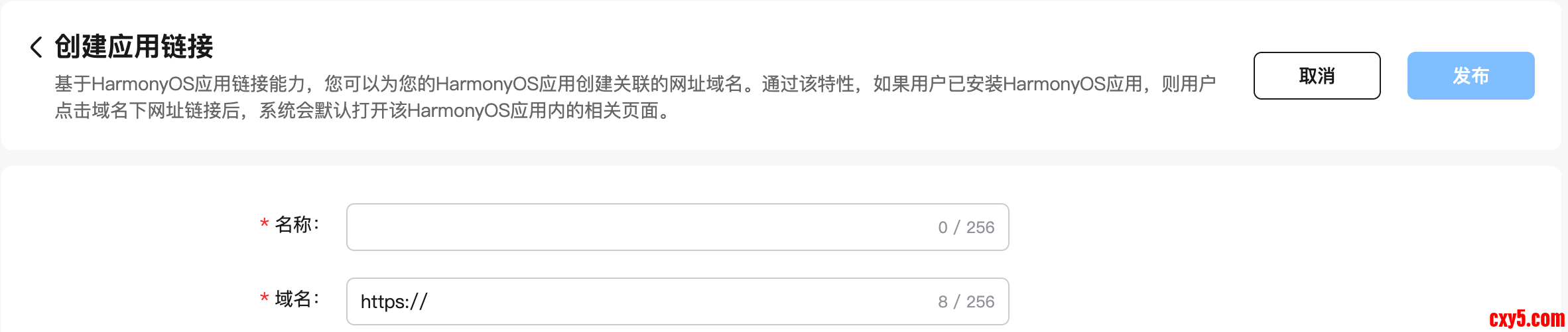
- 输入已备案的HTTPS域名(如www.example.com),点击「下一步」;
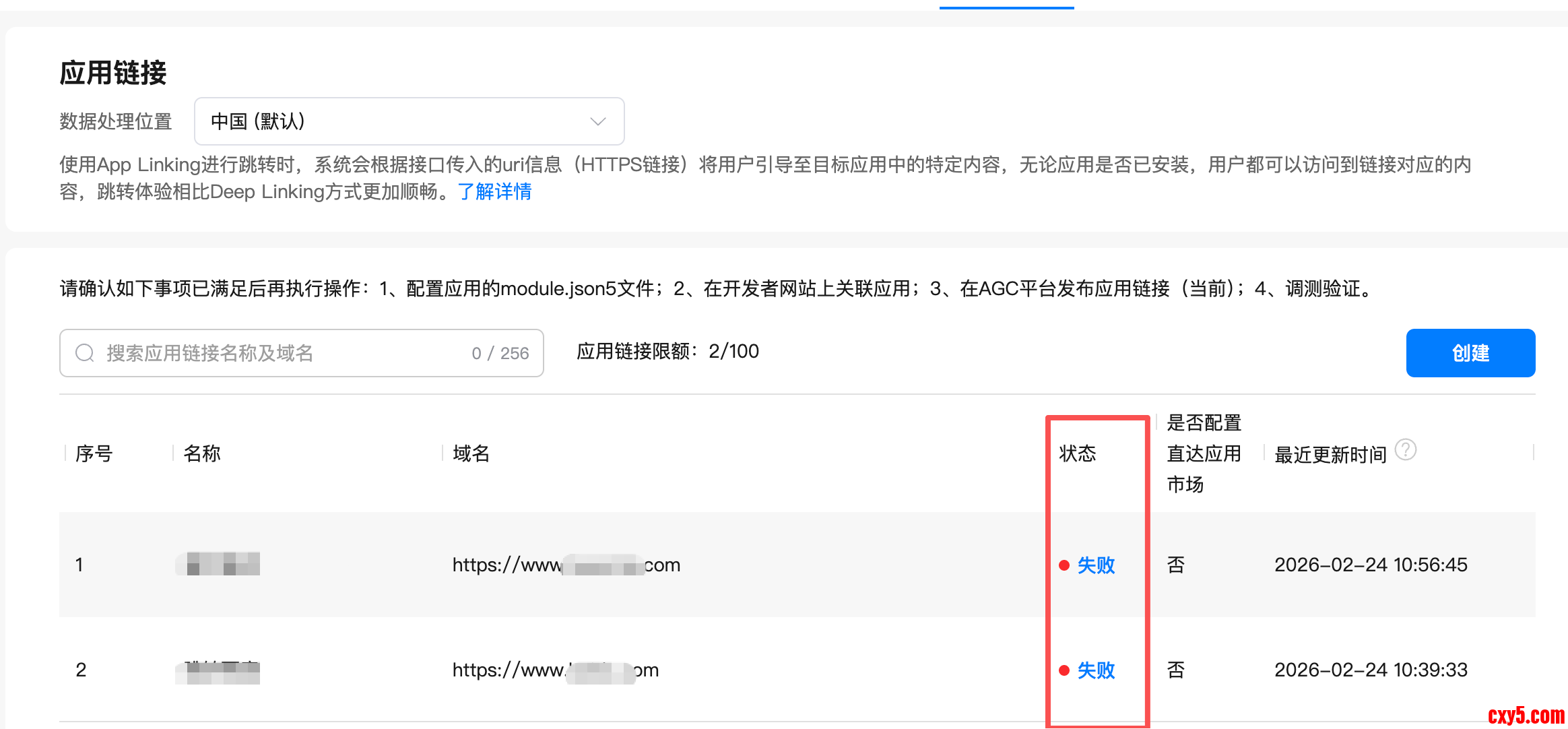
- 点击「发布」,此时 AGC会对该网站域名的配置文件所包含的应用与本项目内的应用列表进行交集校验。
3.3 AGC校验结果
- 如果域名的配置文件中有应用存在本项目中,则发布成功,点击“查看”可显示该域名关联的应用信息。
- 如果异步校验中,则状态为“发布中”。
- 如果配置文件中没有任何应用在本项目中,则发布失败,点击“查看”可显示发布失败原因。
AGC校验更新每24小时更新一次
4. 客户端配置(接收方)
4.1 module.json5新增App Linking配置
- {
- "module": {
- "abilities": [
- {
- "name": "EntryAbility",
- "exported": true,
- "skills": [
- // 桌面入口skill
- {
- "entities": ["entity.system.home"],
- "actions": ["ohos.want.action.home"]
- },
- // Deep Linking配置(保留)
- {
- "actions": ["ohos.want.action.viewData"],
- "uris": [
- {
- "scheme": "harmonydemo",
- "host": "www.example.com",
- "pathStartWith": "programs"
- }
- ]
- },
- // App Linking独立配置(新增)
- {
- "entities": ["entity.system.browsable"], // 必须配置,标识可被浏览器唤起
- "actions": ["ohos.want.action.viewData"], // 不能为空
- "uris": [
- {
- "scheme": "https", // 固定为https
- "host": "www.example.com", // 与AGC配置的域名一致
- // "path": "programs" // path可选,表示域名服务器上的目录或文件路径,例如www.example.com/programs中的programs
- }
- ],
- "domainVerify": true // 开启域名校验(核心)
- }
- ]
- }
- ]
- }
- }
- onCreate(want: Want, launchParam: AbilityConstant.LaunchParam): void {
- this.parseAppLinking(want)
- }
- /**
- * AppLinking
- * @param want 从want中获取传入的链接信息。
- */
- private parseAppLinking(want:Want){
- // 假如传入的url为:https://www.example.com/programs?action=showall
- let uri = want?.uri;
- if (uri) {
- // 从链接中解析query参数,拿到参数后,开发者可根据自己的业务需求进行后续的处理。
- try {
- let urlObject = url.URL.parseURL(want?.uri);
- let action = urlObject.params.get('action');
- // 例如,当action为showall时,展示所有的节目。
- if (action === "showall"){
- //...
- }
- //...
- } catch (error) {
- hilog.error(0x0000, 'testTag', `Failed to parse url.`);
- }
- }
- }
- 点击调用方「App Linking仅应用拉起」按钮:应用已安装则成功拉起,未安装则提示「无匹配应用」;
- 点击「App Linking优先应用+降级」按钮:应用已安装则打开应用,未安装则自动打开浏览器访问https://www.example.com/programs?action=showall&linkId=10086。
五、避坑指南
- Deep Linking匹配失败:检查skill是否独立配置、actions是否非空、Scheme/host是否匹配、exported是否为true;
- canOpenLink校验失败:必须配置querySchemes,且Scheme与目标方完全一致;
- Scheme命名规范:不能以ohos开头,不建议使用http/https/file等系统保留值;
- 参数命名避坑:避免使用id等系统预留字段,建议使用linkId/bizId等业务自定义名称;
- App Linking域名校验失败:
- 检查applinking.json路径是否为.well-known目录,且可通过HTTPS访问;
- 检查appIdentifier是否与AGC中APP ID一致;
- 检查设备网络是否正常,域名是否备案;
- 应用必须手动签名,自动签名会导致校验失败;
六、内容总结
- Deep Linking核心是自定义Scheme+隐式Want URI匹配,生产环境需结合canOpenLink前置校验后再拉起,避免跳转失败;
- Web组件可通过onLoadIntercept拦截自定义Scheme链接,复用校验逻辑保证体验一致性;
- App Linking需完成「AGC云端配置→服务器配置→客户端配置→验证」全流程,核心是域名校验,支持应用未安装时降级打开网页;
- App Linking关键要求:备案的HTTPS域名、手动签名、applinking.json正确部署、domainVerify=true;
- 应用链接配置核心规则:目标组件exported=true、链接规则独立skill配置、actions字段非空。
七、下节预告
本节我们完成了Deep Linking 与 App Linking 跨应用跳转的全流程实战,掌握了 canOpenLink 前置校验、openLink 同步拉起、Web 组件拦截、参数解析与降级处理等核心能力。
下一节我们将正式进入 ArkTS 声明式 UI 开发,学习页面标准结构、多设备尺寸适配、vp/fp 单位规范与 @State 数据驱动刷新,从零搭建可直接运行的鸿蒙 UI 页面,为后续布局与组件开发打下坚实基础。
来源:程序园用户自行投稿发布,如果侵权,请联系站长删除
免责声明:如果侵犯了您的权益,请联系站长,我们会及时删除侵权内容,谢谢合作! |


 提升卡
提升卡 置顶卡
置顶卡 沉默卡
沉默卡 喧嚣卡
喧嚣卡 变色卡
变色卡 千斤顶
千斤顶 照妖镜
照妖镜


