当应用平台组织诸如秒杀、抽奖等营销活动时,经常会遭遇"薅羊毛"行为,给业务方带来不小的经费损失。比如通过虚假手机号进行批量注册,多次参加活动;又比如,当应用商户进行红包补贴、优惠券发放等营销活动时,使用脚本或模拟器"薅羊毛"。
为避免该问题,HarmonyOS SDK华为账号服务(Account Kit)提供了获取用户风险等级的能力,能够有效识别恶意场景,提前防范业务风险。
应用场景
一、应用登录风控场景:
当用户使用华为账号关联登录应用时,开发者可通过华为账号获取用户风险等级的能力获取用户账号的风险等级,对高风险等级账号进行风控,提升应用的安全等级。
二、营销活动反作弊场景:
在应用进行营销活动期间,如进行商户补贴、优惠券发放等商业营销活动时获取华为账号风险等级,协助开发者有效识别"薅羊毛"风险;保护营销资源合理使用,降低业务安全问题给营销方带来的损失,为相关活动保驾护航。
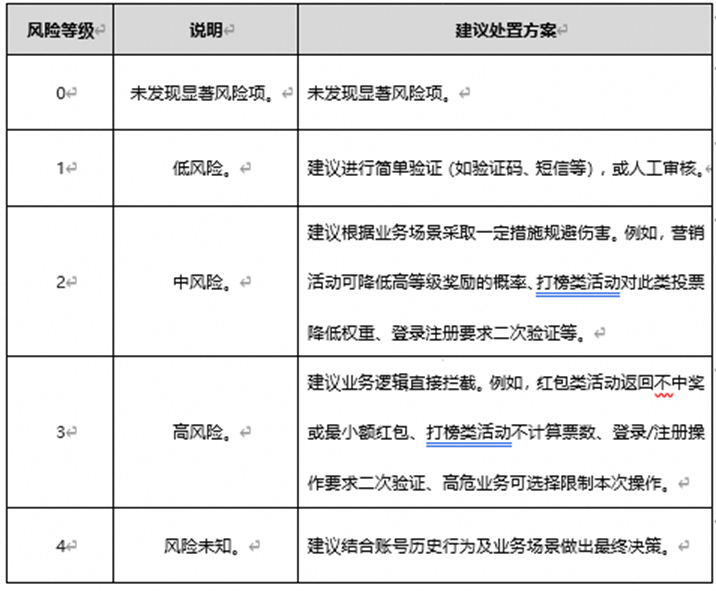
风险等级
获取用户风险等级方式
一、 通过华为账号一键登录获取用户风险等级。
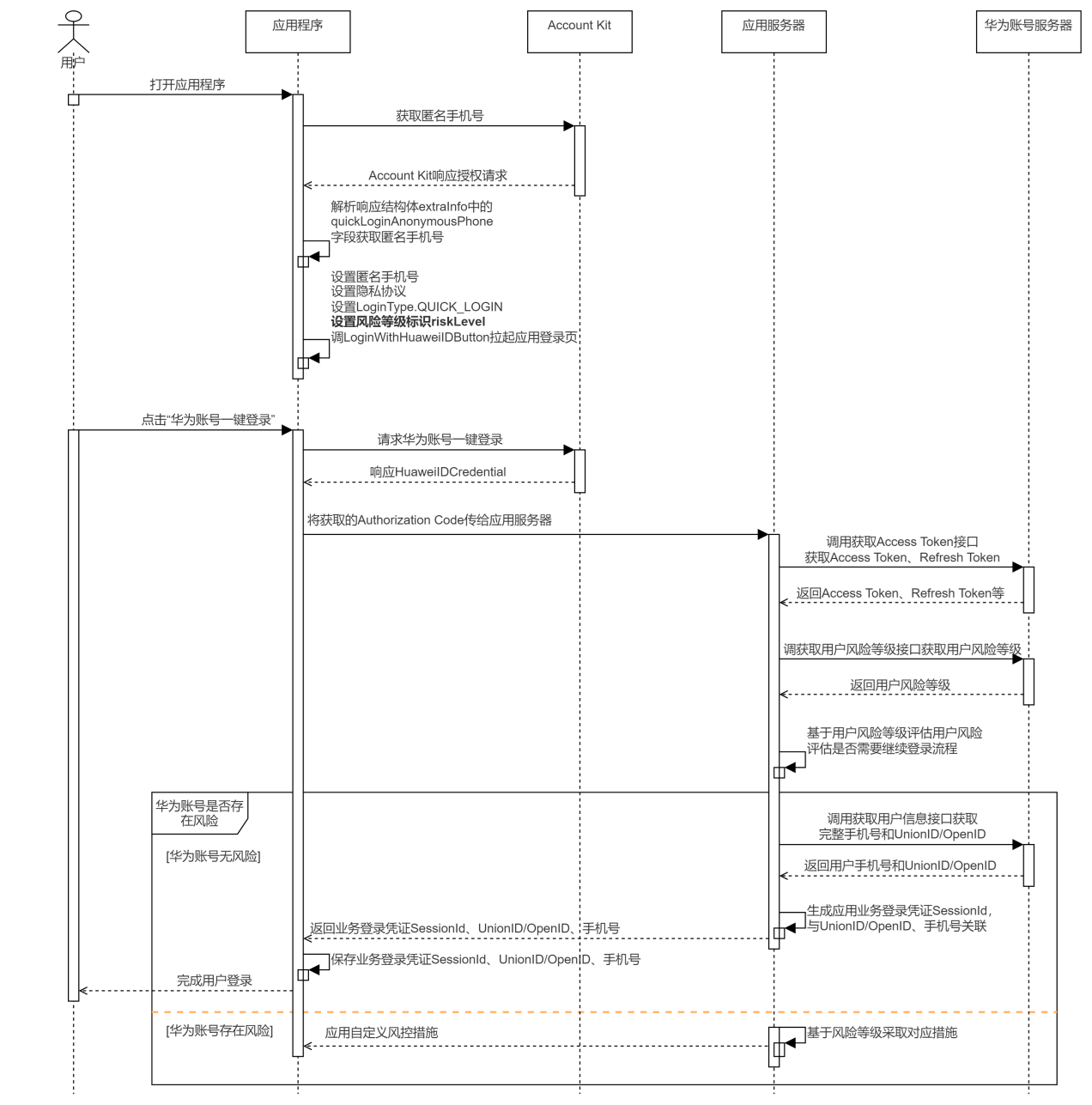
在应用登录风控场景中,开发者可以通过华为账号一键登录获取用户风险等级,对恶意账号进行风控,提升应用的安全等级。
大致业务流程如下:
通过华为账号一键登录获取用户风险等级的开发,需要建立在一键登录的开发基础上。在进行代码开发前,请确认已经完成一键登录的开发准备工作,然后申请对应的scope权限,接着就可以进行客户端部分的开发。
在客户端开发部分,需要参考一键登录开发流程步骤1及步骤2,确保系统账号已登录,匿名手机号获取成功,且用户首次通过华为账号登录该应用。接着再参考步骤3的示例代码,在LoginWithHuaweiIDButton组件参数params中设置riskLevel标识为true,其余示例代码保持不变,拉起应用登录页。- LoginWithHuaweiIDButton({ params: { // LoginWithHuaweiIDButton支持的样式 style: loginComponentManager.Style.BUTTON_RED, // 账号登录按钮在登录过程中展示加载态 extraStyle: { buttonStyle: new loginComponentManager.ButtonStyle().loadingStyle({ show: true }) }, // LoginWithHuaweiIDButton的边框圆角半径 borderRadius: 24, // LoginWithHuaweiIDButton支持的登录类型 loginType: loginComponentManager.LoginType.QUICK_LOGIN, // LoginWithHuaweiIDButton支持按钮的样式跟随系统深浅色模式切换 supportDarkMode: true, // verifyPhoneNumber:如果华为账号用户在过去90天内未进行短信验证,是否拉起Account Kit提供的短信验证码页面 verifyPhoneNumber: true, // riskLevel:标识应用期望在登录后获取华为账号的风险等级 riskLevel: true, }, controller: this.controller})
- import com.alibaba.fastjson2.JSONArray;import com.alibaba.fastjson2.JSONObject;import lombok.extern.slf4j.Slf4j;import org.apache.http.client.methods.CloseableHttpResponse;import org.apache.http.client.methods.HttpPost;import java.io.IOException;import java.util.HashMap;import java.util.Map;import java.util.Objects;/** * 获取用户风险等级 */@Slf4jpublic class GetUserRiskLevelDemo { public static void main(String[] args) throws IOException { // 获取用户风险等级的接口URL String url = "https://account.cloud.huawei.com/user/getuserrisklevel"; // 替换为您实际的Client ID String clientID = ""; // 替换为您实际的transactionID String transactionID = ""; // 替换为您实际的获取到的用户级凭证Access Token String accessToken = ""; // 替换为您实际的scene String scene = ""; JSONObject result = getUserRiskLevel(url, clientID, transactionID, accessToken, scene); // 解析获取errCode Integer errCode = result.getInteger("errCode"); // 解析获取errMsg String errMsg = result.getString("errMsg"); // 解析获取riskLevel Integer riskLevel = result.getInteger("riskLevel"); // 解析获取riskTag JSONArray riskTag = result.getJSONArray("riskTag"); } private static JSONObject getUserRiskLevel(String url, String clientID, String transactionID, String accessToken, String scene) throws IOException { HttpPost httpPost = new HttpPost(url + "?" + "clientID=" + clientID + "&transactionID=" + transactionID); Map reqBody = new HashMap(); reqBody.put("accessToken", accessToken); reqBody.put("scene", scene); httpPost.setHeader("Content-Type", "application/json;charset=utf-8"); httpPost.setEntity(CallUtils.wrapJsonEntity(reqBody)); return CallUtils.toJsonObject(CallUtils.remoteCall(httpPost, (CloseableHttpResponse response, String rawBody) -> { int statusCode = response.getStatusLine().getStatusCode(); // http状态码不是200,请求失败 if (statusCode != 200) { return new IOException("call failed! http status code: " + statusCode + ", response data: " + rawBody); } // http状态码为200,解析响应的body,判断业务错误码 JSONObject errorResponseBody = CallUtils.toJsonObject(rawBody); // 错误码 Integer errCode = errorResponseBody.getInteger("errCode"); // errCode为0表示成功,非0表示失败 if (Objects.nonNull(errCode) && errCode != 0) { return new IOException("call failed! http status code: " + statusCode + ", response data: " + rawBody); } return null; })); }}
在应用已使用华为账号关联登录的场景中,开展商户补贴、优惠券发放等商业营销活动时,开发者可通过华为账号其他方式登录获取华为账号风险等级,有效识别"薅羊毛"风险,保护营销资源合理使用。
大致业务流程如下:
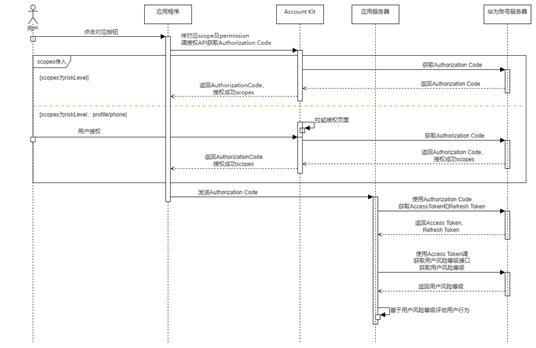
通过华为账号其他方式登录获取用户风险等级的开发步骤同样分为客户端开发和服务端开发。客户端开发步骤如下:
- 首先导入authentication模块及相关公共模块。
import { authentication } from '@kit.AccountKit';
import { hilog } from '@kit.PerformanceAnalysisKit';
import { util } from '@kit.ArkTS';
import { BusinessError } from '@kit.BasicServicesKit';
- 然后创建授权请求并设置参数。
// 创建授权请求,并设置参数
const authRequest = new authentication.HuaweiIDProvider().createAuthorizationWithHuaweiIDRequest();
// 获取风险等级需要传如下scope
authRequest.scopes = ['riskLevel'];
// 获取authorizationCode需传如下permission
authRequest.permissions = ['serviceauthcode'];
// 用户是否需要登录授权,该值为true且用户未登录或未授权时,会拉起用户登录或授权页面
authRequest.forceAuthorization = true;
// 用于防跨站点请求伪造
authRequest.state = util.generateRandomUUID();
- 调用AuthenticationController对象的executeRequest方法执行授权请求,并处理授权结果,从授权结果中解析出authorizedScopes和Authorization Code。
// 执行授权请求
try {
// 此示例为代码片段,实际需在自定义组件实例中使用,以获取UIContext对象作为函数入参
const controller = new authentication.AuthenticationController(this.getUIContext().getHostContext());
controller.executeRequest(authRequest).then((data) => {
const authorizationWithHuaweiIDResponse = data as authentication.AuthorizationWithHuaweiIDResponse;
const state = authorizationWithHuaweiIDResponse.state;
if (state && authRequest.state !== state) {
hilog.error(0x0000, 'testTag', Failed to authorize. The state is different, response state: ${state});
return;
}
hilog.info(0x0000, 'testTag', 'Succeeded in authentication.');
let riskLevelAuthorized: boolean = false;
const authorizationWithHuaweiIDCredential = authorizationWithHuaweiIDResponse?.data;
const authorizedScopes = authorizationWithHuaweiIDCredential?.authorizedScopes;
// 判断授权成功scopes中是否包含riskLevel
if (authorizedScopes?.includes("riskLevel")) {
riskLevelAuthorized = true;
}
const authorizationCode = authorizationWithHuaweiIDCredential?.authorizationCode;
// 开发者处理riskLevelAuthorized, authorizationCode
}).catch((err: BusinessError) => {
dealAllError(err);
});
} catch (error) {
dealAllError(error);
}
// 错误处理
function dealAllError(error: BusinessError): void {
hilog.error(0x0000, 'testTag', Failed to obtain userInfo. Code: ${error.code}, message: ${error.message});
// 在应用获取用户风险等级场景下,涉及UI交互时,建议按照如下错误码指导提示用户
if (error.code === ErrorCode.ERROR_CODE_LOGIN_OUT) {
// 用户未登录华为账号,请登录华为账号并重试
} else if (error.code === ErrorCode.ERROR_CODE_NETWORK_ERROR) {
// 网络异常,请检查当前网络状态并重试
} else if (error.code === ErrorCode.ERROR_CODE_USER_CANCEL) {
// 用户取消授权
} else if (error.code === ErrorCode.ERROR_CODE_SYSTEM_SERVICE) {
// 系统服务异常,请稍后重试
} else if (error.code === ErrorCode.ERROR_CODE_REQUEST_REFUSE) {
// 重复请求,应用无需处理
} else {
// 获取用户信息失败,请稍后重试
}
}
export enum ErrorCode {
// 账号未登录
ERROR_CODE_LOGIN_OUT = 1001502001,
// 网络错误
ERROR_CODE_NETWORK_ERROR = 1001502005,
// 用户取消授权
ERROR_CODE_USER_CANCEL = 1001502012,
// 系统服务异常
ERROR_CODE_SYSTEM_SERVICE = 12300001,
// 重复请求
ERROR_CODE_REQUEST_REFUSE = 1001500002
}
- 在客户端开发完成后,同样需要调用获取用户级凭证接口向华为账号服务器请求获取Access Token,并使用Access Token调用获取用户风险等级接口获取用户的风险等级。
了解更多详情>>
访问华为账号服务联盟官网
获取获取风险等级开发指导文档
来源:程序园用户自行投稿发布,如果侵权,请联系站长删除
免责声明:如果侵犯了您的权益,请联系站长,我们会及时删除侵权内容,谢谢合作! |


 提升卡
提升卡 置顶卡
置顶卡 沉默卡
沉默卡 喧嚣卡
喧嚣卡 变色卡
变色卡 千斤顶
千斤顶 照妖镜
照妖镜


