登录
/
注册
首页
论坛
其它
首页
科技
业界
安全
程序
广播
Follow
关于
导读
排行榜
资讯
发帖说明
登录
/
注册
账号
自动登录
找回密码
密码
登录
立即注册
搜索
搜索
关闭
CSDN热搜
程序园
精品问答
技术交流
资源下载
本版
帖子
用户
软件
问答
教程
代码
写记录
写博客
小组
VIP申请
VIP网盘
网盘
联系我们
发帖说明
道具
勋章
任务
淘帖
动态
分享
留言板
导读
设置
我的收藏
退出
腾讯QQ
微信登录
返回列表
首页
›
业界区
›
业界
›
AI新手入门:10分钟用Spring AI打造你的第一个智能心理 ...
AI新手入门:10分钟用Spring AI打造你的第一个智能心理咨询师
[ 复制链接 ]
萧海芷
2026-1-19 19:55:01
猛犸象科技工作室:
网站开发,备案域名,渗透,服务器出租,DDOS/CC攻击,TG加粉引流
大家好!我是你们的 AI 技术向导。今天带来一篇超级实用的 Spring AI 上手教程,专为零基础的 AI 爱好者设计。无需高深技术背景,只需 10 分钟,你就能创建一个能对话的智能体!
什么是 Spring AI?
Spring AI 是 Spring 生态中用于简化 AI 应用开发的框架,让开发者能轻松集成大语言模型。今天的 Demo 将基于阿里云的 DashScope 平台,创建一个专业的心理咨询师智能体。
环境准备
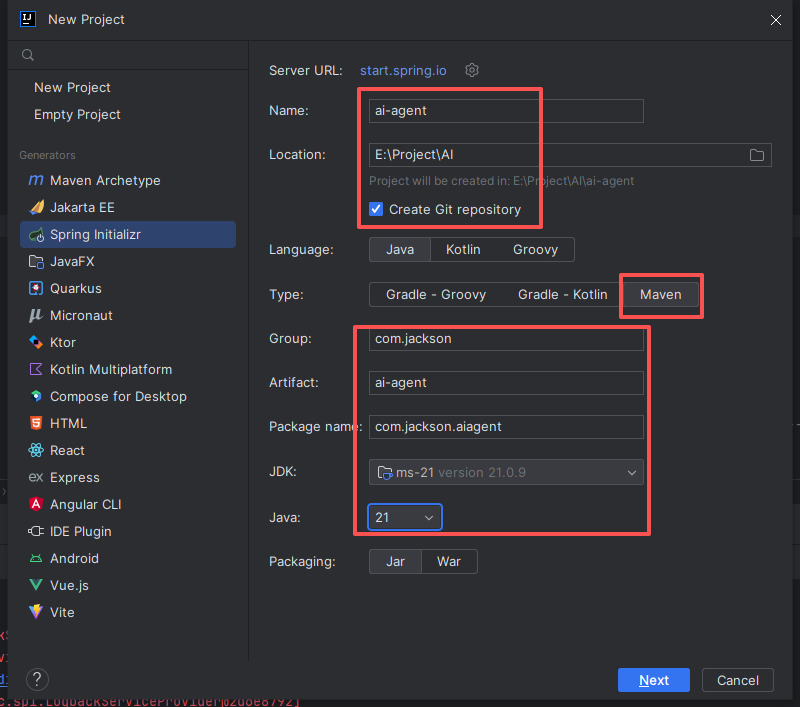
首先,我们需要创建一个 Spring 项目。推荐使用 IDEA 开发工具:
打开 IDEA,选择新建 Spring 项目
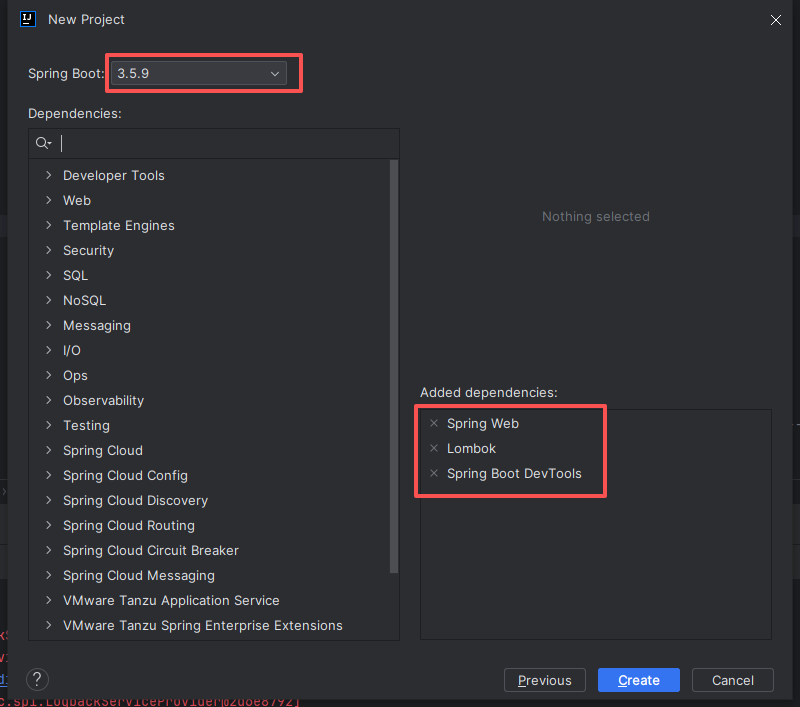
设置 Spring Boot 版本以及依赖
项目创建成功后,进入下一步
添加关键依赖
在项目的 pom.xml 文件中,添加以下两个核心依赖:
<dependency>
<groupId>com.alibaba.cloud.ai</groupId>
spring-ai-alibaba-agent-framework</artifactId>
<version>1.1.0.0-M5</version>
</dependency>
<dependency>
<groupId>com.alibaba.cloud.ai</groupId>
spring-ai-alibaba-starter-dashscope</artifactId>
<version>1.1.0.0-M5</version>
</dependency>
复制代码
这两个依赖分别提供了智能体框架和 DashScope 模型的支持。
编写核心代码
在 com.jackson.aiagent 包下创建 AgentExample.java 文件:
package com.jackson.aiagent;
// 导入必要的类
public class AgentExample {
public static void main(String[] args) throws Exception {
// 1. 创建模型实例(记得替换成你自己的API Key)
DashScopeApi dashScopeApi = DashScopeApi.builder()
.apiKey("sk-309xxxxxxxxxxxxxxxxxxxxxxxx")
.build();
ChatModel chatModel = DashScopeChatModel.builder()
.dashScopeApi(dashScopeApi)
.build();
// 2. 创建智能体角色
ReactAgent agent = ReactAgent.builder()
.name("智能心理咨询师")
.model(chatModel)
.instruction("你是一名10年经验的资深心理咨询师.")
.build();
// 3. 与智能体对话
var response = agent.call("抑郁症有些什么症状?该如何缓解?");
System.out.println(response.getText());
}
}
复制代码
运行你的第一个 AI 智能体
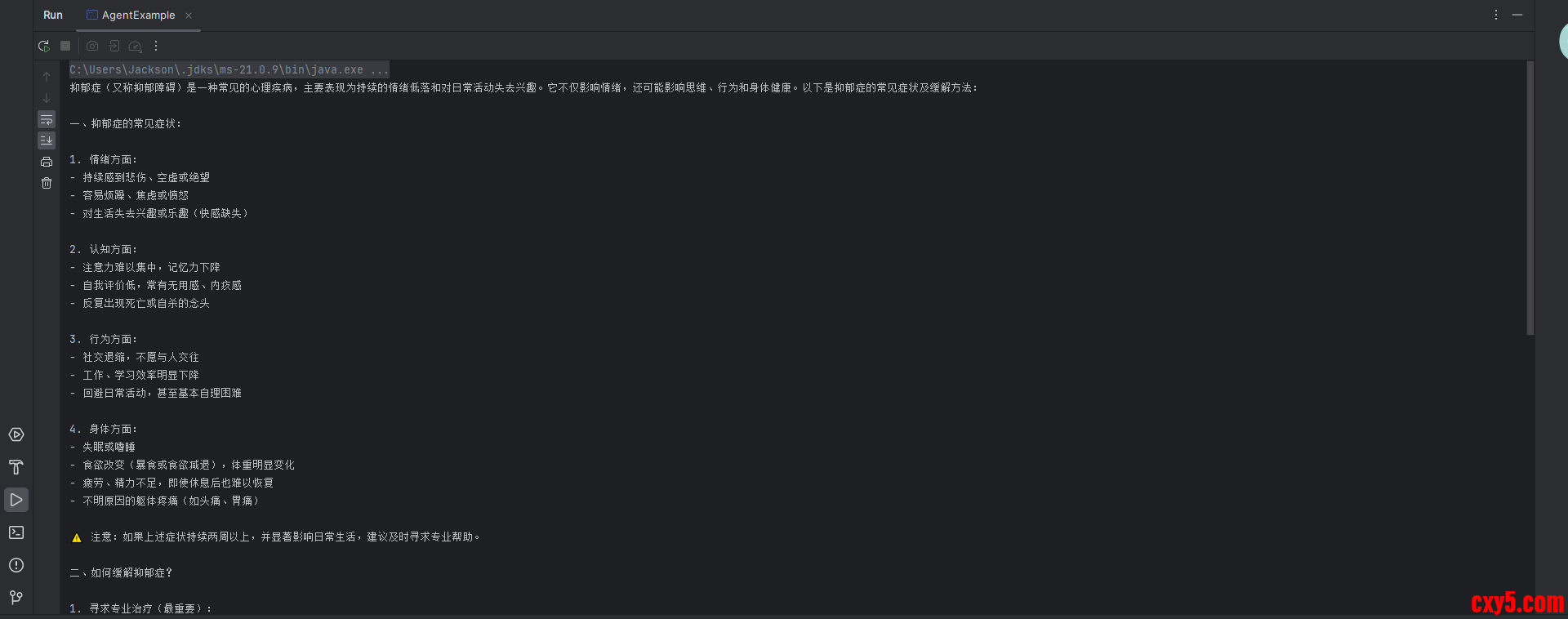
代码编写完成后,直接运行 main 方法。你会看到控制台输出类似以下内容:
技术要点解析
API Key 配置
:需要到 DashScope 平台申请自己的 API Key
智能体定制
:通过 instruction 参数定义智能体的专业背景
对话交互
:使用 call 方法即可与智能体进行对话
拓展思路
这个 Demo 虽然简单,但已经包含了 AI 智能体的核心要素。你可以尝试:
更换不同的专业角色(如法律顾问、编程助手等)
设计更复杂的对话流程
集成到 Web 应用中提供在线服务
总结
通过这个教程,我们见证了 Spring AI 的强大之处——用极简的代码实现智能对话功能。作为 AI 新手,这是一个完美的起点。未来你可以在此基础上探索更复杂的 AI 应用场景。
动手试试吧!
在评论区分享你的第一个智能体作品,遇到问题随时提问哦~
本文基于技术文档整理,适合 AI 入门学习。实际开发中请参考官方最新文档。
_Reference: _https://github.com/alibaba/spring-ai-alibaba
来源:程序园用户自行投稿发布,如果侵权,请联系站长删除
免责声明:如果侵犯了您的权益,请联系站长,我们会及时删除侵权内容,谢谢合作!
AI
新手入门
10分钟
Spring
打造
相关帖子
目前最火的 AI 助手 Clawdbot 又又又改名了 并且发布新版本
深夜惊魂:一行代码让内存爆炸!从 5秒超时到 50ms 响应,我是如何重构 AI 网关的
AI时代的项目管理:1+3Ownership模式和项目管理
AI开发者如何无痛部署Oracle AI Database 26ai环境
关于 AI 的学习路线图
Spring AI学习:使用WSL2安装Ubuntu&安装redis-8.4.0
AI开发-python-langchain框架(1-8-2 缓存机制——验证缓存的效果)
天翼云全面上线Moltbot,通过云主机、AI云电脑、息壤应用托管一键开启AI助手体验!
用 Vue3 + fetch-event-source 打造流式 AI 翻译平台:OCR + 大模型 + SSE 全链路实战
回复
使用道具
举报
提升卡
置顶卡
沉默卡
喧嚣卡
变色卡
千斤顶
照妖镜
相关推荐
业界
目前最火的 AI 助手 Clawdbot 又又又改名了 并且发布新版本
0
338
宇文之
2026-01-30
安全
深夜惊魂:一行代码让内存爆炸!从 5秒超时到 50ms 响应,我是如何重构 AI 网关的
0
662
鞠彗云
2026-01-30
业界
AI时代的项目管理:1+3Ownership模式和项目管理
0
895
刘凤
2026-01-30
业界
AI开发者如何无痛部署Oracle AI Database 26ai环境
1
702
卒挪
2026-01-30
业界
关于 AI 的学习路线图
2
359
闹忧踫
2026-02-01
业界
Spring AI学习:使用WSL2安装Ubuntu&安装redis-8.4.0
0
159
陶田田
2026-02-02
业界
AI开发-python-langchain框架(1-8-2 缓存机制——验证缓存的效果)
0
50
秦欣艷
2026-02-02
业界
天翼云全面上线Moltbot,通过云主机、AI云电脑、息壤应用托管一键开启AI助手体验!
0
175
鞍汉
2026-02-02
业界
用 Vue3 + fetch-event-source 打造流式 AI 翻译平台:OCR + 大模型 + SSE 全链路实战
0
935
勺缓曜
2026-02-02
回复
(9)
米嘉怡
2026-1-20 00:04:40
回复
使用道具
举报
照妖镜
程序园永久vip申请,500美金$,无限下载程序园所有程序/软件/数据/等
谢谢分享,辛苦了
卓卞恻
2026-1-21 08:01:49
回复
使用道具
举报
照妖镜
程序园永久vip申请,500美金$,无限下载程序园所有程序/软件/数据/等
鼓励转贴优秀软件安全工具和文档!
鄂缮输
2026-1-21 18:58:04
回复
使用道具
举报
照妖镜
猛犸象科技工作室:
网站开发,备案域名,渗透,服务器出租,DDOS/CC攻击,TG加粉引流
新版吗?好像是停更了吧。
福清婉
2026-1-25 11:20:03
回复
使用道具
举报
照妖镜
程序园永久vip申请,500美金$,无限下载程序园所有程序/软件/数据/等
感谢分享
晌集涟
2026-1-25 12:10:34
回复
使用道具
举报
照妖镜
程序园永久vip申请,500美金$,无限下载程序园所有程序/软件/数据/等
这个好,看起来很实用
跟尴
6 天前
回复
使用道具
举报
照妖镜
猛犸象科技工作室:
网站开发,备案域名,渗透,服务器出租,DDOS/CC攻击,TG加粉引流
热心回复!
林鱼
4 天前
回复
使用道具
举报
照妖镜
程序园永久vip申请,500美金$,无限下载程序园所有程序/软件/数据/等
感谢分享,下载保存了,貌似很强大
劳怡月
昨天 02:30
回复
使用道具
举报
照妖镜
猛犸象科技工作室:
网站开发,备案域名,渗透,服务器出租,DDOS/CC攻击,TG加粉引流
用心讨论,共获提升!
呵烘稿
昨天 05:52
回复
使用道具
举报
照妖镜
程序园永久vip申请,500美金$,无限下载程序园所有程序/软件/数据/等
这个好,看起来很实用
高级模式
B
Color
Image
Link
Quote
Code
Smilies
您需要登录后才可以回帖
登录
|
立即注册
回复
本版积分规则
回帖并转播
回帖后跳转到最后一页
浏览过的版块
安全
签约作者
程序园优秀签约作者
发帖
萧海芷
昨天 05:52
关注
0
粉丝关注
22
主题发布
板块介绍填写区域,请于后台编辑
财富榜{圆}
3934307807
991124
anyue1937
9994892
kk14977
6845359
4
xiangqian
638210
5
宋子
9939
6
韶又彤
9952
7
闰咄阅
9993
8
刎唇
9995
9
蓬森莉
9921
10
俞瑛瑶
9998
查看更多
今日好文热榜
157
题解:P15049 [UOI 2022 II Stage] 图 2
969
vue 甘特图 vxe-gantt 自定义任务条插槽模
239
Qt 技巧笔记(四)QVector 的底层原理与高
712
零门槛搭建部署 OpenClaw/Moltbot/Clawdbot
762
如何保障分布式IM聊天系统的消息可靠性(即
985
【面试题】MySQL 中 count(*)、count(1) 和
545
MWGA让千亿行代码在Web端“复活”!
24
spring6-多种类型的注入方式
661
LLVM Pass快速入门(二):运行第一个pass
227
LLVM Pass快速入门(二):运行第一个pass
637
MySQL 5.6 2000 万行高频读写表新增字段实
272
电商带货三步式快速开播工具:全能播Live O
545
上传本地文件到linux服务器的三种方法对比
935
用 Vue3 + fetch-event-source 打造流式 AI
758
吴恩达深度学习课程五:自然语言处理 第三
813
Java中的数据类型
504
Google正式上线Gemini In Chrome,国内环境
175
天翼云全面上线Moltbot,通过云主机、AI云
523
10408_基于SSM的野营用品租赁管理系统
334
10408_基于SSM的野营用品租赁管理系统


 提升卡
提升卡 置顶卡
置顶卡 沉默卡
沉默卡 喧嚣卡
喧嚣卡 变色卡
变色卡 千斤顶
千斤顶 照妖镜
照妖镜


