〇、前言
前文已经介绍过什么是 Serilog,以及其核心特点,详见:https://www.cnblogs.com/hnzhengfy/p/19167414/Serilog_basic。
本文继续对各种类型的 Sink 进行简单的实践,主题是消息队列 Sinks,供参考。
在现代分布式系统中,将日志事件通过消息队列 Sinks 发布出去是一种实现系统解耦、异步处理和流量削峰的高效方式。
消息队列 Sinks 常见的有以下三种:
排名消息队列主要优势领域适用人群1Kafka高吞吐、日志、流处理大数据、互联网大厂2RabbitMQ可靠投递、灵活路由、易运维中小企业、传统行业3RocketMQ事务消息、顺序消费、高可靠中国互联网、电商金融本文就前两种进行简单的介绍和示例,对于 RocketMQ 待后续有机会进行补充。
一、消息队列 Sinks 的用法
1.1 Serilog.Sinks.Kafka:将日志信息写入 Kafka 队列
Serilog.Sinks.Kafka 是 Serilog 日志库的一个 Sink(接收器)插件,用于将结构化日志数据发送到 Apache Kafka 主题。它利用 Kafka 高吞吐量、分布式发布-订阅消息系统的特点,构建实时日志管道,使日志系统能够轻松处理海量日志数据,并支持多系统集成分析。
1.1.1 在 Windows 上安装 Kafka(用于开发测试,生产环境建议 Linux)
注意:Kafka 官方主要支持 Linux 环境,Windows 安装不是官方推荐的方式。但如果是在 Windows 上进行开发测试,还是可以的。
本文使用现今最新的版本 4.1.1,Kafka 4.1.1 默认使用 KRaft(Kafka Raft)模式,即去 ZooKeeper 架构,因此只需安装 java 环境,无需在安装 ZooKeeper 。
1)安装 Java 环境
由于 Kafka 4.1.1 是用 Java 17(class version 61)编译的,对应关系如下:
Java 版本与 class file version 对照关系:
Java 8 → 52
Java 11 → 55
Java 17 → 61
Java 21 → 65
因此,在安装 Kafka 之前可以先安装下 JDK 17。官方下载地址:https://www.oracle.com/java/technologies/javase/jdk17-archive-downloads.html。
直接默认选项安装即可。
然后配置环境变量:JAVA_HOME:C:\Program Files\Java\jdk-17。安装时若改了路径需要改成对应的路径。
Path 中添加一行:%JAVA_HOME%\bin。
然后打开 cmd 窗口验证安装成功:- C:\Users\Administrator>java -version
- java version "17.0.12" 2024-07-16 LTS
- Java(TM) SE Runtime Environment (build 17.0.12+8-LTS-286)
- Java HotSpot(TM) 64-Bit Server VM (build 17.0.12+8-LTS-286, mixed mode, sharing)
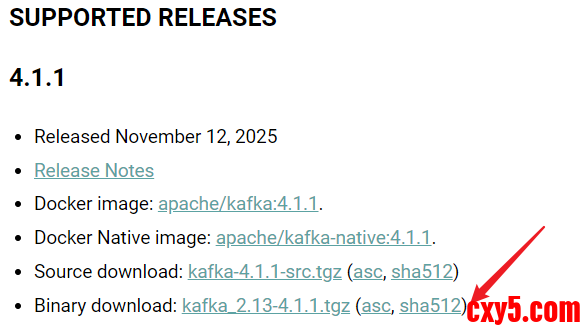
下载如下图中的二进制版本(Binary),可以直接运行,无需自己编译。文件名中的 2.13 表示该 Kafka 版本是用 Scala 2.13 编译的,可以忽略。
官方下载地址:https://kafka.apache.org/downloads。
解压到文件夹:D:\kafka_2.13-4.1.1。
修改配置文件夹D:\kafka_2.13-4.1.1\config\server.properties:- # 【已默认】启用 KRaft 模式(同时作为 broker 和 controller)
- process.roles=broker,controller
- node.id=1
- broker.id=1
- # 【必须设置,需手动新增】
- # 定义 controller quorum 的投票成员
- # 格式:nodeId@host:port
- controller.quorum.voters=1@localhost:9093
- # controller.quorum.voters=1@localhost:9093 中的 1 必须和 node.id=1 一致
- # 9093 是 CONTROLLER 监听端口,必须与 listeners 中的 CONTROLLER://:9093 匹配
- # 必须设置!定义 controller quorum 的投票成员
- # 格式:nodeId@host:port
- controller.quorum.voters=1@localhost:9093
- # 【已默认】监听器配置
- listeners=PLAINTEXT://:9092,CONTROLLER://:9093
- inter.broker.listener.name=PLAINTEXT
- controller.listener.names=CONTROLLER
- # 日志目录(建议使用 Windows 路径)
- log.dirs=/tmp/kraft-combined-logs
- # 虽然出现了 Log4j 的 ERROR 日志,但实际上 UUID 已成功生成
- PS D:\kafka_2.13-4.1.1> bin\windows\kafka-storage.bat random-uuid
- 2025-12-04T11:26:06.769887100Z main ERROR Reconfiguration failed: No configuration found for '4dc63996' at 'null' in 'null'
- wTL_esmQSuKMtvzx6eclsQ
- # 使用生成的 Cluster ID 格式化 Kafka 存储目录
- PS D:\kafka_2.13-4.1.1> bin\windows\kafka-storage.bat format -t wTL_esmQSuKMtvzx6eclsQ -c config/server.properties
- 2025-12-04T11:29:22.735759Z main ERROR Reconfiguration failed: No configuration found for '4dc63996' at 'null' in 'null'
- Formatting metadata directory /tmp/kraft-combined-logs with metadata.version 4.1-IV1.
- # 关于 Log4j ERROR 警告
- # main ERROR Reconfiguration failed: No configuration found for '4dc63996' at 'null' in 'null'
- # 是因为 Kafka 工具脚本(如 kafka-storage.bat)没有找到 Log4j 2 配置文件
- # 它不影响功能,只是日志系统初始化失败,但仍会使用默认配置。
看到如下输出就是启动成功了:
注意:Windows 安装 Kafka 仅适用于开发测试环境,生产环境建议使用 Linux 或 Docker 部署。
server.properties 示例- # Licensed to the Apache Software Foundation (ASF) under one or more
- # contributor license agreements. See the NOTICE file distributed with
- # this work for additional information regarding copyright ownership.
- # The ASF licenses this file to You under the Apache License, Version 2.0
- # (the "License"); you may not use this file except in compliance with
- # the License. You may obtain a copy of the License at
- #
- # http://www.apache.org/licenses/LICENSE-2.0
- #
- # Unless required by applicable law or agreed to in writing, software
- # distributed under the License is distributed on an "AS IS" BASIS,
- # WITHOUT WARRANTIES OR CONDITIONS OF ANY KIND, either express or implied.
- # See the License for the specific language governing permissions and
- # limitations under the License.
- ############################# Server Basics #############################
- # The role of this server. Setting this puts us in KRaft mode
- process.roles=broker,controller
- # The node id associated with this instance's roles
- node.id=1
- broker.id=1
- # List of controller endpoints used connect to the controller cluster
- controller.quorum.bootstrap.servers=localhost:9093
- # 必须设置!定义 controller quorum 的投票成员
- # 格式:nodeId@host:port
- controller.quorum.voters=1@localhost:9093
- ############################# Socket Server Settings #############################
- # The address the socket server listens on.
- # Combined nodes (i.e. those with `process.roles=broker,controller`) must list the controller listener here at a minimum.
- # If the broker listener is not defined, the default listener will use a host name that is equal to the value of java.net.InetAddress.getCanonicalHostName(),
- # with PLAINTEXT listener name, and port 9092.
- # FORMAT:
- # listeners = listener_name://host_name:port
- # EXAMPLE:
- # listeners = PLAINTEXT://your.host.name:9092
- listeners=PLAINTEXT://:9092,CONTROLLER://:9093
- # Name of listener used for communication between brokers.
- inter.broker.listener.name=PLAINTEXT
- # Listener name, hostname and port the broker or the controller will advertise to clients.
- # If not set, it uses the value for "listeners".
- advertised.listeners=PLAINTEXT://localhost:9092,CONTROLLER://localhost:9093
- # A comma-separated list of the names of the listeners used by the controller.
- # If no explicit mapping set in `listener.security.protocol.map`, default will be using PLAINTEXT protocol
- # This is required if running in KRaft mode.
- controller.listener.names=CONTROLLER
- # Maps listener names to security protocols, the default is for them to be the same. See the config documentation for more details
- listener.security.protocol.map=CONTROLLER:PLAINTEXT,PLAINTEXT:PLAINTEXT,SSL:SSL,SASL_PLAINTEXT:SASL_PLAINTEXT,SASL_SSL:SASL_SSL
- # The number of threads that the server uses for receiving requests from the network and sending responses to the network
- num.network.threads=3
- # The number of threads that the server uses for processing requests, which may include disk I/O
- num.io.threads=8
- # The send buffer (SO_SNDBUF) used by the socket server
- socket.send.buffer.bytes=102400
- # The receive buffer (SO_RCVBUF) used by the socket server
- socket.receive.buffer.bytes=102400
- # The maximum size of a request that the socket server will accept (protection against OOM)
- socket.request.max.bytes=104857600
- ############################# Log Basics #############################
- # A comma separated list of directories under which to store log files
- # log.dirs=/tmp/kraft-combined-logs
- # 数据目录(确保路径存在且可写)
- log.dirs=D:/kafka_2.13-4.1.1/data/kafka-logs
- # The default number of log partitions per topic. More partitions allow greater
- # parallelism for consumption, but this will also result in more files across
- # the brokers.
- num.partitions=1
- # The number of threads per data directory to be used for log recovery at startup and flushing at shutdown.
- # This value is recommended to be increased for installations with data dirs located in RAID array.
- num.recovery.threads.per.data.dir=1
- ############################# Internal Topic Settings #############################
- # The replication factor for the group metadata internal topics "__consumer_offsets", "__share_group_state" and "__transaction_state"
- # For anything other than development testing, a value greater than 1 is recommended to ensure availability such as 3.
- offsets.topic.replication.factor=1
- share.coordinator.state.topic.replication.factor=1
- share.coordinator.state.topic.min.isr=1
- transaction.state.log.replication.factor=1
- transaction.state.log.min.isr=1
- ############################# Log Flush Policy #############################
- # Messages are immediately written to the filesystem but by default we only fsync() to sync
- # the OS cache lazily. The following configurations control the flush of data to disk.
- # There are a few important trade-offs here:
- # 1. Durability: Unflushed data may be lost if you are not using replication.
- # 2. Latency: Very large flush intervals may lead to latency spikes when the flush does occur as there will be a lot of data to flush.
- # 3. Throughput: The flush is generally the most expensive operation, and a small flush interval may lead to excessive seeks.
- # The settings below allow one to configure the flush policy to flush data after a period of time or
- # every N messages (or both). This can be done globally and overridden on a per-topic basis.
- # The number of messages to accept before forcing a flush of data to disk
- #log.flush.interval.messages=10000
- # The maximum amount of time a message can sit in a log before we force a flush
- #log.flush.interval.ms=1000
- ############################# Log Retention Policy #############################
- # The following configurations control the disposal of log segments. The policy can
- # be set to delete segments after a period of time, or after a given size has accumulated.
- # A segment will be deleted whenever *either* of these criteria are met. Deletion always happens
- # from the end of the log.
- # The minimum age of a log file to be eligible for deletion due to age
- log.retention.hours=168
- # A size-based retention policy for logs. Segments are pruned from the log unless the remaining
- # segments drop below log.retention.bytes. Functions independently of log.retention.hours.
- #log.retention.bytes=1073741824
- # The maximum size of a log segment file. When this size is reached a new log segment will be created.
- log.segment.bytes=1073741824
- # The interval at which log segments are checked to see if they can be deleted according
- # to the retention policies
- log.retention.check.interval.ms=300000
- # 允许自动创建 Topic
- auto.create.topics.enable=true
创建语句:(注意,可以替换自定义的 topic 名:my-logs-topic1212)- .\bin\windows\kafka-topics.bat --create --topic my-logs-topic1212 --bootstrap-server localhost:9092 --partitions 3 --replication-factor 1
可能会遇到如下错误:- Error while executing topic command : Call(...createTopics...) timed out...
- Caused by: org.apache.kafka.common.errors.DisconnectException: Cancelled createTopics request... due to node 1 being disconnected
在 KRaft 模式 下,Kafka 启动分为两个角色:Controller:管理元数据(topics、partitions 等);Broker:处理生产/消费请求。如果 Controller 尚未完成初始化或选举,即使 kafka-server-start.bat 看似“已启动”,元数据操作(如创建 Topic)仍会失败。
解决方案:- # 【步骤 1】确认 Kafka 是以 KRaft 模式 启动的
- # 检查是否使用了 正确的配置文件:
- # 正确启动命令(KRaft 模式)
- .\bin\windows\kafka-server-start.bat .\config\server.properties
- # 【步骤 2】检查 server.properties 中的关键配置
- # 打开 config/server.properties,确保包含:
- # 监听地址(必须!)
- process.roles=broker,controller
- node.id=1
- broker.id=1
- controller.quorum.voters=1@localhost:9093
- listeners=PLAINTEXT://:9092,CONTROLLER://:9093
- advertised.listeners=PLAINTEXT://localhost:9092
- inter.broker.listener.name=PLAINTEXT
- controller.listener.names=CONTROLLER
- # 数据目录(确保路径存在且可写)
- log.dirs=D:/kafka_2.13-4.1.1/data/kafka-logs
- # 注意:
- # controller.quorum.voters 必须与 node.id 匹配
- # log.dirs 路径不能包含空格或中文
- # 第一次启动前,清空 log.dirs 目录
- # 【步骤 3】首次启动前格式化存储目录(关键!)
- # KRaft 模式要求:先格式化存储目录,否则 broker 无法正常加入集群
- # 1. 生成 Cluster ID(只需一次)
- .\bin\windows\kafka-storage.bat random-uuid
- # 2. 格式化日志目录
- .\bin\windows\kafka-storage.bat format -t <上一步生成的UUID> -c .\config\kraft\server.properties
- # 【步骤 4】启动 Kafka 并等待完全就绪
- .\bin\windows\kafka-server-start.bat .\config\server.properties
- # Kafka 启动成功后,等待 10~15 秒 再执行 kafka-topics.bat
- # KRaft 启动比 ZooKeeper 模式慢,立即创建 Topic 会失败
- # 实际操作过程示例:
- PS D:\kafka_2.13-4.1.1> .\bin\windows\kafka-storage.bat random-uuid
- nOhIgFFsQm2aiodLw8y7cQ
- PS D:\kafka_2.13-4.1.1> bin\windows\kafka-storage.bat format -t nOhIgFFsQm2aiodLw8y7cQ -c config/server.properties --ignore-formatted
- Formatting metadata directory /tmp/kraft-combined-logs with metadata.version 4.1-IV1.
- PS D:\kafka_2.13-4.1.1> bin\windows\kafka-server-start.bat config/server.properties
- DEPRECATED: A Log4j 1.x configuration file has been detected, which is no longer recommended.
- 。。。
- [2025-12-12 17:31:28,080] INFO [BrokerServer id=1] Transition from STARTING to STARTED (kafka.server.BrokerServer)
- [2025-12-12 17:31:28,082] INFO Kafka version: 4.1.1 (org.apache.kafka.common.utils.AppInfoParser)
- [2025-12-12 17:31:28,082] INFO Kafka commitId: be816b82d25370ce (org.apache.kafka.common.utils.AppInfoParser)
- [2025-12-12 17:31:28,084] INFO Kafka startTimeMs: 1765531888081 (org.apache.kafka.common.utils.AppInfoParser)
- [2025-12-12 17:31:28,085] INFO [KafkaRaftServer nodeId=1] Kafka Server started (kafka.server.KafkaRaftServer)
- # 至此重新启动成功,然后另打开一个窗口,进行下面操作:
- # 添加 topic
- PS D:\kafka_2.13-4.1.1> .\bin\windows\kafka-topics.bat --create --topic my-logs-topic1212 --bootstrap-server localhost:9092 --partitions 3 --replication-factor 1
- Created topic my-logs-topic1212.
- #查看已添加的 topic
- PS D:\kafka_2.13-4.1.1> .\bin\windows\kafka-topics.bat --list --bootstrap-server localhost:9092
- my-logs-topic1212
- # 可以列出 topic 表明:Kafka Broker 已接受客户端连接,并能响应元数据请求
- PS D:\kafka_2.13-4.1.1> .\bin\windows\kafka-topics.bat --list --bootstrap-server localhost:9092
- my-logs-topic1212
- # Kafka 是 Java 应用,必须有 java.exe 进程
- # 后续 netstat 显示该 PID 监听 9092 端口,确认就是 Kafka 进程
- PS D:\kafka_2.13-4.1.1> tasklist /fi "imagename eq java.exe"
- 映像名称 PID 会话名 会话# 内存使用
- ========================= ======== ================ =========== ============
- java.exe 90224 Console 2 432,272 K
- # 9092 端口处于 LISTENING 状态,且 PID 匹配
- # 表示 Kafka Broker 正在监听所有 IPv4/IPv6 接口的 9092 端口
- # PID 90224 与 tasklist 中的 Java 进程一致,确认是 Kafka 在监听
- PS D:\kafka_2.13-4.1.1> netstat -ano | findstr :9092
- TCP 0.0.0.0:9092 0.0.0.0:0 LISTENING 90224
- TCP 127.0.0.1:52704 127.0.0.1:9092 TIME_WAIT 0
- TCP 127.0.0.1:52706 127.0.0.1:9092 TIME_WAIT 0
- TCP 127.0.0.1:52758 127.0.0.1:9092 TIME_WAIT 0
- TCP 127.0.0.1:52766 127.0.0.1:9092 TIME_WAIT 0
- TCP [::]:9092 [::]:0 LISTENING 90224
- # 多个 TIME_WAIT 是之前 kafka-topics.bat 建立的短连接关闭后的正常状态
1)创建 .NET 8.0 控制台应用程序,然后安装必要的包:- dotnet add package Serilog
- dotnet add package Serilog.Sinks.Console
- dotnet add package Serilog.Sinks.ConfluentKafka
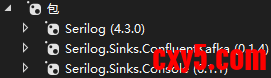
2)修改 Program.cs- using Confluent.Kafka;
- using Serilog;
- using Serilog.Formatting.Json;
- using Serilog.Sinks.Kafka;
- // 配置 Kafka Producer
- var kafkaConfig = new ProducerConfig
- {
- BootstrapServers = "localhost:9092",
- ClientId = "serilog-dotnet8-demo",
- Acks = Acks.All,
- EnableIdempotence = true,
- MessageTimeoutMs = 30000
- };
- // 配置 Serilog
- Log.Logger = new LoggerConfiguration()
- .MinimumLevel.Information()
- .WriteTo.Console() // 可选:同时输出到控制台
- .WriteTo.Kafka(
- topic: "my-logs-topic1212",
- null,
- producerConfig: kafkaConfig,
- formatter: new JsonFormatter() // 或自定义格式
- )
- .CreateLogger();
- // 测试日志
- Log.Information("应用程序启动成功");
- Log.Warning("用户 {UserId} 尝试了高风险操作", 123);
- Log.Error(new Exception("数据库连接失败"), "数据库错误");
- // 模拟业务
- for (int i = 1; i <= 3; i++)
- {
- Log.Information("处理任务 {TaskId},进度 {Progress:P}", i, i / 3.0);
- await Task.Delay(200);
- }
- // 确保日志发送完成
- Log.CloseAndFlush();
- Console.WriteLine("\n日志已发送到 Kafka 主题 'app-logs'。按任意键退出...");
- Console.ReadKey();
官方下载地址:https://www.rabbitmq.com/docs/install-windows#downloads。
下载 RabbitMQ Server Windows Installer (.exe)。例如:rabbitmq-server-4.2.1.exe。推荐使用 .exe 安装包(带图形界面和 Windows 服务),而非 .zip 压缩包。
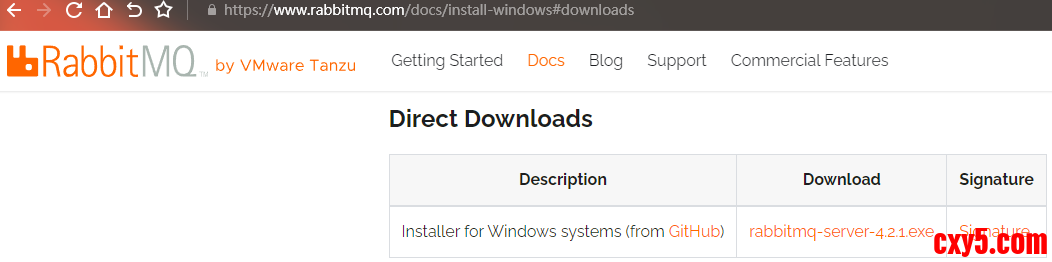
安装完成后,同样需要修改环境变量:
新增一个,RABBITMQ_SERVER:C:\Program Files\RabbitMQ Server。
追加 Path:%RABBITMQ_SERVER%\bin。
最后,验证是否安装成功。- # 使用命令查看
- .\bin\windows\kafka-console-consumer.bat --bootstrap-server localhost:9092 --topic <your-topic> --from-beginning
- # 【kafka-console-consumer.bat】
- # Kafka 自带的 命令行消费者工具(Console Consumer)
- # 【--bootstrap-server localhost:9092】
- # 指定 Kafka Broker 的连接地址(KRaft 模式下必需)
- # 格式:host:port,多个 Broker 用逗号分隔,如 host1:9092,host2:9092
- # 为什么叫 "bootstrap"?客户端只需连接其中一个 Broker,即可获取整个集群的元数据(包括所有 Topic、Partition 分布等),后续会直接与对应 Partition 的 Leader 通信
- # 【--topic <your-topic>】
- # 指定要消费的 Topic 名称,这里一次只能指定 一个 Topic
- # 【--from-beginning】
- # 从该 Topic 的最早消息(offset = 0)开始消费,而不是从最新位置开始
- # 【--property print.key=true】同时打印消息的 Key(默认只打印 Value)
- # 【--property print.timestamp=true】打印消息的时间戳(CreateTime 或 LogAppendTime)
- # 即使 Kafka 正确输出 UTF-8,Windows 控制台默认用 GBK 显示,仍会乱码
- # 在 PowerShell 或 CMD 中执行:
- chcp 65001 # 65001 是 UTF-8 的代码页
- # PowerShell 中设置环境变量后启动
- $env:KAFKA_OPTS="-Dfile.encoding=UTF-8"
- # 然后再重新运行 consumer 命令
- .\bin\windows\kafka-console-consumer.bat --bootstrap-server localhost:9092 --topic <your-topic> --from-beginning
注意:guest 用户默认只能从 localhost 登录,若需远程访问,需创建新用户并授权。
在 sbin 目录下可使用以下命令:
命令说明.\rabbitmqctl.bat status查看节点状态.\rabbitmqctl.bat list_users列出用户.\rabbitmqctl.bat add_user myuser mypass添加用户.\rabbitmqctl.bat set_user_tags myuser administrator设置用户为管理员.\rabbitmqctl.bat set_permissions -p / myuser ".*" ".*" ".*"授予 vhost / 的全部权限配置允许远程访问:- WARN Stopping serving logs in dir D:\kafka_2.13-4.1.1\data\kafka-logs (kafka.log.LogManager)
- ERROR Shutdown broker because all log dirs in D:\kafka_2.13-4.1.1\data\kafka-logs have failed (kafka.log.LogManager)
示例程序的目标:将日志信息通过 localhost guest 账号,推送到 amq.fanout 交换机。
1)创建项目并引入必要的包
创建一个基于 .net8 的控制台应用程序,并引入以下包:- C:\Windows\system32>erl
- Erlang/OTP 27 [erts-15.2.3] [source] [64-bit] [smp:20:20] [ds:20:20:10] [async-threads:1] [jit:ns]
- Eshell V15.2.3 (press Ctrl+G to abort, type help(). for help)
- 1>
- C:\Windows\system32>sc query RabbitMQ
- SERVICE_NAME: RabbitMQ
- TYPE : 10 WIN32_OWN_PROCESS
- STATE : 4 RUNNING
- (STOPPABLE, NOT_PAUSABLE, ACCEPTS_SHUTDOWN)
- WIN32_EXIT_CODE : 0 (0x0)
- SERVICE_EXIT_CODE : 0 (0x0)
- CHECKPOINT : 0x0
- WAIT_HINT : 0x0
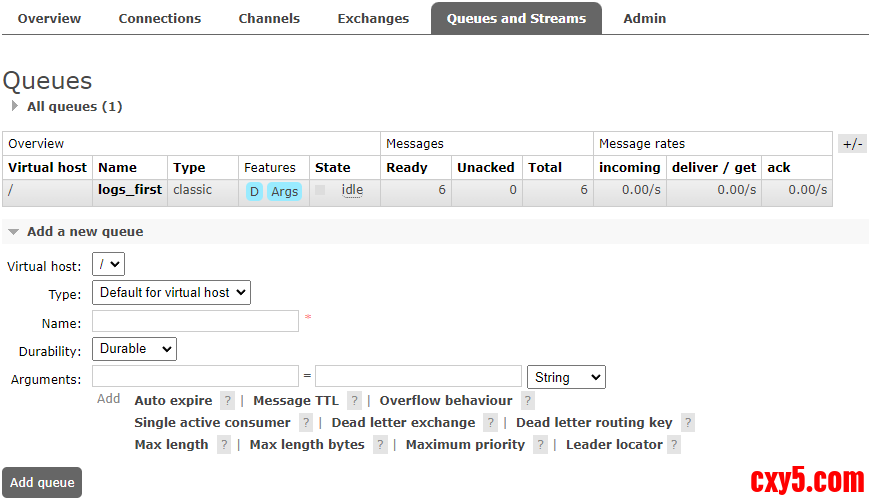
新增队列,填入 Name,然后其他默认,直接保存。
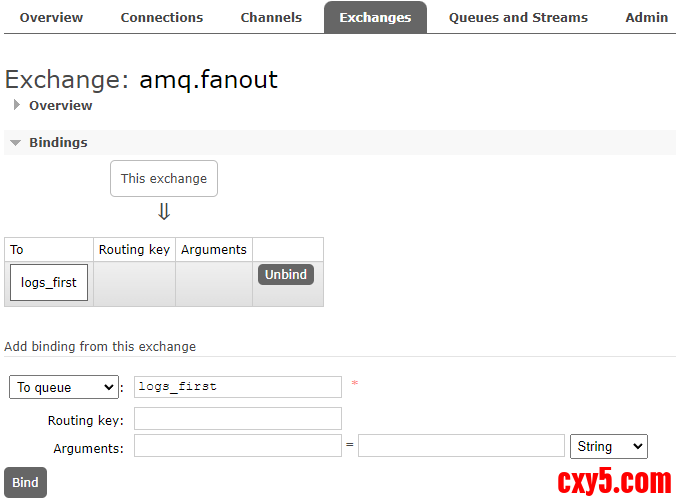
将新增的队列绑定到交换机 amq.fanout 中:(直接输入上一步新增的队列,点击 Bind)
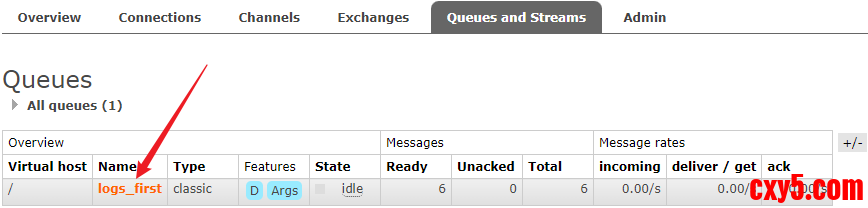
然后运行程序,查看队列中的消息,确认是否写入成功。
1.2.3 查看消息写入结果
点击队列名,进入队列的详细信息。
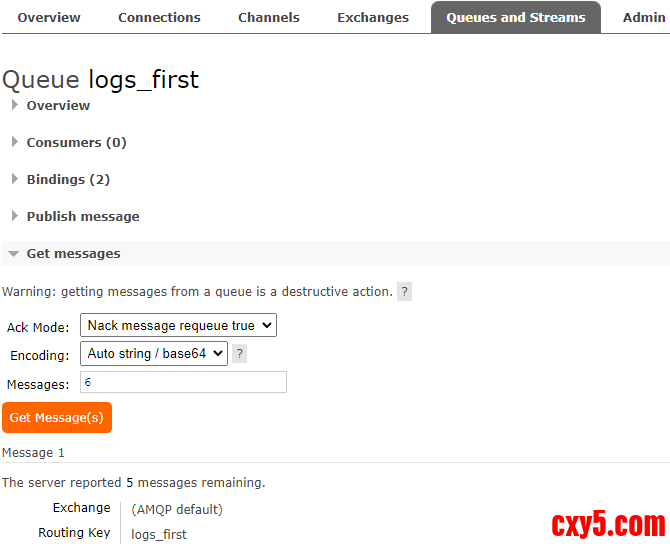
点击(Get Message(s))获取指定条数队列中的消息。
如下是消息的详细信息:- # 以管理员身份打开 命令提示符 或 PowerShell,执行(共两步):
- # 1)进入 RabbitMQ 安装目录的 sbin 文件夹(通常如下,版本号需要改成本地的)
- C:\Program Files\RabbitMQ Server>cd C:\Program Files\RabbitMQ Server\rabbitmq_server-4.2.1\sbin
- # 2)启用管理插件
- C:\Program Files\RabbitMQ Server\rabbitmq_server-4.2.1\sbin>.\rabbitmq-plugins.bat enable rabbitmq_management
- Enabling plugins on node rabbit@chengzijia:
- rabbitmq_management
- The following plugins have been configured:
- rabbitmq_management
- rabbitmq_management_agent
- rabbitmq_web_dispatch
- Applying plugin configuration to rabbit@chengzijia...
- The following plugins have been enabled:
- rabbitmq_management
- rabbitmq_management_agent
- rabbitmq_web_dispatch
- set 3 plugins.
- Offline change; changes will take effect at broker restart.
免责声明:如果侵犯了您的权益,请联系站长,我们会及时删除侵权内容,谢谢合作! |



 提升卡
提升卡 置顶卡
置顶卡 沉默卡
沉默卡 喧嚣卡
喧嚣卡 变色卡
变色卡 千斤顶
千斤顶 照妖镜
照妖镜


