前言
最近,不少技术圈的朋友都在讨论一个话题:Minio是不是开始收费了?
这背后其实涉及到一个更深刻的问题——开源许可证的商业化边界。
有些小伙伴在工作中可能已经遇到了这样的困惑:公司法务审查后,认为Minio的AGPLv3许可证在商业产品中使用存在风险,要求寻找替代方案。
今天就给大家推荐5种其他开源的分布式文件系统替代方案。
01 Minio许可证的“罗生门”
MinIO自2025年10月起实施以下关键变化:
- 停止免费Docker镜像分发:社区版不再提供预构建的Docker镜像,用户需从源码自行编译构建。
- 功能限制与移除:控制台管理功能被删除,仅保留基础存储能力。
- 社区版文档从官网移除,且不再接受新功能请求。
许可证策略收紧:从Apache 2.0协议转向AGPLv3许可证,强化对衍生作品的约束,若违反需购买商业授权。
首先,让我们明确一点:Minio的核心产品仍然是开源的,使用AGPLv3许可证。
但是,这里有几个关键细节需要理解:
AGPLv3许可证的“传染性”
AGPLv3(GNU Affero通用公共许可证第3版)有一个著名特性:“网络服务即分发”。
简单来说,如果你的服务通过网络提供基于AGPLv3代码的功能,那么你必须开源整个服务的源代码。- // 假设你基于Minio开发了一个文件管理服务
- public class FileManagementService {
- // 这段代码本身可能没问题...
- private MinioClient minioClient;
-
- public void processUserFile(UserFile file) {
- // 但是,如果你的整个服务基于AGPLv3代码
- // 根据严格解释,你可能需要开源整个项目
- minioClient.putObject(...);
- // 更多业务逻辑...
- }
- }
Minio公司确实提供了:
- 企业版:包含更多企业功能(如多站点复制、监控等)
- 商业许可证:允许在不开放源代码的情况下使用Minio
这使得很多公司面临选择:是接受AGPLv3的开源要求,还是购买商业许可证?
为什么这很重要?
如果你的公司属于以下情况之一,可能需要重新考虑Minio的使用:
- SaaS提供商:通过网络提供服务
- 专有软件开发商:不希望开源核心代码
- 对许可证合规性严格的企业:有专门的法务审查
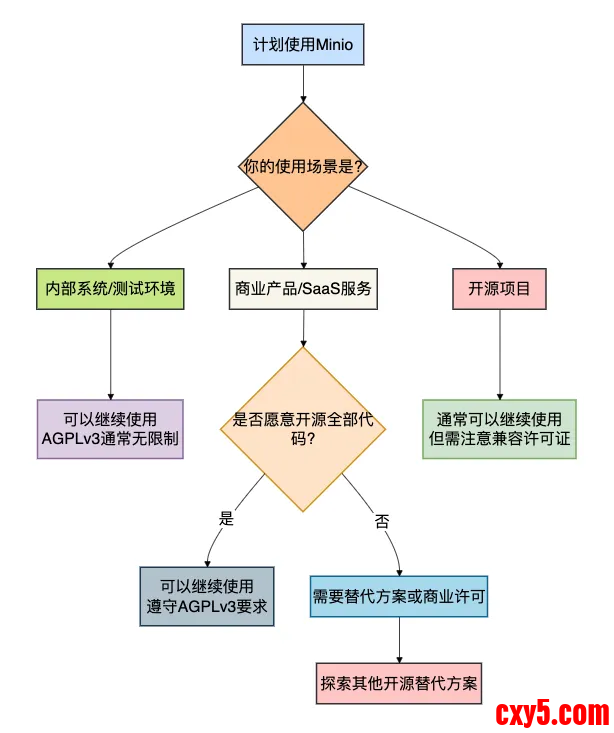
下面的决策流程图清晰地展示了这一困境:
接下来介绍的5个免费替代方案,可能会适合你。
02 SeaweedFS:极致简单的海量小文件专家
首先介绍的是我个人非常喜欢的SeaweedFS。
它最初是为小文件存储优化的,但现在已经成为功能全面的分布式文件系统。
核心优势
- 完全开源:Apache License 2.0(商业友好)
- 架构简单:学习曲线平缓
- 性能卓越:特别适合海量小文件场景
- S3兼容:提供完整的S3 API支持
部署示例:5分钟快速搭建
- # SeaweedFS的部署简单到令人惊讶
- # 1. 下载(只有一个二进制文件!)
- wget https://github.com/seaweedfs/seaweedfs/releases/download/3.55/linux_amd64.tar.gz
- tar -xzf linux_amd64.tar.gz
- # 2. 启动主服务器(管理元数据)
- ./weed master -ip=localhost -port=9333
- # 3. 启动存储节点
- ./weed volume -dir="./data" -max=100 -mserver="localhost:9333" -port=8080
- # 就是这么简单!现在你已经有了一个分布式文件系统
- // SeaweedFS的Java客户端使用示例
- public class SeaweedFSExample {
- // SeaweedFS提供S3兼容接口,可以使用标准的AWS SDK
- private AmazonS3 s3Client;
-
- public void init() {
- // 配置连接到SeaweedFS的Filer组件(提供S3接口)
- AWSCredentials credentials = new BasicAWSCredentials(
- "your-access-key", // SeaweedFS默认无需认证,但可以配置
- "your-secret-key"
- );
-
- s3Client = AmazonS3ClientBuilder.standard()
- .withEndpointConfiguration(
- new AwsClientBuilder.EndpointConfiguration(
- "http://localhost:8333", // Filer默认端口
- "us-east-1"
- )
- )
- .withCredentials(new AWSStaticCredentialsProvider(credentials))
- .withPathStyleAccessEnabled(true) // SeaweedFS需要此设置
- .build();
- }
-
- // 上传文件到SeaweedFS
- public void uploadFile(String bucketName, String objectKey, File file) {
- // 创建存储桶(如果需要)
- if (!s3Client.doesBucketExistV2(bucketName)) {
- s3Client.createBucket(bucketName);
- }
-
- // 上传文件
- s3Client.putObject(bucketName, objectKey, file);
-
- System.out.println("文件已上传至SeaweedFS");
- System.out.println("下载URL: http://localhost:8333/" + bucketName + "/" + objectKey);
- }
-
- // SeaweedFS特色功能:小文件合并存储
- public void uploadSmallFiles(List<File> smallFiles, String bucketName) {
- // SeaweedFS内部会自动将小文件合并存储
- // 这大大提高了海量小文件的存储效率
-
- for (int i = 0; i < smallFiles.size(); i++) {
- File file = smallFiles.get(i);
- String objectKey = "small-file-" + i + "-" + file.getName();
- s3Client.putObject(bucketName, objectKey, file);
- }
-
- System.out.println("已上传 " + smallFiles.size() + " 个小文件");
- System.out.println("SeaweedFS会自动优化这些文件的存储");
- }
- }
- 图片、文档等小文件存储服务
- 需要快速部署和验证的场景
- 对S3兼容性有要求的迁移项目
- 资源有限的团队或环境
为什么选择SeaweedFS替代Minio?
- 许可证更友好:Apache 2.0 vs AGPLv3
- 部署更简单:单二进制文件 vs 需要Docker或复杂配置
- 小文件性能更好:专门为小文件优化
- 社区活跃:持续更新和维护
03 Garage:专注于去中心化的新选择
Garage是一个相对较新但非常有潜力的分布式对象存储系统,源自法国国立计算机与自动化研究所(INRIA)。
核心特色
- 完全开源:Apache License 2.0
- 去中心化设计:无单点故障
- 轻量级:资源消耗少
- 兼容S3 API:完美替代Minio
集群部署示例
- # docker-compose.yml - 3节点Garage集群
- version: '3.8'
- services:
- garage1:
- image: dxflrs/garage:v0.9.0
- command: "garage server"
- environment:
- - GARAGE_NODE_NAME=node1
- - GARAGE_RPC_SECRET=my-secret-key
- - GARAGE_BIND_ADDR=0.0.0.0:3901
- - GARAGE_RPC_BIND_ADDR=0.0.0.0:3902
- - GARAGE_REPLICATION_MODE=3
- volumes:
- - ./data/garage1:/var/lib/garage
- ports:
- - "3901:3901"
- - "3902:3902"
-
- garage2:
- image: dxflrs/garage:v0.9.0
- command: "garage server"
- environment:
- - GARAGE_NODE_NAME=node2
- - GARAGE_RPC_SECRET=my-secret-key
- - GARAGE_BIND_ADDR=0.0.0.0:3901
- - GARAGE_RPC_BIND_ADDR=0.0.0.0:3902
- - GARAGE_SEED=garage1:3902
- volumes:
- - ./data/garage2:/var/lib/garage
-
- garage3:
- image: dxflrs/garage:v0.9.0
- command: "garage server"
- environment:
- - GARAGE_NODE_NAME=node3
- - GARAGE_RPC_SECRET=my-secret-key
- - GARAGE_BIND_ADDR=0.0.0.0:3901
- - GARAGE_RPC_BIND_ADDR=0.0.0.0:3902
- - GARAGE_SEED=garage1:3902
- volumes:
- - ./data/garage3:/var/lib/garage
- // Garage的Java客户端示例
- public class GarageExample {
- // Garage完全兼容S3 API,可以直接使用AWS SDK
- private AmazonS3 garageClient;
-
- public void initGarageConnection() {
- // Garage的配置与Minio非常相似
- AWSCredentials credentials = new BasicAWSCredentials(
- "GK...", // Garage生成的访问密钥
- "..." // 对应的秘密密钥
- );
-
- garageClient = AmazonS3ClientBuilder.standard()
- .withEndpointConfiguration(
- new AwsClientBuilder.EndpointConfiguration(
- "http://localhost:3900", // Garage的S3 API端口
- "garage" // 区域名称可自定义
- )
- )
- .withCredentials(new AWSStaticCredentialsProvider(credentials))
- .withPathStyleAccessEnabled(true)
- .build();
- }
-
- // 创建存储桶并设置策略
- public void createBucketWithPolicy(String bucketName) {
- // 创建存储桶
- garageClient.createBucket(bucketName);
-
- // Garage支持灵活的存储策略配置
- String bucketPolicy = """
- {
- "version": "2012-10-17",
- "statement": [
- {
- "effect": "Allow",
- "principal": "*",
- "action": "s3:GetObject",
- "resource": "arn:aws:s3:::%s/*"
- }
- ]
- }
- """.formatted(bucketName);
-
- garageClient.setBucketPolicy(bucketName, bucketPolicy);
-
- System.out.println("存储桶创建完成,已设置公开读取策略");
- }
-
- // 上传文件并生成访问URL
- public String uploadAndGenerateUrl(String bucketName,
- String objectKey,
- InputStream inputStream) {
- ObjectMetadata metadata = new ObjectMetadata();
- // 可以在这里设置内容类型等元数据
- metadata.setContentType("application/octet-stream");
-
- PutObjectRequest request = new PutObjectRequest(
- bucketName, objectKey, inputStream, metadata
- );
-
- garageClient.putObject(request);
-
- // 生成预签名URL(Garage支持此功能)
- java.util.Date expiration = new java.util.Date();
- long expTimeMillis = expiration.getTime();
- expTimeMillis += 1000 * 60 * 60; // 1小时有效期
- expiration.setTime(expTimeMillis);
-
- GeneratePresignedUrlRequest generatePresignedUrlRequest =
- new GeneratePresignedUrlRequest(bucketName, objectKey)
- .withMethod(HttpMethod.GET)
- .withExpiration(expiration);
-
- return garageClient.generatePresignedUrl(
- generatePresignedUrlRequest).toString();
- }
- }
- 去中心化应用或区块链项目
- 需要轻量级对象存储的场景
- 研究或教育项目
- 对新兴技术有兴趣的团队
04 Ceph:企业级的全能开源方案
Ceph是最知名、功能最全面的开源分布式存储系统之一。
虽然它比Minio复杂得多,但也强大得多。
为什么Ceph是真正的免费?
- 开源许可证:LGPL(较GPL更宽松)
- 社区驱动:由Red Hat支持但社区主导
- 无商业限制:可以自由用于商业产品
部署架构
Java客户端操作Ceph
- // 使用Ceph的S3兼容接口(RADOSGW)
- public class CephExample {
- private AmazonS3 cephClient;
-
- public void initCephConnection() {
- // Ceph通过RADOSGW提供S3兼容接口
- // 配置方式与AWS S3几乎完全相同
- AWSCredentials credentials = new BasicAWSCredentials(
- System.getenv("CEPH_ACCESS_KEY"),
- System.getenv("CEPH_SECRET_KEY")
- );
-
- cephClient = AmazonS3ClientBuilder.standard()
- .withCredentials(new AWSStaticCredentialsProvider(credentials))
- .withEndpointConfiguration(
- new AwsClientBuilder.EndpointConfiguration(
- "http://ceph-gateway.example.com:7480",
- "" // Ceph可以不指定区域
- )
- )
- .withPathStyleAccessEnabled(true)
- .build();
- }
-
- // Ceph的高级特性:多部分上传
- public void uploadLargeFileToCeph(String bucketName,
- String objectKey,
- File largeFile)
- throws Exception {
-
- // 初始化多部分上传
- InitiateMultipartUploadRequest initRequest =
- new InitiateMultipartUploadRequest(bucketName, objectKey);
- InitiateMultipartUploadResult initResponse =
- cephClient.initiateMultipartUpload(initRequest);
- String uploadId = initResponse.getUploadId();
-
- // 分片上传(Ceph可以处理非常大的文件)
- long fileSize = largeFile.length();
- long partSize = 100 * 1024 * 1024; // 100MB分片
- long bytePosition = 0;
- List<PartETag> partETags = new ArrayList<>();
- int partNumber = 1;
-
- try (FileInputStream fis = new FileInputStream(largeFile)) {
- while (bytePosition < fileSize) {
- long currentPartSize = Math.min(partSize, fileSize - bytePosition);
-
- UploadPartRequest uploadRequest = new UploadPartRequest()
- .withBucketName(bucketName)
- .withKey(objectKey)
- .withUploadId(uploadId)
- .withPartNumber(partNumber)
- .withInputStream(fis)
- .withPartSize(currentPartSize);
-
- UploadPartResult uploadResult = cephClient.uploadPart(uploadRequest);
- partETags.add(uploadResult.getPartETag());
-
- bytePosition += currentPartSize;
- partNumber++;
- }
-
- // 完成上传
- CompleteMultipartUploadRequest compRequest =
- new CompleteMultipartUploadRequest(
- bucketName, objectKey, uploadId, partETags);
- cephClient.completeMultipartUpload(compRequest);
-
- } catch (Exception e) {
- // 发生错误时中止上传
- cephClient.abortMultipartUpload(
- new AbortMultipartUploadRequest(bucketName, objectKey, uploadId));
- throw e;
- }
- }
-
- // Ceph特有的功能:获取存储使用情况
- public void checkCephUsage() {
- // 注意:Ceph不通过S3 API提供使用统计
- // 需要通过管理API或命令行获取
- System.out.println("Ceph使用统计需通过以下方式获取:");
- System.out.println("1. 命令行: ceph df");
- System.out.println("2. 管理API: /api/auth");
- System.out.println("3. Dashboard: 内置Web界面");
- }
- }
- 大型企业存储需求
- 需要同时支持对象、块和文件存储
- 已经有一定运维能力的团队
- 对可靠性和扩展性要求极高的场景
05 GlusterFS:简单可靠的横向扩展文件系统
GlusterFS是一个开源的分布式横向扩展文件系统,特别适合需要POSIX文件系统语义的场景。
核心优势
- 开源许可证:GPLv3(但无AGPL的网络服务条款)
- 无元数据服务器:独特的无中心架构
- 部署简单:易于理解和维护
- 成熟稳定:经过多年生产验证
快速部署脚本
- #!/bin/bash
- # GlusterFS 3节点集群快速部署脚本
- # 在三个节点上执行类似命令
- # 节点1:
- gluster peer probe node2
- gluster peer probe node3
- # 创建分布式卷(数据分散在所有节点)
- gluster volume create gv0 disperse 3 node1:/data/brick1 node2:/data/brick1 node3:/data/brick1
- # 或创建复制卷(数据在所有节点复制)
- gluster volume create gv1 replica 3 node1:/data/brick2 node2:/data/brick2 node3:/data/brick2
- # 启动卷
- gluster volume start gv0
- gluster volume start gv1
- # 在客户端挂载
- mount -t glusterfs node1:/gv0 /mnt/glusterfs
- // 通过标准的Java文件API访问GlusterFS
- public class GlusterFSExample {
- private Path glusterMountPoint;
-
- public GlusterFSExample(String mountPath) {
- this.glusterMountPoint = Paths.get(mountPath);
-
- // 验证挂载点
- if (!Files.exists(glusterMountPoint)) {
- throw new IllegalArgumentException("GlusterFS挂载点不存在: " + mountPath);
- }
-
- System.out.println("GlusterFS挂载点: " + mountPoint.toAbsolutePath());
- }
-
- // 写入文件 - GlusterFS自动处理数据分布
- public void writeFile(String filename, String content) throws IOException {
- Path filePath = glusterMountPoint.resolve(filename);
-
- // 创建父目录(如果需要)
- if (filePath.getParent() != null) {
- Files.createDirectories(filePath.getParent());
- }
-
- // 写入文件
- Files.write(filePath,
- content.getBytes(StandardCharsets.UTF_8),
- StandardOpenOption.CREATE,
- StandardOpenOption.WRITE,
- StandardOpenOption.TRUNCATE_EXISTING);
-
- System.out.println("文件已写入GlusterFS: " + filePath);
- }
-
- // 读取文件
- public String readFile(String filename) throws IOException {
- Path filePath = glusterMountPoint.resolve(filename);
-
- if (Files.exists(filePath)) {
- byte[] content = Files.readAllBytes(filePath);
- return new String(content, StandardCharsets.UTF_8);
- }
-
- return null;
- }
-
- // 列出目录内容
- public List<String> listFiles(String directory) throws IOException {
- Path dirPath = glusterMountPoint.resolve(directory);
-
- if (Files.exists(dirPath) && Files.isDirectory(dirPath)) {
- try (Stream<Path> stream = Files.list(dirPath)) {
- return stream
- .filter(Files::isRegularFile)
- .map(Path::getFileName)
- .map(Path::toString)
- .collect(Collectors.toList());
- }
- }
-
- return Collections.emptyList();
- }
-
- // 获取文件信息
- public void printFileInfo(String filename) throws IOException {
- Path filePath = glusterMountPoint.resolve(filename);
-
- if (Files.exists(filePath)) {
- BasicFileAttributes attrs = Files.readAttributes(
- filePath, BasicFileAttributes.class);
-
- System.out.println("文件: " + filename);
- System.out.println("大小: " + attrs.size() + " 字节");
- System.out.println("创建时间: " + attrs.creationTime());
- System.out.println("修改时间: " + attrs.lastModifiedTime());
- System.out.println("访问时间: " + attrs.lastAccessTime());
- }
- }
- }
- 需要标准文件系统接口的应用
- 媒体处理、日志存储等场景
- 已有大量基于文件API的遗留系统
- 希望避免学习新API的团队
06 OpenStack Swift:企业级对象存储标准
OpenStack Swift是OpenStack生态中的对象存储组件,是一个完全开源、高度可扩展的对象存储系统。
开源承诺
- 完全开源:Apache License 2.0
- 社区治理:由OpenStack基金会管理
- 无商业限制:真正的自由使用
Swift集群架构
- # 简化的Swift集群配置示例
- # swift.conf - 主要配置文件
- [swift-hash]
- # 随机hash种子,集群中所有节点必须相同
- swift_hash_path_prefix = changeme
- swift_hash_path_suffix = changeme
- [storage-policy:0]
- name = Policy-0
- default = yes
- # ring文件 - 数据分布配置
- # 使用swift-ring-builder工具管理
- $ swift-ring-builder account.builder create 10 3 24
- $ swift-ring-builder container.builder create 10 3 24
- $ swift-ring-builder object.builder create 10 3 24
- # 添加存储节点
- $ swift-ring-builder object.builder add r1z1-127.0.0.1:6010/sdb1 100
- $ swift-ring-builder object.builder rebalance
- // 使用jclouds库访问OpenStack Swift
- public class SwiftExample {
- private BlobStore blobStore;
-
- public void initSwiftConnection() {
- // 配置Swift连接
- Properties overrides = new Properties();
- overrides.setProperty("jclouds.swift.auth.version", "3");
-
- // Swift支持多种认证方式
- SwiftApi swiftApi = ContextBuilder.newBuilder("openstack-swift")
- .endpoint("http://swift.example.com:5000/v3")
- .credentials("project:username", "password")
- .overrides(overrides)
- .buildApi(SwiftApi.class);
-
- blobStore = swiftApi.getBlobStore("RegionOne");
- }
-
- // 上传对象到Swift
- public String uploadToSwift(String containerName,
- String objectName,
- InputStream data,
- long size) {
-
- // 确保容器存在
- if (!blobStore.containerExists(containerName)) {
- blobStore.createContainerInLocation(null, containerName);
- }
-
- // 创建Blob对象
- Blob blob = blobStore.blobBuilder(objectName)
- .payload(data)
- .contentLength(size)
- .contentType("application/octet-stream")
- .build();
-
- // 上传
- String etag = blobStore.putBlob(containerName, blob);
-
- System.out.println("对象上传成功,ETag: " + etag);
-
- // 生成临时URL(Swift支持此功能)
- return generateTempUrl(containerName, objectName);
- }
-
- private String generateTempUrl(String container, String object) {
- // Swift支持通过临时URL共享对象
- // 这里需要Swift集群配置了临时URL密钥
- long expires = System.currentTimeMillis() / 1000 + 3600; // 1小时后过期
-
- // 临时URL生成逻辑(实际实现更复杂)
- return String.format(
- "http://swift.example.com:8080/v1/AUTH_%s/%s/%s?temp_url_sig=xxx&temp_url_expires=%d",
- "account", container, object, expires
- );
- }
-
- // 大对象分片上传(Swift称为"静态大对象")
- public void uploadLargeObject(String container,
- String objectName,
- List<File> segments) {
-
- // 上传所有分片
- List<String> segmentPaths = new ArrayList<>();
- for (int i = 0; i < segments.size(); i++) {
- String segmentName = String.format("%s/%08d", objectName, i);
- try (InputStream is = new FileInputStream(segments.get(i))) {
- uploadToSwift(container, segmentName, is, segments.get(i).length());
- segmentPaths.add(String.format("/%s/%s", container, segmentName));
- } catch (IOException e) {
- throw new RuntimeException("分片上传失败", e);
- }
- }
-
- // 创建清单文件
- String manifest = String.join("\n", segmentPaths);
- try (InputStream is = new ByteArrayInputStream(manifest.getBytes())) {
- blobStore.putBlob(container,
- blobStore.blobBuilder(objectName)
- .payload(is)
- .contentLength(manifest.length())
- .contentType("text/plain")
- .build());
- } catch (IOException e) {
- throw new RuntimeException("清单文件创建失败", e);
- }
-
- System.out.println("大对象上传完成,共 " + segments.size() + " 个分片");
- }
- }
- OpenStack云环境
- 需要高持久性保证的企业应用
- 多地域复制需求
- 已有OpenStack基础设施的团队
07 综合对比与选型指南
现在我们已经了解了5个Minio的免费替代方案。
如何选择最适合你的那个?
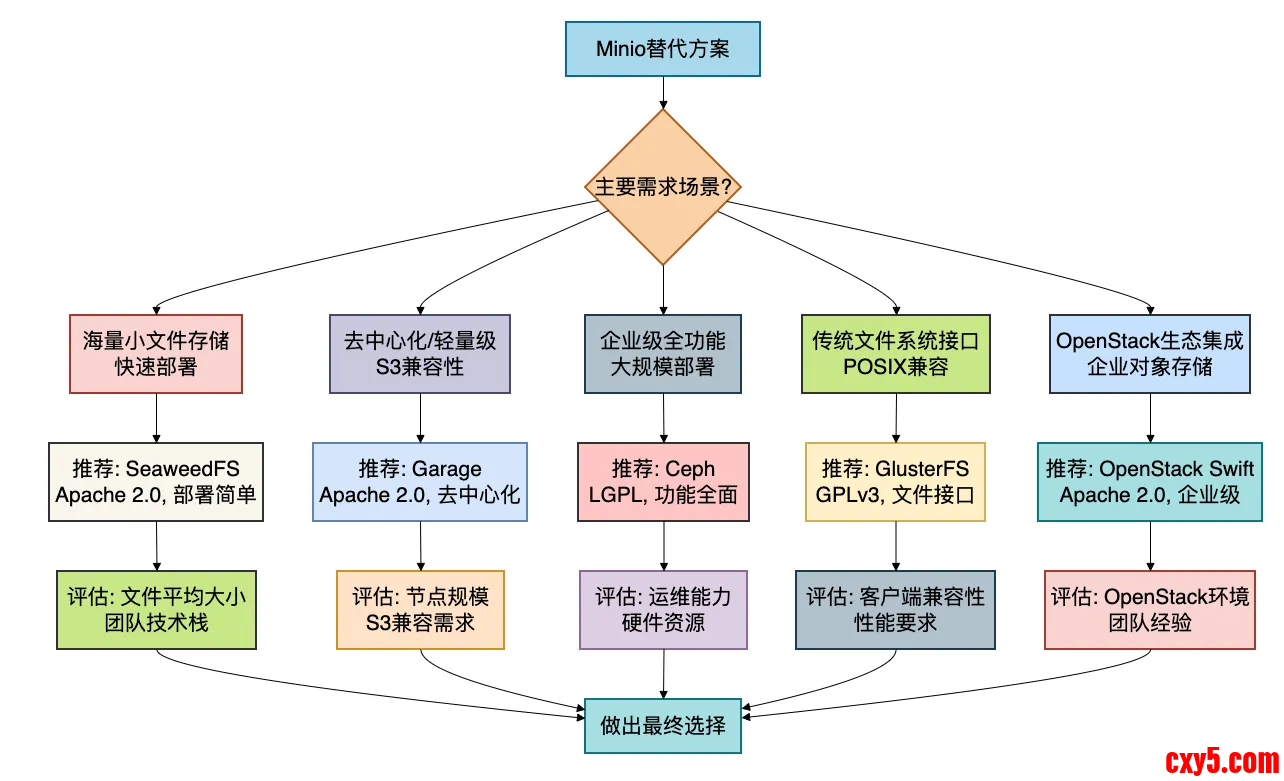
下面的对比表格和决策指南可以帮助你:
详细对比表
特性SeaweedFSGarageCephGlusterFSOpenStack Swift许可证Apache 2.0Apache 2.0LGPLGPLv3Apache 2.0部署复杂度⭐☆☆☆☆ (极简)⭐⭐☆☆☆ (简单)⭐⭐⭐⭐⭐ (复杂)⭐⭐⭐☆☆ (中等)⭐⭐⭐⭐☆ (较复杂)S3兼容性完全兼容完全兼容通过RADOSGW通过第三方原生支持文件系统支持有限无CephFS原生POSIX无适用规模中小规模中小规模超大规模中大规模大规模小文件性能⭐⭐⭐⭐⭐⭐⭐⭐☆☆⭐⭐⭐☆☆⭐⭐☆☆☆⭐⭐⭐⭐☆大文件性能⭐⭐⭐☆☆⭐⭐⭐⭐☆⭐⭐⭐⭐⭐⭐⭐⭐⭐☆⭐⭐⭐⭐⭐运维要求低低高中中高总结
有些小伙伴在工作中可能会因为Minio的许可证变化而感到焦虑,但实际上,开源世界给了我们丰富的选择。
关键是要根据你的具体需求做出明智的决策:
- 如果你是小型团队或创业公司,需要快速部署且主要处理小文件,SeaweedFS是最佳选择。
- 如果你在构建去中心化应用或需要极简架构,Garage值得考虑。
- 如果你有企业级需求,需要同时支持对象、块和文件存储,Ceph是行业标准。
- 如果你需要标准的文件系统接口,并且希望迁移简单,GlusterFS非常合适。
- 如果你已经在OpenStack环境中或需要企业级对象存储,OpenStack Swift是最佳选择。
记住,技术选型的核心原则是:没有最好的系统,只有最适合的系统。
许可证只是考量的一个方面,你还需要考虑性能需求、团队技能、运维成本等多个因素。
最后说一句(求关注,别白嫖我)
如果这篇文章对您有所帮助,或者有所启发的话,帮忙关注一下我的同名公众号:苏三说技术,您的支持是我坚持写作最大的动力。
求一键三连:点赞、转发、在看。
关注公众号:【苏三说技术】,在公众号中回复:进大厂,可以免费获取我最近整理的10万字的面试宝典,好多小伙伴靠这个宝典拿到了多家大厂的offer。
更多项目实战在我的技术网站:http://www.susan.net.cn/project
来源:程序园用户自行投稿发布,如果侵权,请联系站长删除
免责声明:如果侵犯了您的权益,请联系站长,我们会及时删除侵权内容,谢谢合作! |



 提升卡
提升卡 置顶卡
置顶卡 沉默卡
沉默卡 喧嚣卡
喧嚣卡 变色卡
变色卡 千斤顶
千斤顶 照妖镜
照妖镜


