背景
在日常使用AI进行开发和工作中,经常遇到以下场景:
- AI修改代码后发现改错了,想回退到之前的版本
- AI上下文溢出导致文件被删除或内容被清空
- 重要文档被AI误删或误改,找不到历史版本
虽然 Git 可以解决代码版本问题,但是实际工作中是不可能将每次修改都commit,不仅费时费力而且不规范,此时需要一个更轻量的解决方案。
FileBackupGuardian 就是为解决这些问题而设计的桌面应用,它可以:
- 实时监听指定目录的文件变更
- 自动创建备份,保留修改前后两个版本
- 提供差异对比功能,直观查看修改内容
- 支持一键恢复到任意历史版本
技术选型
类别技术选择理由桌面框架Electron 29跨平台支持,生态成熟前端框架Vue 3 + TypeScript组合式 API,类型安全状态管理Pinia轻量,与 Vue 3 深度集成构建工具Vite 5开发体验好,构建速度快文件监听@parcel/watcher性能优异,原生支持递归监听差异计算diff-match-patchGoogle 开源,算法成熟核心功能实现
1. 实时文件监听
文件监听是整个应用的核心。使用 @parcel/watcher 替代 Node.js 原生的 fs.watch,因为它:
- 基于 native 实现,性能更好
- 支持递归监听,无需手动遍历子目录
- 事件去重机制,避免重复触发
- // watcher-manager.tsimport * as parcelWatcher from '@parcel/watcher';async startWatching(watchPath: WatchPath): Promise { const subscription = await parcelWatcher.subscribe( watchRoot, async (error, events) => { if (error) { this.updateStatus(watchPath.id, { error: error.message }); return; } await this.handleParcelEvents(watchPath, events); } ); this.watchers.set(watchPath.id, subscription);}
这是本工具的特色功能。当文件被修改时,我们需要:
- 变更前备份:在文件写入前,保存原始内容
- 变更后备份:文件写入完成后,保存新版本
这样用户可以对比任意修改前后差异,而不仅仅是对比当前版本和备份版本。
实现的关键是利用文件内容缓存:- // 使用 LRU 缓存存储文件内容(100MB)private fileContentCache = new LRUCache(100 * 1024 * 1024);// 文件变更前,从缓存获取原始内容private async handleFileChange(filePath, watchPathId, eventType) { if (eventType === 'change') { const cachedContent = this.fileContentCache.get(filePath); if (cachedContent) { // 使用缓存内容创建"变更前备份" await this.backupManager.createBackupWithContent(filePath, cachedContent); } } // 文件变更后,创建"变更后备份" await this.backupManager.createPostChangeBackup(filePath, preBackupId);}
大文件的差异计算和文件计数是耗时操作,如果在主线程执行会阻塞 UI。使用 Worker 线程来解决:- // worker-manager.tsasync computeDiff(originalContent: string, backupContent: string) { return new Promise((resolve, reject) => { const worker = new Worker(this.workerPath, { workerData: { type: 'diff', originalContent, backupContent } }); worker.on('message', (message) => { if (message.type === 'result') { resolve(message.diffs); worker.terminate(); } }); });}
恢复文件后,文件系统会触发变更事件,可能导致产生冗余备份。通过标记机制来防止:- // backup-manager.tsasync restoreBackup(backupId: string, targetPath?: string): Promise { const destination = path.normalize(targetPath || record.originalPath); // 标记文件为正在恢复状态 this.restoringFiles.add(destination); // 记录到最近恢复列表,用于延迟窗口内的跳过 this.recentlyRestoredFiles.set(destination, { timestamp: Date.now() }); try { await fs.copy(record.backupPath, destination, { overwrite: true }); } finally { this.restoringFiles.delete(destination); }}// 检查是否应该跳过备份shouldSkipBackup(filePath: string): boolean { if (this.restoringFiles.has(filePath)) return true; const restoredInfo = this.recentlyRestoredFiles.get(filePath); if (restoredInfo && Date.now() - restoredInfo.timestamp < this.restoreSkipWindow) { return true; } return false;}
Electron 的安全模型要求渲染进程不能直接访问 Node.js API。通过 preload 脚本暴露安全的 API:- // preload.tsconst electronAPI = { watcher: { addPath: (path: string, recursive?: boolean) => ipcRenderer.invoke(IPC_CHANNELS.WATCHER_ADD_PATH, path, recursive), getStatus: () => ipcRenderer.invoke(IPC_CHANNELS.WATCHER_GET_STATUS), onStatusUpdate: (callback) => { ipcRenderer.on(IPC_CHANNELS.WATCHER_STATUS_UPDATE, callback); return () => ipcRenderer.removeListener(...); }, }, backup: { getList: (originalPath?: string) => ipcRenderer.invoke(IPC_CHANNELS.BACKUP_GET_LIST, originalPath), restore: (backupId: string) => ipcRenderer.invoke(IPC_CHANNELS.BACKUP_RESTORE, backupId), }, compare: { pairedBackups: (preBackupId: string) => ipcRenderer.invoke(IPC_CHANNELS.COMPARE_PAIRED_BACKUPS, preBackupId), },};contextBridge.exposeInMainWorld('electronAPI', electronAPI);
- // CompareView.vueconst result = await window.electronAPI.compare.pairedBackups(preBackupId);if (result.success) { compareResult.value = result.data.compareResult;}
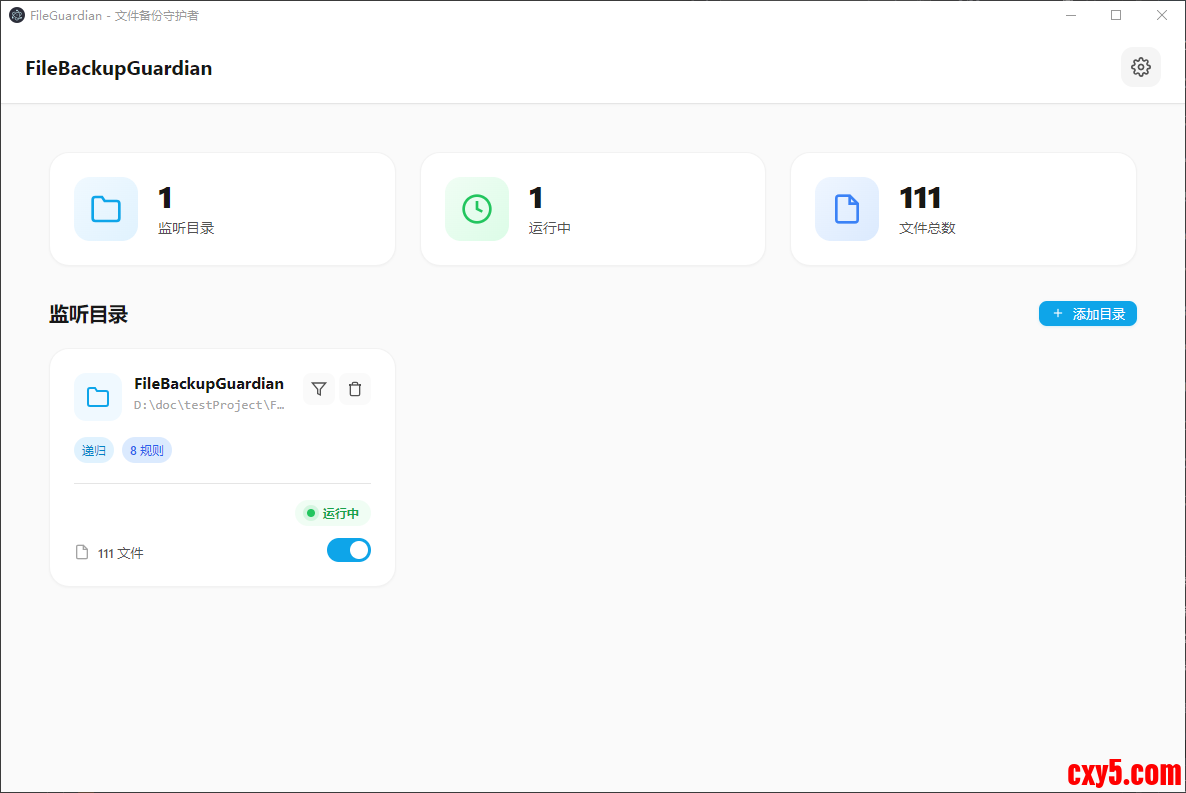
应用包含四个主要页面:
监听管理页面
- 显示监听目录统计(目录数、运行中、文件总数)
- 支持添加/删除监听目录
- 配置忽略规则(扩展名、文件名、文件夹、正则)
文件跟踪页面
- 显示指定文件夹的备份历史
- 按时间分组显示备份记录
- 支持搜索过滤、批量恢复
对比页面
- 显示备份对列表(修改前/修改后)
- 并排显示两个版本的代码差异
- 高亮新增、删除、未变更的行
- 支持跳转到差异位置
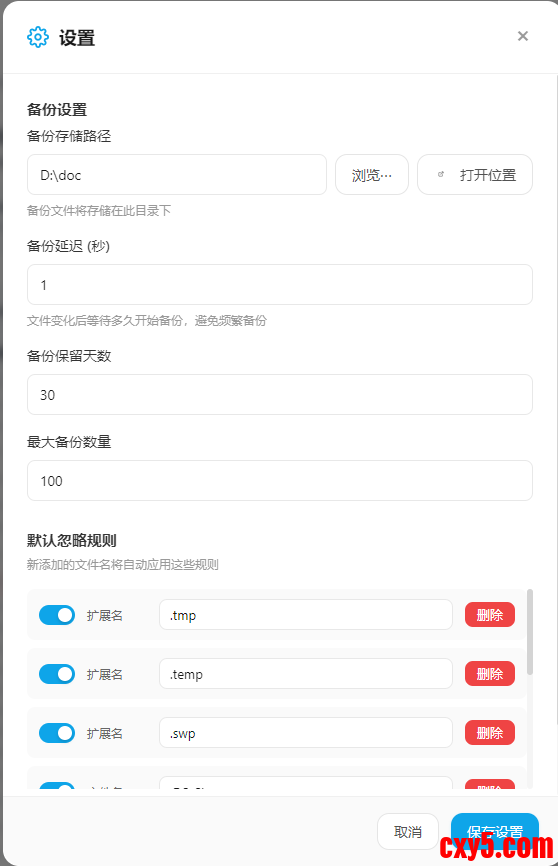
设置页面
- 配置备份路径、延迟时间、保留天数
- 查看和导出操作日志
打包配置支持:
- Windows:NSIS 安装器 + 便携版
- macOS:DMG + ZIP
- Linux:AppImage + deb
总结
FileBackupGuardian 是一个功能完善的文件备份工具,主要特点:
- 双版本备份:保留修改前后两个版本,完整记录变更历史
- 实时监听:基于 @parcel/watcher 的高性能文件监听
- Worker 优化:耗时操作在后台线程执行,保持界面流畅
- 恢复防循环:智能跳过恢复触发的备份事件
- 跨平台支持:一次开发,支持 Windows、macOS、Linux
项目地址:https://github.com/jclown/FileBackupGuardian ,欢迎 Star 和贡献代码!
来源:程序园用户自行投稿发布,如果侵权,请联系站长删除
免责声明:如果侵犯了您的权益,请联系站长,我们会及时删除侵权内容,谢谢合作! |




 提升卡
提升卡 置顶卡
置顶卡 沉默卡
沉默卡 喧嚣卡
喧嚣卡 变色卡
变色卡 千斤顶
千斤顶 照妖镜
照妖镜


