手搓shellcode
为什么要用c语言搓个shellcode出来,为什么不用msfvenom?因为这玩意生成的shellcode是基于winsocket的,注进去还要启动个监听,我仅仅想要验证一下可行性而已,不如自己搓个弹出messagebox版本的shellcode
环境
windows 11,amd64, 编译器用的x64 Native Tools Command Prompt for VS 2022(MSVC)
原理
要写一个能在 Windows 上的 Shellcode,最大的挑战在于 PIC(Position Independent Code,位置无关代码)。你不能硬编码 API 的地址(因为重启或不同机器上地址会变),也不能直接引用数据段的字符串和全局变量,全局变量依赖重定位表,Shellcode 没有这东西。所有数据必须在栈(Stack)上。更不能用库函数,因为代码没有导入表(IAT)。
我们以 弹出MessageBox为例,需要解决四个主要问题:
- 找到 kernel32.dll 的基地址
- 在 kernel32 中找到 GetProcAddress 和 LoadLibraryA 的地址
- 使用 LoadLibraryA 加载 user32.dll(MessageBox 在这里面)
- 解析出 MessageBoxA 的地址并调用
1.找 kernel32.dll 的基地址
我们利用 TEB (Thread Environment Block) 和 PEB (Process Environment Block) 来查找。
_WIN64 和 32 位使用不同的寄存器:64 位:gs:[0x60]32 位:fs:[0x30]
获取 PEB后,找到peb下的Ldr,再获取InMemoryOrderModuleList。链表顺序通常是: .exe -> ntdll.dll -> kernel32.dll. LDR_DATA_TABLE_ENTRY 结构体比较复杂,但在 InMemoryOrderLinks 偏移处 DllBase 通常在 entry 之后特定的偏移位置。 可以利用CONTAINING_RECORD的技巧或者直接偏移计算。- HMODULE GetKernel32() {
- #ifdef _WIN64
- PEB *peb = (PEB*)__readgsqword(0x60);
- #else
- PEB *peb = (PEB*)__readfsdword(0x30);
- #endif
- PEB_LDR_DATA *ldr = peb->Ldr;
- LIST_ENTRY *head = &ldr->InMemoryOrderModuleList;
- LIST_ENTRY *entry = head->Flink;
- entry = entry->Flink;
- entry = entry->Flink;
-
- LDR_DATA_TABLE_ENTRY *ldrEntry = CONTAINING_RECORD(entry, LDR_DATA_TABLE_ENTRY, InMemoryOrderLinks);
- return (HMODULE)ldrEntry->DllBase;
- }
获取 DOS Header 和 NT Header。从 OptionalHeader.DataDirectory 获取导出表 RVA。然后获取三个主要数组的地址(addressOfFunctions、addressOfNames、addressOfNameOrdinals),遍历 AddressOfNames 找函数名。使用 ordinals 和 AddressOfFunctions 得到函数实际地址。
其实就是等价于 Windows API 的 GetProcAddress,但是自己实现了,不依赖任何导入表。- FARPROC MyGetProcAddress(HMODULE hModule, const char *lpProcName) {
- PIMAGE_DOS_HEADER dos = (PIMAGE_DOS_HEADER)hModule;
- PIMAGE_NT_HEADERS nt = (PIMAGE_NT_HEADERS)((BYTE*)hModule + dos->e_lfanew);
- DWORD exportDirRVA = nt->OptionalHeader.DataDirectory[IMAGE_DIRECTORY_ENTRY_EXPORT].VirtualAddress;
- if (exportDirRVA == 0) return NULL;
- PIMAGE_EXPORT_DIRECTORY exportDir = (PIMAGE_EXPORT_DIRECTORY)((BYTE*)hModule + exportDirRVA);
- DWORD *names = (DWORD*)((BYTE*)hModule + exportDir->AddressOfNames);
- WORD *ordinals = (WORD*)((BYTE*)hModule + exportDir->AddressOfNameOrdinals);
- DWORD *funcs = (DWORD*)((BYTE*)hModule + exportDir->AddressOfFunctions);
- for (DWORD i = 0; i < exportDir->NumberOfNames; i++) {
- char *name = (char*)((BYTE*)hModule + names[i]);
- if (MyStrCmp(name, lpProcName) == 0) {
- WORD ordinal = ordinals[i];
- return (FARPROC)((BYTE*)hModule + funcs[ordinal]);
- }
- }
- return NULL;
- }
- int MyStrCmp(const char *s1, const char *s2) {
- while (*s1 && (*s1 == *s2)) {
- s1++;
- s2++;
- }
- return *(const unsigned char*)s1 - *(const unsigned char*)s2;
- }
首先函数名和 DLL 名手动写成 char 数组,避免直接引用字符串。获取 Kernel32 基址,再获取 GetProcAddress 函数指针、获取 LoadLibraryA 和 ExitProcess 函数指针,就可以加载 user32.dll, 获取 MessageBoxA 函数指针了- void EntryPoint() {
- char sLoadLib[] = {'L','o','a','d','L','i','b','r','a','r','y','A',0};
- char sGetProc[] = {'G','e','t','P','r','o','c','A','d','d','r','e','s','s',0};
- char sExit[] = {'E','x','i','t','P','r','o','c','e','s','s',0};
- char sUser32[] = {'u','s','e','r','3','2','.','d','l','l',0};
- char sMsgBox[] = {'M','e','s','s','a','g','e','B','o','x','A',0};
- char sText[] = {'H','e','l','l','o',' ','F','r','o','m',' ','C',0};
- char sTitle[] = {'T','e','s','t','.',0};
- HMODULE hKernel32 = GetKernel32();
- P_GetProcAddress pGetProcAddress = (P_GetProcAddress)MyGetProcAddress(hKernel32, sGetProc);
- if (!pGetProcAddress) return;
- P_LoadLibraryA pLoadLibraryA = (P_LoadLibraryA)pGetProcAddress(hKernel32, sLoadLib);
- P_ExitProcess pExitProcess = (P_ExitProcess)pGetProcAddress(hKernel32, sExit);
- HMODULE hUser32 = pLoadLibraryA(sUser32);
- P_MessageBoxA pMessageBoxA = (P_MessageBoxA)pGetProcAddress(hUser32, sMsgBox);
- if (pMessageBoxA) {
- pMessageBoxA(NULL, sText, sTitle, MB_OK);
- }
- if (pExitProcess) {
- pExitProcess(0);
- }
- }
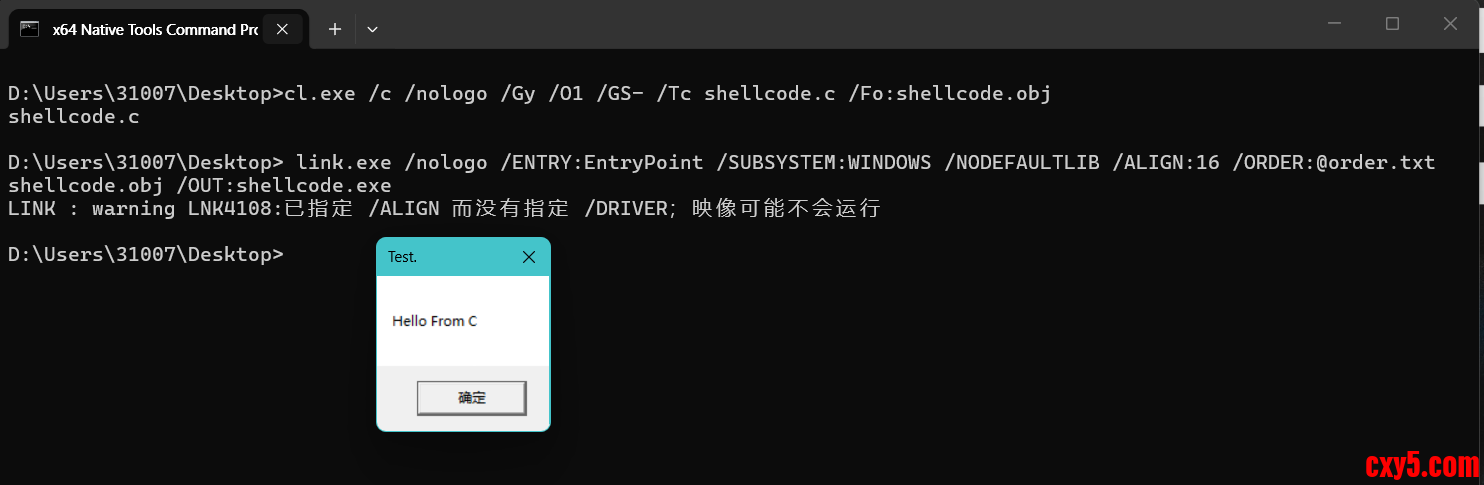
编译shellcode,这里建议开启O1优化把函数内联进去- cl.exe /c /nologo /Gy /O1 /GS- /Tc shellcode.c /Fo:shellcode.obj
- link.exe /nologo /ENTRY:EntryPoint /SUBSYSTEM:WINDOWS /NODEFAULTLIB /ALIGN:16 /ORDER:@order.txt shellcode.obj /OUT:shellcode.exe
我采用的顺序如下:- EntryPoint
- GetKernel32
- MyGetProcAddress
- MyStrCmp
这里虽然error但是其实在用户态,shellcode.exe就已经可以执行了
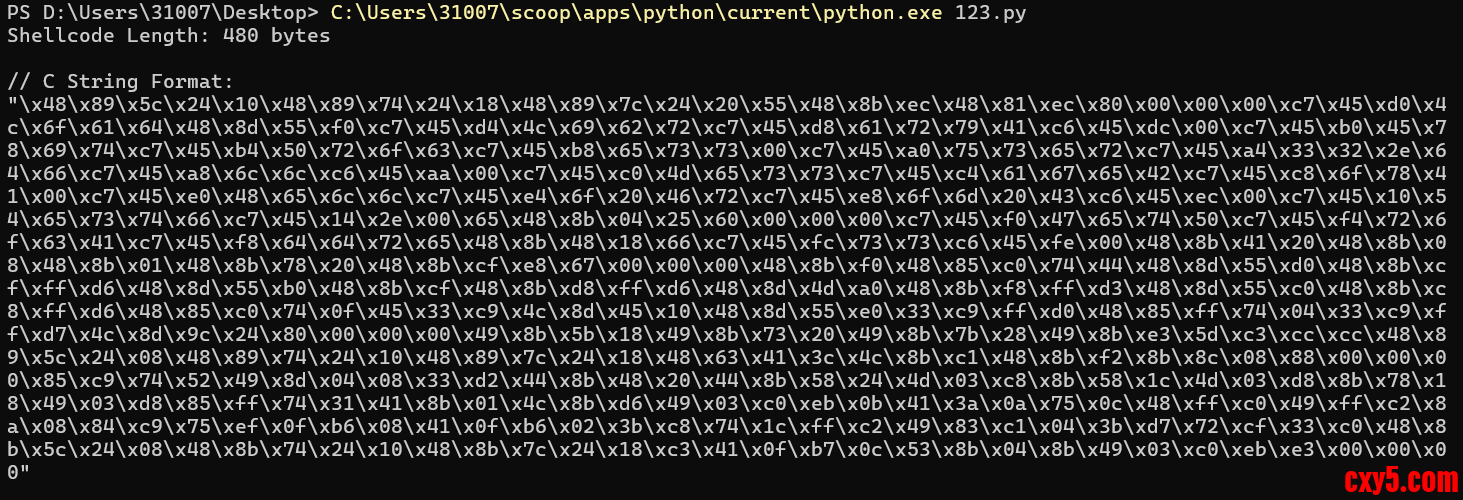
然后把shellcode.exe的.text段抠出来,这里我们用python比较方便- import pefile
- import os
- def extract_shellcode(file_path, out_file="shellcode.bin"):
- try:
- pe = pefile.PE(file_path)
- except FileNotFoundError:
- print(f"Error: File '{file_path}' not found!")
- return
- except pefile.PEFormatError as e:
- print(f"Error: Invalid PE file: {e}")
- return
-
- shellcode = b""
- for section in pe.sections:
- if b".text" in section.Name:
- shellcode = section.get_data()
- break
-
- if not shellcode:
- print("Error: .text section not found!")
- return
-
- print(f"Shellcode Length: {len(shellcode)} bytes\n")
-
- c_array = ''.join(f"\\x{byte:02x}" for byte in shellcode)
- print(f"// C String Format:\n"{c_array}"")
-
- print("\n// Hex Format:")
- print(shellcode.hex())
-
- try:
- with open(out_file, "wb") as f:
- f.write(shellcode)
- print(f"\nShellcode written to '{out_file}'")
- except Exception as e:
- print(f"Error writing shellcode to file: {e}")
- if __name__ == "__main__":
- exe_path = "shellcode.exe"
- out_path = "shellcode.bin"
- extract_shellcode(exe_path, out_path)
就得到了hex串
执行
然后简单写个加载器试试
[code]#include #include #include int main() { unsigned char shellcode[] = ""; void* exec_mem = VirtualAlloc(0, sizeof(shellcode), MEM_COMMIT | MEM_RESERVE, PAGE_READWRITE); if (exec_mem == NULL) { std::cerr |


 提升卡
提升卡 置顶卡
置顶卡 沉默卡
沉默卡 喧嚣卡
喧嚣卡 变色卡
变色卡 千斤顶
千斤顶 照妖镜
照妖镜


