AI Agent框架探秘:拆解 OpenHands(11)--- Runtime主要组件
目录
- AI Agent框架探秘:拆解 OpenHands(11)--- Runtime主要组件
- 0x00 概要
- 0x01 三大组件
- 0x02 数据流
- 0x03 插件系统
- 3.1 sandbox_plugins
- sandbox_plugins 的定义和作用
- 具体插件功能
- 插件在系统中的使用
- 3.2 Plugin 基类
- 3.3 JupyterPlugin
- 3.4 AgentSkillsPlugin
- 功能概述
- 核心特色
- AgentSkillsRequirement
- 框架注册与技能发现
- 流程图
- 代码
- 0x04 执行系统
- 4.1 调用
- 4.2action_execution_client.py
- 4.3 action_execution_server.py
- 4.4 流程图
- 4.5 代码
- 0x05 环境
- 5.1 调用
- 5.2 核心特色
- 5.3 流程图
- 5.4 代码
- 0xFF 参考
0x00 概要
本篇继续对 runtime 的解读,主要介绍 插件、执行系统和环境这三个组件。
因为本系列借鉴的文章过多,可能在参考文献中有遗漏的文章,如果有,还请大家指出。
0x01 三大组件
本篇要介绍的几个组件如下:
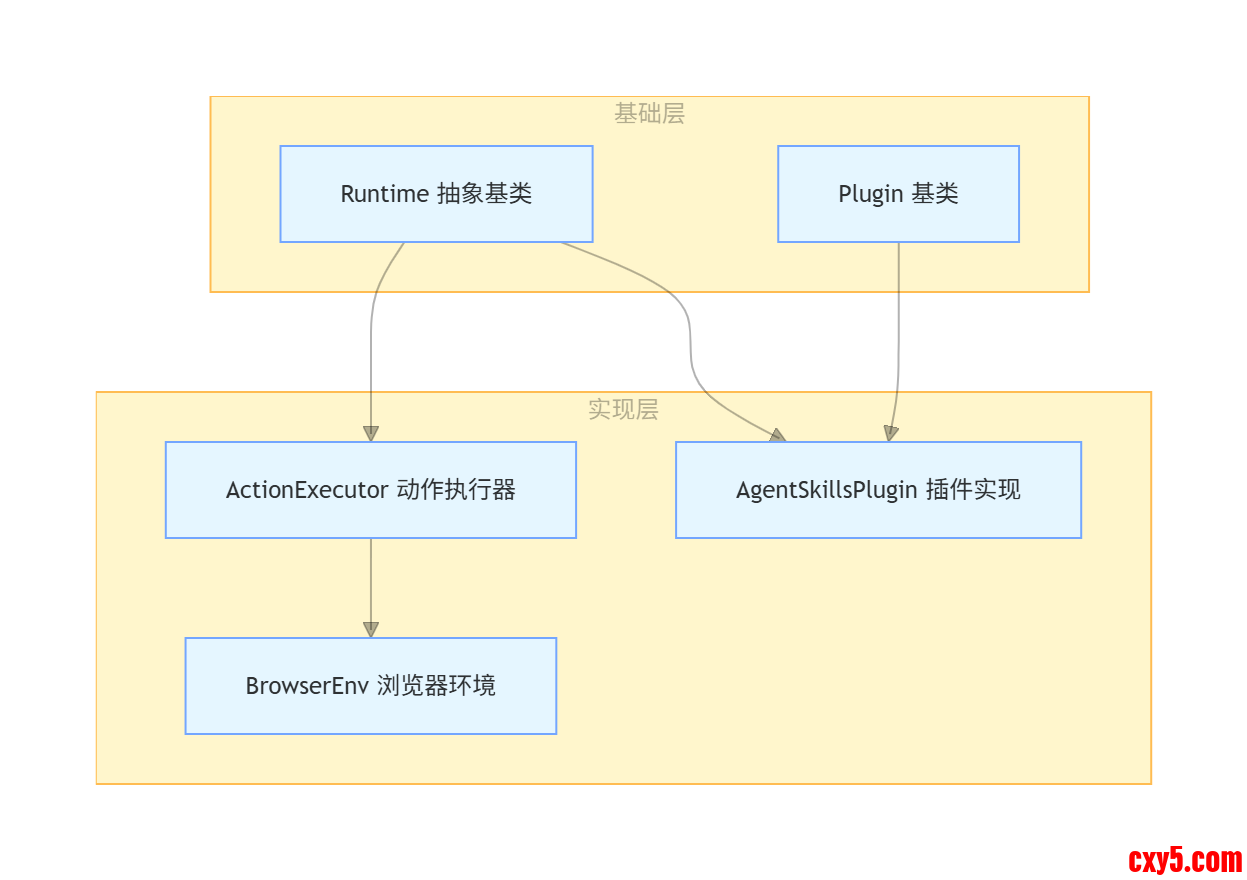
- ActionExecutor:在 Runtime 中执行动作的核心组件
- ActionExecutor 初始化时会根据配置加载指定的插件。插件注册到 ActionExecutor 的插件字典。
- 当接收到动作请求时,ActionExecutor 会调用相应的方法执行动作。
- 对于浏览动作,ActionExecutor 会使用 BrowserEnv 来处理。
- 如果涉及插件,ActionExecutor 会通过插件系统处理
- AgentSkillsPlugin:提供智能体技能功能的插件
- AgentSkillsPlugin 是一个插件,继承自 Plugin 基类。
- Runtime 初始化时,插件会被加载到插件字典中。 插件通过 PluginRequirement 机制被注册到系统中。
- 特定动作触发时调用相应插件功能。
- BrowserEnv:浏览器环境封装,使用 BrowserGym 库。
- ActionExecutor 在初始化时根据配置决定是否启用浏览器环境。
- 当需要执行浏览相关的动作时,ActionExecutor 会调用 BrowserEnv 的方法。
- BrowserEnv 运行在一个独立的多进程环境中。
0x02 数据流
Runtime 的数据流如下:
- Runtime 会发起动作请求 → ActionExecutor.run_action()
- ActionExecutor 根据动作类型调用相应的处理方法;
- 如果涉及插件,通过插件系统处理;
- 如果涉及浏览器,调用 BrowserEnv 处理;
- 返回观察结果给智能体。
0x03 插件系统
Runtime会遇到如下问题:新增模块(如自定义工具、新 LLM 模型)时,需修改核心代码,扩展性差;多任务并发执行时,模块间交互频繁,易出现性能瓶颈;框架部署与运维复杂,难以适配不同环境(本地、云端、边缘端)。
因此,业界大多采用微服务架构或插件化设计,模块间通过标准化接口通信,新增功能只需开发插件并注册。
3.1 sandbox_plugins
sandbox_plugins 在 OpenHands 的 CodeActAgent 中起到了关键作用,主要用于定义和配置代理在沙箱环境中可以使用的工具和功能。这些插件是代理能够与环境交互并完成任务的基础工具集。
sandbox_plugins 的定义和作用
在 CodeActAgent 类中,sandbox_plugins 是一个类属性,定义了代理在沙箱环境中需要的插件:- sandbox_plugins: list[PluginRequirement] = [
- AgentSkillsRequirement(),
- JupyterRequirement(),
- ]
具体插件功能
AgentSkillsRequirement 和 JupyterRequirement 是两个插件需求类。
- AgentSkillsRequirement:提供了一系列 Python 函数和工具,使代理能够执行各种操作,包括文件操作、目录浏览、代码执行等基本技能。需要在 JupyterRequirement 之前初始化,因为 Jupyter 需要使用这些函数。
- JupyterRequirement:提供了交互式 Python 解释器环境,允许代理执行 Python 代码,依赖于 AgentSkillsRequirement 提供的函数。
插件在系统中的使用
从代码中可以看出,这些插件在多个地方被使用:
- # 在 agent_session.py 中
- self.runtime = runtime_cls(
- plugins=agent.sandbox_plugins,
- )
- # 在 base.py 中
- self.plugins = copy.deepcopy(plugins) if plugins is not None and len(plugins) > 0 else []
- 执行 Bash 命令:通过 AgentSkills 中的命令执行功能
- 执行 Python 代码:通过 Jupyter 插件提供 IPython 环境
- 文件系统操作:读取、写入、编辑文件
- 目录浏览:查看和导航文件系统
- 其他实用工具:各种辅助函数和工具
我们接下来具体分析基类Plugin,AgentSkillsRequirement 和 JupyterPlugin
3.2 Plugin 基类
- class Plugin:
- """Base class for a plugin.
- This will be initialized by the runtime client, which will run inside docker.
- """
- name: str
- @abstractmethod
- async def initialize(self, username: str) -> None:
- """Initialize the plugin."""
- pass
- @abstractmethod
- async def run(self, action: Action) -> Observation:
- """Run the plugin for a given action."""
- pass
- @dataclass
- class PluginRequirement:
- """Requirement for a plugin."""
- name: str
- ALL_PLUGINS = {
- 'jupyter': JupyterPlugin,
- 'agent_skills': AgentSkillsPlugin,
- 'vscode': VSCodePlugin,
- }
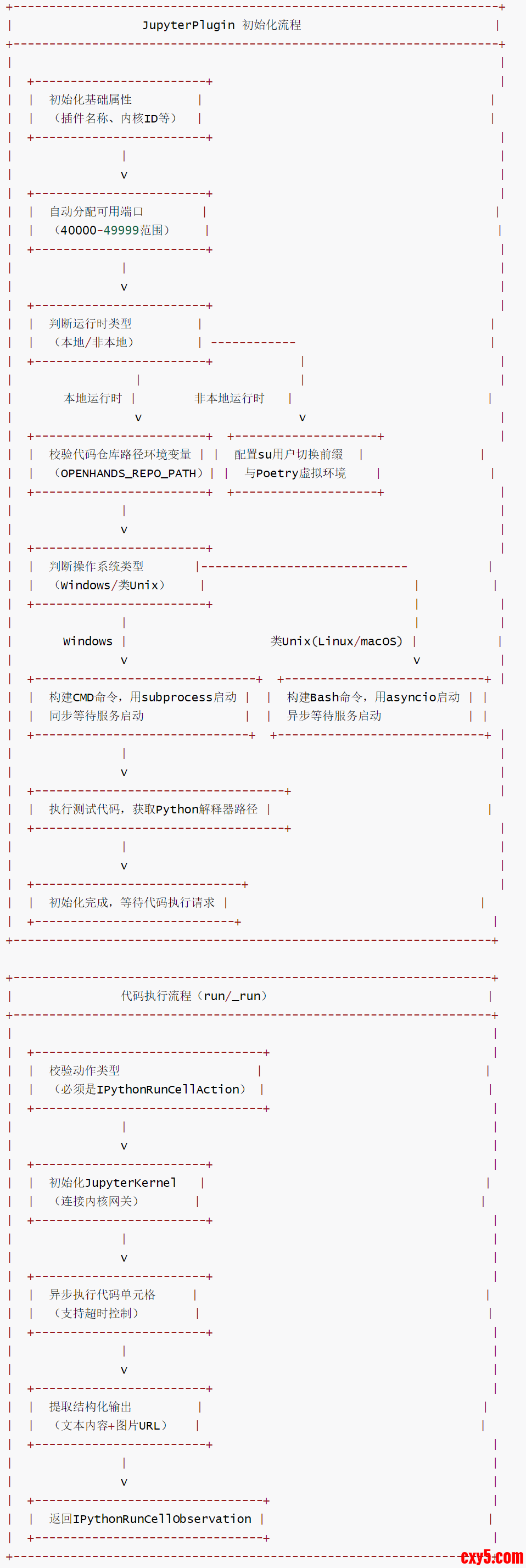
JupyterPlugin 是 OpenHands 框架中的 Jupyter 内核插件,基于 Plugin 基类实现,核心职责是启动 Jupyter Kernel Gateway(内核网关)服务,提供 IPython 代码单元格的异步执行能力,支持代码运行、输出捕获(文本 / 图片)及 Python 解释器路径获取,是框架中集成交互式数据分析、代码调试等 Jupyter 相关功能的核心组件。
核心特色
- 跨平台适配:兼容 Windows、Linux、macOS 系统,针对不同系统采用差异化的进程启动方式(Windows 用 subprocess.Popen,类 Unix 用 asyncio.create_subprocess_shell)。
- 灵活的运行时支持:区分本地运行时(LocalRuntime)与非本地运行时,适配不同部署场景(如沙箱环境、本地开发环境),自动处理工作目录与环境变量配置。
- 端口自动分配:在 40000-49999 端口范围内自动查找可用 TCP 端口,避免端口冲突。
- 异步代码执行:基于 JupyterKernel 封装异步代码执行逻辑,支持超时控制,能捕获文本输出与图片 URL 等结构化结果。
- 环境隔离与兼容:通过 micromamba 虚拟环境或本地环境变量确保依赖一致性,支持 Poetry 项目的路径配置,适配 OpenHands 框架的工程化部署。
流程图
代码
[code]@dataclassclass JupyterRequirement(PluginRequirement): """Jupyter插件的依赖声明类,用于框架识别插件依赖。""" name: str = 'jupyter' # 依赖名称,固定为'jupyter'class JupyterPlugin(Plugin): """Jupyter插件,提供Jupyter Kernel Gateway启动与IPython代码执行能力。""" name: str = 'jupyter' # 插件名称,固定为'jupyter' kernel_gateway_port: int # Jupyter Kernel Gateway服务端口 kernel_id: str # Jupyter内核ID gateway_process: asyncio.subprocess.Process | subprocess.Popen # 内核网关进程对象 python_interpreter_path: str # Python解释器路径 async def initialize( self, username: str, kernel_id: str = 'openhands-default' ) -> None: """初始化Jupyter插件,启动Kernel Gateway服务,配置运行环境。 参数: username: 执行用户名称(非本地运行时使用) kernel_id: Jupyter内核ID(默认:openhands-default) """ # 在40000-49999端口范围内查找可用TCP端口,避免冲突 self.kernel_gateway_port = find_available_tcp_port(40000, 49999) self.kernel_id = kernel_id # 判断是否为本地运行时(通过环境变量LOCAL_RUNTIME_MODE标记) is_local_runtime = os.environ.get('LOCAL_RUNTIME_MODE') == '1' # 判断是否为Windows系统 is_windows = sys.platform == 'win32' if not is_local_runtime: # 非本地运行时:配置用户切换前缀与Poetry虚拟环境 # 若启用SU_TO_USER,则添加"su - 用户名 -s "前缀(切换用户执行命令) prefix = f'su - {username} -s ' if SU_TO_USER else '' # 命令前缀:切换到代码仓库目录,配置环境变量,使用micromamba虚拟环境 poetry_prefix = ( 'cd /openhands/code\n' 'export POETRY_VIRTUALENVS_PATH=/openhands/poetry;\n' 'export PYTHONPATH=/openhands/code PYTHONPATH;\n' 'export MAMBA_ROOT_PREFIX=/openhands/micromamba;\n' '/openhands/micromamba/bin/micromamba run -n openhands ' ) else: # 本地运行时:无需用户切换,直接使用本地环境 prefix = '' # 从环境变量获取代码仓库路径(本地运行时必须配置) code_repo_path = os.environ.get('OPENHANDS_REPO_PATH') if not code_repo_path: raise ValueError( 'OPENHANDS_REPO_PATH environment variable is not set. ' 'This is required for the jupyter plugin to work with LocalRuntime.' ) # 命令前缀:切换到代码仓库目录(本地环境依赖PATH确保环境正确) poetry_prefix = f'cd {code_repo_path}\n' if is_windows: # Windows系统:构建CMD格式的启动命令 jupyter_launch_command = ( f'cd /d "{code_repo_path}" && ' # 切换到代码仓库目录(/d参数支持跨盘符切换) f'"{sys.executable}" -m jupyter kernelgateway ' # 启动Jupyter Kernel Gateway '--KernelGatewayApp.ip=0.0.0.0 ' # 绑定所有网络接口 f'--KernelGatewayApp.port={self.kernel_gateway_port}' # 指定端口 ) # Windows系统使用同步subprocess.Popen启动进程(asyncio在Windows有兼容性限制) self.gateway_process = subprocess.Popen( # type: ignore[ASYNC101] # noqa: ASYNC101 jupyter_launch_command, stdout=subprocess.PIPE, # 捕获标准输出 stderr=subprocess.STDOUT, # 标准错误重定向到标准输出 shell=True, # 使用shell执行命令 text=True, # 输出以文本模式返回 ) # Windows系统同步等待Kernel Gateway启动(读取输出直到包含'at'字符,标识服务就绪) output = '' while should_continue(): if self.gateway_process.stdout is None: time.sleep(1) # 无输出时等待1秒 continue line = self.gateway_process.stdout.readline() # 读取一行输出 if not line: time.sleep(1) continue output += line if 'at' in line: # 服务启动成功的标识(输出含"at",如"Listening at...") break time.sleep(1) else: # 类Unix系统(Linux/macOS):构建Bash格式的启动命令 jupyter_launch_command = ( f"{prefix}/bin/bash PYTHONPATH;\n' 'export MAMBA_ROOT_PREFIX=/openhands/micromamba;\n' '/openhands/micromamba/bin/micromamba run -n openhands ' ) else: # 本地运行时:无需用户切换,直接使用本地环境 prefix = '' # 从环境变量获取代码仓库路径(本地运行时必须配置) code_repo_path = os.environ.get('OPENHANDS_REPO_PATH') if not code_repo_path: raise ValueError( 'OPENHANDS_REPO_PATH environment variable is not set. ' 'This is required for the jupyter plugin to work with LocalRuntime.' ) # 命令前缀:切换到代码仓库目录(本地环境依赖PATH确保环境正确) poetry_prefix = f'cd {code_repo_path}\n' if is_windows: # Windows系统:构建CMD格式的启动命令 jupyter_launch_command = ( f'cd /d "{code_repo_path}" && ' # 切换到代码仓库目录(/d参数支持跨盘符切换) f'"{sys.executable}" -m jupyter kernelgateway ' # 启动Jupyter Kernel Gateway '--KernelGatewayApp.ip=0.0.0.0 ' # 绑定所有网络接口 f'--KernelGatewayApp.port={self.kernel_gateway_port}' # 指定端口 ) # Windows系统使用同步subprocess.Popen启动进程(asyncio在Windows有兼容性限制) self.gateway_process = subprocess.Popen( # type: ignore[ASYNC101] # noqa: ASYNC101 jupyter_launch_command, stdout=subprocess.PIPE, # 捕获标准输出 stderr=subprocess.STDOUT, # 标准错误重定向到标准输出 shell=True, # 使用shell执行命令 text=True, # 输出以文本模式返回 ) # Windows系统同步等待Kernel Gateway启动(读取输出直到包含'at'字符,标识服务就绪) output = '' while should_continue(): if self.gateway_process.stdout is None: time.sleep(1) # 无输出时等待1秒 continue line = self.gateway_process.stdout.readline() # 读取一行输出 if not line: time.sleep(1) continue output += line if 'at' in line: # 服务启动成功的标识(输出含"at",如"Listening at...") break time.sleep(1) else: # 类Unix系统(Linux/macOS):构建Bash格式的启动命令 jupyter_launch_command = ( f"{prefix}/bin/bash |


 提升卡
提升卡 置顶卡
置顶卡 沉默卡
沉默卡 喧嚣卡
喧嚣卡 变色卡
变色卡 千斤顶
千斤顶 照妖镜
照妖镜


