前言
大家好,我是苏三。
今天跟大家聊一下很多小伙伴都比较关心的话题:如何设计一个扛住千万级流量的系统?
这个话题无论在面试,还是在实际工作中,都非常常见。
今天这篇文章就专门跟大家聊聊这个问题,希望对你会有所帮助。
01 三个关键点
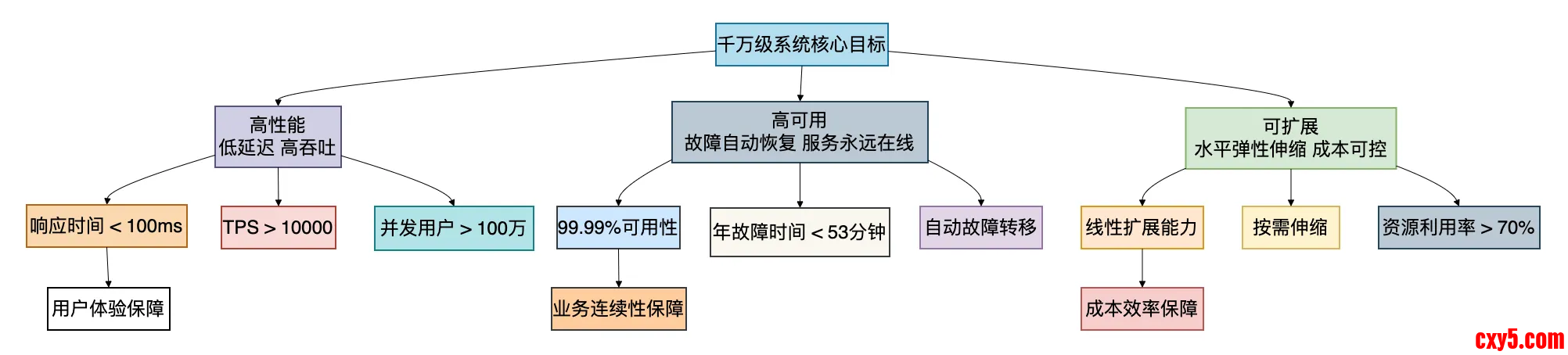
在深入技术细节前,我们先要明确设计千万级系统的核心目标。
记住这三个关键点:
1. 高性能:不是简单追求快,而是要在保证正确性的前提下,用有限的资源处理尽可能多的请求。我们的目标是核心接口P99响应时间低于100毫秒,单机QPS不低于5000。
2. 高可用:系统需要具备故障自愈能力。我们追求的是“两个9”打底,“三个9”起步,“四个9”努力的目标(即99.99%可用性,全年不可用时间不超过53分钟)。
3. 可扩展:系统要能随着业务增长而平滑扩展,且扩展成本要可控。这里包括水平扩展(加机器)和垂直扩展(优化单机性能)两个维度。
02 架构演进:从单体到千万级的四步走
让我们从一个最简单的电商系统开始,看看它是如何一步步演进到支撑千万级流量的。
阶段一:单机单体架构(日请求 /proc/sys/net/ipv4/conf/lo/arp_ignoreecho "2" > /proc/sys/net/ipv4/conf/lo/arp_announceecho "1" > /proc/sys/net/ipv4/conf/all/arp_ignoreecho "2" > /proc/sys/net/ipv4/conf/all/arp_announce# LVS Director配置ipvsadm -A -t 192.168.1.100:80 -s wrripvsadm -a -t 192.168.1.100:80 -r 192.168.1.10:8080 -g -w 1ipvsadm -a -t 192.168.1.100:80 -r 192.168.1.11:8080 -g -w 2[/code]七层负载均衡(Nginx/API网关)
- // 最简单的Spring Boot单体应用
- @SpringBootApplication
- @RestController
- public class MonolithicApp {
-
- @Autowired
- private ProductService productService;
-
- @Autowired
- private OrderService orderService;
-
- @GetMapping("/product/{id}")
- public Product getProduct(@PathVariable Long id) {
- return productService.getById(id);
- }
-
- @PostMapping("/order")
- public Order createOrder(@RequestBody OrderRequest request) {
- return orderService.createOrder(request);
- }
-
- public static void main(String[] args) {
- SpringApplication.run(MonolithicApp.class, args);
- }
- }
- // 商品服务 - 独立部署
- @SpringBootApplication
- @RestController
- @RequestMapping("/product")
- public class ProductServiceApp {
-
- @GetMapping("/{id}")
- public Product getProduct(@PathVariable Long id) {
- // 直接查询数据库
- return productRepository.findById(id).orElse(null);
- }
- }
- // 订单服务 - 独立部署
- @SpringBootApplication
- @RestController
- @RequestMapping("/order")
- public class OrderServiceApp {
-
- @PostMapping("/")
- public Order createOrder(@RequestBody OrderRequest request) {
- // 通过HTTP调用商品服务
- Product product = restTemplate.getForObject(
- "http://product-service/product/" + request.getProductId(),
- Product.class
- );
- // 创建订单逻辑
- return orderRepository.save(order);
- }
- }
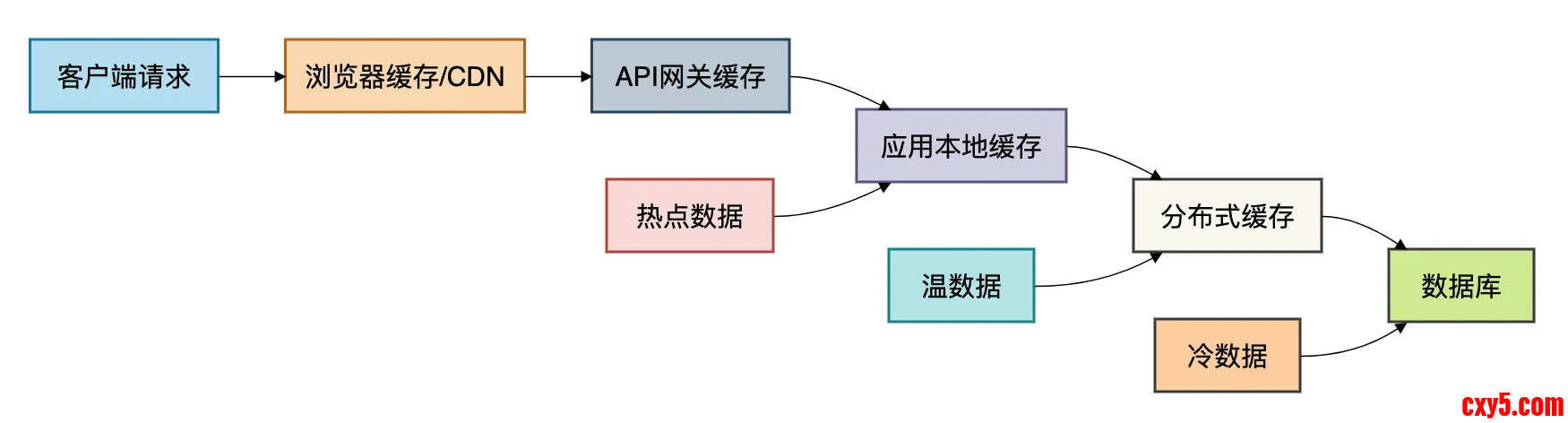
缓存是提升系统性能最有效的手段之一。千万级系统需要设计智能的多级缓存策略。
四级缓存架构
1. 本地缓存(Caffeine)
- # Kubernetes部署配置文件示例
- apiVersion: apps/v1
- kind: Deployment
- metadata:
- name: product-service
- spec:
- replicas: 3 # 3个实例
- selector:
- matchLabels:
- app: product-service
- template:
- metadata:
- labels:
- app: product-service
- spec:
- containers:
- - name: product-service
- image: product-service:latest
- resources:
- limits:
- memory: "512Mi"
- cpu: "500m"
- readinessProbe: # 就绪探针
- httpGet:
- path: /actuator/health
- port: 8080
- initialDelaySeconds: 30
- periodSeconds: 10
- livenessProbe: # 存活探针
- httpGet:
- path: /actuator/health
- port: 8080
- initialDelaySeconds: 60
- periodSeconds: 10
- ---
- apiVersion: v1
- kind: Service
- metadata:
- name: product-service
- spec:
- selector:
- app: product-service
- ports:
- - port: 80
- targetPort: 8080
- type: ClusterIP
- # LVS DR模式配置示例
- # 真实服务器配置回环接口
- ifconfig lo:0 192.168.1.100 netmask 255.255.255.255 up
- route add -host 192.168.1.100 dev lo:0
- # 配置ARP抑制
- echo "1" > /proc/sys/net/ipv4/conf/lo/arp_ignore
- echo "2" > /proc/sys/net/ipv4/conf/lo/arp_announce
- echo "1" > /proc/sys/net/ipv4/conf/all/arp_ignore
- echo "2" > /proc/sys/net/ipv4/conf/all/arp_announce
- # LVS Director配置
- ipvsadm -A -t 192.168.1.100:80 -s wrr
- ipvsadm -a -t 192.168.1.100:80 -r 192.168.1.10:8080 -g -w 1
- ipvsadm -a -t 192.168.1.100:80 -r 192.168.1.11:8080 -g -w 2
- # Nginx负载均衡配置
- upstream backend_servers {
- # 加权轮询,配合健康检查
- server 192.168.1.10:8080 weight=3 max_fails=3 fail_timeout=30s;
- server 192.168.1.11:8080 weight=2 max_fails=3 fail_timeout=30s;
- server 192.168.1.12:8080 weight=1 max_fails=3 fail_timeout=30s;
-
- # 会话保持(需要时开启)
- # sticky cookie srv_id expires=1h domain=.example.com path=/;
-
- # 备份服务器
- server 192.168.1.13:8080 backup;
- }
- server {
- listen 80;
- server_name api.example.com;
-
- # 限流配置
- limit_req_zone $binary_remote_addr zone=api_limit:10m rate=100r/s;
-
- location /api/ {
- # 应用限流
- limit_req zone=api_limit burst=50 nodelay;
-
- # 连接超时设置
- proxy_connect_timeout 3s;
- proxy_read_timeout 10s;
- proxy_send_timeout 10s;
-
- # 负载均衡
- proxy_pass http://backend_servers;
-
- # 故障转移
- proxy_next_upstream error timeout invalid_header http_500 http_502 http_503;
- proxy_next_upstream_timeout 0;
- proxy_next_upstream_tries 3;
-
- # 添加代理头
- proxy_set_header Host $host;
- proxy_set_header X-Real-IP $remote_addr;
- proxy_set_header X-Forwarded-For $proxy_add_x_forwarded_for;
- }
-
- # 健康检查端点
- location /health {
- access_log off;
- return 200 "healthy\n";
- }
- }
数据库是系统的核心,也是千万级系统最难扩展的部分。
读写分离
- @Configuration
- public class GatewayConfig {
-
- @Bean
- public RouteLocator customRouteLocator(RouteLocatorBuilder builder) {
- return builder.routes()
- .route("product_route", r -> r
- .path("/api/product/**")
- .filters(f -> f
- .requestRateLimiter(config -> config
- .setRateLimiter(redisRateLimiter())
- .setKeyResolver(ipKeyResolver()))
- .circuitBreaker(config -> config
- .setName("productCircuitBreaker")
- .setFallbackUri("forward:/fallback/product"))
- .rewritePath("/api/(?<segment>.*)", "/${segment}")
- )
- .uri("lb://product-service"))
- .route("order_route", r -> r
- .path("/api/order/**")
- .filters(f -> f
- .requestRateLimiter(config -> config
- .setRateLimiter(redisRateLimiter())
- .setKeyResolver(userKeyResolver()))
- .retry(config -> config
- .setRetries(3)
- .setStatuses(HttpStatus.INTERNAL_SERVER_ERROR))
- )
- .uri("lb://order-service"))
- .build();
- }
-
- @Bean
- public RedisRateLimiter redisRateLimiter() {
- // 每秒10个请求,突发容量20
- return new RedisRateLimiter(10, 20, 1);
- }
-
- @Bean
- public KeyResolver ipKeyResolver() {
- return exchange -> Mono.just(
- exchange.getRequest().getRemoteAddress().getAddress().getHostAddress()
- );
- }
- }
- @Component
- public class LocalCacheManager {
-
- // 一级缓存:Guava Cache(适合较小数据量)
- private final Cache<String, Object> guavaCache = CacheBuilder.newBuilder()
- .maximumSize(10000)
- .expireAfterWrite(5, TimeUnit.MINUTES)
- .recordStats()
- .build();
-
- // 二级缓存:Caffeine(高性能,W-TinyLFU算法)
- private final Cache<String, Object> caffeineCache = Caffeine.newBuilder()
- .maximumSize(50000)
- .expireAfterWrite(10, TimeUnit.MINUTES)
- .refreshAfterWrite(1, TimeUnit.MINUTES)
- .recordStats()
- .build();
-
- // 热点数据特殊缓存(如秒杀商品)
- private final Cache<String, Object> hotDataCache = Caffeine.newBuilder()
- .maximumSize(1000)
- .expireAfterWrite(30, TimeUnit.SECONDS) // 热点数据过期快
- .recordStats()
- .build();
-
- public <T> T getWithCache(String key, Class<T> clazz,
- Supplier<T> loader, CacheLevel level) {
- switch (level) {
- case LOCAL_HOT:
- return getFromHotCache(key, clazz, loader);
- case LOCAL_NORMAL:
- return getFromLocalCache(key, clazz, loader);
- case DISTRIBUTED:
- return getFromDistributedCache(key, clazz, loader);
- default:
- return loader.get();
- }
- }
-
- private <T> T getFromLocalCache(String key, Class<T> clazz, Supplier<T> loader) {
- try {
- return (T) caffeineCache.get(key, k -> {
- T value = loader.get();
- if (value == null) {
- // 缓存空值,防止缓存穿透
- return new NullValue();
- }
- return value;
- });
- } catch (Exception e) {
- // 本地缓存异常,降级直接加载
- return loader.get();
- }
- }
- }
- // 使用示例
- @Service
- public class ProductService {
-
- @Autowired
- private LocalCacheManager cacheManager;
-
- @Autowired
- private RedisTemplate<String, Product> redisTemplate;
-
- public Product getProductWithCache(Long productId) {
- String cacheKey = "product:" + productId;
-
- return cacheManager.getWithCache(cacheKey, Product.class, () -> {
- // 先查Redis分布式缓存
- Product product = redisTemplate.opsForValue().get(cacheKey);
- if (product != null) {
- return product;
- }
-
- // Redis没有,查数据库
- product = productRepository.findById(productId).orElse(null);
- if (product != null) {
- // 异步回写到Redis,不阻塞当前请求
- CompletableFuture.runAsync(() ->
- redisTemplate.opsForValue().set(cacheKey, product, 1, TimeUnit.HOURS)
- );
- }
-
- return product;
- }, CacheLevel.LOCAL_NORMAL);
- }
- }
- @Configuration
- public class RedisConfig {
-
- @Bean
- public RedisConnectionFactory redisConnectionFactory() {
- RedisClusterConfiguration clusterConfig = new RedisClusterConfiguration();
-
- // 集群节点配置
- clusterConfig.addClusterNode(new RedisNode("192.168.1.100", 6379));
- clusterConfig.addClusterNode(new RedisNode("192.168.1.101", 6379));
- clusterConfig.addClusterNode(new RedisNode("192.168.1.102", 6379));
-
- // 集群配置
- clusterConfig.setMaxRedirects(3); // 最大重定向次数
-
- return new JedisConnectionFactory(clusterConfig);
- }
-
- @Bean
- public RedisTemplate<String, Object> redisTemplate() {
- RedisTemplate<String, Object> template = new RedisTemplate<>();
- template.setConnectionFactory(redisConnectionFactory());
-
- // 使用String序列化器
- template.setKeySerializer(new StringRedisSerializer());
- template.setValueSerializer(new GenericJackson2JsonRedisSerializer());
-
- // 开启事务支持
- template.setEnableTransactionSupport(true);
-
- return template;
- }
-
- @Bean
- public RedisCacheManager cacheManager(RedisConnectionFactory connectionFactory) {
- RedisCacheConfiguration config = RedisCacheConfiguration.defaultCacheConfig()
- .entryTtl(Duration.ofMinutes(30)) // 默认过期时间
- .disableCachingNullValues() // 不缓存null值
- .serializeKeysWith(RedisSerializationContext.SerializationPair
- .fromSerializer(new StringRedisSerializer()))
- .serializeValuesWith(RedisSerializationContext.SerializationPair
- .fromSerializer(new GenericJackson2JsonRedisSerializer()));
-
- // 不同缓存区域的不同配置
- Map<String, RedisCacheConfiguration> cacheConfigurations = new HashMap<>();
- cacheConfigurations.put("product", config.entryTtl(Duration.ofHours(1)));
- cacheConfigurations.put("user", config.entryTtl(Duration.ofDays(1)));
-
- return RedisCacheManager.builder(connectionFactory)
- .cacheDefaults(config)
- .withInitialCacheConfigurations(cacheConfigurations)
- .transactionAware()
- .build();
- }
- }
对于千万级系统,同步处理所有请求是不现实的。异步化是提高系统吞吐量的关键。
消息队列设计
- @Service
- public class CacheStrategyService {
-
- /**
- * 防止缓存穿透:缓存空值
- */
- public Product getProductWithNullCache(Long productId) {
- String cacheKey = "product:" + productId;
- String nullCacheKey = "product_null:" + productId;
-
- // 先检查空值缓存
- if (Boolean.TRUE.equals(redisTemplate.hasKey(nullCacheKey))) {
- return null; // 知道是空值,直接返回,不查数据库
- }
-
- Product product = redisTemplate.opsForValue().get(cacheKey);
- if (product != null) {
- return product;
- }
-
- // 加分布式锁,防止缓存击穿
- String lockKey = "lock:product:" + productId;
- boolean locked = false;
- try {
- locked = tryLock(lockKey, 3, TimeUnit.SECONDS);
- if (locked) {
- // 双重检查
- product = redisTemplate.opsForValue().get(cacheKey);
- if (product != null) {
- return product;
- }
-
- // 查询数据库
- product = productRepository.findById(productId).orElse(null);
-
- if (product == null) {
- // 缓存空值,过期时间短
- redisTemplate.opsForValue().set(nullCacheKey, "NULL", 5, TimeUnit.MINUTES);
- } else {
- // 缓存数据
- redisTemplate.opsForValue().set(cacheKey, product, 1, TimeUnit.HOURS);
- }
-
- return product;
- } else {
- // 未获取到锁,短暂等待后重试或返回降级数据
- Thread.sleep(100);
- return getProductWithNullCache(productId);
- }
- } catch (InterruptedException e) {
- Thread.currentThread().interrupt();
- return null;
- } finally {
- if (locked) {
- releaseLock(lockKey);
- }
- }
- }
-
- /**
- * 防止缓存雪崩:随机过期时间
- */
- public void setWithRandomExpire(String key, Object value, long baseExpire, TimeUnit unit) {
- long expireTime = unit.toMillis(baseExpire);
-
- // 增加随机偏移量(±20%)
- double randomFactor = 0.8 + Math.random() * 0.4; // 0.8 ~ 1.2
- long actualExpire = (long) (expireTime * randomFactor);
-
- redisTemplate.opsForValue().set(
- key, value, actualExpire, TimeUnit.MILLISECONDS
- );
- }
-
- /**
- * 热点数据发现与自动缓存
- */
- @Scheduled(fixedDelay = 60000) // 每分钟执行一次
- public void discoverHotData() {
- // 从Redis统计访问频率
- Set<String> hotKeys = findHotKeys();
-
- for (String key : hotKeys) {
- // 将热点数据加载到本地缓存
- Object value = redisTemplate.opsForValue().get(key);
- if (value != null) {
- localCache.put(key, value);
- }
- }
- }
- }
- @Configuration
- public class DataSourceConfig {
-
- @Bean
- @Primary
- public DataSource dataSource() {
- // 主从数据源配置
- Map<Object, Object> targetDataSources = new HashMap<>();
-
- // 主库
- DataSource masterDataSource = createDataSource(
- "jdbc:mysql://master-db:3306/db?useSSL=false",
- "master_user",
- "master_password"
- );
- targetDataSources.put(DataSourceType.MASTER, masterDataSource);
-
- // 从库1
- DataSource slave1DataSource = createDataSource(
- "jdbc:mysql://slave1-db:3306/db?useSSL=false",
- "slave_user",
- "slave_password"
- );
- targetDataSources.put("slave1", slave1DataSource);
-
- // 从库2
- DataSource slave2DataSource = createDataSource(
- "jdbc:mysql://slave2-db:3306/db?useSSL=false",
- "slave_user",
- "slave_password"
- );
- targetDataSources.put("slave2", slave2DataSource);
-
- // 动态数据源
- DynamicDataSource dynamicDataSource = new DynamicDataSource();
- dynamicDataSource.setDefaultTargetDataSource(masterDataSource);
- dynamicDataSource.setTargetDataSources(targetDataSources);
-
- return dynamicDataSource;
- }
-
- @Bean
- public AbstractRoutingDataSource routingDataSource() {
- return new AbstractRoutingDataSource() {
- @Override
- protected Object determineCurrentLookupKey() {
- return DynamicDataSourceContextHolder.getDataSourceType();
- }
- };
- }
-
- @Aspect
- @Component
- public class DataSourceAspect {
-
- @Before("@annotation(com.example.annotation.Master)")
- public void setMasterDataSource() {
- DynamicDataSourceContextHolder.setDataSourceType(DataSourceType.MASTER);
- }
-
- @Before("@annotation(com.example.annotation.Slave)")
- public void setSlaveDataSource() {
- // 随机选择从库
- String[] slaves = {"slave1", "slave2"};
- String selectedSlave = slaves[ThreadLocalRandom.current().nextInt(slaves.length)];
- DynamicDataSourceContextHolder.setDataSourceType(selectedSlave);
- }
-
- @After("@annotation(com.example.annotation.Master) || " +
- "@annotation(com.example.annotation.Slave)")
- public void clearDataSource() {
- DynamicDataSourceContextHolder.clearDataSourceType();
- }
- }
- }
- // 使用示例
- @Service
- public class OrderService {
-
- @Master // 使用主库
- public void createOrder(Order order) {
- orderRepository.save(order); // 写操作
- }
-
- @Slave // 使用从库
- public Order getOrder(Long orderId) {
- return orderRepository.findById(orderId).orElse(null); // 读操作
- }
- }
没有监控的系统就像盲人开车。千万级系统需要完善的监控体系。
全链路监控
- // 分片策略:用户ID取模分片
- @Component
- public class UserShardingStrategy implements PreciseShardingAlgorithm<Long> {
-
- @Override
- public String doSharding(Collection<String> availableTargetNames,
- PreciseShardingValue<Long> shardingValue) {
- long userId = shardingValue.getValue();
-
- // 分片数
- int shardCount = availableTargetNames.size();
-
- // 简单取模分片
- long shardIndex = userId % shardCount;
-
- for (String tableName : availableTargetNames) {
- if (tableName.endsWith("_" + shardIndex)) {
- return tableName;
- }
- }
-
- throw new UnsupportedOperationException("无法找到对应的分片表");
- }
- }
- // 分库分表配置
- @Configuration
- public class ShardingConfig {
-
- @Bean
- public DataSource shardingDataSource() throws SQLException {
- // 数据源映射
- Map<String, DataSource> dataSourceMap = new HashMap<>();
- dataSourceMap.put("ds0", createDataSource("jdbc:mysql://db0:3306/db"));
- dataSourceMap.put("ds1", createDataSource("jdbc:mysql://db1:3306/db"));
- dataSourceMap.put("ds2", createDataSource("jdbc:mysql://db2:3306/db"));
-
- // 用户表分片规则
- ShardingRuleConfiguration shardingRuleConfig = new ShardingRuleConfiguration();
-
- // 用户表分表规则
- TableRuleConfiguration userTableRuleConfig = new TableRuleConfiguration("user", "ds${0..2}.user_${0..7}");
- userTableRuleConfig.setDatabaseShardingStrategyConfig(
- new InlineShardingStrategyConfiguration("id", "ds${id % 3}")
- );
- userTableRuleConfig.setTableShardingStrategyConfig(
- new StandardShardingStrategyConfiguration("id", new UserShardingStrategy())
- );
-
- // 订单表分表规则
- TableRuleConfiguration orderTableRuleConfig = new TableRuleConfiguration("order", "ds${0..2}.order_${0..15}");
- orderTableRuleConfig.setDatabaseShardingStrategyConfig(
- new InlineShardingStrategyConfiguration("user_id", "ds${user_id % 3}")
- );
- orderTableRuleConfig.setTableShardingStrategyConfig(
- new InlineShardingStrategyConfiguration("order_id", "order_${order_id % 16}")
- );
-
- shardingRuleConfig.getTableRuleConfigs().add(userTableRuleConfig);
- shardingRuleConfig.getTableRuleConfigs().add(orderTableRuleConfig);
-
- // 创建ShardingSphere数据源
- return ShardingSphereDataSourceFactory.createDataSource(
- dataSourceMap, Collections.singleton(shardingRuleConfig), new Properties()
- );
- }
- }
- -- 1. 索引优化示例
- -- 错误的索引设计
- CREATE INDEX idx_user_email ON user(email); -- 过长的索引
- CREATE INDEX idx_user_status ON user(status); -- 低区分度的索引
- -- 正确的索引设计
- -- 联合索引,注意字段顺序
- CREATE INDEX idx_user_created_status ON user(created_at, status);
- -- 前缀索引,适合长字段
- CREATE INDEX idx_user_email_prefix ON user(email(20));
- -- 2. 慢查询优化示例
- -- 优化前:全表扫描
- EXPLAIN SELECT * FROM order WHERE YEAR(created_at) = 2024;
- -- 优化后:使用索引
- EXPLAIN SELECT * FROM order
- WHERE created_at >= '2024-01-01'
- AND created_at < '2025-01-01';
- -- 3. 分页优化
- -- 传统分页(数据量大时慢)
- SELECT * FROM user ORDER BY id LIMIT 1000000, 20;
- -- 优化分页(使用覆盖索引)
- SELECT * FROM user
- WHERE id > (SELECT id FROM user ORDER BY id LIMIT 1000000, 1)
- ORDER BY id LIMIT 20;
- -- 4. 批量操作优化
- -- 批量插入
- INSERT INTO user (name, email) VALUES
- ('user1', 'user1@example.com'),
- ('user2', 'user2@example.com'),
- -- ... 1000条
- ('user1000', 'user1000@example.com');
- -- 批量更新(避免在循环中单条更新)
- UPDATE user SET status = 'active'
- WHERE id IN (1, 2, 3, ..., 1000);
让我们用一个具体的例子来综合运用上述技术。- @Configuration
- public class KafkaConfig {
-
- @Bean
- public ProducerFactory<String, String> producerFactory() {
- Map<String, Object> configProps = new HashMap<>();
- configProps.put(
- ProducerConfig.BOOTSTRAP_SERVERS_CONFIG,
- "kafka1:9092,kafka2:9092,kafka3:9092"
- );
- configProps.put(
- ProducerConfig.KEY_SERIALIZER_CLASS_CONFIG,
- StringSerializer.class
- );
- configProps.put(
- ProducerConfig.VALUE_SERIALIZER_CLASS_CONFIG,
- StringSerializer.class
- );
- // 高吞吐量配置
- configProps.put(ProducerConfig.LINGER_MS_CONFIG, 20); // 批量发送延迟
- configProps.put(ProducerConfig.BATCH_SIZE_CONFIG, 32 * 1024); // 批量大小
- configProps.put(ProducerConfig.COMPRESSION_TYPE_CONFIG, "lz4"); // 压缩
-
- // 高可靠性配置
- configProps.put(ProducerConfig.ACKS_CONFIG, "all"); // 所有副本确认
- configProps.put(ProducerConfig.RETRIES_CONFIG, 3); // 重试次数
- configProps.put(ProducerConfig.ENABLE_IDEMPOTENCE_CONFIG, true); // 幂等性
-
- return new DefaultKafkaProducerFactory<>(configProps);
- }
-
- @Bean
- public KafkaTemplate<String, String> kafkaTemplate() {
- return new KafkaTemplate<>(producerFactory());
- }
- }
- @Service
- public class OrderMessageService {
-
- @Autowired
- private KafkaTemplate<String, String> kafkaTemplate;
-
- // 顺序消息发送
- public void sendOrderEvent(OrderEvent event) {
- // 使用订单ID作为key,保证同一订单的消息顺序
- String key = String.valueOf(event.getOrderId());
- String topic = "order-events";
-
- kafkaTemplate.send(topic, key, JsonUtils.toJson(event))
- .addCallback(
- result -> log.info("消息发送成功: {}", event),
- ex -> {
- log.error("消息发送失败: {}", event, ex);
- // 失败处理:记录到数据库,定时重试
- saveFailedMessage(event, ex.getMessage());
- }
- );
- }
-
- // 批量消息处理
- @KafkaListener(topics = "order-events",
- containerFactory = "batchFactory")
- public void processOrderEvents(List<ConsumerRecord<String, String>> records) {
- List<OrderEvent> events = new ArrayList<>();
-
- for (ConsumerRecord<String, String> record : records) {
- try {
- OrderEvent event = JsonUtils.fromJson(record.value(), OrderEvent.class);
- events.add(event);
- } catch (Exception e) {
- log.error("消息解析失败: {}", record.value(), e);
- }
- }
-
- if (!events.isEmpty()) {
- // 批量处理
- batchProcessOrders(events);
- }
- }
-
- @Bean
- public ConcurrentKafkaListenerContainerFactory<String, String> batchFactory() {
- ConcurrentKafkaListenerContainerFactory<String, String> factory =
- new ConcurrentKafkaListenerContainerFactory<>();
- factory.setConsumerFactory(consumerFactory());
- factory.setBatchListener(true); // 开启批量监听
- factory.getContainerProperties().setPollTimeout(3000);
- return factory;
- }
- }
设计一个扛住千万级流量的系统,不是简单堆砌技术组件,而是构建一个有机的、能自我调节的生态系统。
通过本文的分享,我想你已经看到了一个完整的高并发系统架构图景。
让我最后总结一下关键点:
- 架构是演进而来的:不要一开始就追求完美架构,而是随着业务增长不断演进。从小而美的单体开始,逐步拆分、优化、扩展。
- 缓存是性能的银弹:但要用得聪明。多级缓存、智能淘汰、防止穿透/击穿/雪崩,每个细节都影响巨大。
- 数据库是瓶颈所在:读写分离、分库分表、索引优化、SQL调优,这些基本功比任何炫酷的技术都重要。
- 异步是扩展的关键:能异步的绝不同步,能批处理的绝不单条。消息队列、事件驱动、反应式编程,让系统松耦合、高内聚。
- 监控是系统的眼睛:没有监控的系统就是在裸奔。全链路追踪、指标监控、日志聚合、智能告警,缺一不可。
- 容错比优化更重要:系统一定会出问题,关键是如何快速发现、快速恢复、快速止损。熔断、降级、限流、重试,这些机制是系统的保险绳。
真正的架构大师,不是掌握了多少技术框架,而是能在业务需求、技术实现、团队能力、资源约束之间找到最佳平衡点。
更多内容推荐:
- Java常见面试题及答案
- JVM面试题及答案
- SpringBoot项目实战
来源:程序园用户自行投稿发布,如果侵权,请联系站长删除
免责声明:如果侵犯了您的权益,请联系站长,我们会及时删除侵权内容,谢谢合作! |


 提升卡
提升卡 置顶卡
置顶卡 沉默卡
沉默卡 喧嚣卡
喧嚣卡 变色卡
变色卡 千斤顶
千斤顶 照妖镜
照妖镜


