本文节选自新书《GIS基础原理与技术实践》第6章。很多人会用 gdal_contour 一键生成等高线,但你知道它背后是如何通过三角网或格网 DEM 计算交线的吗?本文带你从零实现矢量等高线提取与栅格分层设色图生成,真正理解地形表达的本质。
6.6 等高线地形图
地形的表达除了前文介绍的基于栅格形式的格网DEM和基于矢量形式的不规则三角网DEM之外,还有一种表达方式:等高线地形图,简称等高线图。等高线图的历史非常悠久,是一种非常经典的地形表达方式,在高中地理中就有详细的介绍和考察(有趣的是在国内的课程设置中,高中地理属于文科,本科的地理信息系统却属于理科,相信在进入大学后才接触到等高线图的人不止笔者一个)。
6.6.1 等高线图的基础理解
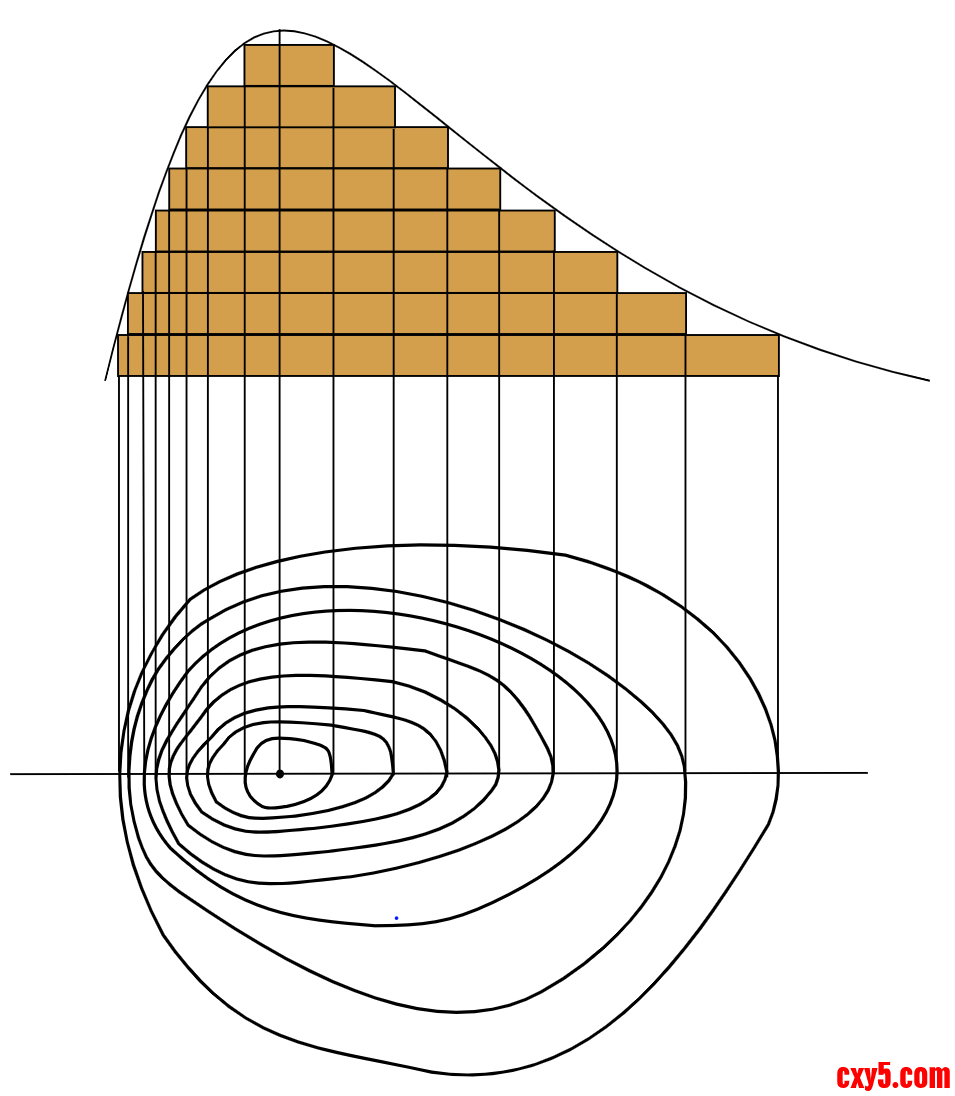
所谓等高线,就是把地面上海拔高度相等的点相连,垂直投影到水平面上,并按照一定的比例缩放绘制到图纸所得到的闭合曲线。如果我们按照一定高度差(等高距),从低到高依次绘制等高线,就得到了一张等高线图。如下图6.15所示:
等高线图虽然有不易识别的特点,但是其最大的优点就在于通过较少的信息量,就能够轻易识别出多种地形地貌,从而帮助我们做出地理空间相关的决策。一些典型的地貌包括:
1. 陡坡和缓坡
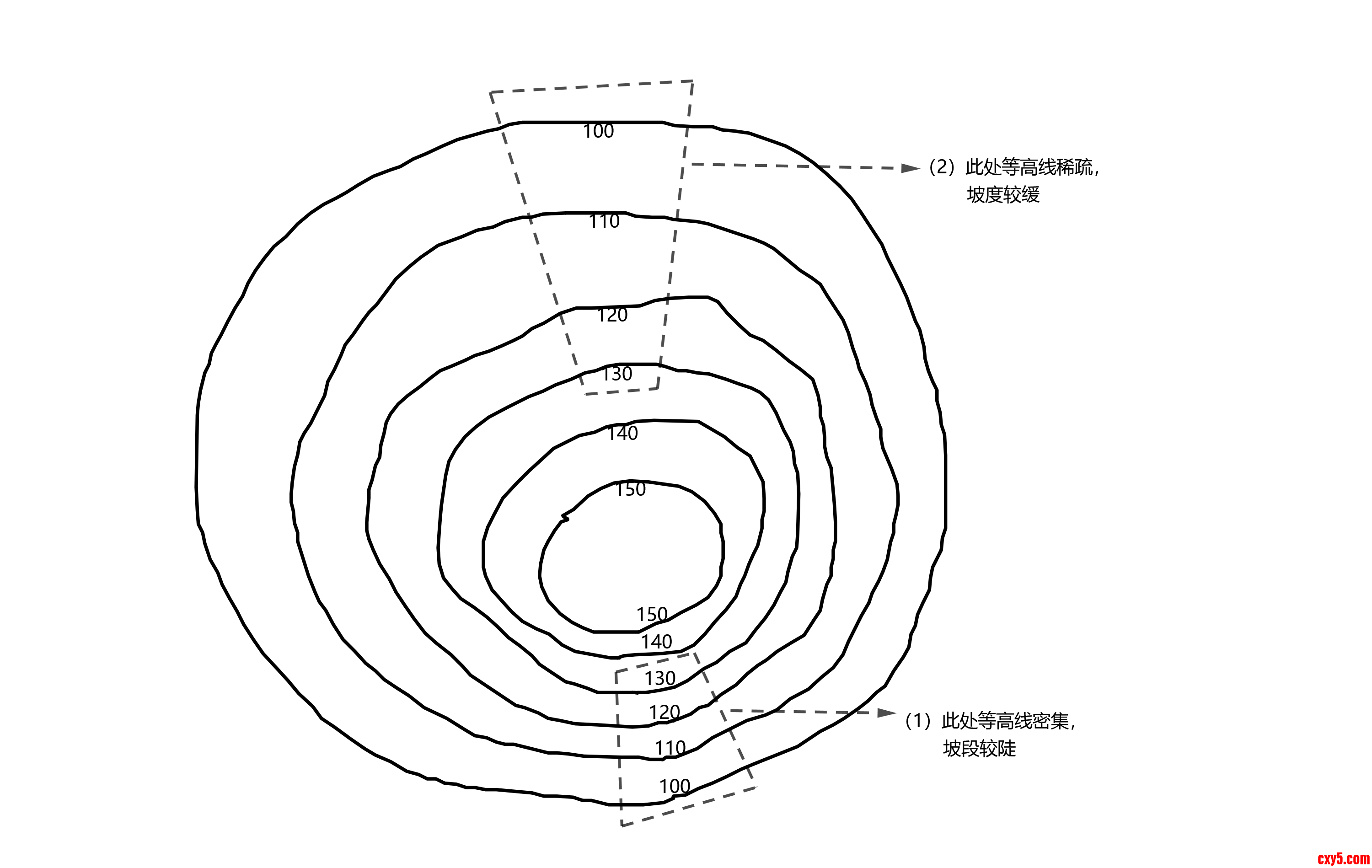
等高线密集的地方,坡度较陡,如图6.16(1)所示。而图6.16(2)所示的坡度较缓,因为其等高线较为稀疏,坡度较缓。如果我们进行爬山活动,应选择等高线稀疏的地方。
2. 山头和洼地
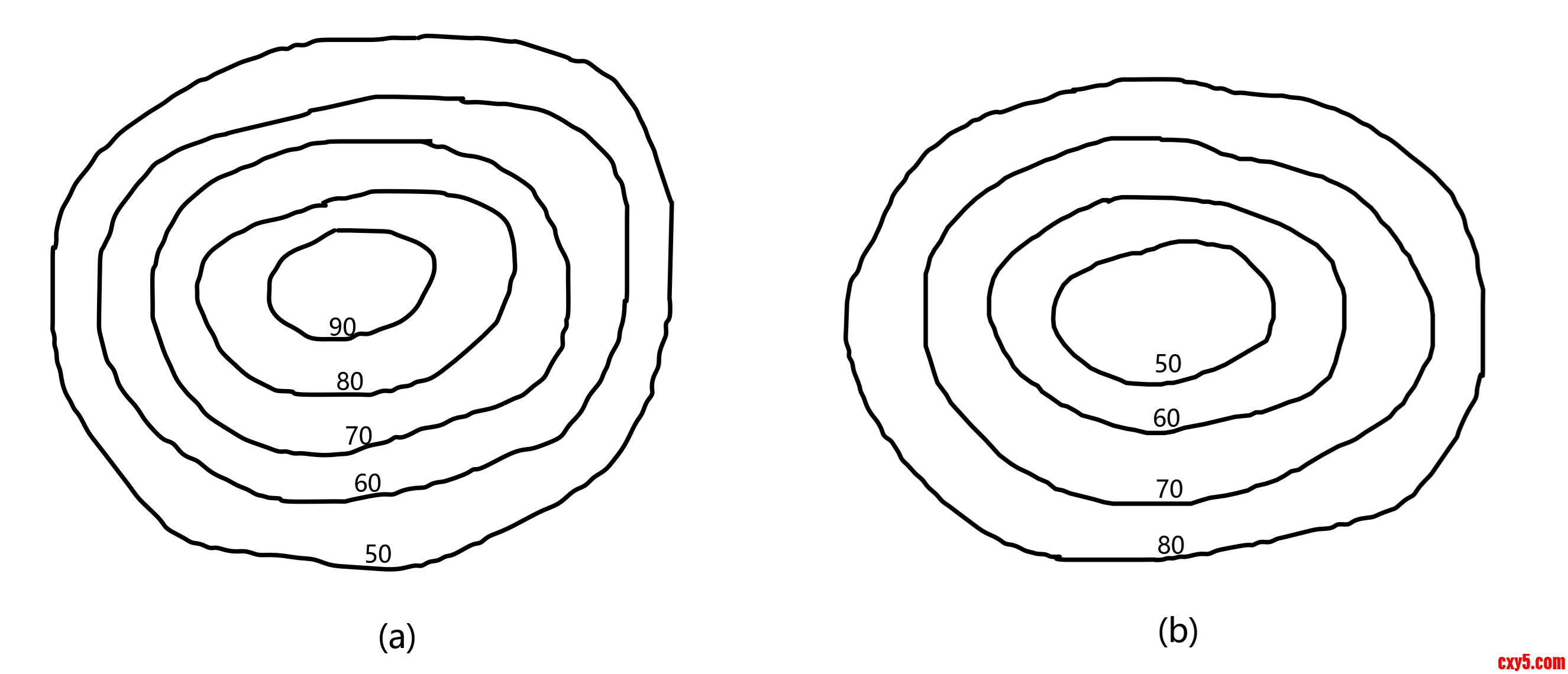
下图6.17中等高线(a)表示山头,等高线(b)为表示洼地,它们投影到平面上都是简单的闭合多边形曲线。两者的区别在于山头的内圈高程大于外圈,而洼地则相反。
3. 山脊、山谷和鞍部
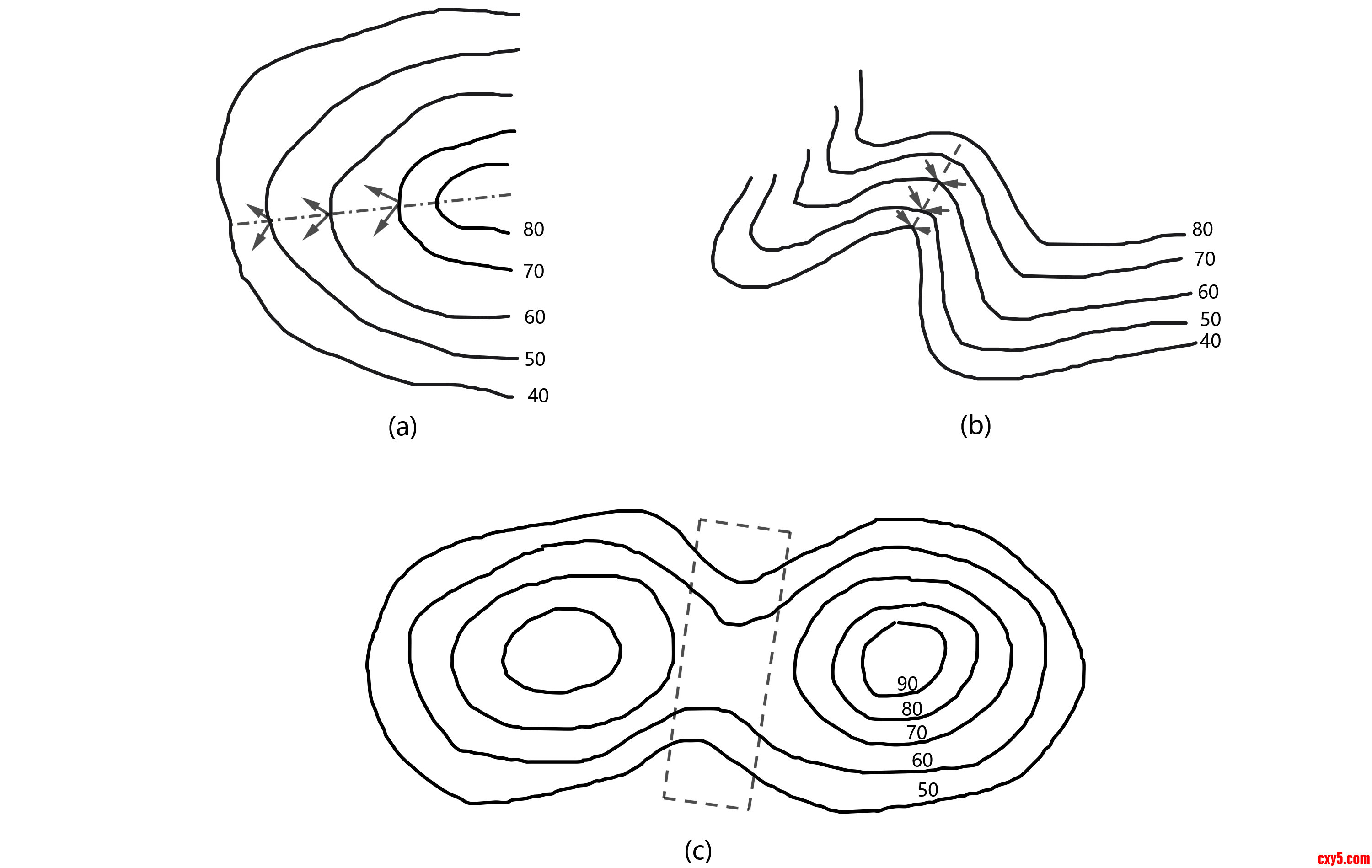
山脊位于等高线弯曲的地方,其高程值沿着凸向从高到底,如下图6.18(a)所示。山谷则相反,等高线弯曲处从高程值低往高程值高的地方凸出,如下图6.18(b)所示。山脊弯曲处相连的线被称为山脊线,附近雨水在降落到这条线上时会分别流向山脊的两侧,因此山脊线被称为分水线。山谷弯曲处相连的线被称为山谷线,雨水会从两侧上坡流向谷底,容易发育河流,因此山谷线被称为集水线。分水线、集水线是土木工程中需要重点关注的问题。
鞍部是位于两个山头之间呈马鞍形的低凹部位,如下图6.18所示。鞍部是修建山区道路的关节点,可以考虑在鞍部修建越岭道路。
4. 绝壁和悬崖
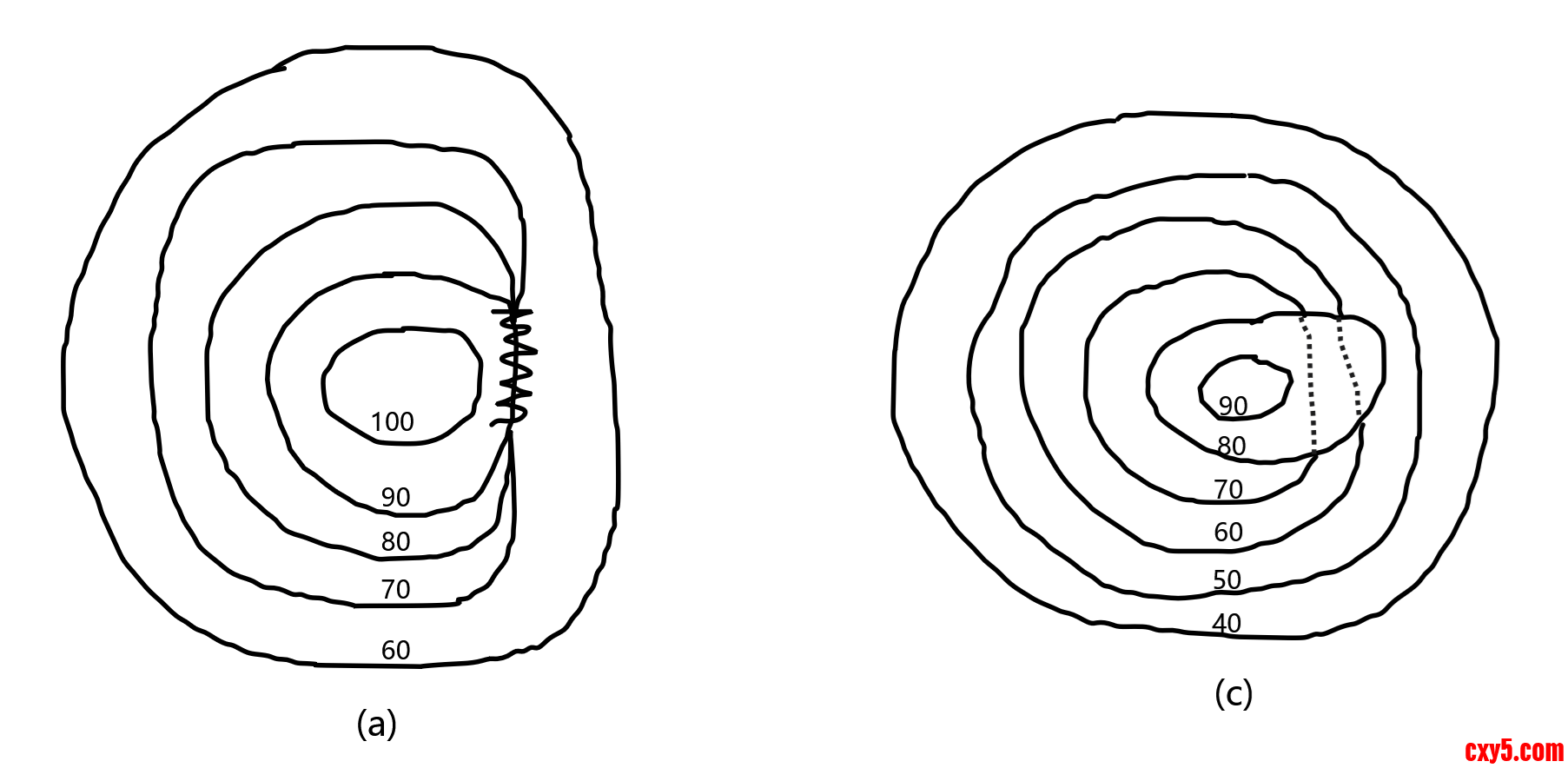
绝壁是坡度在70°以上的陡峭崖壁,此时多条等高线的一部分会重叠,将这部分用锯齿状的符号表示绝壁,如下图6.19(a)所示。悬崖是上部突出,下部凹进的绝壁,这种地貌的等高线出现相交。这时隐蔽的等高线用虚线表示,如下图6.19(c)所示。
等高线图的另一个特点的是其并不完全是定性的,由于每一条等高线都会标注高程信息,很多情况下可以进行大致定量运算,比如估算等高线图中两个点的相对高差、坡度等。所以等高线图确实是一种非常简洁有力的地形表达,应用非常广泛。
6.6.2 等高线地形图矢量形式
正如图6.16~图6.19所示,最为简洁的等高线图是基于要素特征的,是由一组闭合的曲线组成的。因此不难想象,为了从DEM中生成矢量形式的等高线地形图,关键在于使用DEM的空间要素进行立体几何计算。其实在GDAL自带的工具中已经有提取等高线图的工具,但是正如前面笔者所说,结果并不重要,重要的是其中的原理。这里笔者自己的实现如下例6.10所示。- //例6.10 生成等高线图的矢量形式
- #include <gdal_priv.h>
- #include <ogrsf_frmts.h>
- #include <Eigen/Eigen>
- #include <fstream>
- #include <iostream>
- #include <sstream>
- using namespace std;
- using namespace Eigen;
- struct TrigonVertexIndex {
- size_t index[3];
- };
- double startHeight = 550;
- double endHeight = 2815;
- double heightInterval = 500;
- size_t nV; //点的个数
- std::vector<Vector3d> vertexXyz; //点集
- size_t nF; //面的个数.
- std::vector<TrigonVertexIndex> faceVertexIndex; //面在点集中的序号
- //根据空截断字符串
- void ChopStringWithSpace(string line, vector<string>& substring) {
- std::stringstream linestream(line);
- string sub;
- while (linestream >> sub) {
- substring.push_back(sub);
- }
- }
- bool ReadTin(const char* szModelPath) {
- ifstream infile(szModelPath, ios::binary);
- if (!infile) {
- printf("Can't Load %s\n", szModelPath);
- return false;
- }
- string line;
- while (line != string("end_header")) {
- getline(infile, line);
- vector<string> substring;
- ChopStringWithSpace(line, substring);
- if (substring.size() == 3 && substring[0] == "element") {
- if (substring[1] == "vertex") {
- nV = stoul(substring[2]);
- } else if (substring[1] == "face") {
- nF = stoul(substring[2]);
- }
- }
- }
- vertexXyz.resize(nV);
- vertexXyz.shrink_to_fit();
- uint8_t propertyNum = 3;
- double* vertexTmp = new double[propertyNum * nV];
- infile.read((char*)(vertexTmp),
- static_cast<int64_t>(propertyNum * nV * sizeof(double)));
- for (size_t i = 0; i < nV; i++) {
- vertexXyz[i].x() = vertexTmp[i * propertyNum];
- vertexXyz[i].y() = vertexTmp[i * propertyNum + 1];
- vertexXyz[i].z() = vertexTmp[i * propertyNum + 2];
- }
- delete[] vertexTmp;
- vertexTmp = nullptr;
- faceVertexIndex.resize(nF);
- faceVertexIndex.shrink_to_fit();
- for (size_t i = 0; i < nF; i++) {
- uint8_t type;
- infile.read((char*)(&type), 1);
- if (type != 3) {
- printf("Format Incompatible Or Non Trigon!\n");
- return false;
- }
- for (unsigned int j = 0; j < type; j++) {
- int id;
- infile.read((char*)(&id), sizeof(int));
- faceVertexIndex[i].index[j] = static_cast<size_t>(id);
- }
- }
- infile.close();
- return true;
- }
- //判断几种可能的相交情况
- int CalTriangleType(TrigonVertexIndex trigonVID,
- std::vector<bool>& vertexFlag) {
- bool triVertexFlag[3] = {false, false, false};
- for (int vi = 0; vi < 3; vi++) {
- size_t vid = trigonVID.index[vi];
- triVertexFlag[vi] = vertexFlag[vid];
- }
- int type = 0;
- if (!triVertexFlag[0] && !triVertexFlag[1] && !triVertexFlag[2]) {
- type = 0;
- } else if (!triVertexFlag[0] && !triVertexFlag[1] && triVertexFlag[2]) {
- type = 1;
- } else if (triVertexFlag[0] && !triVertexFlag[1] && !triVertexFlag[2]) {
- type = 2;
- } else if (!triVertexFlag[0] && triVertexFlag[1] && !triVertexFlag[2]) {
- type = 3;
- } else if (triVertexFlag[0] && triVertexFlag[1] && triVertexFlag[2]) {
- type = 4;
- } else if (triVertexFlag[0] && triVertexFlag[1] && !triVertexFlag[2]) {
- type = 5;
- } else if (!triVertexFlag[0] && triVertexFlag[1] && triVertexFlag[2]) {
- type = 6;
- } else if (triVertexFlag[0] && !triVertexFlag[1] && triVertexFlag[2]) {
- type = 7;
- }
- return type;
- }
- //计算空间线段已知Z值的点的坐标
- bool CalPointOfSegmentLineWithZ(Vector3d O, Vector3d E, double z, Vector3d& P) {
- if (E.z() < O.z()) {
- Vector3d tmp = O;
- O = E;
- E = tmp;
- }
- double t = (z - O.z()) / (E.z() - O.z());
- if (t < 0 && t > 1) {
- return false;
- }
- Vector3d D = E - O;
- P = O + D * t;
- return true;
- }
- //计算空间中三角形与直线相交
- void CalTriangleIntersectingLine(TrigonVertexIndex trigonVID, int cornerId,
- Vector3d& start, Vector3d& end, double z) {
- vector<Vector3d> xyzList(3);
- for (size_t vi = 0; vi < 3; vi++) {
- size_t vid = trigonVID.index[vi];
- xyzList[vi] = vertexXyz[vid];
- }
- if (cornerId == 0) {
- CalPointOfSegmentLineWithZ(xyzList[0], xyzList[1], z, start);
- CalPointOfSegmentLineWithZ(xyzList[0], xyzList[2], z, end);
- } else if (cornerId == 1) {
- CalPointOfSegmentLineWithZ(xyzList[1], xyzList[0], z, start);
- CalPointOfSegmentLineWithZ(xyzList[1], xyzList[2], z, end);
- } else if (cornerId == 2) {
- CalPointOfSegmentLineWithZ(xyzList[2], xyzList[1], z, start);
- CalPointOfSegmentLineWithZ(xyzList[2], xyzList[0], z, end);
- }
- }
- bool CalIsoHeightLine(TrigonVertexIndex trigonVID, int type, Vector3d& start,Vector3d& end, double height) {
- bool flag = false;
- switch (type) {
- case 1:
- case 5: {
- CalTriangleIntersectingLine(trigonVID, 2, start, end, height);
- flag = true;
- break;
- }
- case 2:
- case 6: {
- CalTriangleIntersectingLine(trigonVID, 0, start, end, height);
- flag = true;
- break;
- }
- case 3:
- case 7: {
- CalTriangleIntersectingLine(trigonVID, 1, start, end, height);
- flag = true;
- break;
- }
- case 0:
- case 4:
- default:
- break;
- }
- return flag;
- }
- int main() {
- GDALAllRegister(); // GDAL所有操作都需要先注册格式
- vector<double> heightThresholdList;
- {
- double heightThreshold = startHeight;
- while (heightThreshold < endHeight) {
- heightThresholdList.push_back(heightThreshold);
- heightThreshold = heightThreshold + heightInterval;
- }
- }
- string workDir = getenv("GISBasic");
- string outShpFile = workDir + "/../Data/Terrain/dst.shp";
- string tinPath = workDir + "/../Data/Terrain/terrain.ply";
- if (!ReadTin(tinPath.c_str())) {
- return 1;
- }
- //创建
- GDALDriver* driver =
- GetGDALDriverManager()->GetDriverByName("ESRI Shapefile");
- if (!driver) {
- printf("Get Driver ESRI Shapefile Error!\n");
- return 1;
- }
- GDALDataset* dataset =
- driver->Create(outShpFile.c_str(), 0, 0, 0, GDT_Unknown, nullptr);
- OGRLayer* poLayer = dataset->CreateLayer("IsoHeightline", nullptr,
- wkbMultiLineStringZM, nullptr);
- OGRFeature* poFeature = new OGRFeature(poLayer->GetLayerDefn());
- OGRMultiLineString multiLineString;
- for (size_t i = 0; i < heightThresholdList.size(); i++) {
- double heightThreshold = heightThresholdList[i];
- std::vector<bool> vertexFlag(vertexXyz.size(), false);
- for (size_t i = 0; i < vertexXyz.size(); i++) {
- if (vertexXyz[i].z() >= heightThreshold) {
- vertexFlag[i] = true;
- }
- }
- for (size_t fi = 0; fi < faceVertexIndex.size(); fi++) {
- int type = CalTriangleType(faceVertexIndex[fi], vertexFlag);
- Vector3d start;
- Vector3d end;
- if (CalIsoHeightLine(faceVertexIndex[fi], type, start, end,
- heightThreshold)) {
- OGRLinearRing ogrring;
- ogrring.setPoint(0, start.x(), start.y(), start.z());
- ogrring.setPoint(1, end.x(), end.y(), end.z());
- multiLineString.addGeometry(&ogrring);
- }
- }
- }
- poFeature->SetGeometry(&multiLineString);
- if (poLayer->CreateFeature(poFeature) != OGRERR_NONE) {
- printf("Failed to create feature in shapefile.\n");
- return 1;
- }
- //释放
- GDALClose(dataset);
- dataset = nullptr;
- return 0;
- }
某一固定的高程面与这一组立体空间三角形相交的算法也不是使用计算几何算法硬算,其实原理非常简单,如果高程面与立体空间三角形相交,那么空间三角形就会有一个角或者两个角在高程面上方。换句话说,高程面与立体空间三角形相交,比如有一个角在高程面上方,或者在高程面下方。只要求取这个角,就可以获取到两条相交的三角形边。最后,求两个相交的三角形边上固定高程的点,将两点相连就是等高线上的线段。
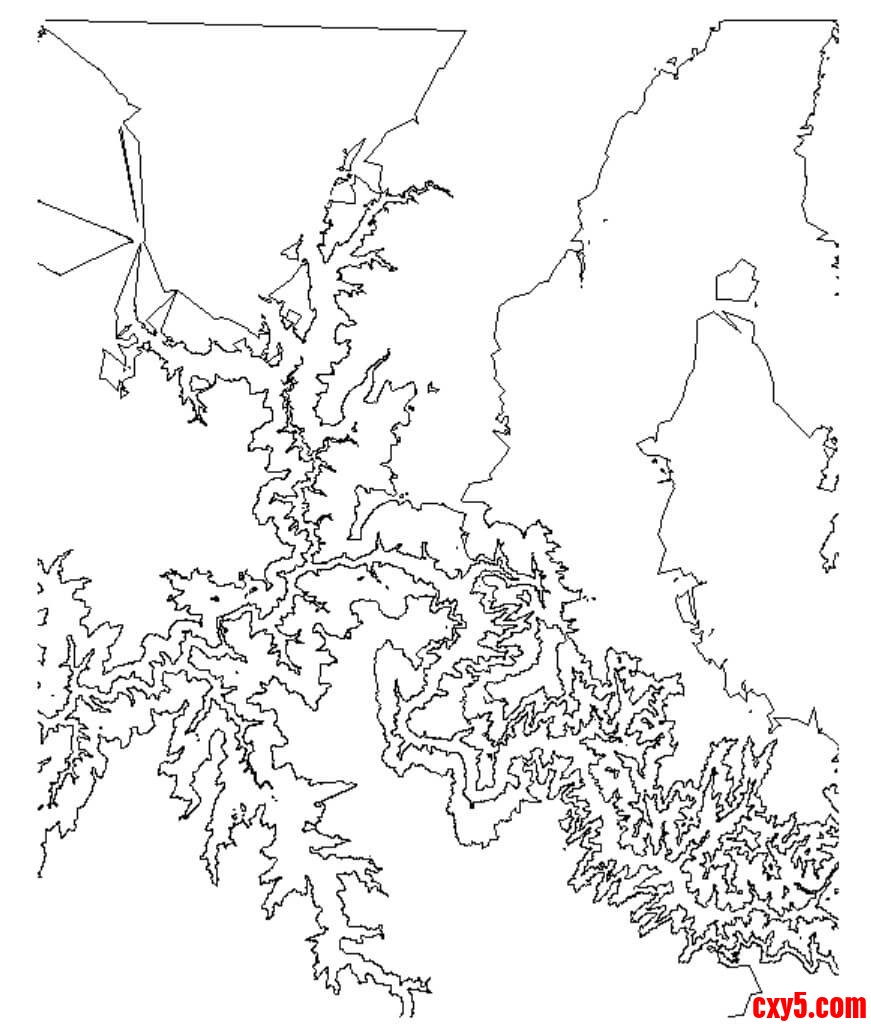
其实上述原理也体现了笔者在前面的论述,DEM其实只是个2.5维的数据,这里确实也没有用到真正意义上的三维立体空间运算,而是很快根据高度值做出高程面与立体空间三角形相交的判定。这种降维的思想在GIS中是非常有用的,我们应该充分利用它。最后得到的结果如下图6.20所示:
6.6.3 等高线地形图栅格形式
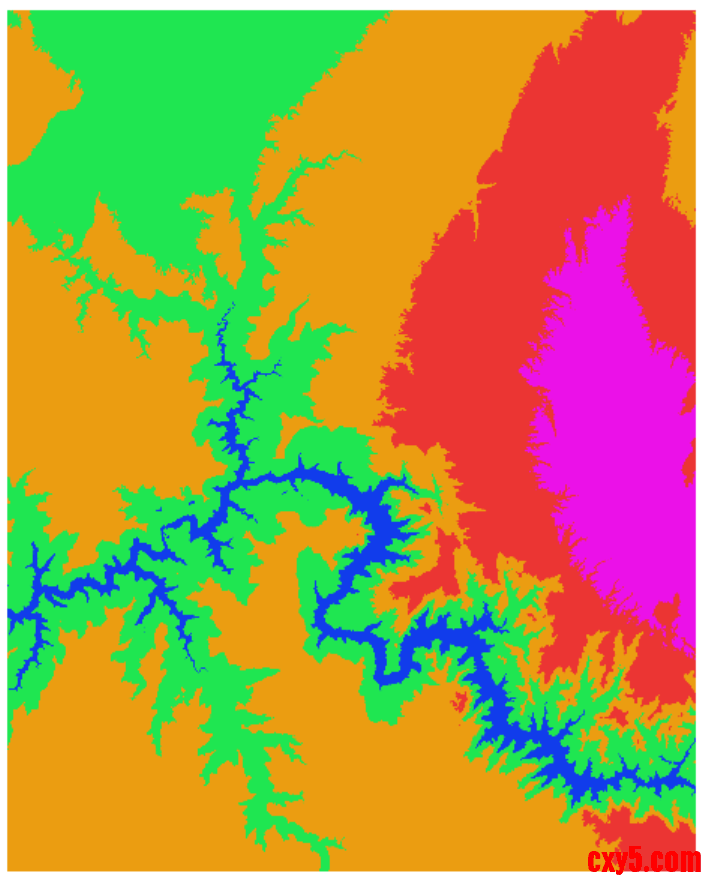
等高线地形图的矢量形式虽然比较简洁,但是确实不够直观。我们可以仿照热力图的表达,将其栅格化,并根据不同的高度区间赋予不同的颜色,就得到了分层设色的等高线地形图。这种栅格形式的等高线地形图更为直接美观,我们可以很容易根据颜色区分那些地区属于平原、丘陵、盆地、高原或者山地,也方便直接输出图纸。
一个思路是将例6.10所得到的结果栅格化,不过这并不是最佳的方案。由于格网DEM数据本身就是栅格化的,我们可以直接在格网DEM上生成分层设色等高线地形图,如下例6.11所示:- //例6.11 生成等高线图的栅格形式
- #include <gdal_priv.h>
- #include
- #include <iostream>
- #include <vector>
- using namespace std;
- using F_RGB = std::array<double, 3>;
- int demWidth;
- int demHeight;
- double geoTransform[6] = {0};
- double startX; //左上角点坐标X
- double dx; // X方向的分辨率
- double startY; //左上角点坐标Y
- double dy; // Y方向的分辨率
- vector<float> demBuf;
- int dstBandNum = 4;
- vector<uint8_t> dstBuf;
- double startHeight = 550;
- double endHeight = 2815;
- double heightInterval = 500;
- vector<F_RGB> tableRGB(256); //颜色映射表
- vector<double> heightThresholdList; //高度区间
- vector<F_RGB> heightRGBList; //高度区间对应的颜色
- //生成渐变色
- void Gradient(F_RGB &start, F_RGB &end, vector<F_RGB> &RGBList) {
- F_RGB d;
- for (int i = 0; i < 3; i++) {
- d[i] = (end[i] - start[i]) / RGBList.size();
- }
- for (size_t i = 0; i < RGBList.size(); i++) {
- for (int j = 0; j < 3; j++) {
- RGBList[i][j] = start[j] + d[j] * i;
- }
- }
- }
- //初始化颜色查找表
- void InitColorTable() {
- F_RGB blue({17, 60, 235}); //蓝色
- F_RGB green({17, 235, 86}); //绿色
- vector<F_RGB> RGBList(60);
- Gradient(blue, green, RGBList);
- for (int i = 0; i < 60; i++) {
- tableRGB[i] = RGBList[i];
- }
- F_RGB yellow({235, 173, 17}); //黄色
- RGBList.clear();
- RGBList.resize(60);
- Gradient(green, yellow, RGBList);
- for (int i = 0; i < 60; i++) {
- tableRGB[i + 60] = RGBList[i];
- }
- F_RGB red({235, 60, 17}); //红色
- RGBList.clear();
- RGBList.resize(60);
- Gradient(yellow, red, RGBList);
- for (int i = 0; i < 60; i++) {
- tableRGB[i + 120] = RGBList[i];
- }
- F_RGB white({235, 17, 235}); //紫色
- RGBList.clear();
- RGBList.resize(76);
- Gradient(red, white, RGBList);
- for (int i = 0; i < 76; i++) {
- tableRGB[i + 180] = RGBList[i];
- }
- }
- void ReadDem() {
- string workDir = getenv("GISBasic");
- string demPath = workDir + "/../Data/Terrain/dem.tif";
- GDALDataset *dem = (GDALDataset *)GDALOpen(demPath.c_str(), GA_ReadOnly);
- if (!dem) {
- cout << "Can't Open Image!" << endl;
- return;
- }
- demWidth = dem->GetRasterXSize();
- demHeight = dem->GetRasterYSize();
- dem->GetGeoTransform(geoTransform);
- startX = geoTransform[0]; //左上角点坐标X
- dx = geoTransform[1]; // X方向的分辨率
- startY = geoTransform[3]; //左上角点坐标Y
- dy = geoTransform[5]; // Y方向的分辨率
- // noValue = dem->GetRasterBand(1)->GetNoDataValue();
- size_t demBufNum = (size_t)demWidth * demHeight;
- demBuf.resize(demBufNum, 0);
- int depth = sizeof(float);
- dem->GetRasterBand(1)->RasterIO(GF_Read, 0, 0, demWidth, demHeight,
- demBuf.data(), demWidth, demHeight,
- GDT_Float32, depth, demWidth * depth);
- GDALClose(dem);
- dem = nullptr;
- }
- void HandleDem() {
- size_t dstBufNum = (size_t)demWidth * demHeight * dstBandNum;
- dstBuf.resize(dstBufNum, 255);
- for (size_t i = 0; i < heightThresholdList.size(); i++) {
- double heightThreshold = heightThresholdList[i];
- F_RGB thresholdRgb = heightRGBList[i];
- for (int yi = 0; yi < demHeight; yi++) {
- for (int xi = 0; xi < demWidth; xi++) {
- size_t m = (size_t)demWidth * yi + xi;
- if (demBuf[m] > heightThreshold) {
- size_t n = (size_t)demWidth * dstBandNum * yi + dstBandNum * xi;
- for (int bi = 0; bi < 3; bi++) {
- dstBuf[n + bi] = (uint8_t)thresholdRgb[bi];
- }
- }
- }
- }
- }
- }
- void WriteDst() {
- string workDir = getenv("GISBasic");
- string demPath = workDir + "/../Data/Terrain/dst.tif";
- GDALDriver *pDriver =
- GetGDALDriverManager()->GetDriverByName("GTIFF"); //图像驱动
- char **ppszOptions = NULL;
- ppszOptions =
- CSLSetNameValue(ppszOptions, "BIGTIFF", "IF_NEEDED"); //配置图像信息
- GDALDataset *dst = pDriver->Create(demPath.c_str(), demWidth, demHeight, 4,
- GDT_Byte, ppszOptions);
- if (!dst) {
- printf("Can't Write Image!");
- return;
- }
- dst->SetGeoTransform(geoTransform);
- int depth = sizeof(uint8_t);
- dst->RasterIO(GF_Write, 0, 0, demWidth, demHeight, dstBuf.data(), demWidth,
- demHeight, GDT_Byte, dstBandNum, nullptr, dstBandNum * depth,
- demWidth * dstBandNum * depth, depth);
- GDALClose(dst);
- dst = nullptr;
- }
- int main() {
- GDALAllRegister(); // GDAL所有操作都需要先注册格式
- //设置Proj数据
- std::string projDataPath = getenv("GISBasic");
- projDataPath += "/share/proj";
- CPLSetConfigOption("PROJ_LIB", projDataPath.c_str());
- ReadDem();
- InitColorTable();
- double heightThreshold = startHeight;
- while (heightThreshold < endHeight) {
- heightThresholdList.push_back(heightThreshold);
- heightThreshold = heightThreshold + heightInterval;
- }
- if (heightThresholdList.size() == 1) {
- heightRGBList.push_back(tableRGB[0]);
- } else {
- size_t step = tableRGB.size() / (heightThresholdList.size() - 1);
- size_t index = 0;
- for (size_t i = 0; i < heightThresholdList.size() - 1; i++) {
- heightRGBList.push_back(tableRGB[index]);
- index = index + step;
- }
- heightRGBList.push_back(tableRGB[tableRGB.size() - 1]);
- }
- HandleDem();
- WriteDst();
- return 0;
- }
结语
在本章中,我们详细论述了一种综合了矢量特性与栅格特性的地理空间数据——地形。因此,如果我们前面对矢量和栅格掌握的比较熟练,掌握地形相关的知识也不是太难。此外,我们还介绍了一些地形数据的基本处理方法,地形内插算法,晕渲图与等高线图的制作。其实地形相关的知识非常之丰富,远不是本章有限的内容所能涵盖的。而且,地形数据有其数据敏感性,普通从业者想获取高精度的数据进行深入研究也十分不易。不过还是那句话,示例的结果不重要,重要的是要了解其底层的原理,建立一个相对系统而全面的认知,在遇到更为复杂的难题时才能心中不慌。
本文节选自作者新书《GIS基础原理与技术实践》第6章。书中系统讲解 GIS 核心理论与多语言实战,适合开发者与高校师生。
来源:程序园用户自行投稿发布,如果侵权,请联系站长删除
免责声明:如果侵犯了您的权益,请联系站长,我们会及时删除侵权内容,谢谢合作! |


 提升卡
提升卡 置顶卡
置顶卡 沉默卡
沉默卡 喧嚣卡
喧嚣卡 变色卡
变色卡 千斤顶
千斤顶 照妖镜
照妖镜


