【大数据 & AI】Flink Agents 源码解读 --- (3) --- Agent
目录
- 【大数据 & AI】Flink Agents 源码解读 --- (3) --- Agent
- 0x00 概要
- 0x01 核心抽象
- 1.1 Agent抽象
- 1.2 Action 抽象
- 1.3 资源抽象
- 1.4 执行环境抽象
- 1.5 事件抽象
- 1.6 配置抽象
- 0x02 Workflow Style Agent 和ReActAgent
- 2.1 特性
- 2.1.1 设计理念
- 2.1.2 控制流
- 2.1.3 定制级别
- 2.1.4 使用场景
- 2.1.5 开发复杂度
- 2.1.6 总结
- 2.2 workflow
- 2.3 ReAct Agent
- 2.3.1 代码导读
- 准备代理执行环境
- 创建 ReAct Agent
- 与 Flink 集成
- 0x03 ReActAgent
- 3.1 定义
- 3.2 深度定制
- 3.2.1 ReActAgent 特色
- 流式处理适配
- 特定的行为模式
- 键控状态支持
- LLM 集成优化
- 资源管理方式
- 类型信息处理
- 错误处理机制
- 结构化输出支持
- 提示词模板系统
- 工具调用集成
- 运行时协作
- 3.3 典型执行流程
- 3.4 start_action 与 stop_action
- 3.5 输入输出
- 3.5.1 事件驱动架构
- 3.5.2 统一的数据封装
- 3.5.3 支持多种数据类型
- 3.5.4 内置模板支持
- 3.6 模板系统
- 3.7 FunctionTool 与 Action 的关联及注册机制
- 3.7.1 实际转换流程
- Function Tool 注册到 Agent
- 与模型交互
- 3.7.2 AgentPlan 编译过程中工具的处理
- 用户定义的 Function Tool 转换为 Action
- 内置 Tool Call Action
- TOOL_CALL_ACTION 如何编译到AgentPlan
- 3.7.3 工具调用流程
- 3.7.4 完整流程图
- 3.7.5 代码
- 0xFF 参考
0x00 概要
Agent是 Flink Agent 框架的核心概念,它是一个可执行单元,用于处理输入事件并生成输出事件。主要功能和特色如下:
- 事件驱动处理:基于事件驱动架构,响应不同类型的事件(如 InputEvent,ChatRequestEvent等),通过定义actions来处理特定事件类型。
- 资源管理:管理各种资源,如聊天模型、工具、提示词等。支持多种资源类型(CHAT_MOEL, TOOL, PROMPT等)。
- 可扩展性:支持自定义的actions和资源,可以通过继承Agent类来创建特定功能的Agent,如ReActAgent。
- 配置支持:支持通过配置选项自定义行为,提供统一的配置管理机制。
- 模块化设计:将功能分解为独立的Actions,每个action负责处理特定类型的事件。
- 资源抽象:通过 ResourceDescriptor 抽象资源定义,支持不同类型的资源(模型,工具,提示词等)
- 状态管理:提供短期内存管理机制,支持基于key的状态隔离。
- 多环境支持:支持本地执行环境用于调试,支持远程 Flink 环境用于生产。
0x01 核心抽象
1.1 Agent抽象
Agent 作为基类提供了:
- 资源管理(resources 字典)。
- Action 注册机制(actions 字典)。
- 统一的接口供执行环境使用。
- class Agent(ABC):
- """Base class for defining agent logic.
- Example:
- Users have two ways to create an Agent
- * Declare an Agent with decorators
- ::
- class MyAgent(Agent):
- @action(InputEvent)
- @staticmethod
- def my_action(event: Event, ctx: RunnerContext) -> None:
- action logic
- @chat_model_connection
- @staticmethod
- def my_connection() -> ResourceDescriptor:
- return ResourceDescriptor(clazz=OllamaChatModelConnection,
- model="qwen2:7b",
- base_url="http://localhost:11434")
- @chat_model_setup
- @staticmethod
- def my_chat_model() -> ResourceDescriptor:
- return ResourceDescriptor(clazz=OllamaChatModel,
- connection="my_connection")
- * Add actions and resources to an Agent instance
- ::
- my_agent = Agent()
- my_agent.add_action(name="my_action",
- events=[InputEvent],
- func=action_function)
- .add_resource(name="my_connection",
- instance=ResourceDescriptor(
- clazz=OllamaChatModelConnection,
- arg1=xxx
- )
- .add_resource(
- name="my_connection",
- instance=ResourceDescriptor(
- clazz=OllamaChatModelConnection,
- arg1=xxx
- )
- )
- .add_resource(
- name="my_chat_model",
- instance=ResourceDescriptor(
- clazz=OllamaChatModelSetup,
- connection="my_connection"
- )
- )
- """
- _actions: Dict[str, Tuple[List[Type[Event]], Callable, Dict[str, Any]]]
- _resources: Dict[ResourceType, Dict[str, Any]]
- _mcp_servers: Dict[str, MCPServer]
- def __init__(self) -> None:
- """Init method."""
- self._actions = {}
- self._resources = {}
- for type in ResourceType:
- self._resources[type] = {}
- @property
- def actions(self) -> Dict[str, Tuple[List[Type[Event]], Callable, Dict[str, Any]]]:
- """Get added actions."""
- return self._actions
- @property
- def resources(self) -> Dict[ResourceType, Dict[str, Any]]:
- """Get added resources."""
- return self._resources
- def add_action(
- self, name: str, events: List[Type[Event]], func: Callable, **config: Any
- ) -> "Agent":
- """Add action to agent.
- Parameters
- ----------
- name : str
- The name of the action, should be unique in the same Agent.
- events: List[Type[Event]]
- The type of events listened by this action.
- func: Callable
- The function to be executed when receive listened events.
- **config: Any
- Key named arguments can be used by this action in runtime.
- Returns:
- -------
- Agent
- The modified Agent instance.
- """
- if name in self._actions:
- msg = f"Action {name} already defined"
- raise ValueError(msg)
- self._actions[name] = (events, func, config if config else None)
- return self
- def add_resource(
- self, name: str, instance: SerializableResource | ResourceDescriptor
- ) -> "Agent":
- """Add resource to agent instance.
- Parameters
- ----------
- name : str
- The name of the prompt, should be unique in the same Agent.
- instance: SerializableResource | ResourceDescriptor
- The serializable resource instance, or the descriptor of resource.
- Returns:
- -------
- Agent
- The agent to add the resource.
- """
- if isinstance(instance, SerializableResource):
- resource_type = instance.resource_type()
- elif isinstance(instance, ResourceDescriptor):
- resource_type = instance.clazz.resource_type()
- else:
- err_msg = f"Unexpected resource {instance}"
- raise TypeError(err_msg)
- if name in self._resources[resource_type]:
- msg = f"{resource_type.value} {name} already defined"
- raise ValueError(msg)
- self._resources[resource_type][name] = instance
- return self
Action 提供了:
- 事件监听机制
- 与执行上下文的交互接口
- 统一的执行接口
通过装饰器或者add_action方法定义。- @action(InputEvent)
- @staticmethod
- def start_action(event: InputEvent, ctx: RunnerContext) -> None:
- """Start action to format user input and send chat request event."""
- usr_input = event.input
资源抽象包括:模型连接(CHAT_MODEL_CONNECTION),工具,提示词,MCP服务器等。- class ResourceDescriptor:
- """Descriptor of resource, includes the class and the initialize arguments."""
- _clazz: Type[Resource]
- _arguments: Dict[str, Any]
- def __init__(self, *, clazz: Type[Resource], **arguments: Any) -> None:
- """Init method."""
- self._clazz = clazz
- self._arguments = arguments
- @property
- def clazz(self) -> Type[Resource]:
- """Get the class of the resource."""
- return self._clazz
- @property
- def arguments(self) -> Dict[str, Any]:
- """Get the initialize arguments of the resource."""
- return self._arguments
执行上下文提供:
- class RunnerContext(ABC):
- """Abstract base class providing context for agent execution.
- This context provides access to event handling.
即 Event 体系,提供了:
- 统一的事件处理机制
- 类型安全的事件分发
- 可扩展的事件类型系统
- class Event(BaseModel, ABC, extra="allow"):
- """Base class for all event types in the system. Event allow extra properties, but
- these properties are required isinstance of BaseModel, or json serializable.
- Attributes:
- ----------
- id : UUID
- Unique identifier for the event, automatically generated using uuid4.
- """
- id: UUID = Field(default_factory=uuid4)
AgentConfiguration 提供了:
- 类型安全的配置选项
- 默认值管理
- 从文件加载配置的能力
- class AgentConfiguration(BaseModel, Configuration):
- """Base class for config objects in the system.
- Provides a flat dict interface to access nested config values.
- """
- conf_data: Dict[str, Any]
- def __init__(self, conf_data: Dict[str, Any] | None = None) -> None:
- """Initialize with optional configuration data."""
- if conf_data is None:
- super().__init__(conf_data = {})
- else:
- super().__init__(conf_data = conf_data)
有两种最普遍的Agents:
- Workflows 是由预定义的代码路径来编排 LLM 和工具的系统。
- Agents 则是 LLM 动态指导自身流程和工具使用的系统,它们掌控着自己完成任务的方式。
当需要处理更复杂任务时,Workflows 为定义明确的任务提供了可预测性和一致性(复现),而当需要大规模的灵活性和模型驱动的决策时,agents 则是更好的选择。
对应这两种Agent,Flink Agents 有两种不同的Agent:Workflow Style Agent 和ReActAgent。
- 在 Flink-Agents 中,工作流风格的代理(workflow-style agent)把推理与行为组织成一条由“动作(action)”构成的有向工作流,动作之间通过事件连接。这种设计借鉴了复杂多阶段任务的编排需求,希望以透明、可扩展且以数据为中心的方式利用 Apache Flink 的流式架构来完成工作。Workflow 适合任务是可以被清除的解构成固定的子任务单元。Workflow 相对于 Agent 有个天然的优势就是高效率,且效果非常稳定,执行基本都能在预期范围内,不可预知或者说未知性很低。缺点自然就是不够灵活了,面对一些开放的或者无法预定义的任务就无法处理了。
- ReAct(Reasoning and Acting)Agent 是一种通用范式,把推理与行动能力结合起来解决复杂任务。借助该范式,用户只需在提示词里指定目标并提供可用工具,大模型便会自主决定如何达成目标并执行相应动作。ReAct通过模拟人类的“Reasoning-Acting”模式,使LLM能够动态地决定数据需求 。其核心是一个循环:思考(Thought): LLM首先进行内部推理。它分析当前任务和已有信息,判断是否缺少完成任务所需的知识,并制定下一步的行动计划。在这个循环中,数据流是根据LLM的“思考”结果动态生成的。当LLM判断需要外部数据时,它会主动触发一个“行动”来获取数据,然后将获取到的“观察”数据整合进自己的上下文中,用于下一步的决策。
2.1 特性
两种Agent的详细梳理如下:
2.1.1 设计理念
Workflow Style Agent
- 可定制框架:灵活的框架,允许用户定义自己的代理逻辑
- 事件驱动架构:逻辑被组织为由事件连接的动作有向图
- 模块化设计:用户通过定义单个动作及其交互来组合代理
ReActAgent
- 预构建代理:基于 ReAct(推理+行动)范式的内置、即用型代理实现
- 以 LLM 为中心:专门为 LLM 做出采取何种行动的决策而设计
- 标准化工作流:遵循固定的“思维→行动→观察”循环模式
2.1.2 控制流
Workflow Style Agent
- 显式流程:用户明确定义事件如何触发动作
- 事件路由:动作由特定的事件类型触发
- 灵活模式:可以实现各种模式,如顺序、分支或循环工作流
ReActAgent
- 隐式流程:决策过程在内部由 LLM 处理
- 工具调用:使用 LLM 的原生函数调用功能来确定操作
- 固定模式:遵循标准的 ReAct 模式(思考→行动→观察)
2.1.3 定制级别
Workflow Style Agent
- 高度可定制:对代理逻辑、动作和事件流拥有完全控制权
- 自定义动作:用户定义所有动作及其行为
- 灵活事件:用户可以定义自定义事件类型和处理逻辑
ReActAgent
- 有限定制:定制主要通过提示词、模型和输出模式实现
- 预定义动作:使用内置动作如 start_action 和 stop_action
- 标准接口:为类似的 LLM 任务提供一致的接口
2.1.4 使用场景
Workflow Style Agent
- 具有固定序列或条件分支的多步骤流程
- 需要精确控制代理行为的场景
- 在预定顺序中与多个外部系统集成
ReActAgent
- 需要 LLM 推理使用哪些工具/操作的任务
- 带工具使用的标准问答
- LLM 应该动态决定工作流程的场景
只要“问题不可完全穷举、要跨多系统查证、并且需要在对话中澄清/协商/决策”,就更应该用ReActAgent,而不是纯 Workflow。
2.1.5 开发复杂度
Workflow Style Agent
- 更高灵活性:需要更多代码但控制力更强
- 自定义逻辑:需要实现所有动作逻辑
- 无主见:开发人员控制代理行为的所有方面
ReActAgent
- 较低门槛:更容易上手,具有预定义功能
- 代码量少:设置所需的代码最少
- 有主见:代表开发人员做出许多决策
2.1.6 总结
ReActAgent 为标准的基于 LLM 的推理任务提供了现成的解决方案,而 Workflow Style Agent 为复杂的自定义代理实现提供了最大的灵活性。
有人戏称:拉投资用 Agent 讲故事,做业务踏踏实实用 Workflow 。这句玩笑背后折射出现实的考量:Workflow 胜在确定性,而 Agent 胜在上限。
2.2 workflow
官方的快速入门(docs\content\docs\get-started\quickstart\workflow_agent.md)通过两个渐进式流式示例,展示如何用 Flink Agents 构建由大模型驱动的流水线:
- 评论分析:示例一 会持续接收商品评论流,并用单个代理从每条评论中提取评分(1-5)以及不满意原因。
- 产品改进建议:在示例一的基础上,按窗口聚合每条评论的分析结果,生成商品级别的汇总(评分分布、常见抱怨),再调用第二个代理为每件商品输出具体的改进建议。
两个示例合在一起,演示了如何用 Flink Agents 构建多代理工作流,并直接在 Flink 独立集群上运行。
2.2.1 代码导读
准备代理执行环境
创建 Agents 执行环境,注册可供代理使用的聊天模型连接。- // Set up the Flink streaming environment and the Agents execution environment.
- StreamExecutionEnvironment env = StreamExecutionEnvironment.getExecutionEnvironment();
- AgentsExecutionEnvironment agentsEnv =
- AgentsExecutionEnvironment.getExecutionEnvironment(env);
- // Add Ollama chat model connection to be used by the ReviewAnalysisAgent.
- agentsEnv.addResource(
- "ollamaChatModelConnection",
- ResourceType.CHAT_MODEL_CONNECTION,
- CustomTypesAndResources.OLLAMA_SERVER_DESCRIPTOR);
以 ReviewAnalysisAgent 为例,展示如何定义提示词、工具、聊天模型和动作;以及如何处理聊天响应并发送输出事件。更多细节请参考 [工作流代理] 文档。ProductSuggestionAgent 的代码与之类似。- /**
- * An agent that uses a large language model (LLM) to analyze product reviews and generate a
- * satisfaction score and potential reasons for dissatisfaction.
- *
- * <p>This agent receives a product review and produces a satisfaction score and a list of reasons
- * for dissatisfaction. It handles prompt construction, LLM interaction, and output parsing.
- */
- public class ReviewAnalysisAgent extends Agent {
- private static final ObjectMapper MAPPER = new ObjectMapper();
- @Prompt
- public static org.apache.flink.agents.api.prompt.Prompt reviewAnalysisPrompt() {
- return REVIEW_ANALYSIS_PROMPT;
- }
- @ChatModelSetup
- public static ResourceDescriptor reviewAnalysisModel() {
- return ResourceDescriptor.Builder.newBuilder(OllamaChatModelSetup.class.getName())
- .addInitialArgument("connection", "ollamaChatModelConnection")
- .addInitialArgument("model", "qwen3:8b")
- .addInitialArgument("prompt", "reviewAnalysisPrompt")
- .addInitialArgument("tools", Collections.singletonList("notifyShippingManager"))
- .addInitialArgument("extract_reasoning", "true")
- .build();
- }
- /**
- * Tool for notifying the shipping manager when product received a negative review due to
- * shipping damage.
- *
- * @param id The id of the product that received a negative review due to shipping damage
- * @param review The negative review content
- */
- @Tool(
- description =
- "Notify the shipping manager when product received a negative review due to shipping damage.")
- public static void notifyShippingManager(
- @ToolParam(name = "id") String id, @ToolParam(name = "review") String review) {
- CustomTypesAndResources.notifyShippingManager(id, review);
- }
- /** Process input event and send chat request for review analysis. */
- @Action(listenEvents = {InputEvent.class})
- public static void processInput(InputEvent event, RunnerContext ctx) throws Exception {
- String input = (String) event.getInput();
- MAPPER.configure(DeserializationFeature.FAIL_ON_UNKNOWN_PROPERTIES, false);
- CustomTypesAndResources.ProductReview inputObj =
- MAPPER.readValue(input, CustomTypesAndResources.ProductReview.class);
- ctx.getShortTermMemory().set("id", inputObj.getId());
- String content =
- String.format(
- "{\n" + ""id": %s,\n" + ""review": "%s"\n" + "}",
- inputObj.getId(), inputObj.getReview());
- ChatMessage msg = new ChatMessage(MessageRole.USER, "", Map.of("input", content));
- ctx.sendEvent(new ChatRequestEvent("reviewAnalysisModel", List.of(msg)));
- }
- @Action(listenEvents = ChatResponseEvent.class)
- public static void processChatResponse(ChatResponseEvent event, RunnerContext ctx)
- throws Exception {
- JsonNode jsonNode = MAPPER.readTree(event.getResponse().getContent());
- JsonNode scoreNode = jsonNode.findValue("score");
- JsonNode reasonsNode = jsonNode.findValue("reasons");
- if (scoreNode == null || reasonsNode == null) {
- throw new IllegalStateException(
- "Invalid response from LLM: missing 'score' or 'reasons' field.");
- }
- List<String> result = new ArrayList<>();
- if (reasonsNode.isArray()) {
- for (JsonNode node : reasonsNode) {
- result.add(node.asText());
- }
- }
- ctx.sendEvent(
- new OutputEvent(
- new CustomTypesAndResources.ProductReviewAnalysisRes(
- ctx.getShortTermMemory().get("id").getValue().toString(),
- scoreNode.asInt(),
- result)));
- }
- }
读取文本文件中的商品评论流作为输入 DataStream,用 ReviewAnalysisAgent 分析并生成结果 DataStream,最后打印输出。- // Read product reviews from input_data.txt file as a streaming source.
- // Each element represents a ProductReview.
- DataStream<String> productReviewStream =
- env.fromSource(
- FileSource.forRecordStreamFormat(
- new TextLineInputFormat(),
- new Path(inputDataFile.getAbsolutePath()))
- .build(),
- WatermarkStrategy.noWatermarks(),
- "streaming-agent-example");
- // Use the ReviewAnalysisAgent to analyze each product review.
- DataStream<Object> reviewAnalysisResStream =
- agentsEnv
- .fromDataStream(productReviewStream)
- .apply(new ReviewAnalysisAgent())
- .toDataStream();
- // Print the analysis results to stdout.
- reviewAnalysisResStream.print();
- // Execute the Flink pipeline.
- agentsEnv.execute();
本快速入门用一个迷你示例演示如何用 Flink Agents 构建流式 ReAct Agent:
评论分析 代理持续消费商品评论流,用单个代理提取评分(1-5)以及不满意原因;若评论涉及物流不满,则自动通知物流经理。
2.3.1 代码导读
准备代理执行环境
创建 Agents 执行环境,注册可用的聊天模型连接与工具。- # Set up the Flink streaming environment and the Agents execution environment.
- env = StreamExecutionEnvironment.get_execution_environment()
- agents_env = AgentsExecutionEnvironment.get_execution_environment(env)
- # Add Ollama chat model connection and notify shipping manager tool to be used
- # by the Agent.
- agents_env.add_resource(
- "ollama_server",
- ResourceDescriptor(clazz=OllamaChatModelConnection, request_timeout=120),
- ).add_resource(
- "notify_shipping_manager", Tool.from_callable(notify_shipping_manager)
- )
实例化 ReAct Agent,配置聊天模型、提示词以及结果的输出模式。- review_analysis_react_agent = ReActAgent(
- chat_model=ResourceDescriptor(
- clazz=OllamaChatModelSetup,
- connection="ollama_server",
- model="qwen3:8b",
- tools=["notify_shipping_manager"],
- ),
- prompt=review_analysis_react_prompt,
- output_schema=ProductReviewAnalysisRes,
- )
读取商品评论文本文件生成 Source DataStream,用 ReAct Agent 分析并生成结果 DataStream,最后打印输出。- # Read product reviews from a text file as a streaming source.
- # Each line in the file should be a JSON string representing a ProductReview.
- product_review_stream = env.from_source(
- source=FileSource.for_record_stream_format(
- StreamFormat.text_line_format(),
- f"file:///{current_dir}/resources/",
- )
- .monitor_continuously(Duration.of_minutes(1))
- .build(),
- watermark_strategy=WatermarkStrategy.no_watermarks(),
- source_name="streaming_agent_example",
- ).map(
- lambda x: ProductReview.model_validate_json(
- x
- ) # Deserialize JSON to ProductReview.
- )
- # Use the ReAct agent to analyze each product review and notify the shipping manager
- # when needed.
- review_analysis_res_stream = (
- agents_env.from_datastream(
- input=product_review_stream, key_selector=lambda x: x.id
- )
- .apply(review_analysis_react_agent)
- .to_datastream()
- )
- # Print the analysis results to stdout.
- review_analysis_res_stream.print()
ReActAgent 是 Agent 抽象的一个具体实现,展示了这些抽象如何协同工作。
- 资源管理:管理聊天模型和提示词资源
- Action定义:定义 start_action 和 stop_action 处理输入和输出
- 事件处理:响应 InputEvent 和 ChatResponseEvent
- 配置管理:支持错误处理策略配置
- 输出格式化:支持基于 schema 的输出验证和格式化
这种抽象设计使得 Agent 系统具有高度的灵活性和可扩展性,开发者可以通过组合不同的资源、actions和配置来构建满足特定需求的Agent。
3.1 定义
ReActAgent 的定义如下。- class ReActAgent(Agent):
- """Built-in implementation of ReAct agent which is based on the function
- call ability of llm.
- This implementation is not based on the foundational ReAct paper which uses
- prompt to force llm output contain <Thought>, and <Observation> and
- extract tool calls by text parsing. For a more robust and feature-rich
- implementation we use the tool/function call ability of current llm, and get
- the tool calls from response directly.
- Example:
- ::
- class OutputData(BaseModel):
- result: int
- env = AgentsExecutionEnvironment.get_execution_environment()
- # register resource to execution environment
- (
- env.add_resource(
- "ollama",
- ResourceDescriptor(clazz=OllamaChatModelConnection, model=model),
- )
- .add_resource("add", add)
- .add_resource("multiply", multiply)
- )
- # prepare prompt
- prompt = Prompt.from_messages(
- messages=[
- ChatMessage(
- role=MessageRole.SYSTEM,
- content='An example of output is {"result": 30.32}.',
- ),
- ChatMessage(
- role=MessageRole.USER, content="What is ({a} + {b}) * {c}"
- ),
- ],
- )
- # create ReAct agent.
- agent = ReActAgent(
- chat_model=ResourceDescriptor(
- clazz=OllamaChatModelSetup,
- connection="ollama_server",
- tools=["notify_shipping_manager"],
- ),
- prompt=prompt,
- output_schema=OutputData,
- )
- """
- def __init__(
- self,
- *,
- chat_model: ResourceDescriptor,
- prompt: Prompt | None = None,
- output_schema: type[BaseModel] | RowTypeInfo | None = None,
- ) -> None:
- """Init method of ReActAgent.
- Parameters
- ----------
- chat_model : ResourceDescriptor
- The descriptor of the chat model used in this ReAct agent.
- prompt : Optional[Prompt] = None
- Prompt to instruct the llm, could include input and output example,
- task and so on.
- output_schema : Optional[Union[type[BaseModel], RowTypeInfo]] = None
- The schema should be RowTypeInfo or subclass of BaseModel. When user
- provide output schema, ReAct agent will add system prompt to instruct
- response format of llm, and add output parser according to the schema.
- """
- super().__init__()
- self.add_resource(_DEFAULT_CHAT_MODEL, chat_model)
- if output_schema:
- if isinstance(output_schema, type) and issubclass(output_schema, BaseModel):
- json_schema = output_schema.model_json_schema()
- elif isinstance(output_schema, RowTypeInfo):
- json_schema = str(output_schema)
- else:
- err_msg = f"Output schema {output_schema.__class__} is not supported."
- raise TypeError(err_msg)
- schema_prompt = f"The final response should be json format, and match the schema {json_schema}."
- self._resources[ResourceType.PROMPT][_DEFAULT_SCHEMA_PROMPT] = (
- Prompt.from_text(text=schema_prompt)
- )
- if prompt:
- self._resources[ResourceType.PROMPT][_DEFAULT_USER_PROMPT] = prompt
- self.add_action(
- name="stop_action",
- events=[ChatResponseEvent],
- func=self.stop_action,
- output_schema=OutputSchema(output_schema=output_schema),
- )
Flink 对 ReActAgent 做了深度定制,使其能在分布式流处理环境中高效执行,并提供了丰富的功能来简化 LLM 应用开发。
3.2.1 ReActAgent 特色
流式处理适配
Flink 将传统的 ReAct 模式适配到了流处理环境中:
- 通过 InputEvent 和 OutputEvent 包装输入输出数据
- 利用 Flink 的事件驱动架构实现异步处理
- 通过 RunnerContext 管理状态和资源
- agents_env = AgentsExecutionEnvironment.get_execution_environment(env)
- agents_env.fromDataStream(dataStream) # 从DataStream输入
- agents_env.fromTable(table) # 从Table输入
- agents_env.fromList(list) # 从List输入
- review_analysis_res_stream = (
- agents_env.from_datastream( # 从DataSteam创建Agent流程
- input=product_review_stream, key_selector=lambda x: x.id
- )
- .apply(review_analysis_react_agent) # 应用Agent
- .to_datastream() # 转换回Stream
- )
ReActAgent 实现了特定的 ReAct(Reasoning + Action)范式,这是一种结合推理和行动的 AI Agent 模式。它内置了两个核心动作:start_action()和 stop_action()。使用预定义的流程来处理输入并生成输出,而非让用户完全自定义行为逻辑。
- start_action 接收输入并发送 ChatRequestEvent
- stop_action 处理 ChatResponseEvent 并产生最终输出
键控状态支持
支持Flink的键控状态特性- review_analysis_res_stream = (
- agents_env.from_datastream(
- input=product_review_stream, key_selector=lambda x: x.id
- )
- .apply(review_analysis_react_agent)
- .to_datastream()
- )
ReActAgent 专门为 LLM 交互进行优化:内置了提示词管理和格式化功能;支持结构化输出模式,可以指定输出的数据schema;集成了错误处理策略,当LLM输出不符合预期格式时可以选择失败或者忽略。
资源管理方式
ReActAgent 中自动添加默认资源,相比普通的Agent,ReActAgent 会自动为用户设置好必要的资源,简化使用流程。通过统一的资源管理系统与Flink集成。ReActAgent 通过 _DEFAULT_CHAT_MODEL 等常量引用在 AgentsExecutionEnvironment 中注册的资源。- agents_env.add_resource(_DEFAULT_CHAT_MODEL, chat_model)
- agents_env.addResource("ollama_server", ResourceDescriptor(...))
- agents_env.addResource("notify_shipping_manager", Tool.from_callable(...))
Flink Agent能够处理Flink的类型系统- if (outputSchema != null) {
- String jsonSchema;
- // 支持RowTypeInfo和POJO类型
- if (outputSchema instanceof RowTypeInfo) {
- // 处理Row类型
- jsonSchema = outputSchema.toString();
- outputSchema = new OutputSchema((RowTypeInfo) outputSchema);
- } else if (outputSchema instanceof Class) {
- // 处理POJO类型
- try {
- jsonSchema = mapper.generateJsonSchema((Class<?>) outputSchema).toString();
- } catch (JsonMappingException e) {
- throw new RuntimeException(e);
- }
- }
Flink 为 ReActAgent 实现了灵活的处理处理策略,运行用户选择在解析失败时抛出异常还是忽略错误。- except Exception:
- if error_handling_strategy == ErrorHandlingStrategy.IGNORE:
- logging.warning(
- f"The response of llm {output} doesn't match schema constraint, ignoring."
- )
- return
- elif error_handling_strategy == ErrorHandlingStrategy.FAIL:
- raise
Flink 为 ReActAgent 添加了结构化输出的能力,这样可以让 LLM 的输出符合预定义的数据结构,便于后续管理。- if output_schema:
- if isinstance(output_schema, type) and issubclass(output_schema, BaseModel):
- json_schema = output_schema.model_json_schema()
- elif isinstance(output_schema, RowTypeInfo):
- json_schema = str(output_schema)
- else:
- err_msg = f"Output schema {output_schema.__class__} is not supported."
- raise TypeError(err_msg)
- schema_prompt = f"The final response should be json format, and match the schema {json_schema}."
- self._resources[ResourceType.PROMPT][_DEFAULT_SCHEMA_PROMPT] = (
- Prompt.from_text(text=schema_prompt)
- )
Flink 实现了一个完整的提示词模板管理系统:
- 支持字符串模板和消息列表模型
- 提供格式化功能,可以动态替换模板中的占位符
- 自动处理不同类型输入的转换
工具调用集成
Flink 将工具调用集成到 ReActAgent中。- # 注册工具资源
- # Add Ollama chat model connection and notify shipping manager tool to be used
- # by the Agent.
- agents_env.add_resource(
- "ollama_server",
- ResourceDescriptor(clazz=OllamaChatModelConnection, request_timeout=120),
- ).add_resource(
- "notify_shipping_manager", Tool.from_callable(notify_shipping_manager)
- )
-
- # 在Agent 中使用工具
- # Create react agent
- review_analysis_react_agent = ReActAgent(
- chat_model=ResourceDescriptor(
- clazz=OllamaChatModelSetup,
- connection="ollama_server",
- model="qwen3:8b",
- tools=["notify_shipping_manager"],
- ),
- prompt=review_analysis_react_prompt,
- output_schema=ProductReviewAnalysisRes,
- )
- 执行环境负责调度和运行Agent中的各个组件
- Agent通过RunnerContext 访问在环境中注册的资源
- 整个过程采用事件驱动的方式,通过发送和接收事件来推进执行流程
3.3 典型执行流程
对于 ReActAgent 来说,具体适配流程如下:
- 环境初始化:通过 AgentsExecutionEnvironment.get_execution_environment(env) 获取适当的执行环境
- 资源配置:使用 addResource() 添加模型、工具等资源
- 输入设置:通过fromDataStream()、 fromTable()等设置输入源
- Agent应用:使用 apply()方法应用Agent 逻辑
- 输出获取:通过 toDataStream() 获取处理后的 DataStream
- 执行:通过execute() 触发Flink作业执行
典型的执行流程如下:
- run 函数接收到输入数据
- 创建InputEvent 并发送到事件队列
- start_action处理InputEvent,格式化输入并发送 ChatRequestEvent
- LLM处理后产生 ChatResponseEvent
- stop_action 处理 ChatResponseEvent,解析结果并发送 OutputEvent
- run 函数收集 OutputEvent 并返回结果
关键特点是:
- 事件驱动:使用事件队列驱动整个执行流程
- 上下文隔离:每个键值对应独立的执行上下文
- 异步支持:虽然本地执行环境回退到同步执行,但仍然支持异步接口
- 状态管理:通过 LocalRunnerContext 管理短期记忆和资源配置
3.4 start_action 与 stop_action
整体流程特色
这两个 action 构成完整的 ReAct 模式:
- 开始-结束模式:start_action 作为入口,将原始输入转化为适合 LLM 处理的格式;stop_action 作为出口,将 LLM 响应转换为结构化输出。
- 中间处理透明化:用户无需关心中间步骤(如工具调用、上下文检索等),这些由内置的 CHAT_MODEL_ACTION、TOOL_CALL_ACTION 等自动处理。
- 可配置性:支持自定义 Prompt、输出 schema 定义及错误处理策略。
功能
ReActAgent 的 start_action 与 stop_action 各具特征,二者分别承担对话的发起与终结职责。
- start_action 负责输入事件的处理。它首先接收 InputEvent,作为整个 Agent 流程的起点,可接受原始类型、复杂对象或 Row 等多种数据。若提供 Prompt,则以此格式化用户输入,将简单字符串或复杂对象(如 Row 或 POJO)的属性自动提取并填入模板。随后,系统自动追加 schema prompt,约束大模型输出结构,再将整理后的内容封装为 ChatRequestEvent,触发后续处理,默认调用 _DEFAULT_CHAT_MODEL 完成首次生成。
- stop_action 则处理输出事件。它以 ChatResponseEvent 为输入,标志大模型生成完毕,是整个流程的终点。该动作支持按 schema 解析与验证返回结果,可将 JSON 文本转换为 Pydantic 模型或 RowTypeInfo 指定结构,并提供错误处理策略(忽略或抛出异常),保证输出类型安全与业务一致性。
与其他组件的协作
在 ReActAgent 初始化时注册这两个 action:- self.add_action(
- name="stop_action",
- events=[ChatResponseEvent],
- func=self.stop_action,
- output_schema=OutputSchema(output_schema=output_schema),
- )
3.5 输入输出
Flink Agent 的输入输出具有以下几个显著特点,并通过特定机制与Flink进行适配。
3.5.1 事件驱动架构
Flink Agent 基于事件驱动模型,输入和输出都是通过事件对象进行传递:
- 输入:通过InputEvent 封装原始数据
- 输出:通过OutputEvent封装处理结果
- 中间事件:包括 ChatRequestEvent、ChatResponseEvent、ToolRequestEvent、ToolResponseEvent等
3.5.2 统一的数据封装
所有数据都被封装成事件对象,便于Agent内部流转和处理。
3.5.3 支持多种数据类型
输入支持多种数据类型:
- 基本数据类型
- Flink Row对象
- POJO对象
- 复杂嵌套结果
输出同样支持灵活的数据结构,可以通过schema进行约束
3.5.4 内置模板支持
通过Prompt类支持模板化输入处理,可以定义复杂的提示词模板
3.6 模板系统
模板可以用在提示词和Schema。Flink Agent 中的模板系统主要在 Prompt 类中实现,支持两种类型的模板:
3.6.1 字符串模板
最基本的模板形式,就是一个包含占位符的字符串:- String specialTemplate = "Handle special chars: {text} with symbols like @#$%^&*()";
- Prompt specialPrompt = new Prompt(specialTemplate);
- Map<String, String> specialVars = new HashMap<>();
- specialVars.put("text", "Hello & Welcome!");
- String result = specialPrompt.formatString(specialVars);
更复杂的模板形式,包含多个 ChatMessage 对象,可以指定不同的角色。- List<ChatMessage> multipleMessages =
- Arrays.asList(
- new ChatMessage(MessageRole.SYSTEM, "You are a helpful assistant."),
- new ChatMessage(MessageRole.USER, "First message"),
- new ChatMessage(MessageRole.ASSISTANT, "I understand"),
- new ChatMessage(
- MessageRole.USER, "Second message - this should be the response"));
- Prompt multiPrompt = new Prompt(multipleMessages);
- 模板创建:用户创建 Prompt 对象,可以是字符串或消息列表。
- 变量替换:使用 formatString() 或者 formatMessages() 方法对传入变量映射进行替换
- LLM 调用:格式化的消息被发送给LLM进行处理。
- class Prompt(SerializableResource, ABC):
- """Base prompt abstract."""
- @staticmethod
- def from_messages(messages: Sequence[ChatMessage]) -> "Prompt":
- """Create prompt from sequence of ChatMessage."""
- return LocalPrompt(template=messages)
- @staticmethod
- def from_text(text: str) -> "Prompt":
- """Create prompt from text string."""
- return LocalPrompt(template=text)
- @abstractmethod
- def format_string(self, **kwargs: str) -> str:
- """Generate text string from template with additional arguments."""
- @abstractmethod
- def format_messages(
- self, role: MessageRole = MessageRole.SYSTEM, **kwargs: str
- ) -> List[ChatMessage]:
- """Generate list of ChatMessage from template with additional arguments."""
- @classmethod
- @override
- def resource_type(cls) -> ResourceType:
- """Get the resource type."""
- return ResourceType.PROMPT
- class LocalPrompt(Prompt):
- """Prompt for a language model.
- Attributes:
- ----------
- template : Union[Sequence[ChatMessage], str]
- The prompt template.
- """
- template: Sequence[ChatMessage] | str
- def format_string(self, **kwargs: str) -> str:
- """Generate text string from template with input arguments."""
- if isinstance(self.template, str):
- return format_string(self.template, **kwargs)
- else:
- msgs = []
- for m in self.template:
- msg = f"{m.role.value}: {format_string(m.content, **kwargs)}"
- if m.extra_args is not None and len(m.extra_args) > 0:
- msg += f"{m.extra_args}"
- msgs.append(msg)
- return "\n".join(msgs)
- def format_messages(
- self, role: MessageRole = MessageRole.SYSTEM, **kwargs: str
- ) -> List[ChatMessage]:
- """Generate list of ChatMessage from template with input arguments."""
- if isinstance(self.template, str):
- return [
- ChatMessage(role=role, content=format_string(self.template, **kwargs))
- ]
- else:
- msgs = []
- for m in self.template:
- msg = ChatMessage(
- role=m.role, content=format_string(m.content, **kwargs)
- )
- msgs.append(msg)
- return msgs
在 Flink Agents 框架中,function tool 与 action 的联系和注册涉及多个组件和步骤。
3.7.1 实际转换流程
具体的工具到 prompt 的转换过程如下:
- 工具通过 @Tool 或 @tool 注册到执行环境中
- 在创建 ResourceDescriptor 时,通过 tools 参数引用这些已注册的工具
- 当聊天模型 setup 类(如 OllamaChatModelSetup)初始化时,它会获取这些工具的元数据(包括名称和描述)
- 这些工具信息会被自动整合到发送给 LLM 的系统 prompt 中,告知 LLM 有哪些可用工具及其用途
这种方式使得开发者只需关注工具的定义和注册,而无需手动编写工具描述到 prompt 中,提高了开发效率并减少了出错可能性。
Function Tool 注册到 Agent
Function tool 首先通过以下几种方式注册到执行环境中:
方式一:使用装饰器- @tool
- @staticmethod
- def notify_shipping_manager(id: str, review: str) -> None:
- """Notify the shipping manager when product received a negative review due to
- shipping damage.
- Parameters
- ----------
- id : str
- The id of the product that received a negative review due to shipping damage
- review: str
- The negative review content
- """
- # reuse the declared function, but for parsing the tool metadata, we write doc
- # string here again.
- notify_shipping_manager(id=id, review=review)
即,在执行环境注册工具资源。- def add(a: int, b: int) -> int:
- """Calculate the sum of a and b.
- Parameters
- ----------
- a : int
- The first operand
- b : int
- The second operand
- Returns:
- -------
- int:
- The sum of a and b
- """
- return a + b
- env.add_resource("add", ResourceType.TOOL, add)
- class MyAgent(Agent):
- def __init__(self):
- super().__init__()
- self.add_resource("add", add) # 添加到 TOOL 类型资源中
即,通过 tools 参数指定。- // Create ReAct agent.
- private static ReActAgent getReActAgent() {
- return new ReActAgent(
- ResourceDescriptor.Builder.newBuilder(OllamaChatModelSetup.class.getName())
- .addInitialArgument("connection", "ollamaChatModelConnection")
- .addInitialArgument("model", "qwen3:8b")
- .addInitialArgument(
- "tools", Collections.singletonList("notifyShippingManager"))
- .build(),
- reviewAnalysisReactPrompt(),
- CustomTypesAndResources.ProductReviewAnalysisRes.class);
- }
Chat Model Setup 中引用工具
在创建 Chat Model Setup 时,通过 tools 参数指定要使用的工具列表:- chat_model_descriptor = ResourceDescriptor(
- clazz=OllamaChatModelSetup,
- connection="my_ollama_connection",
- model="qwen3:8b",
- tools=["notify_shipping_manager"] # 引用已注册的工具
- )
Flink Agents 内置了一个 TOOL_CALL_ACTION,,专门用于调用工具。TOOL_CALL_ACTION 与用户定义工具函数的联系主要依赖于:
- 统一的命名系统:工具函数的名称作为唯一标识符
- 资源管理机制:通过 RunnerContext.get_resource() 方法按名称检索工具
- 标准化接口:所有工具都实现相同的 call() 接口
- 事件驱动架构:通过 ToolRequestEvent 和 ToolResponseEvent 传递调用信息
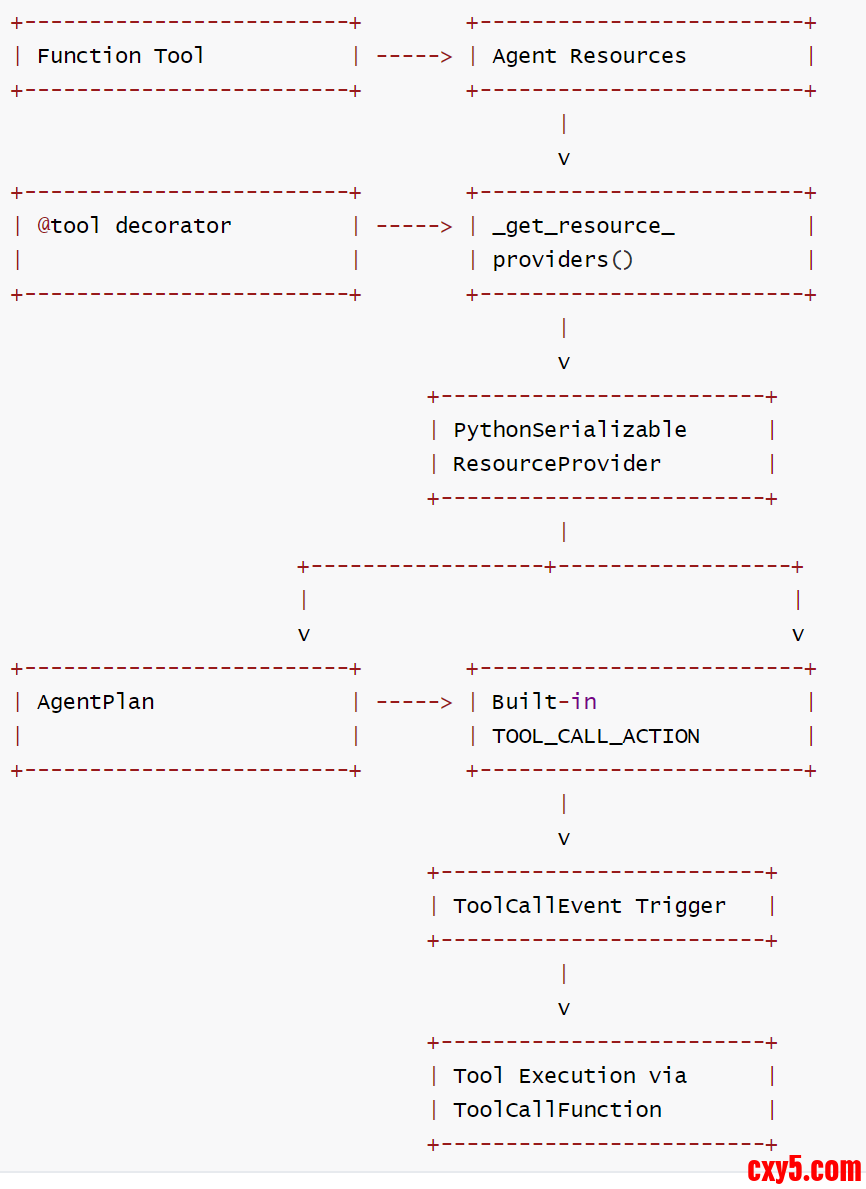
这种设计使得系统可以在运行时动态地将 LLM 的工具调用请求路由到正确的用户定义函数,而无需硬编码具体的函数引用。
用户定义的 Function Tool 转换为 Action
当 Agent 被编译成 AgentPlan 时,系统会收集所有资源(包括工具) ,这些工具会被转换为可执行的 Action:
- 在 _get_resource_providers 函数中,识别带有 _is_tool 属性的资源
- 使用 from_callable 将函数转换为工具对象
- 工具被包装为 ResourceProvider 并存储在 AgentPlan 中,即通过 PythonSerializableResourceProvider 包装工具资源
内置 Tool Call Action
框架提供了一个内置的 TOOL_CALL_ACTION,专门用于调用工具:- TOOL_CALL_ACTION = Action(
- name="tool_call_action",
- exec=PythonFunction.from_callable(process_tool_request),
- listen_event_types=[f"{ToolRequestEvent.__module__}.{ToolRequestEvent.__name__}"],
- )
- 命名匹配:当 LLM 决定调用某个工具时,它会在 tool_call 中指定工具名称(如 "notify_shipping_manager")
- 资源查找:TOOL_CALL_ACTION 使用这个名称通过 ctx.get_resource(name, ResourceType.TOOL) 查找已注册的工具
- 动态调用:找到工具后,通过 tool.call(**kwargs) 调用用户定义的实际函数
- public class ToolCallAction {
- public static Action getToolCallAction() throws Exception {
- return new Action(
- "tool_call_action",
- new JavaFunction(
- ToolCallAction.class,
- "processToolRequest",
- new Class[] {ToolRequestEvent.class, RunnerContext.class}),
- List.of(ToolRequestEvent.class.getName()));
- }
- @SuppressWarnings("unchecked")
- public static void processToolRequest(ToolRequestEvent event, RunnerContext ctx) {
- Map<String, Boolean> success = new HashMap<>();
- Map<String, String> error = new HashMap<>();
- Map<String, ToolResponse> responses = new HashMap<>();
- Map<String, String> externalIds = new HashMap<>();
- for (Map<String, Object> toolCall : event.getToolCalls()) {
- String id = String.valueOf(toolCall.get("id"));
- Map<String, Object> function = (Map<String, Object>) toolCall.get("function");
- String name = (String) function.get("name");// 获取工具名称
- Map<String, Object> arguments = (Map<String, Object>) function.get("arguments"); // 获取工具参数
- if (toolCall.containsKey("original_id")) {
- externalIds.put(id, (String) toolCall.get("original_id"));
- }
- Tool tool = null;
- try {
- // 从上下文获取对应名称的工具资源
- tool = (Tool) ctx.getResource(name, ResourceType.TOOL);
- } catch (Exception e) {
- success.put(id, false);
- responses.put(
- id, ToolResponse.error(String.format("Tool %s does not exist.", name)));
- error.put(id, e.getMessage());
- }
- if (tool != null) {
- try {
- // 调用用户实际工具
- ToolResponse response = tool.call(new ToolParameters(arguments));
- success.put(id, true);
- responses.put(id, response);
- } catch (Exception e) {
- success.put(id, false);
- responses.put(
- id, ToolResponse.error(String.format("Tool %s execute failed.", name)));
- error.put(id, e.getMessage());
- }
- }
- }
- // 返回工具响应事件
- ctx.sendEvent(new ToolResponseEvent(event.getId(), responses, success, error, externalIds));
- }
- }
- "tool_call_action": {
- "name": "tool_call_action",
- "exec": {
- "func_type": "PythonFunction",
- "module": "flink_agents.plan.actions.tool_call_action",
- "qualname": "process_tool_request"
- },
- "listen_event_types": [
- "flink_agents.api.events.tool_event.ToolRequestEvent"
- ]
- }
- 在 AgentPlan.from_agent 方法中:
- 当创建 AgentPlan 时,会收集所有动作,包括用户定义的动作和内置动作
- 代码中明确包含了内置动作:
BUILT_IN_ACTIONS = [CHAT_MODEL_ACTION, TOOL_CALL_ACTION, CONTEXT_RETRIEVAL_ACTION]
- 在 _get_actions(agent) 函数中,这些内置动作会被添加到动作列表中
- 具体编译过程:
- AgentPlan.from_agent() 方法调用 _get_actions(agent) 获取所有动作
- _get_actions() 函数不仅提取用户定义的动作,还会包含 BUILT_IN_ACTIONS
- 这些动作随后被编译进 AgentPlan 的 actions 和 actions_by_event 字段中
- 在最终的 AgentPlan 中:
- TOOL_CALL_ACTION 会作为一个普通的动作存在于 actions 映射中
- 它会监听 ToolRequestEvent 事件类型,并在该事件发生时被触发执行
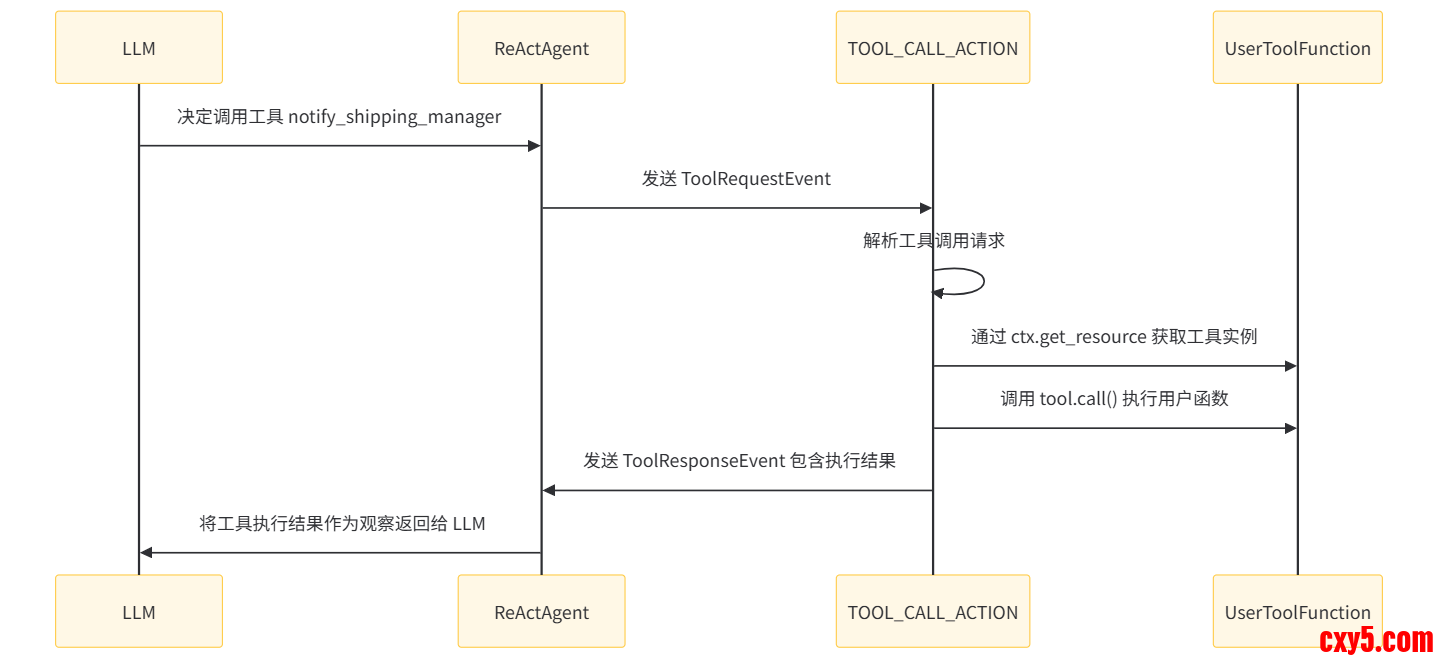
因此,TOOL_CALL_ACTION 确实会被编译到 AgentPlan 中,作为处理工具调用的标准机制。当 LLM 决定调用工具时,会发出 ToolRequestEvent,然后 TOOL_CALL_ACTION 就会被触发来实际执行相应的工具调用。
3.7.3 工具调用流程
整个流程中,工具不是直接绑定到 ActionExecutionOperator,而是通过 AgentPlan 中的资源提供者机制,在需要时动态获取和实例化。这种设计实现了工具与操作符的松耦合,同时支持多种类型的工具(Java、Python 等)。
- LLM 决定调用某个工具
- TOOL_CALL_ACTION 内置动作被触发
- 通过 RunnerContext 获取对应工具资源
- RunnerContextImpl.get_resource() 方法根据名称和类型查找工具资源
- 工具实际在需要时才通过 ResourceProvider 实例化
- 通过 ToolCallFunction 查找并执行相应的工具函数
- 结果作为新事件发送到事件队列
3.7.4 完整流程图
3.7.5 代码
在 agent_plan.py中处理工具资源的代码如下:- # 识别工具资源并创建提供者
- elif hasattr(value, "_is_tool"):
- if isinstance(value, staticmethod):
- value = value.__func__
- if callable(value):
- # TODO: support other tool type.
- tool = from_callable(func=value)
- resource_providers.append(
- PythonSerializableResourceProvider.from_resource(
- name=name, resource=tool
- )
- )
- # 或者通过add_resource 添加的工具
- for name, tool in agent.resources[ResourceType.TOOL].items():
- resource_providers.append(
- PythonSerializableResourceProvider.from_resource(
- name=name, resource=from_callable(tool.func)
- )
- )
0xFF 参考
https://ce101.mintlify.app/core-tech/agent#7-2-5-multi-agent
https://www.zhihu.com/question/1959742114519844109/answer/1983526566437880277
来源:程序园用户自行投稿发布,如果侵权,请联系站长删除
免责声明:如果侵犯了您的权益,请联系站长,我们会及时删除侵权内容,谢谢合作! |


 提升卡
提升卡 置顶卡
置顶卡 沉默卡
沉默卡 喧嚣卡
喧嚣卡 变色卡
变色卡 千斤顶
千斤顶 照妖镜
照妖镜


