uniapp项目(vue3+ts+vite+unocss)
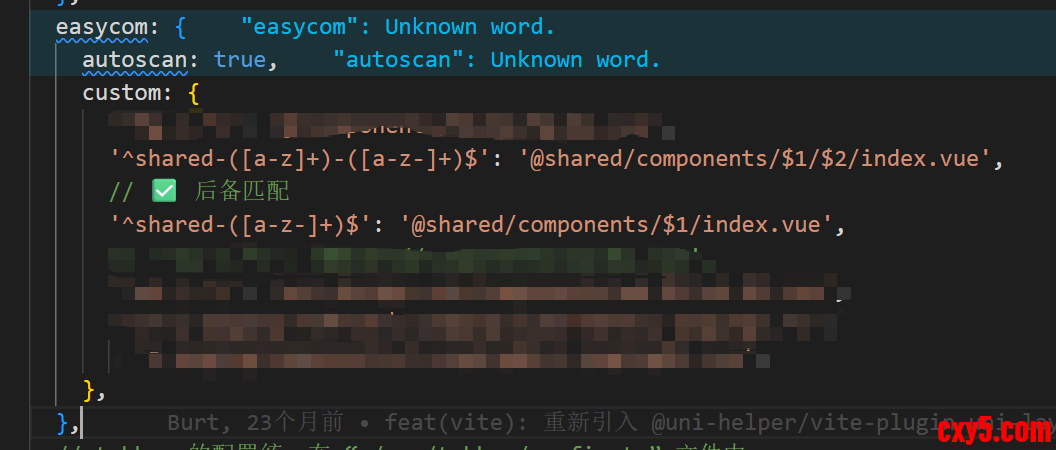
前提: 开发新项目为了主包不超包;我把一个分包(shared)easycom了,
然后主包我想用都写在这个分包中组件,其他分包共用的组件也写在这个分包中相当'共享分包'.
根据已有知识配置当前页面,- definePage({
- style: {
- navigationBarTitleText: '',
- },
- // ✅ 在这里配置微信小程序特有的选项
- componentPlaceholder: {
- 'shared-my-info': 'view',
- 'shared-my-details': 'view',
- 'shared-my-calendar': 'view',
- 'shared-my-activities': 'view',
- },
- })
问题: 对应页面的json文件没有生成对应代码- componentPlaceholder: {
- 'shared-my-info': 'view',
- 'shared-my-details': 'view',
- 'shared-my-calendar': 'view',
- 'shared-my-activities': 'view',
- },
vite文件如下,如果需要的话可以拿走,注意我自动生成的pages.json.js如果你是pages.json记得改- import type { Plugin } from 'vite'
- import path from 'node:path'
- import process from 'node:process'
- import fs from 'fs-extra'
- /**
- * 页面配置同步插件配置接口
- *
- * 用于解决微信小程序 componentPlaceholder 需要同时配置在 pages.json 和页面 .json 文件的问题
- * 自动将 pages.json 中的 componentPlaceholder 配置同步到对应的页面 .json 文件中
- */
- export interface SyncPageConfigOptions {
- /** 是否启用插件 */
- enable?: boolean
- /**
- * 是否显示详细日志,便于调试和监控同步过程
- */
- verbose?: boolean
- /** 自定义日志前缀,用于区分不同插件的日志输出 */
- logPrefix?: string
- /**
- * 目标平台,默认为 'mp-weixin'
- * 可以扩展到其他小程序平台如 'mp-alipay', 'mp-baidu' 等
- */
- targetPlatform?: string
- }
- /**
- * 默认配置
- */
- const DEFAULT_OPTIONS: Required<SyncPageConfigOptions> = {
- enable: true,
- verbose: true,
- logPrefix: '[sync-page-config]',
- targetPlatform: 'mp-weixin',
- }
- /**
- * 页面配置同步插件
- *
- * 功能说明:
- * 1. 解决微信小程序 componentPlaceholder 配置问题
- * 2. 自动将 pages.json 中的 componentPlaceholder 配置同步到对应页面的 .json 文件
- * 3. 支持主包页面和分包页面
- * 4. 智能合并现有配置,避免覆盖其他配置
- *
- * 使用场景:
- * - 使用 @uni-helper/vite-plugin-uni-pages 插件
- * - 在页面中使用 definePage({ componentPlaceholder: {...} })
- * - 需要微信小程序平台支持自定义组件的占位配置
- *
- * 工作原理:
- * 1. 在构建完成后读取 dist/[mode]/[platform]/pages.json
- * 2. 遍历所有页面配置,查找包含 componentPlaceholder 的页面
- * 3. 将 componentPlaceholder 配置同步到对应的页面 .json 文件
- * 4. 如果页面 .json 文件不存在,则创建新文件
- * 5. 如果已存在,则智能合并配置
- */
- export function syncPageConfig(options: SyncPageConfigOptions = {}): Plugin {
- const config = { ...DEFAULT_OPTIONS, ...options }
- // 如果插件被禁用,返回一个空插件
- if (!config.enable) {
- return {
- name: 'sync-page-config-disabled',
- apply: 'build',
- writeBundle() {
- // 插件已禁用,不执行任何操作
- },
- }
- }
- return {
- name: 'sync-page-config',
- apply: 'build', // 只在构建时应用
- enforce: 'post', // 在其他插件执行完毕后执行
- async writeBundle() {
- const { verbose, logPrefix, targetPlatform } = config
- try {
- // 获取项目根目录路径
- const projectRoot = process.cwd()
- // 构建模式:'build' (生产环境) 或 'dev' (开发环境)
- const buildMode = process.env.NODE_ENV === 'production' ? 'build' : 'dev'
- const platform = process.env.UNI_PLATFORM || targetPlatform
- // 只处理目标平台(默认微信小程序)
- if (platform !== targetPlatform) {
- // if (verbose) {
- // console.log(`${logPrefix} 当前平台 ${platform} 不是目标平台 ${targetPlatform},跳过同步`)
- // }
- return
- }
- // 构建 pages.json.js 文件路径 - 微信小程序生成的是 pages.json.js
- const pagesJsonPath = path.resolve(
- projectRoot,
- 'dist',
- buildMode,
- platform,
- 'pages.json.js',
- )
- // 检查 pages.json.js 是否存在
- const pagesJsonExists = await fs.pathExists(pagesJsonPath)
- if (!pagesJsonExists) {
- if (verbose) {
- console.warn(`${logPrefix} pages.json.js 不存在,跳过同步操作`)
- console.warn(`${logPrefix} 文件路径: ${pagesJsonPath}`)
- }
- return
- }
- // if (verbose) {
- // console.log(`${logPrefix} 开始同步页面配置...`)
- // console.log(`${logPrefix} 构建模式: ${buildMode}`)
- // console.log(`${logPrefix} 目标平台: ${platform}`)
- // console.log(`${logPrefix} pages.json.js 路径: ${pagesJsonPath}`)
- // }
- // 直接读取并解析 JavaScript 文件
- const fileContent = await fs.readFile(pagesJsonPath, 'utf8')
- const pagesJson = parseJavaScriptConfigFile(fileContent, verbose, logPrefix)
- if (!pagesJson) {
- console.error(`${logPrefix} ❌ 解析配置文件失败,无法继续`)
- return
- }
- // 调试:显示解析结果
- if (verbose) {
- // console.log(`${logPrefix} 解析成功,找到配置:`)
- // console.log(`${logPrefix} - 主包页面数: ${pagesJson.pages?.length || 0}`)
- // console.log(`${logPrefix} - 分包数量: ${pagesJson.subPackages?.length || 0}`)
- // 查找 me 页面
- const mePage = pagesJson.pages?.find((p: any) => p.path === 'pages/me/me')
- // if (mePage) {
- // console.log(`${logPrefix} - 找到 me 页面: ${mePage.path}`)
- // if (mePage.componentPlaceholder) {
- // console.log(`${logPrefix} - me 页面有 componentPlaceholder:`, Object.keys(mePage.componentPlaceholder))
- // }
- // }
- }
- let totalProcessed = 0
- // 处理主包页面
- if (pagesJson.pages && Array.isArray(pagesJson.pages)) {
- totalProcessed += await processPages(
- pagesJson.pages,
- path.resolve(projectRoot, 'dist', buildMode, platform),
- '',
- verbose,
- logPrefix,
- )
- }
- // 处理分包页面
- if (pagesJson.subPackages && Array.isArray(pagesJson.subPackages)) {
- for (const subPackage of pagesJson.subPackages) {
- if (subPackage.pages && subPackage.root) {
- const subPackageRoot = path.resolve(
- projectRoot,
- 'dist',
- buildMode,
- platform,
- subPackage.root,
- )
- totalProcessed += await processPages(
- subPackage.pages,
- subPackageRoot,
- subPackage.root,
- verbose,
- logPrefix,
- )
- }
- }
- }
- // if (verbose) {
- // console.log(`${logPrefix} ✅ 页面配置同步完成`)
- // console.log(`${logPrefix} 共处理 ${totalProcessed} 个页面的 componentPlaceholder 配置`)
- // }
- }
- catch (error) {
- console.error(`${logPrefix} ❌ 同步页面配置失败:`, error)
- console.error(`${logPrefix} 错误详情:`, error instanceof Error ? error.message : String(error))
- console.error(`${logPrefix} 堆栈:`, error instanceof Error ? error.stack : '无堆栈信息')
- // 不抛出错误,避免影响整个构建过程
- }
- },
- }
- }
- /**
- * 解析 JavaScript 配置文件
- * 专门处理微信小程序的 pages.json.js 格式
- */
- function parseJavaScriptConfigFile(
- jsContent: string,
- verbose: boolean,
- logPrefix: string,
- ): any {
- try {
- // 根据你提供的文件格式,这是一个 CommonJS 模块
- // 我们需要执行这个 JavaScript 代码来获取 exports
- // 方法1:使用 Function 构造函数创建一个安全的执行环境
- const moduleCode = `
- const exports = {};
- const module = { exports };
- ${jsContent};
- return module.exports;
- `
- const getModuleExports = new Function(moduleCode)
- const result = getModuleExports()
- // if (verbose) {
- // console.log(`${logPrefix} 成功解析 JavaScript 配置文件`)
- // }
- return result
- }
- catch (error) {
- console.error(`${logPrefix} ❌ 解析 JavaScript 配置文件失败:`, error)
- // 方法2:尝试简单的正则解析(备选方案)
- try {
- const result: any = {}
- // 提取 pages 数组
- const pagesMatch = jsContent.match(/const pages = (\[[\s\S]*?\]);/)
- if (pagesMatch) {
- try {
- const pagesCode = pagesMatch[1]
- // 将 JavaScript 数组转换为 JSON
- const jsonStr = pagesCode
- .replace(/(['"])?(\w+)(['"])?\s*:/g, '"$2":')
- .replace(/'/g, '"')
- .replace(/,\s*\]/g, ']') // 移除尾随逗号
- result.pages = JSON.parse(jsonStr)
- // if (verbose) {
- // console.log(`${logPrefix} 使用正则成功解析 pages`)
- // }
- }
- catch (e) {
- console.warn(`${logPrefix} ⚠️ 正则解析 pages 失败:`, e)
- }
- }
- // 提取 subPackages 数组
- const subPackagesMatch = jsContent.match(/const subPackages = (\[[\s\S]*?\]);/)
- if (subPackagesMatch) {
- try {
- const subPackagesCode = subPackagesMatch[1]
- const jsonStr = subPackagesCode
- .replace(/(['"])?(\w+)(['"])?\s*:/g, '"$2":')
- .replace(/'/g, '"')
- .replace(/,\s*\]/g, ']')
- result.subPackages = JSON.parse(jsonStr)
- // if (verbose) {
- // console.log(`${logPrefix} 使用正则成功解析 subPackages`)
- // }
- }
- catch (e) {
- console.warn(`${logPrefix} ⚠️ 正则解析 subPackages 失败:`, e)
- }
- }
- if (result.pages || result.subPackages) {
- return result
- }
- throw new Error('两种解析方法都失败了')
- }
- catch (fallbackError) {
- console.error(`${logPrefix} ❌ 备用解析方案也失败:`, fallbackError)
- return null
- }
- }
- }
- /**
- * 处理页面数组
- */
- async function processPages(
- pages: any[],
- baseDir: string,
- rootPath: string,
- verbose: boolean,
- logPrefix: string,
- ): Promise<number> {
- let processedCount = 0
- // 安全检查:确保 pages 是数组
- if (!Array.isArray(pages)) {
- console.warn(`${logPrefix} ⚠️ pages 不是数组,跳过处理`)
- return 0
- }
- for (const page of pages) {
- // 安全检查:确保 page 是对象
- if (!page || typeof page !== 'object') {
- console.warn(`${logPrefix} ⚠️ 页面配置不是对象,跳过`)
- continue
- }
- // 检查是否有 componentPlaceholder 配置
- const hasPlaceholder = page.componentPlaceholder
- && typeof page.componentPlaceholder === 'object'
- && Object.keys(page.componentPlaceholder).length > 0
- if (hasPlaceholder) {
- try {
- // 获取页面路径,确保移除 .vue 扩展名
- let pagePath = page.path
- if (pagePath && typeof pagePath === 'string' && pagePath.endsWith('.vue')) {
- pagePath = pagePath.slice(0, -4) // 移除 .vue
- }
- if (!pagePath || typeof pagePath !== 'string') {
- console.warn(`${logPrefix} ⚠️ 页面路径无效: ${pagePath}`)
- continue
- }
- // 构建目标 .json 文件路径
- const jsonFilePath = path.join(baseDir, `${pagePath}.json`)
- // 确保目录存在
- await fs.ensureDir(path.dirname(jsonFilePath))
- // 读取或创建页面配置
- let pageConfig: any = {}
- if (await fs.pathExists(jsonFilePath)) {
- try {
- const existingContent = await fs.readFile(jsonFilePath, 'utf8')
- pageConfig = JSON.parse(existingContent)
- }
- catch (readError) {
- if (verbose) {
- console.warn(`${logPrefix} ⚠️ 无法读取现有配置文件 ${jsonFilePath},将创建新配置`)
- }
- }
- }
- // 确保必要的字段存在
- if (!pageConfig.navigationBarTitleText && page.style?.navigationBarTitleText) {
- pageConfig.navigationBarTitleText = page.style.navigationBarTitleText
- }
- // 确保 usingComponents 存在
- if (!pageConfig.usingComponents) {
- pageConfig.usingComponents = {}
- }
- // 合并 componentPlaceholder
- const placeholder = page.componentPlaceholder || {}
- pageConfig.componentPlaceholder = {
- ...(pageConfig.componentPlaceholder || {}),
- ...placeholder,
- }
- // 写入文件
- await fs.writeFile(jsonFilePath, JSON.stringify(pageConfig, null, 2))
- processedCount++
- if (verbose) {
- const logRootPrefix = rootPath ? `[${rootPath}] ` : ''
- const placeholderCount = Object.keys(placeholder).length
- // console.log(`${logPrefix} ${logRootPrefix}✅ 已同步: ${pagePath} → ${placeholderCount} 个占位组件`)
- }
- }
- catch (pageError) {
- console.error(`${logPrefix} ❌ 处理页面 ${page?.path || '未知页面'} 失败:`, pageError)
- }
- }
- else if (verbose) {
- // 调试信息:显示没有 componentPlaceholder 的页面
- const logRootPrefix = rootPath ? `[${rootPath}] ` : ''
- // console.log(`${logPrefix} ${logRootPrefix}跳过: ${page.path || '未知页面'} (无 componentPlaceholder)`)
- }
- }
- return processedCount
- }
- /**
- * 创建页面配置同步插件的便捷函数
- *
- * 这是一个便捷的工厂函数,用于快速创建插件实例
- * 特别适用于在 vite.config.ts 中进行条件性插件配置
- *
- * 使用示例:
- * ```typescript
- * // 在 vite.config.ts 中
- * plugins: [
- * // 仅在微信小程序平台启用
- * createSyncPageConfigPlugin(
- * UNI_PLATFORM === 'mp-weixin',
- * { verbose: mode === 'development' }
- * ),
- * ]
- * ```
- */
- export function createSyncPageConfigPlugin(
- enable: boolean = true,
- options: Omit<SyncPageConfigOptions, 'enable'> = {},
- ): Plugin {
- return syncPageConfig({ enable, ...options })
- }
来源:程序园用户自行投稿发布,如果侵权,请联系站长删除
免责声明:如果侵犯了您的权益,请联系站长,我们会及时删除侵权内容,谢谢合作! |


 提升卡
提升卡 置顶卡
置顶卡 沉默卡
沉默卡 喧嚣卡
喧嚣卡 变色卡
变色卡 千斤顶
千斤顶 照妖镜
照妖镜


