大伙伴们只要学过三天 EF Core 一定知道,.NET SDK 有一个 dotnet-ef 工具(需要安装),可以用来创建/迁移数据库、生成模型代码、优化模型和查询代码等。必要时还能生一个单独的 exe,可以运行它来更新数据库结构。
不过,按照官方的设计思路,肯定不会把所有功能都堆在 exe 项目中的,这不,dotnet-ef 只是做个封装,可以通过命令行执行罢了,其实核心功能是写在 Design 包里面(Nuget 包名:Microsoft.EntityFrameworkCore.Design)。于是,咱们可以开发自己的 EF 辅助工具。比如,你可以把命令行操作的功能搞成窗口图形化操作。当然,这些功能仅限开发者使用,用户一般不需要(不一般的用户除外)。
如此,在 DB First 方案(先有数据库)中,咱们可以把生成实体类以及 dbContext 类的功能直接写到项目代码中,然后加上一个条件编译,在需要生成代码时开启一下编译符号,运行一个项目就能生成实体模型了。其他情况下把条件编译符号注释掉就可以。
这个功能就有点像 Sugar 的玩法。老周在某些项目中就是这么干的。不过老周更喜欢 EF,理由有:
1、EF Core 更灵活。
2、EF Core 的表达树翻译功能比 Sugar 完善,功能更多。
3、有官方支持的优先用原则,没有才考虑第三方。
好了,不扯废话了,咱们开始!
一、基础知识
首先,咱们要明确功能:数据库已经有了,可能是你创建的,可能是别人创建的。很多团队都会把搞数据库,写存储过程的单独一堆人去干,然后,项目的非数据库部分另一堆人去做。所以,小型数据库才考虑用 EF Core 去创建,复杂的数据库还是先创建数据库好一些。咱们要做的就是根据现有的数据库和表,直接生成实体类和 DbContext 的派生类。
在分析思路之前,既然大伙儿都是玩 .NET 的,那就坚守这个原则:处处都是服务容器和依赖注入。
好,有这个思想准备,咱们才能讲知识点。咱们来认识几个新朋友,熟悉一下,以后才能好好利用他们,嗯,朋友是拿来利用的。
第一位,本名 IDatabaseModelFactory。他的绝活本领是爆库。你要从数据库生成实体,那你得知道数据库里有哪些表,表中有哪些列,哪个是主键,列的类型是什么……没事,这些信息交给这位朋友就行。
调用以下方法,你能得到一个 DatabaseModel 对象。- DatabaseModel Create(string connectionString, DatabaseModelFactoryOptions options);
- public DatabaseModelFactoryOptions(IEnumerable<string>? tables = null, IEnumerable<string>? schemas = null)
- {
- Tables = tables ?? [];
- Schemas = schemas ?? [];
- }
Create 方法返回的 DatabaseModel 对象包含数据库名、数据库中表、列、主键、外键、索引等相关信息。
好了,拿到数据库信息了,轮到第二位朋友出场—— IScaffoldingModelFactory。他的绝活是加工,把你从数据库中爆出来的信息处理后,直接返回一个 IModel。对,就是 EF Core 中用的数据库模型,所以,如果你不打算生成代码,这时候你完全可以把这个 IModel 作为 DbContext 的外部模型使用。还记得老周写过使用外部模型的水文吗?在 DbContext 选项配置时,用 UseModel 方法。
但,建议你不要这么干,你想想每次运行程序都要爆一次数据库再转换为 EF Core 模型,既浪费性能也没啥实际意义。所以,这个生成的 IModel 还要进一步处理。
第三位朋友叫 IModelCodeGeneratorSelector。他是一名零件选配师,他会根据你的需要帮你找到合适的专属文员(代码生成器)。这位朋友有一个 Select 方法,调用后进行筛选。- [Obsolete("Use the overload that takes ModelCodeGenerationOptions instead.")]
- IModelCodeGenerator Select(string? language);
- // 注意,上面的方法过时,而下面的方法又反过去调用它
- IModelCodeGenerator Select(ModelCodeGenerationOptions options)
- #pragma warning disable CS0618 // Type or member is obsolete
- => Select(options.Language);
- #pragma warning restore CS0618
Select 方法帮你选好了心仪的文员妹妹,她叫 IModelCodeGenerator。她虽然学历不高,但很勤奋很务实,你可以相信她。调用她的 GenerateModel 方法,她会帮你生成代码。- ScaffoldedModel GenerateModel(
- IModel model,
- ModelCodeGenerationOptions options);
到这里基本工作就完成了,返回的 ScaffoldedModel 对象中已经包含代码,以及代码要存放的路径了。不过,这些目前还在内存中,未真正写入磁盘文件。程序退出后就没了。- public class ScaffoldedModel
- {
- // dbContext 类的代码,以及文件路径
- public virtual ScaffoldedFile ContextFile { get; set; } = null!;
- // 附加文件,通常是实体类的代码以及文件路径,每个实体类占一个文件
- public virtual IList<ScaffoldedFile> AdditionalFiles { get; } = new List<ScaffoldedFile>();
- }
- public class ScaffoldedFile(string path, string code)
- {
- // 代码要存入的文件路径
- public virtual string Path { get; set; } = path;
- // 已生成的代码
- public virtual string Code { get; set; } = code;
- }
A、获取数据库信息;
B、生成设计时模型;
C、生成代码;
D、保存代码。
你一定会抱怨了,这过程有点复杂。别急,还没完呢,继续往下看,简单的来了。
上面提到的几位朋友,你一个个地告诉他们干什么是有些麻烦的,所以,把他们组成一个团队,设立一名管理者,有事只要跟他们的老大说行了。这位由不民主制度任命的老大叫 IReverseEngineerScaffolder(位于 Microsoft.EntityFrameworkCore.Scaffolding 命名空间),默认实现类是 ReverseEngineerScaffolder(位于 Microsoft.EntityFrameworkCore.Scaffolding.Internal 命名空间)。虽然这个类是 public 的,但官方团队让它藏在 Internal 命名空间下,这表明:在功能上是不希望外部代码访问的。在使用时,咱们的确不用访问该类,而是通过 IReverseEngineerScaffolder 接口来调用。
前面介绍的几位朋友,吃过几回饭后你可以忘记,现在你只要记住 IReverseEngineerScaffolder 即可。有事找他。
IReverseEngineerScaffolder 接口定义了两个方法:- ScaffoldedModel ScaffoldModel(
- string connectionString,
- DatabaseModelFactoryOptions databaseOptions,
- ModelReverseEngineerOptions modelOptions,
- ModelCodeGenerationOptions codeOptions);
- SavedModelFiles Save(
- ScaffoldedModel scaffoldedModel,
- string outputDir,
- bool overwriteFiles);
二、如何使用
既然处处是注入,那就得先初始化服务集合。Design 库提供了两个扩展方法:- public static IServiceCollection AddDbContextDesignTimeServices(
- this IServiceCollection services,
- DbContext context);
- public static IServiceCollection AddEntityFrameworkDesignTimeServices(
- this IServiceCollection services,
- IOperationReporter? reporter = null,
- Func<IServiceProvider>? applicationServiceProviderAccessor = null);
当然,这是设计时的基础服务,不包括 EF 核心服务。核心服务一般可以通过实现 IDesignTimeServices 接口来添加。- public interface IDesignTimeServices
- {
- void ConfigureDesignTimeServices(IServiceCollection serviceCollection);
- }
然后,在程序集级别使用 [DesignTimeProviderServices] 特性指定你实现 IDesignTimeServices 接口的类的完整名称(连同命名空间)。其他工具(如 dotnet-ef,或你自己实现的工具)可以通过反射获取它,动态实例化并调用 ConfigureDesignTimeServices 方法。当然,你不用反射,直接在代码中 new 也可以的。
其实,你完全可以偷懒,不用去实现 IDesignTimeServices 接口,因为每种数据库的提供者都会实现专用的类。比如 SQL Server 的提供者,会有一个 SqlServerDesignTimeServices 类,并且应用 [DesignTimeProviderServices] 特性。- [assembly: DesignTimeProviderServices("Microsoft.EntityFrameworkCore.SqlServer.Design.Internal.SqlServerDesignTimeServices")]
- [assembly: DesignTimeProviderServices("Microsoft.EntityFrameworkCore.Sqlite.Design.Internal.SqliteDesignTimeServices")]
当所有需要的服务都添加到容器后,生成 ServiceProvider。然后你直接从服务容器中获取 IReverseEngineerScaffolder 接口,配置好相关参数(如输出目录、DbContext 类的名称等),先调用 ScaffoldModel 方法生成代码,再调用 Save 方法写入文件就行了。
三、实例演示
光说不练,惨过失恋。前文已介绍完所有基础知识了,该练练手了。
老周以 SQL Server 来演示,先创建数据库,以及两张表。一张表是客户表,一张是照片表。因为这是一家照相馆的信息管理系统。一位客户可以有多张照片,所以是“一对多”的关系(别问我怎么没有多对多,你一张照片给多个客户?这么有分享精神的吗?除非是大合照)。- USE [master]
- GO
- CREATE DATABASE [SomeDB]
- GO
- CREATE TABLE [dbo].[tb_customers] (
- [cust_id] INT IDENTITY (1, 1) NOT NULL,
- [name] NVARCHAR (12) NOT NULL,
- [age] INT NULL,
- [address] NVARCHAR (100) NULL,
- [phone] CHAR (11) NOT NULL,
- [email] NVARCHAR (64) NULL,
- [remark] NTEXT NULL,
- CONSTRAINT [PK_customers] PRIMARY KEY CLUSTERED ([cust_id] ASC)
- );
- CREATE TABLE [dbo].[tb_photos] (
- [Id] INT IDENTITY (1, 1) NOT NULL,
- [tags] NVARCHAR (30) NOT NULL,
- [dpi] REAL DEFAULT ((300.0)) NULL,
- [width] FLOAT (53) NOT NULL,
- [height] FLOAT (53) NOT NULL,
- [cust_id] INT DEFAULT ((0)) NOT NULL,
- CONSTRAINT [PK_photos] PRIMARY KEY CLUSTERED ([Id] ASC),
- CONSTRAINT [FK_photos_custs] FOREIGN KEY ([cust_id]) REFERENCES [dbo].[tb_customers] ([cust_id]) ON DELETE CASCADE ON UPDATE CASCADE
- );
创建一个最简单的.NET项目(控制台),你需要向项目添加以下 nuget 包:- <ItemGroup>
- <PackageReference Include="Microsoft.EntityFrameworkCore.Design" Version="10.0.0">
- <PrivateAssets>all</PrivateAssets>
-
- </PackageReference>
- <PackageReference Include="Microsoft.EntityFrameworkCore.SqlServer" Version="10.0.0" />
- </ItemGroup>
其他的包都常规操作了,老周这里用的是 SQL Server就用 Sqlserver 包,你用的如果是 SQLite 那就 Sqlite 包。这个就不多说了,都懂的。
咱们并不是每次运行程序都需要生成代码的,除非是有改动(通常不会改,小改动的话也不用重新生成,直接手动改代码就行),所以定义一个符号,当需要生成实体代码时启用,毕竟这是为开发者服务的功能,不是面向最终用户。- <strong>#define GEN_CODES</strong>
- ……
- static void Main(string[] args)
- {
- #if GEN_CODES
- GenModelCodes();
- #endif
- }
- #if GEN_CODES
- private static void GenModelCodes()
- {
- ……
- }<br>#endif
- // 连接字符串
- const string connectStr = "Data Source=(localdb)\\MSSQLLocalDB;Initial Catalog=SomeDB";
- // 输出目录
- const string outputDir = "..\\..\\..\\DBModels";
- // 命名空间
- const string myNamespace = "DB";
- // 数据库上下文名称
- const string contextName = "SomeDbContext";
对于命名空间,可以有两个,一个是 DbContext 派生类所在命名空间,一个是实体类所在命名空间。当然,老周这里只用了一个 DB,意思就是它们都位于 DB 命名空间内。
contextName 常量指示生成的 DbContext 子类的名字,这里老周给了它一个风雅的名字 SomeDbContext。
接着,咱们需要配置三个选项类(上文介绍过了,虽然名字有点臭长,但不用死记,大概记得就行)。- DatabaseModelFactoryOptions dmfacOpts = new(
- // 选择你要的表
- tables: ["tb_customers", "tb_photos"],
- // 选择你要的架构
- schemas: ["dbo"]
- );
- ModelCodeGenerationOptions modgenOpt = new()
- {
- Language = "C#", // 语言可以不设置,默认 C#
- ContextDir = "",
- ModelNamespace = myNamespace,
- ContextNamespace = myNamespace,
- ContextName = contextName,
- UseDataAnnotations = false,
- UseNullableReferenceTypes = true
- };
- ModelReverseEngineerOptions modreverOpt = new()
- {
- UseDatabaseNames = true,
- NoPluralize = false
- };
2、ModelCodeGenerationOptions 选项:生成代码相关。
- Language 属性可以忽略的,默认就是 C#;
- ContextDir 属性可以为 dbContext 类指定一个子目录(相对于 outputDir),空字符串表示只放在 outputDir 下,不用单独子目录;
- ModelNamespace 属性指定实体类代码的命名空间;
- ContextNamespace 属性指定 dbContext 类的命名空间。可以与实体类在同一命名空间;
- ContextName 属性指定 dbcontext 类的类名;
- UseDataAnnotations 属性表示用不用数据批注来配置模型,false 表示用 ModelBuilder 来配置,重写 DbContext.OnModelCreating 方法;
- UseNullableReferenceTypes 属性配置用不用可以为 null 类型,比如 string?、int?;
- ConnectionString 属性是连接字符串,不用配置,因为 IReverseEngineerScaffolder.ScaffoldModel 方法的第一个参数就是连接字符串;
- ProjectDir 属性是 .NET 项目所在目录,这里不用配置,因为连 DbContext 都没有,这里用不上。
3、ModelReverseEngineerOptions 选项:UseDatabaseNames 表示是否用数据库原有的名字,即实体属性等命名与数据库中一样;如果不用,那么会生成 C# 命名风格的名称,如 Name、TbCustomer 等。NoPluralize 表示禁用复数,这个主要是 dbcontext 类中 DbSet 类型属性的命名,如 Students、Customers 等,false 表示不禁用。
下一步就是服务容器配置了。- ServiceCollection services = new();
- services.AddEntityFrameworkDesignTimeServices();
第一种方法,我们是知道的,面向 SQL Server 的设计时服务类叫 SqlServerDesignTimeServices。对,直接 new 一下就好,最简单。- IDesignTimeServices designtimeSvc = new SqlServerDesignTimeServices();
- designtimeSvc.<strong>ConfigureDesignTimeServices(services)</strong>;
- #pragma warning disable EF1001
- Assembly sqlserverProvdAssm = typeof(SqlServerServiceCollectionExtensions).Assembly;
- DesignTimeProviderServicesAttribute? attr = sqlserverProvdAssm.GetCustomAttribute<DesignTimeProviderServicesAttribute>();
- if (attr == null)
- {
- Console.WriteLine("这个程序集不对劲!");
- return;
- }
- Type? designSvcType = sqlserverProvdAssm.GetType(attr.TypeName);
- if (designSvcType == null)
- {
- Console.WriteLine("闹鬼了,居然找不到类型");
- return;
- }
- // 创建实例
- IDesignTimeServices designtimeSvc = (IDesignTimeServices)Activator.CreateInstance(designSvcType)!;
- // 调用方法配置服务
- designtimeSvc.ConfigureDesignTimeServices(services);
获取到程序集后,拿到 DesignTimeProviderServices 特性。- DesignTimeProviderServicesAttribute? attr = sqlserverProvdAssm.GetCustomAttribute<DesignTimeProviderServicesAttribute>();
配置完服务容器后,生成一下服务 Provider。- IServiceProvider serviceProvider = services.BuildServiceProvider();
- IReverseEngineerScaffolder scaffolder = serviceProvider.GetRequiredService<IReverseEngineerScaffolder>();
- var scaffModel = scaffolder.ScaffoldModel(
- connectionString: connectStr,
- databaseOptions: dmfacOpts,
- modelOptions: modreverOpt,
- codeOptions: modgenOpt
- );
- if (scaffModel != null)
- {
- var res = scaffolder.Save(
- scaffoldedModel: scaffModel,
- outputDir: outputDir,
- overwriteFiles: true // 覆盖文件
- );
- if (res is not null)
- {
- Console.WriteLine("dbContext路径:{0}", res.ContextFile);
- Console.WriteLine("实体路径:");
- foreach (string f in res.AdditionalFiles)
- {
- Console.WriteLine(" {0}", f);
- }
- }
- }
- #if GEN_CODES private static void GenModelCodes() { // 连接字符串 const string connectStr = "Data Source=(localdb)\\MSSQLLocalDB;Initial Catalog=SomeDB"; // 输出目录 const string outputDir = "..\\..\\..\\DBModels"; // 命名空间 const string myNamespace = "DB"; // 数据库上下文名称 const string contextName = "SomeDbContext"; // 准备选项 DatabaseModelFactoryOptions dmfacOpts = new( // 选择你要的表 tables: ["tb_customers", "tb_photos"], // 选择你要的架构 schemas: ["dbo"] ); ModelCodeGenerationOptions modgenOpt = new() { Language = "C#", // 语言可以不设置,默认 C# ContextDir = "", ModelNamespace = myNamespace, ContextNamespace = myNamespace, ContextName = contextName, UseDataAnnotations = false, UseNullableReferenceTypes = true }; ModelReverseEngineerOptions modreverOpt = new() { UseDatabaseNames = true, NoPluralize = false }; // 服务集合 ServiceCollection services = new(); // 1、设计时基础服务 services.AddEntityFrameworkDesignTimeServices(); // 2、数据库提供的设计时服务,它已包含框架基础服务 // 直接实例化 IDesignTimeServices designtimeSvc = new SqlServerDesignTimeServices(); designtimeSvc.ConfigureDesignTimeServices(services); // 或使用反射 /* Assembly sqlserverProvdAssm = typeof(SqlServerServiceCollectionExtensions).Assembly; DesignTimeProviderServicesAttribute? attr = sqlserverProvdAssm.GetCustomAttribute<DesignTimeProviderServicesAttribute>(); if (attr == null) { Console.WriteLine("这个程序集不对劲!"); return; } Type? designSvcType = sqlserverProvdAssm.GetType(attr.TypeName); if (designSvcType == null) { Console.WriteLine("闹鬼了,居然找不到类型"); return; } // 创建实例 IDesignTimeServices designtimeSvc = (IDesignTimeServices)Activator.CreateInstance(designSvcType)!; // 调用方法配置服务 designtimeSvc.ConfigureDesignTimeServices(services); */ // 构建服务 IServiceProvider serviceProvider = services.BuildServiceProvider(); // 生成代码 IReverseEngineerScaffolder scaffolder = serviceProvider.GetRequiredService<IReverseEngineerScaffolder>(); var scaffModel = scaffolder.ScaffoldModel( connectionString: connectStr, databaseOptions: dmfacOpts, modelOptions: modreverOpt, codeOptions: modgenOpt ); // 完事后还得保存 if (scaffModel != null) { var res = scaffolder.Save( scaffoldedModel: scaffModel, outputDir: outputDir, overwriteFiles: true // 覆盖文件 ); if (res is not null) { Console.WriteLine("dbContext路径:{0}", res.ContextFile); Console.WriteLine("实体路径:"); foreach (string f in res.AdditionalFiles) { Console.WriteLine(" {0}", f); } } } }#endif
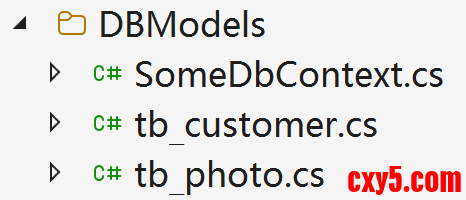
看看生成的代码。- using System;
- using System.Collections.Generic;
- namespace DB;
- public partial class tb_customer
- {
- public int cust_id { get; set; }
- public string name { get; set; } = null!;
- public int? age { get; set; }
- public string? address { get; set; }
- public string phone { get; set; } = null!;
- public string? email { get; set; }
- public string? remark { get; set; }
- public virtual ICollection<tb_photo> tb_photos { get; set; } = new List<tb_photo>();
- }
- /************************************************************/
- using System;
- using System.Collections.Generic;
- namespace DB;
- public partial class tb_photo
- {
- public int Id { get; set; }
- public string tags { get; set; } = null!;
- public float? dpi { get; set; }
- public double width { get; set; }
- public double height { get; set; }
- public int cust_id { get; set; }
- public virtual tb_customer cust { get; set; } = null!;
- }
- using System;
- using System.Collections.Generic;
- using Microsoft.EntityFrameworkCore;
- namespace DB;
- public partial class SomeDbContext : DbContext
- {
- public SomeDbContext()
- {
- }
- public SomeDbContext(DbContextOptions<SomeDbContext> options)
- : base(options)
- {
- }
- public virtual DbSet<tb_customer> tb_customers { get; set; }
- public virtual DbSet<tb_photo> tb_photos { get; set; }
- protected override void OnConfiguring(DbContextOptionsBuilder optionsBuilder)
- #warning To protect potentially sensitive information in your connection string, you should move it out of source code. You can avoid scaffolding the connection string by using the Name= syntax to read it from configuration - see https://go.microsoft.com/fwlink/?linkid=2131148. For more guidance on storing connection strings, see https://go.microsoft.com/fwlink/?LinkId=723263.
- => optionsBuilder.UseSqlServer("Data Source=(localdb)\\MSSQLLocalDB;Initial Catalog=SomeDB");
- protected override void OnModelCreating(ModelBuilder modelBuilder)
- {
- modelBuilder.Entity<tb_customer>(entity =>
- {
- entity.HasKey(e => e.cust_id).HasName("PK_customers");
- entity.Property(e => e.address).HasMaxLength(100);
- entity.Property(e => e.email).HasMaxLength(64);
- entity.Property(e => e.name).HasMaxLength(12);
- entity.Property(e => e.phone)
- .HasMaxLength(11)
- .IsUnicode(false)
- .IsFixedLength();
- entity.Property(e => e.remark).HasColumnType("ntext");
- });
- modelBuilder.Entity<tb_photo>(entity =>
- {
- entity.HasKey(e => e.Id).HasName("PK_photos");
- entity.Property(e => e.dpi).HasDefaultValue(300f);
- entity.Property(e => e.tags).HasMaxLength(30);
- entity.HasOne(d => d.cust).WithMany(p => p.tb_photos)
- .HasForeignKey(d => d.cust_id)
- .HasConstraintName("FK_photos_custs");
- });
- OnModelCreatingPartial(modelBuilder);
- }
- partial void OnModelCreatingPartial(ModelBuilder modelBuilder);
- }
重写 OnConfiguring 方法,配置数据库连接的地方有个警告。- protected override void OnConfiguring(DbContextOptionsBuilder optionsBuilder)
- #warning To protect potentially sensitive information in your connection string, you should move it out of source code. You can avoid scaffolding the connection string by using the Name= syntax to read it from configuration - see https://go.microsoft.com/fwlink/?linkid=2131148. For more guidance on storing connection strings, see https://go.microsoft.com/fwlink/?LinkId=723263.
- => optionsBuilder.UseSqlServer("Data Source=(localdb)\\MSSQLLocalDB;Initial Catalog=SomeDB");
好了,今天的话题聊到这儿。下一篇咱们聊 Code First 方案下,用编程方式去生成迁移代码,并迁移数据库。
来源:程序园用户自行投稿发布,如果侵权,请联系站长删除
免责声明:如果侵犯了您的权益,请联系站长,我们会及时删除侵权内容,谢谢合作! |


 提升卡
提升卡 置顶卡
置顶卡 沉默卡
沉默卡 喧嚣卡
喧嚣卡 变色卡
变色卡 千斤顶
千斤顶 照妖镜
照妖镜



